
qemu-ga windows下的安装及监控开发
windows安装qemu-ga
虚拟机配置里添加virtio serial端口
#virsh edit instance-name
devices里添加下面这段配置,
1 <channel type='unix'>

2     <source mode='bind' path='/var/lib/libvirt/qemu/org.qemu.guest_agent.0.instance-name.sock'/>

3     <target type='virtio' name='org.qemu.guest_agent.0'/>

4     <address type='virtio-serial' controller='0' bus='0' port='1'/>

5 </channel>
安装Qemu Guest Agent服务
#wget https://fedorapeople.org/groups/virt/virtio-win/virtio-win.repo -O /etc/yum.repos.d/virtio-win.repo
#yum install virtio-win
安装virtio-win包,virtio-win里包含windows virtio设备驱动,及qemu-ga的安装包。

将msi安装文件和virtio-win.iso拷贝到windows下。
virtio-win.iso包含各个windows版本下的virtio serial驱动,安装对应版本的驱动。
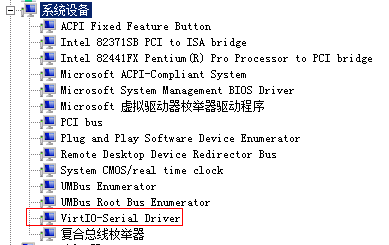
安装对应版本qemu-ga.msi,至此,qga安装完毕。
qga功能扩展
搭建编译环境:
rpm -ivh epel-release
下载 Microsoft VSS SDK: http://www.microsoft.com/en-us/download/details.aspx?id=23490
提取Microsoft VSS SDK的源文件(qemu/scripts下提供了extract-vsssdk-headers,也可以在windows下解压后拷贝到linux上)
wget http://wiki.qemu-project.org/download/qemu-2.6.0-rc1.tar.bz2
yum install -y mingw64-pixman
yum install -y mingw64-glib2
yum install -y mingw64-gmp
yum install -y mingw64-SDL
yum install -y mingw64-pkg-config
./configure --enable-guest-agent --with-vss-sdk=/vss_path --cross-prefix=x86_64-w64-mingw32-
make qemu-ga.exe
添加功能示例(添加内存使用率检测)
编辑qapi-schema.json,添加自定义结构体及命令声明。
 1     ##  结构体声明

 2     # @GuestMemInfo

 3     #

 4     # Information about Memory usage.

 5     #

 6     # @total: total size of Memory

 7     #

 8     # @usage: Memory usage

 9     #

10     # Since 2.6

11     ##

12     { 'struct': 'GuestMemInfo',

13       'data': { 'total': 'int', 'usage': 'int' } }

14

15     ##  命令声明

16     # @guest-get-mem-usage:

17     #

18     # Get the memory utilization rate.

19     #

20     # Returns: @GuestMemInfo on success.

21     #

22     # Since 2.6

23     ##

24     { 'command': 'guest-get-mem-usage',

25       'returns': 'GuestMemInfo' }
在commands-win32.c中添加命令实现:
1 GuestMemInfo *qmp_guest_get_mem_usage(Error **errp)

2 {

3       MEMORYSTATUS ms;

4       GuestMemInfo *meminfo = g_new0(GuestMemInfo, 1);

5       GlobalMemoryStatus(&ms);

6       meminfo->usage = (int64_t)ms.dwMemoryLoad;

7       meminfo->total = (int64_t)ms.dwTotalPhys;

8       return meminfo;

9 }
在commands-posix.c中添加命令实现(直接返回QERR_UNSUPPORTED错误):
1 GuestMemInfo *qmp_guest_get_mem_usage(Error **errp)

2 {

3   error_setg(errp, QERR_UNSUPPORTED);

4 }
重新编译qemu-ga.exe,替换C:\Program Files\qemu-ga下的qemu-ga.exe,重启服务即可。
(dll依赖,在/usr/x86_64-w64-mingw32/sys-root/mingw/bin/下可找到。)

参考文献:
http://wiki.qemu.org/Features/QAPI/GuestAgent
http://wiki.libvirt.org/page/Qemu_guest_agent
http://fedoraproject.org/wiki/Windows_Virtio_Drivers
http://lists.gnu.org/archive/html/qemu-discuss/2014-11/msg00027.html
qemu-ga windows下的安装及监控开发的更多相关文章
- Ruby入门--Linux/Windows下的安装、代码开发及Rails实战
Ruby入门--Linux/Windows下的安装.代码开发及Rails实战 http://www.linuxidc.com/Linux/2014-04/100242.htm Ubuntu 13.04 ...
- Windows下快速安装CACTI流量监控
Windows下快速安装CACTI流量监控 原文 http://os.51cto.com/art/201111/300977.htm CACTI是一套PHP程序,它利用SNMPGET采集数据,使用R ...
- flume 1.7在windows下的安装与运行
flume 1.7在windows下的安装与运行 一.安装 安装java,配置环境变量. 安装flume,flume的官网http://flume.apache.org/,下载地址,下载后直接解压即可 ...
- memcache的windows下的安装和简单使用
原文:memcache的windows下的安装和简单使用 memcache是为了解决网站访问量大,数据库压力倍增的解决方案之一,由于其简单实用,很多站点现在都在使用memcache,但是memcach ...
- Windows下pry安装和配置
Windows下pry安装和配置 pry是一个增强型的交互式命令行工具,比irb强大. 有自动完成功能,自动缩进,有颜色.有更强大的调试功能. pry 安装很简单. 在终端输入: gem instal ...
- Windows下虚拟机安装Mac OS X ----- VM12安装Mac OS X 10.11
Windows下虚拟机安装Mac OS X -– VM12安装Mac OS X 10.11 随着Iphone在国内大行其道,越来越多的开发者涌入iOS开发大军 中,但都苦于没有苹果机,本文即将介绍WI ...
- Windows下memcache安装使用
Windows下Memcache安装 随着时间的推移,网上现在能找到的在 Windows下安装 Memcache 的文档大多已经过时.雪峰这里再简要介绍一下当下最新版的安装和配置方法. Memcach ...
- Windows 下如何安装配置Snort视频教程
Windows 下如何安装配置Snort视频教程: 第一步: http://www.tudou.com/programs/view/UUbIQCng360/ 第二部: http://www.tudou ...
- 在windows下完美安装GitHub
笔者最近在Windows下安装GitHub,过程中遇到不少问题.现在把安装的详细步骤分享给大家,免得大家走弯路. 笔者安装了GitHub for Windows程序,一切都运行顺利.但事情没有结束,首 ...
随机推荐
- 最全的cURL命令使用
cURL是什么 curl是Linux命令行工具,可以使用任何可支持的协议(如HTTP.FTP.IMAP.POP3.SCP.SFTP.SMTP.TFTP.TELNET.LDAP或FILE)在服务器之间传 ...
- istio部署问题Q&A
端口绑定无权限 创建Gateway,提示绑定端口无权限. 2020-12-27T12:25:30.974288Z warning envoy config gRPC config for type.g ...
- git合并代码到主分支
git合并login分支到master分支 1.首先查看源码状态 git status 2.添加到暂存区 git add . git status //添加到暂存区后再次查看源码状态 3.提交代码到本 ...
- 一文搞懂:java中的VO、PO、BO、DAO、POJO
针对java工程里的各种带O的对象,进行分析,了解各自的作用. PO:persistent object,持久对象.与数据库里表字段一一对应.PO是一些属性,以及set和get方法组成.一般情况下,一 ...
- 配置文件修改java安全级别和站点信息
配置文件修改java安全级别和站点信息原创Green_1001 最后发布于2015-04-22 23:00:09 阅读数 516 收藏展开 通过配置文件修改java安全级别 配置文件名称为deploy ...
- 057.Python前端Django模型ORM多表查询
一 基于对象的查询 1.1 一对多查询 设计路由 from django.contrib import admin from django.urls import path from app01 im ...
- 009.Python字符串相关函数
字符串相关函数 1 capitalize 字符串首字母大写 strvar = "this is a dog" res = strvar.capitalize() print(res ...
- 最简单的方法是使用标准的 Linux GUI 程序之一: i-nex 收集硬件信息,并且类似于 Windows 下流行的 CPU-Z 的显示。 HardInfo 显示硬件具体信息,甚至包括一组八个的流行的性能基准程序,你可以用它们评估你的系统性能。 KInfoCenter 和 Lshw 也能够显示硬件的详细信息,并且可以从许多软件仓库中获取。
最简单的方法是使用标准的 Linux GUI 程序之一: i-nex 收集硬件信息,并且类似于 Windows 下流行的 CPU-Z 的显示. HardInfo 显示硬件具体信息,甚至包括一组八个的流 ...
- 串口配合DMA接收不定长数据(空闲中断+DMA接收)-(转载)
1.空闲中断和别的接收完成(一个字节)中断,发送完成(发送寄存器控)中断的一样是串口中断: 2.空闲中断是接收到一个数据以后,接收停顿超过一字节时间 认为桢收完,总线空闲中断是在检测到在接收数据后, ...
- OSI七层模型与TCP/IP五层模型-(转自钛白Logic)
OSI七层模型与TCP/IP五层模型 博主是搞是个FPGA的,一直没有真正的研究过以太网相关的技术,现在终于能静下心学习一下,希望自己能更深入的掌握这项最基本的通信接口技术.下面就开始 ...