
What is SolrCloud? (And how does it compare to master-slave?)
What is SolrCloud?
(And how does it compare to master-slave?)
SolrCloud is a set of new features and functionality added in Solr 4.0 to enable a new way of creating durable, highly available Solr clusters with commodity hardware. While similar in many ways to master-slave, SolrCloud automates a lot of the manual labor required in master-slave through using ZooKeeper nodes to monitor the state of the cluster as well as additional Solr features that understand how to interact with other machines in their Solr cluster.
In short, where master-slave requires manual effort to change the role of a node in a given cluster and to add new nodes to a cluster, SolrCloud aims to automate a lot of that work and allow seamless addition of new nodes to a cluster and to work around downed nodes with minimal oversight.
//master-slave模式需要手工管理节点的角色(master/slave),SolrCloud能自动感知集群的状态(节点挂掉/恢复、或者新节点加入等)
What does a SolrCloud look like compared to master-slave?
On the surface, the primary difference between SolrCloud and master-slave is the additional requirement of at least three ZooKeeper (ZK) nodes. Effectively, this means the minimum size of a SolrCloud cluster is larger than for master-slave, but the ZK nodes do not need to be particularly powerful. As their only role is to monitor and maintain the state of nodes in the SolrCloud, latency is more important than computing power so the ZooKeeper nodes can be fairly minimal machines, so long as they are dedicated to the purpose.
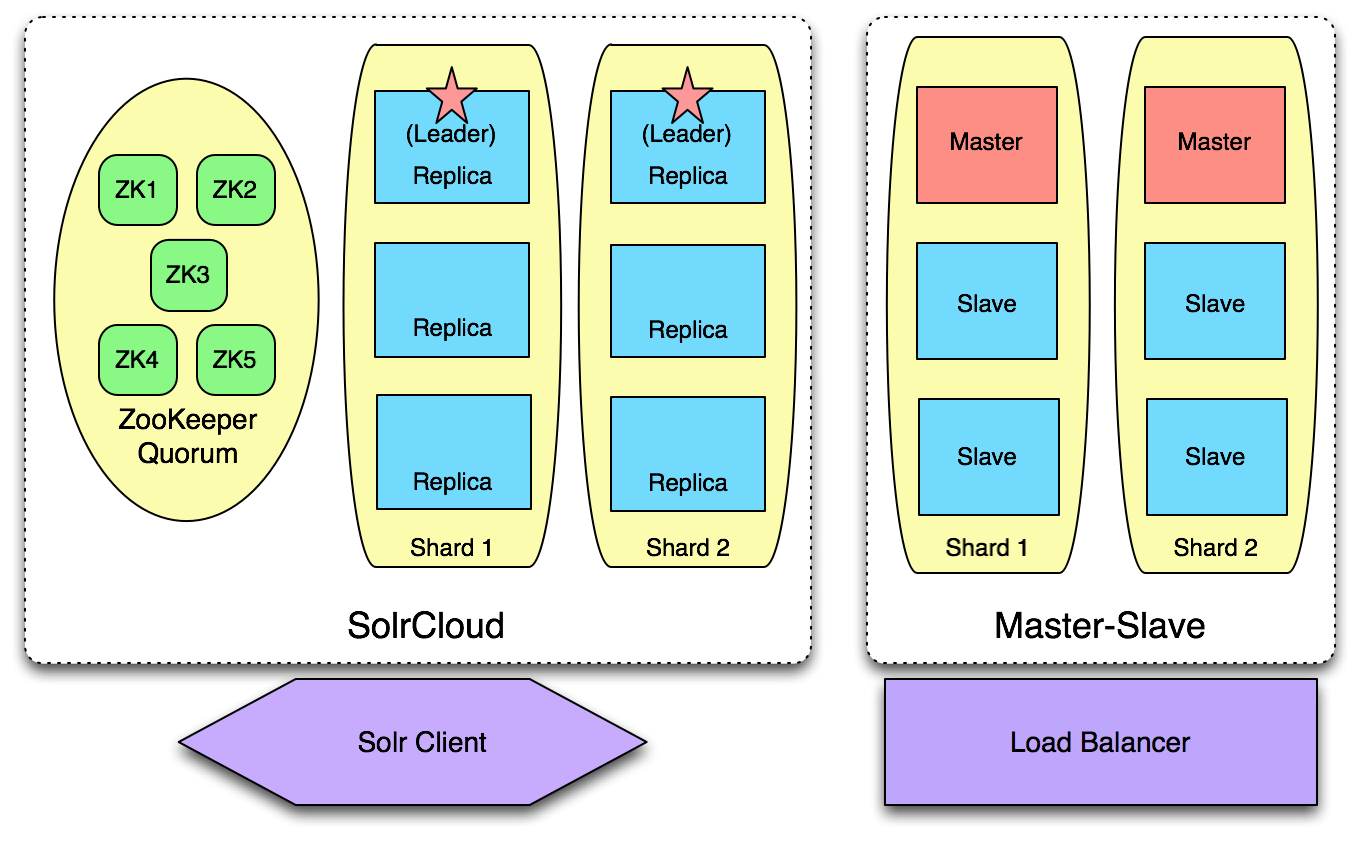
Why would I need SolrCloud or master-slave at all?
SolrCloud and master-slave both address four particular issues:
- Sharding
- Near Real Time (NRT) search and incremental indexing
- Query distribution and load balancing
- High Availability (HA)
What is sharding?
Sharding is the act of splitting a single Solr index across multiple machines, also known as shards or slices in Solr terminology. Sharding is most often needed because an index has grown too large to fit on a single server. A given shard can contain multiple physical/virtual servers, meaning that all the machines/replicas on that shard contain the same index data and serve queries for that data.
Through sharding, you can split your index across multiple machines and continue to grow without running into problems. More information can be found here: http://docs.lucidworks.com/display/solr/Shards+and+Indexing+Data+in+SolrCloud
Near Real Time search and incremental indexing:
Master-slave operates with every shard having a single master which takes care of all indexing. All other nodes in the shard are slaves, and upon entering the shard are given the current state of the index using SolrReplication (http://wiki.apache.org/solr/SolrReplication). Once a slave has been replicated, the slave's pollInterval determines how often it will contact the shard master to receive index updates.
SolrCloud similarly has a leader in every shard but the leader is largely the same as any other replica, both indexing documents and serving queries. The only additional responsibility of the leader is to distribute documents to be indexed to all other replicas in the shard, and to then report that all replicas have confirmed receiving a given document. Any document sent into SolrCloud is re-routed to the leader of the appropriate shard, who then performs this responsibility. When a replica receives a document, it adds the document to its transaction log and it will send a response to the leader. In this way, updates to SolrCloud indexes are performed in a distributed manner and are durable.
Once a document has been added to the transaction logs, it is available via a RealTimeGet (http://wiki.apache.org/solr/RealTimeGet), but is not available via search until a soft commit or hard commit with openSearcher=true has been executed. A manual soft commit or hard commit will make all documents in the transaction log available for search. One can also use the autoCommit and autoSoftCommit parameters to trigger commits from individual nodes on a regular basis.
Query distribution and load balancing:
In master-slave, querying a single node will only bring you results from that node, which in most cases is equivalent to querying one slice of your data. In order to generate a query for your entire sharded index, you must use a Distributed Search (http://wiki.apache.org/solr/DistributedSearch) to query one node per shard. In the event that one of those nodes is unable to respond, an error will be given and the query will not be fulfilled. This being the case, trying to load balance queries across a master-slave cluster can be problematic. Master-slave also does not provide any load balancing, and thus requires an external load balancer.
With SolrCloud, distributed searching is handled automatically by the nodes in the cloud: querying any node will cause that node to send the query out to one node in all other shards, returning a response only when it has aggregated the results from all shards. Furthermore, ZooKeeper and all replicas are aware of any non-responding nodes, and therefore won't direct queries to nodes that are considered dead. In the event that a downed node has not yet been detected by ZK and is sent a query, the querying node will report the node as down to ZK, and resend the query to another node. In this way, queries to a SolrCloud are quite durable and will almost never be interrupted by a downed node.
SolrCloud can handle its own load balancing if you use a smart client such as Solrj (http://wiki.apache.org/solr/Solrj). Solrj will use a simple round robin load balancer, distributing queries evenly to all nodes in SolrCloud. Furthermore, Solrj is ZooKeeper aware and thus will never send a query to a node that is known as down.
High Availability:
In the event of a downed master in a master-slave cluster, the shard can continue to serve queries, but will no longer be able to index until a new master is instated. The process of promoting a slave to a master is manual, though it can be scripted. Any updates to the master's index since the last replication are lost, and those documents will have to be resubmitted. When a slave disconnects from the cluster and then rejoins, it will automatically retrieve any missed updates/index segments from the master before it is considered ready to serve queries.
In SolrCloud, when ZooKeeper detects a leader has gone down, it will initiate the leader election process instantaneously, selecting a new leader to begin distributing documents again. Since the transaction log ensures that all nodes in the shard are in sync, all updates are durable and never lost when a leader goes down. Similar to master-slave, when a replica rejoins the cluster it simply replays the transaction log to bring itself up to date with other machines in the shard. In some cases if a replica has missed too many updates, it will perform a standard replication as well as replaying the transaction log before serving queries.
Both SolrCloud and master-slave take advantage of SolrReplication, but SolrCloud automatically handles rerouting and recovery when any node in the cluster goes down, whereas master-slave requires some manual work in the event a master becomes unresponsive. As a result, turning a master-slave cluster into a HA solution requires a fair amount of work in scripting and case checking, to ensure no documents are lost and that queries are accurate. By contrast, SolrCloud will never lose updates and will automatically route around any unresponsive nodes.
See also: https://support.lucidworks.com/entries/22180608-Solr-HA-DR-overview-3-x-and-4-0-SolrCloud-
-------------------------------
https://support.lucidworks.com/hc/en-us/sections/200314327-Lucene-Solr
http://www.solr.cc/blog/?p=99
What is SolrCloud? (And how does it compare to master-slave?)的更多相关文章
- Solr4.8.0源码分析(24)之SolrCloud的Recovery策略(五)
Solr4.8.0源码分析(24)之SolrCloud的Recovery策略(五) 题记:关于SolrCloud的Recovery策略已经写了四篇了,这篇应该是系统介绍Recovery策略的最后一篇了 ...
- SolrCloud:依据Solr Wiki的译文
本文是作者依据Apache Solr Document的译文.翻译不对或者理解不到位的地方欢迎大家指正!谢谢! Nodes, Cores, Cluster and Leaders Nodes and ...
- compare across commits online
https://gist.github.com/nevik/5689882 Examples: https://github.com/octocat/Spoon-Knife/compare/ed122 ...
- 缓存、队列(Memcached、redis、RabbitMQ)
本章内容: Memcached 简介.安装.使用 Python 操作 Memcached 天生支持集群 redis 简介.安装.使用.实例 Python 操作 Redis String.Hash.Li ...
- PHP7函数大全(4553个函数)
转载来自: http://www.infocool.net/kb/PHP/201607/168683.html a 函数 说明 abs 绝对值 acos 反余弦 acosh 反双曲余弦 addcsla ...
- Learn Git and GitHub without any code!
What is GitHub? GitHub is a code hosting platform for version control and collaboration.代码托管平台. repo ...
- show master/slave status求根溯源
show master/slave status分别是查看主数据库以及副数据库的状态,是一种能查看主从复制运行情况的方式. 这里仅仅讨论linux下的nysql5.7.13版本的执行情况 一.show ...
- Stack Overflow: The Architecture - 2016 Edition
To get an idea of what all of this stuff “does,” let me start off with an update on the average day ...
- GitHub入门教程 Hello World for GitHub
Intro 1.简介 What is GitHub? 2.什么是github? Create a Reposi ...
随机推荐
- Gym 101655:2013Pacific Northwest Regional Contest(寒假自训第13场)
A .Assignments 题意:给定距离D,以及N个飞机的速度Vi,单位时间耗油量Fi,总油量Ci.问有多少飞机可以到达目的地. 思路:即问多少飞机满足(Ci/Fi)*Vi>=D ---- ...
- php基础-6
类的继承和方法重写 <?php class people{ public function __construct($name, $age, $sex) { $this->age = $a ...
- (0)前端总结(HTML + CSS + JQ)
HTML 1.<meta charset="UTF-8"> #设置页面编码,这个设置英文则现在国内浏览器会弹出是否要转换中文 2.<title>我的第一个 ...
- 简单了解version control
1.什么是版本控制: 版本控制是指对软件开发过程中各种程序代码.配置文件及说明文档等文件变更的管理,是软件管理的核心思想之一 2.版本控制简述 版本控制最主要的功能就是追踪文件的变更.它将什么时候.什 ...
- string的方法find
官方解释:find(sub[, start[, end]]) Return the lowest index in the string where substring sub is found wi ...
- LeetCode - Diameter of Binary Tree
Given a binary tree, you need to compute the length of the diameter of the tree. The diameter of a b ...
- Vue 1组件的使用
在components新建一个vue组件: <template> <div> <h1>{{ msg }}</h1> </div> </ ...
- 深入浅出理解 COOKIE MAPPING
转载自:http://www.myttnn.com/digital-marketing/cookie-mapping-introduction/ 在RTB(实时竞价广告,Real-Time-Biddi ...
- Modern Data Lake with Minio : Part 2
转自: https://blog.minio.io/modern-data-lake-with-minio-part-2-f24fb5f82424 In the first part of this ...
- OFIFG fault when using DCO in MSP430
The OFIFG flag always set in my recent MSP430 smoke device project. In this A sample hardware, there ...