
黄聪:在.NET中使用GeckoFX 29
GeckoFX is a .NET control, that works similarly to “System.Windows.Forms.WebBrowser” Control, while being cross platform, and offering much more control, it is in my opinion, a great replacement for the “System.Windows.Forms.WebBrowser”.
GeckoFX is based on the same engine as Firefox, the Mozilla Gecko.
This is an example on how to use it in Visual Studio.
This is a great replacement for Forms.WebBrowser control.
To get this working, you need to first download the GeckoFX from here:
https://bitbucket.org/geckofx/
During the writing of this, the last available version was the “GeckoFX-29.0”, so I downloaded that from here, if while you download this found a newer version, which is very likely, be careful to what XUL version you download on the next step:
https://bitbucket.org/geckofx/geckofx-29.0/downloads
and last revision:
https://bitbucket.org/geckofx/geckofx-29.0/downloads/GeckoFx-Windows-29.0-0.11.zip
After that, you need to download the XULRunner runtime from Mozilla website, it is very important that you download a version from here that matches the same version as the GeckoFX version.
Here is a version list that will help you know what XULRunner version you need:
https://bitbucket.org/geckofx/geckofx/wiki/Version_lists
And download from:
http://ftp.mozilla.org/pub/mozilla.org/xulrunner/
In my case, I downloaded version “29.0” from:
http://ftp.mozilla.org/pub/mozilla.org/xulrunner/releases/29.0/runtimes/xulrunner-29.0.en-US.win32.zip
Extract the contents of the archive in the same folder as the executable, the same folder that has the WindowsFormsApplication1.exe, if you choose to extract to a different folder, be sure to modify the code to point to the new folder.
After that, start Visual studio, create a new C# Windows form project, and add refrences to both “Geckofx-Winforms.dll”, and “Geckofx-Core.dll” in the project refrences.
You may also need to add those line to the top of the file:
using Gecko; |
And in the form constructor, you need to add some code to initiate the GeckoFX control, this code will be added after the “InitializeComponent()” function call, like this:
GeckoWebBrowser browser; |
And add this one line to the form load event handler:
private void Form1_Load(object sender, EventArgs e) |
Important Problem: you need to go to your project properties, and in the ‘build’ tab, change the platform target to x86 for (all configurations), instead of “Any CPU”.
Before running the application for the first time, do not forget that you need to extract the xulrunner in the “\bin\Debug” or “\bin\Release” folder.
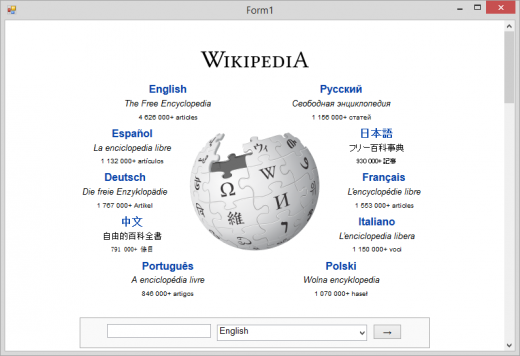
This is the result:
黄聪:在.NET中使用GeckoFX 29的更多相关文章
- 黄聪:AngularJS中的$resource使用与Restful资源交互(转)
原文:http://blog.csdn.net/he90227/article/details/50525836 1.AngularJS中的 $resource 这个服务可以创建一个资源对象,我们可以 ...
- 转载: 黄聪:C#中 Excel列字母与数字的转换
using System; using System.Collections.Generic; using System.Linq; using System.Text; using System.T ...
- 黄聪:C#中HtmlAgilityPack判断是否包含或不包含指定的属性或值
//选择不包含class属性的节点 var result = node.SelectNodes(".//span[not(@class)]"); //选择不包含class和id属性 ...
- 黄聪:HtmlAgilityPack中SelectSingleNode的XPath和CSS选择器
XPath和CSS选择器 原文:http://ejohn.org/blog/xpath-css-selectors 最近,我做了很多工作来实现一个同时支持XPath和CSS 3的解析器,令我惊讶的是: ...
- 黄聪:wordpress中PHP运行错最有效解决办法Fatal error: Out of memory (allocated 6029312)(转)
近日在升级wordpress 3.2.1和若干插件的过程中,发现了一个wordpress的错误:Allowed memory size of XXX bytes exhausted Fatal err ...
- 黄聪:C#中CefSharp的简单使用
C#中CefSharp的简单使用 https://blog.csdn.net/qq_26712977/article/details/78282995
- 黄聪:bootstrap中模态框modal在苹果手机上会失效
bootstrap中模态框在苹果手机上会失效 可将代码修改为<a data-toggle="modal" data-target="#wrap" hre ...
- 黄聪:C#中WebClient自动判断编码是UTF-8还是GBK,并且有超时判断功能
public class WebDownload : WebClient { private int _timeout; /// <summary> /// 超时时间(毫秒) /// &l ...
- 黄聪:wordpress中remove_action、add_action、 do_action()的hook钩子都有哪些
原文地址:http://codex.wordpress.org/Plugin_API/Action_Reference muplugins_loaded After must-use plugins ...
随机推荐
- 【转载】 火爆的996.ICU项目正在酝酿开源许可证 禁止996公司使用
原文地址: https://www.cnbeta.com/articles/tech/832449.htm ---------------------------------------------- ...
- php在foreach中使用引用赋值&可能遇到的问题(转)
楼主在写项目的时候,由于初涉PHP的赋值引用操作,觉得这个功能非常强大,用时一时爽,没有深入了解过其中的原理,导致了一些当时觉得不可思议的BUG,废话不都说,我举个例子详细的描述一下这个问题. 代码: ...
- html+css实现小米商城首页静态页面
学了一个星期的html和css,用新学的东西写点东西,仿照小米商城的首页按照它的页面布局盗用它的图片写了个小米商城的静态页面. 源代码:链接:https://pan.baidu.com/s/1qf63 ...
- Ubuntu上latex+atom配置
网上流传的latex+atom大都是windows上的,Ubuntu与windows上的配置方式大同小异,这里写下自己的经验: 分为三个步骤,首先安装texlive,texlive是latex的依赖库 ...
- 后台管理Models
1.后台的配置 登录地址 :http://localhost:8000/admin 创建后台管理员(超级用户): 在终端输入:./manage.py createsuperuser Username ...
- centos6.8 搭建zabbix被监控端
System:Centos 6.8 Zabbix-agent:3.2.1 1 安装对应版本的zabbix的yum源,官方网站中没有找到zabbix3.0支持的centos6的源,所以用的3.2 #rp ...
- 求两个数之间的质数 -----------基于for循环 算法思想
前端代码: <%@ Page Language="C#" AutoEventWireup="true" CodeFile="Default.as ...
- pageContext中page、request、session、application四种范围变量的用法。
在PageContext中有很多作用域 第一种:PageContext.PAGE_SCOPE适用于当前页面的作用域,其接受数据的代码是pageContext.getAttribute();访问页面也是 ...
- 【HAOI2012】容易题
终于自己做出一道题了quq 原题: 为了使得大家高兴,小Q特意出个自认为的简单题(easy)来满足大家,这道简单题是描述如下:有一个数列A已知对于所有的A[i]都是1~n的自然数,并且知道对于一些A[ ...
- 【liunx】linux后台执行命令:&和nohup
当我们在终端或控制台工作时,可能不希望由于运行一个作业而占住了屏幕,因为可能还有更重要的事情要做,比如阅读电子邮件.对于密集访问磁盘的进程,我们更希望它能够在每天的非负荷高峰时间段运行(例如凌晨).为 ...