
练习|Django-多表
models.py
from django.db import models

# Create your models here.

class Author(models.Model):

    nid = models.AutoField(primary_key=True)

    name=models.CharField( max_length=32)

    age=models.IntegerField()

class Publish(models.Model):

    nid = models.AutoField(primary_key=True)

    name=models.CharField( max_length=32)

    city=models.CharField( max_length=32)

    email=models.EmailField()

class Book(models.Model):

    nid = models.AutoField(primary_key=True)

    title = models.CharField( max_length=32)

    publishDate=models.DateField()

    price=models.DecimalField(max_digits=5,decimal_places=2) # 999.99

    # 与Publish建立一对多的关系,外键字段建立在多的一方

    publish=models.ForeignKey(to="Publish",to_field="nid",on_delete=models.CASCADE)

    # 与Author表建立多对多的关系,ManyToManyField可以建在两个模型中的任意一个,自动创建第三张表

    authors=models.ManyToManyField(to='Author',)
urls.py
from django.contrib import admin

from django.urls import path,re_path

from book import views

urlpatterns = [

    path('admin/', admin.site.urls),

    re_path('books/add/$', views.add_book),

    re_path('books/$', views.books),

    re_path('books/(\d+)/change/$', views.change_book),

    re_path('books/(\d+)/delete/$', views.delete_book),

]
在settings里边

views.py
from django.shortcuts import render,HttpResponse,redirect

# Create your views here.

from .models import Publish,Author,Book

def add_book(request):

    if request.method=="POST":

        title=request.POST.get("title")

        price=request.POST.get("price")

        pub_date=request.POST.get("pub_date")

        publish_id=request.POST.get("publish_id")

        authors_id_list=request.POST.getlist("authors_id_list") # checkbox,select

        book_obj=Book.objects.create(title=title,price=price,publishDate=pub_date,publish_id=publish_id)

        print(authors_id_list) # ['2', '3']

        book_obj.authors.add(*authors_id_list)

        return HttpResponse("success")

    publish_list=Publish.objects.all()

    author_list=Author.objects.all()

    return render(request,"addbook.html",{"author_list":author_list,"publish_list":publish_list})

def books(request):

    book_list = Book.objects.all()

    return render(request, "book.html",{"book_list":book_list})

def change_book(request,edit_book_id):

    edit_book_obj = Book.objects.filter(pk = edit_book_id).first()

    if request.method == 'POST':

        title = request.POST.get('title')

        price = request.POST.get('price')

        pub_date = request.POST.get('pub_date')

        publish_id = request.POST.get('publish_id')

        authors_id_list = request.POST.getlist('authors_id_list')

        Book.objects.filter(pk=edit_book_id).update(title=title, price=price,publishDate=pub_date, publish_id=publish_id)

        # edit_book_obj.authors.clear()

        # edit_book_obj.authors.add(*authors_id_list)

        edit_book_obj.authors.set(authors_id_list)

        return redirect("/books/")

    publish_list = Publish.objects.all()

    author_list = Author.objects.all()

    return render(request, 'editbook.html',{"edit_book_obj":edit_book_obj, "publish_list":publish_list, "author_list":author_list})

def delete_book(request, delete_book_id):

    Book.objects.filter(pk=delete_book_id).delete()

    return redirect("/books/")
addbook.html(添加书籍)
<!DOCTYPE html>

<html lang="en">

<head>

    <meta charset="UTF-8">

    <title>Title</title>

    <link rel="stylesheet" href="/static/bs/css/bootstrap.css">

</head>

<body>

<h3>添加书籍</h3>

<div class="container">

    <div class="row">

        <div class="col-md-6 col-md-offset-3">

            <form action="" method="post">

                {% csrf_token %}

                <div class="form-group">

                    <label for="">名称</label>

                    <input type="text" name="title" class="form-control" value="">

                </div>

                <div class="form-group">

                    <label for="">价格</label>

                    <input type="text" name="price" class="form-control">

                </div>

                <div class="form-group">

                    <label for="">出版日期</label>

                    <input type="date" name="pub_date" class="form-control">

                </div>

                <div class="form-group">

                    <label for="">出版社</label>

                    <select name="publish_id" id="" class="form-control">

                        {% for publish in publish_list %}

                            <option value="{{ publish.pk }}">{{ publish.name }}</option>

                        {% endfor %}

                    </select>

                </div>

                <div class="form-group">

                    <label for="">作者</label>

                    <select type="text" name="authors_id_list" multiple class="form-control">

                        {% for author in author_list %}

                            <option value="{{ author.pk }}">{{ author.name }}</option>

                        {% endfor %}

                    </select>

                </div>

                <input type="submit" class="btn btn-default">

            </form>

        </div>

    </div>

</div>

</body>

</html>
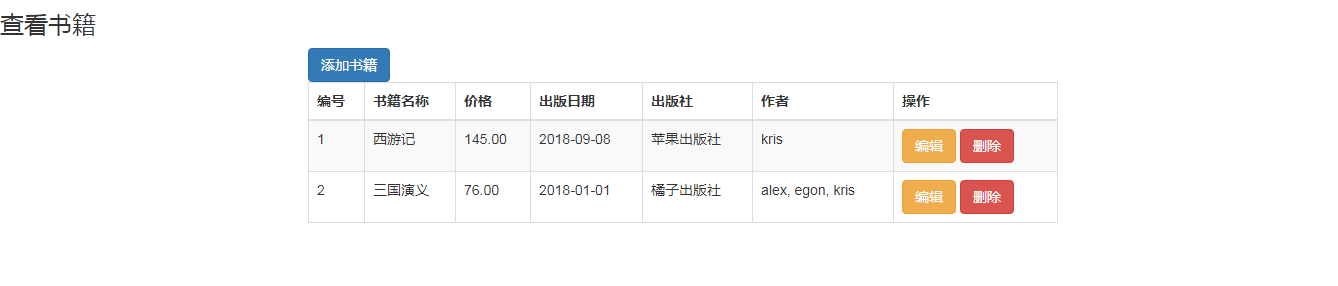
book.html(查看书籍)
<!DOCTYPE html>

<html lang="en">

<head>

    <meta charset="UTF-8">

    <title>Title</title>

    <link rel="stylesheet" href="/static/bs/css/bootstrap.css">

</head>

<body>

<h3>查看书籍</h3>

<div class="container">

    <div class="row">

        <div class="col-md-8 col-md-offset-2"> {# 边框、悬浮时变色、条纹编码 #}

            <a href="/books/add" class="btn btn-primary">添加书籍</a>

            <table class="table table-bordered table-hover table-striped">

                <thead>

                <tr>

                    <th>编号</th>

                    <th>书籍名称</th>

                    <th>价格</th>

                    <th>出版日期

                    <th>出版社</th>

                    <th>作者</th>

                    <th>操作</th>

                </tr>

                </thead>

                <tbody>

                {% for book in book_list %}

                    <tr>

                        <td>{{ forloop.counter }}</td>

                        <td>{{ book.title }}</td>

                        <td>{{ book.price }}</td>

                        <td>{{ book.publishDate|date:'Y-m-d' }}</td>

                        <td>{{ book.publish.name }}</td>

                        <td>

                            {% for author in book.authors.all %}

                                {% if forloop.last %}

                                    <span>{{ author.name }}</span>

                                {% else %}

                                    <span>{{ author.name }}</span>,

                                {% endif %}

                            {% endfor %}

                        </td>

                        <td>

                            <a href="/books/{{ book.pk }}/change/" class="btn btn-warning">编辑</a>

                            <a href="/books/{{ book.pk }}/delete/" class="btn btn-danger">删除</a>

                        </td>

                    </tr>

                {% endfor %}

                </tbody>

            </table>

        </div>

    </div>

</div>

</body>

</html>
editbook.html(编辑书籍)
<!DOCTYPE html>

<html lang="en">

<head>

    <meta charset="UTF-8">

    <title>Title</title>

    <link rel="stylesheet" href="/static/bs/css/bootstrap.css">

</head>

<body>

<h3>编辑书籍</h3>

<div class="container">

    <div class="row">

        <div class="col-md-6 col-md-offset-3">

            <form action="" method="post">

                {% csrf_token %}

                <div class="form-group">

                    <label for="">名称</label>

                    <input type="text" name="title" class="form-control" value="{{ edit_book_obj.title }}">

                </div>

                <div class="form-group">

                    <label for="">价格</label>

                    <input type="text" name="price" class="form-control" value="{{ edit_book_obj.price }}">

                </div>

                <div class="form-group">

                    <label for="">出版日期</label>

                    <input type="date" name="pub_date" class="form-control"

                           value="{{ edit_book_obj.publishDate|date:'Y-m-d' }}">

                </div>

                <div class="form-group">

                    <label for="">出版社</label>

                    <select name="publish_id" id="" class="form-control">

                        {% for publish in publish_list %}

                            <option selected value="{{ publish.pk }}">{{ publish.name }}</option>

                            {% if edit_book_obj.publish == publish %}

                            {% else %}

                                <option value="{{ publish.pk }}">{{ publish.name }}</option>

                            {% endif %}

                        {% endfor %}

                    </select>

                </div>

                <div class="form-group">

                    <label for="">作者</label>

                    <select type="text" name="authors_id_list" multiple class="form-control">

                        {% for author in author_list %}

                            {% if author in edit_book_obj.authors.all %}

                                <option selected value="{{ author.pk }}">{{ author.name }}</option>

                            {% else %}

                                <option value="{{ author.pk }}">{{ author.name }}</option>

                            {% endif %}

                        {% endfor %}

                    </select>

                </div>

                <input type="submit" class="btn btn-default">

            </form>

        </div>

    </div>

</div>

</body>

</html>
练习|Django-多表的更多相关文章
- python运维开发(十九)----Django后台表单验证、session、cookie、model操作
内容目录: Django后台表单验证 CSRF加密传输 session.cookie model数据库操作 Django后台Form表单验证 Django中Form一般有2种功能: 1.用于做用户提交 ...
- django form表单验证
一. django form表单验证引入 有时时候我们需要使用get,post,put等方式在前台HTML页面提交一些数据到后台处理例 ; <!DOCTYPE html> <html ...
- django from表单验证
django from表单验证 实现:表单验证 工程示例: urls.py 1 2 3 4 5 6 7 8 9 from django.conf.urls import url from djan ...
- Django 数据表更改
Django 数据表更改 « Django 开发内容管理系统(第四天) Django 后台 » 我们设计数据库的时候,早期设计完后,后期会发现不完善,要对数据表进行更改,这时候就要用到本节的知识. D ...
- python 全栈开发,Day73(django多表添加,基于对象的跨表查询)
昨日内容回顾 多表方案: 如何确定表关系呢? 表关系是在2张表之间建立的,没有超过2个表的情况. 那么相互之间有2条关系线,先来判断一对多的关系. 如果其中一张表的记录能够对应另外一张表的多条记录,那 ...
- python 全栈开发,Day72(昨日作业讲解,昨日内容回顾,Django多表创建)
昨日作业讲解 1.图书管理系统 实现功能:book单表的增删改查 1.1 新建一个项目bms,创建应用book.过程略... 1.2 手动创建static目录,并在目录里面创建css文件夹,修改set ...
- Django:表结构发生变化需要执行命令
Django:表结构发生变化需要执行命令 Django:表结构发生变化需要执行命令 mysite> python manage.py makemigrations blog #让 Django ...
- django Form表单的使用
Form django表单系统中,所有的表单类都作为django.forms.Form的子类创建,包括ModelForm 关于django的表单系统,主要分两种 基于django.forms.Form ...
- Django(5) session登录注销、csrf及中间件自定义、django Form表单验证(非常好用)
一.Django中默认支持Session,其内部提供了5种类型的Session供开发者使用: 数据库(默认) 缓存 文件 缓存+数据库 加密cookie 1.数据库Session 1 2 3 4 5 ...
- django删除表重建&修改用户密码&base64加密解密字符串&ps aux参数说明&各种Error例子
1.django的queryset不支持负索引 AssertionError: Negative indexing is not supported. 2.django向前端JavaScript传递列 ...
随机推荐
- 集大软件工程15级个人作业Week1
集大软件工程15级个人作业Week1 孙志威 201521123077 博客园主页 码云地址 阅读参考材料,并回答下面几个问题 (1)回想一下你初入大学时对网络工程专业的畅想 当初你是如何做出选择网络 ...
- 滑动条QSlider
QSlider只提供整数范围 滑块接受Tab键的焦点,并同时提供了一个鼠标滚轮和键盘接口.键盘接口如下: Left/Right 移动水平滑块一个步长.Up/Down 移动垂直滑块一个步长.PageUp ...
- QMessageBox消息框
QMessageBox提供两套接口来实现,一种是static functions(静态方法调用),另外一种 the property-base API(基于属性的API) #需要 from PyQt5 ...
- Python之print(args)与sys.stdout.write(string)使用总结
一.sys.stdout.write(string) import sys; # sys.stdout.write(): # 1.默认不换行 # 2.参数必须是字符串 # demo 01 x = &q ...
- sun.misc.BASE64Encoder等类报错的解决方法
一.引言: sun.misc.BASE64Encoder等类不属于JDK标准库范畴,但在JDK中包含了该类,可以直接使用.但是在eclipse中直接使用却报错.本文就介绍一下针对这样的类如何处理. 二 ...
- Mysql 插入中文错误:Incorrect string value: '\xE7\xA8\x8B\xE5\xBA\x8F...' for column 'course' at row 1
create table my_user ( id tinyint(4) not null auto_increment, account varchar(255) default nul ...
- 【ARTS】01_09_左耳听风-20190107~20190113
ARTS: Algrothm: leetcode算法题目 Review: 阅读并且点评一篇英文技术文章 Tip/Techni: 学习一个技术技巧 Share: 分享一篇有观点和思考的技术文章 Algo ...
- 【逆向知识】动态调试技巧-C++代码逆向
1.C++类代码的特点 寄存器ECX传参时一般用作this指针(对象地址)或是计数器. 有ecx传参的call,是成员函数,构造函数,析构函数 能访问成员变量的函数都会有ecx传参 静态函数.全局函数 ...
- linux学习笔记1——指令的基本格式及基本文件操作
从今天开始就正式踏上了linux的学习历程.linux作为绝大多数服务器采用的操作系统,是每个开发人员都非常有必要掌握的操作系统.初学时,我没有直接在电脑上安装linux操作系统,而是采用了虚拟机的方 ...
- mysql之 innobackupex备份+binlog日志的完全恢复【转】
前言: MySQL的完全恢复,我们可以借助于完整的 备份+binlog 来将数据库恢复到故障点. 备份可以是热备与逻辑备份(mysqldump),只要备份与binlog是完整的,都可以实现完全恢复. ...