
Tessaract 源码分析(转)
源码分析
- Page Layout 分析步骤
二值化
算法: OTSU
调用栈:
main[api/tesseractmain.cpp] ->
TessBaseAPI::ProcessPages[api/baseapi.cpp] ->
TessBaseAPI::ProcessPage[api/baseapi.cpp] ->
TessBaseAPI::Recognize[api/baseapi.cpp] ->
TessBaseAPI::FindLines[api/baseapi.cpp] ->
TessBaseAPI::Threshold[api/baseapi.cpp] ->
ImageThresholder::ThresholdToPix[ccmain/thresholder.cpp] ->
ImageThresholder::OtsuThresholdRectToPix [ccmain/thresholder.cpp]
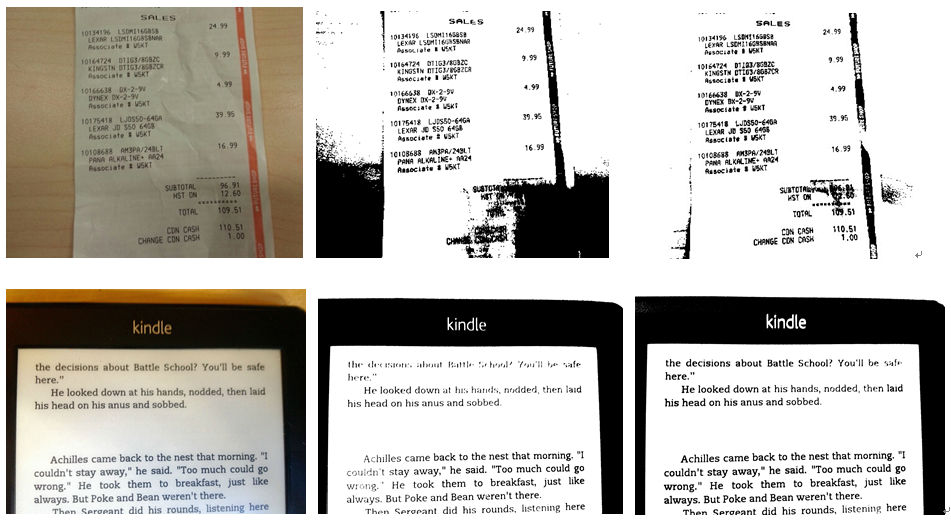
OTSU 是一个全局二值化算法. 如果图片中包含阴影而且阴影不平均,二值化算法效果就会比较差。OCRus利用一个局部的二值化算法,Wolf Jolion, 对包含有阴影的图片也有比较好的二值化结果,以下是一些对比图:(左为原图, 中间为用OTSU算法结果图, 右边为WolfJolion算法结果图):
- 预处理
Remove vertical lines(去除平行线)
This step removes vertical and horizontal lines in the image.
调用栈
main [api/tesseractmain.cpp] ->
TessBaseAPI::ProcessPages [api/baseapi.cpp] ->
TessBaseAPI::ProcessPage [api/baseapi.cpp] ->
TessBaseAPI::Recognize [api/baseapi.cpp] ->
TessBaseAPI::FindLines [api/baseapi.cpp] ->
Tesseract::SegmentPage [ccmain/pagesegmain.cpp] ->
Tesseract::AutoPageSeg [ccmain/ pagesegmain.cpp] ->
Tesseract::SetupPageSegAndDetectOrientation [ccmain/ pagesegmain.cpp]
LineFinder::FindAndRemoveLines [textord/linefind.cpp]
Remove images(去除影像)
This step remove images from the picture.
调用栈
main [api/tesseractmain.cpp] ->
TessBaseAPI::ProcessPages [api/baseapi.cpp] ->
TessBaseAPI::ProcessPage [api/baseapi.cpp] ->
TessBaseAPI::Recognize [api/baseapi.cpp] ->
TessBaseAPI::FindLines [api/baseapi.cpp] ->
Tesseract::SegmentPage [ccmain/pagesegmain.cpp] ->
Tesseract::AutoPageSeg [ccmain/ pagesegmain.cpp] ->
Tesseract::SetupPageSegAndDetectOrientation [ccmain/ pagesegmain.cpp]
ImageFind::FindImages [textord/linefind.cpp]
I never try this function successfully. May be the image needs to satisfy some conditions.
Filter connected component(相关区域)
This step generate all the connected components and filter the noise blobs.
调用栈
main [api/tesseractmain.cpp] ->
TessBaseAPI::ProcessPages [api/baseapi.cpp] ->
TessBaseAPI::ProcessPage [api/baseapi.cpp] ->
TessBaseAPI::Recognize [api/baseapi.cpp] ->
TessBaseAPI::FindLines [api/baseapi.cpp] ->
Tesseract::SegmentPage [ccmain/pagesegmain.cpp] ->
Tesseract::AutoPageSeg [ccmain/ pagesegmain.cpp] ->
Tesseract::SetupPageSegAndDetectOrientation [ccmain/ pagesegmain.cpp] ->
(i) Textord::find_components [textord/tordmain.cpp] ->
{
extract_edges[textord/edgblob.cpp] //extract outlines and assign outlines to blobs
assign_blobs_to_blocks2[textord/edgblob.cpp] //assign normal, noise, rejected blobs to TO_BLOCK_LIST for further filter blobs operations
Textord::filter_blobs[textord/tordmain.cpp] ->
Textord::filter_noise_blobs[textord/tordmain.cpp] //Move small blobs to a separate list
}
(ii) ColumnFinder::SetupAndFilterNoise [textord/colfind.cpp]
This step will generate the intermediate result like this:
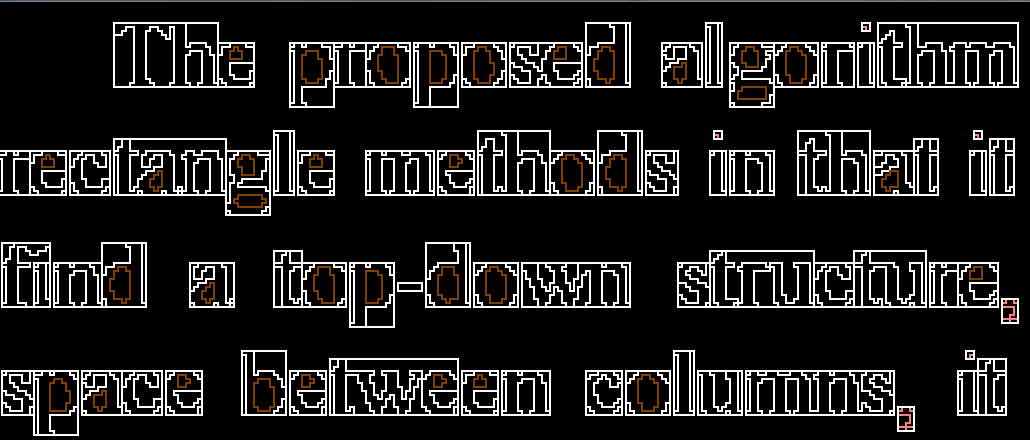
The inner and outer outline of the connected component will be recognized. There will be a box area overlap the connected component. The potential small noise blobs will be marked as pink outlines, such as punctuation and dot in character “i”.
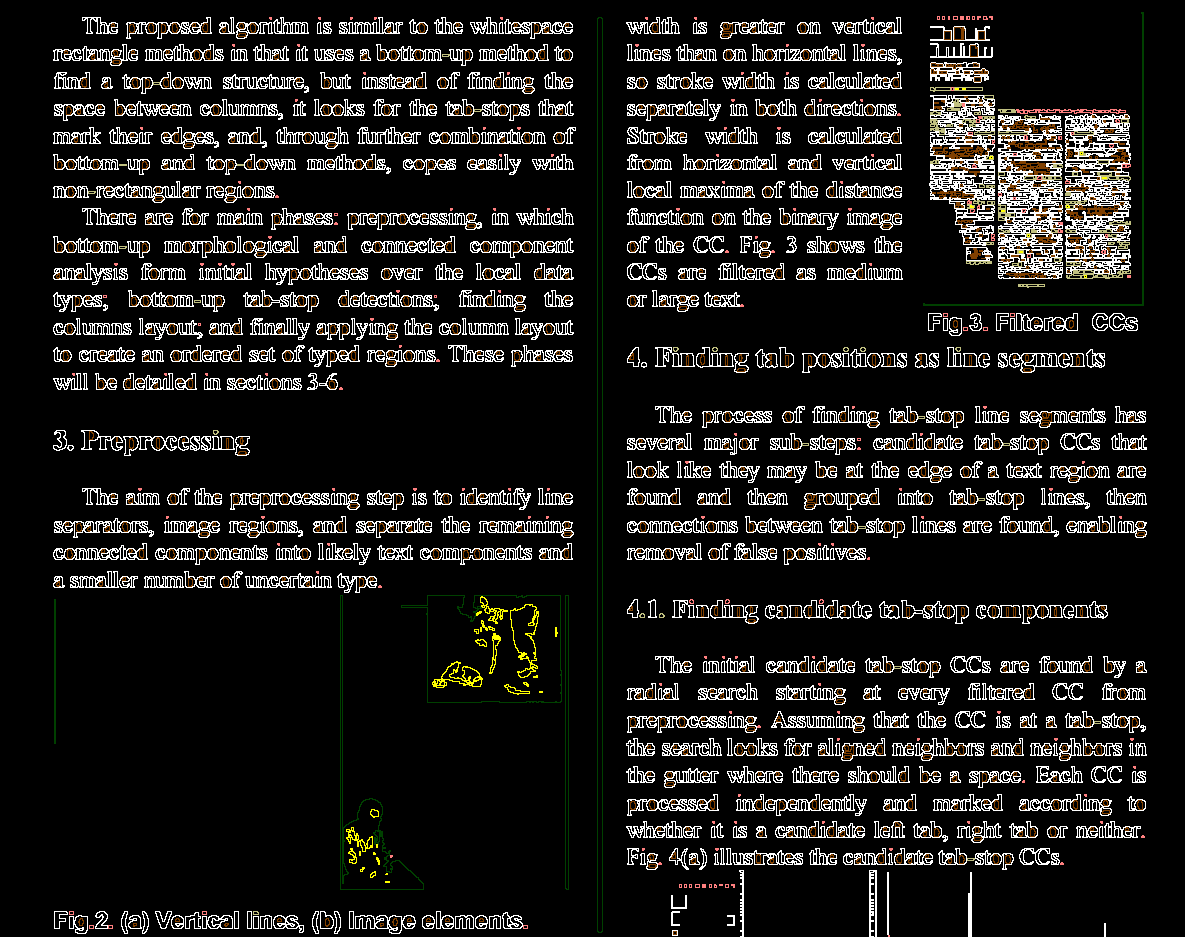
The large blobs will be marked as dark green color:
Finding candidate tab-stop components
调用栈
main [api/tesseractmain.cpp] ->
TessBaseAPI::ProcessPages [api/baseapi.cpp] ->
TessBaseAPI::ProcessPage [api/baseapi.cpp] ->
TessBaseAPI::Recognize [api/baseapi.cpp] ->
TessBaseAPI::FindLines [api/baseapi.cpp] ->
Tesseract::SegmentPage [ccmain/pagesegmain.cpp] ->
Tesseract::AutoPageSeg [ccmain/ pagesegmain.cpp] ->
ColumnFinder::FindBlocks [textord/ colfind.cpp] ->
TabFind::FindInitialTabVectors[textord/tabfind.cpp] ->
TabFind::FindTabBoxes [textord/tabfind.cpp]
This step finds the initial candidate tab-stop CCs by a radial search starting at every filtered CC from preprocessing. The result will be like this:

Finding the column layout(找出行信息)
调用栈
main [api/tesseractmain.cpp] ->
TessBaseAPI::ProcessPages [api/baseapi.cpp] ->
TessBaseAPI::ProcessPage [api/baseapi.cpp] ->
TessBaseAPI::Recognize [api/baseapi.cpp] ->
TessBaseAPI::FindLines [api/baseapi.cpp] ->
Tesseract::SegmentPage [ccmain/pagesegmain.cpp] ->
Tesseract::AutoPageSeg [ccmain/ pagesegmain.cpp] ->
ColumnFinder::FindBlocks [textord/ colfind.cpp] ->
ColumnFinder::FindBlocks (begin at line 369) [textord/ colfind.cpp]
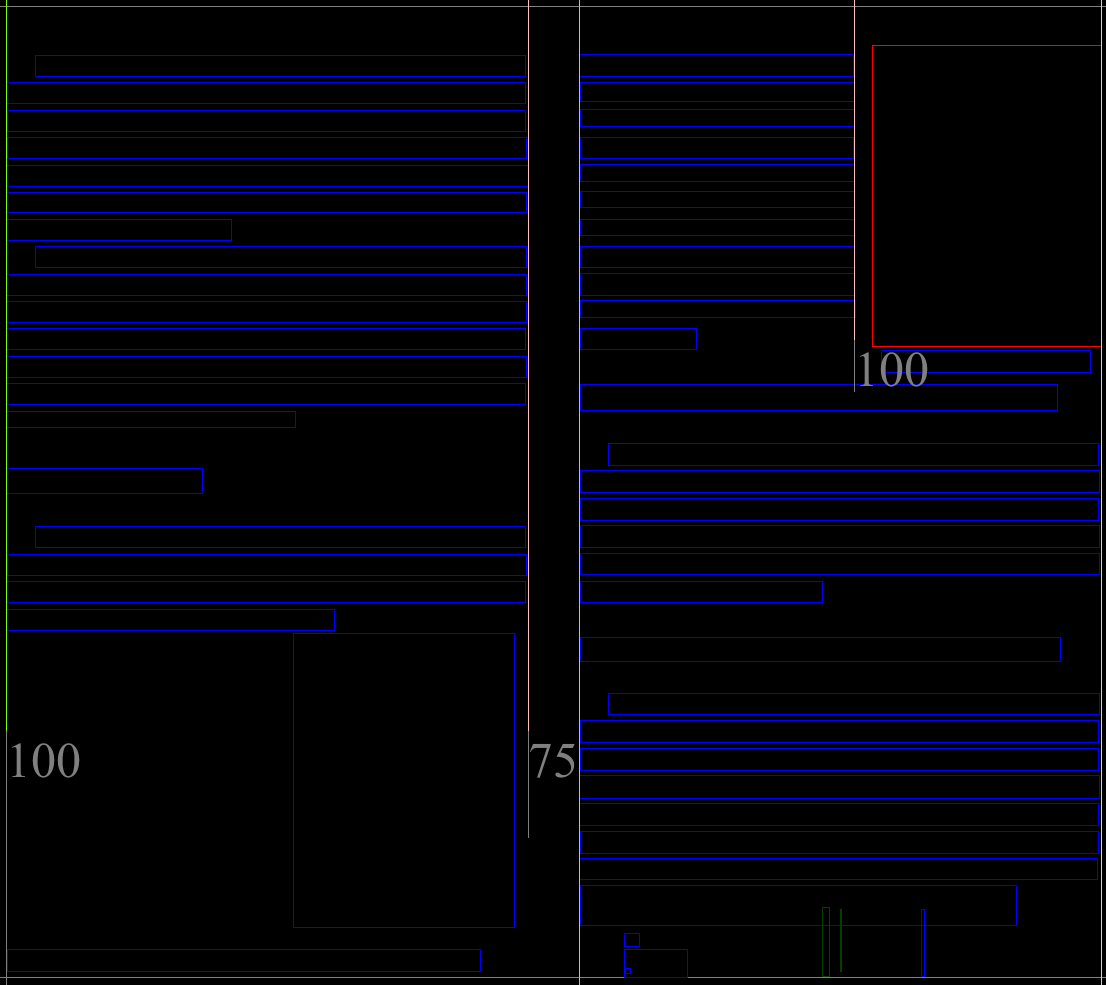
This step finds the column layout of the page:
Finding the regions(找出字符区域)
调用栈
main [api/tesseractmain.cpp] ->
TessBaseAPI::ProcessPages [api/baseapi.cpp] ->
TessBaseAPI::ProcessPage [api/baseapi.cpp] ->
TessBaseAPI::Recognize [api/baseapi.cpp] ->
TessBaseAPI::FindLines [api/baseapi.cpp] ->
Tesseract::SegmentPage [ccmain/pagesegmain.cpp] ->
Tesseract::AutoPageSeg [ccmain/ pagesegmain.cpp] ->
ColumnFinder::FindBlocks [textord/ colfind.cpp]
This step recognizes the different type of blocks:

接下来的工作
找tab-stops及之后处理步骤的算法还不甚清楚,需要继续了解
识别字符部分还没开始看,这部分应该有涉及机器学习的多种算法,有时间需要继续学习
---------------------
作者:kaelsass
来源:CSDN
原文:https://blog.csdn.net/kaelsass/article/details/46874627
版权声明:本文为博主原创文章,转载请附上博文链接!
Tessaract 源码分析(转)的更多相关文章
- ABP源码分析一:整体项目结构及目录
ABP是一套非常优秀的web应用程序架构,适合用来搭建集中式架构的web应用程序. 整个Abp的Infrastructure是以Abp这个package为核心模块(core)+15个模块(module ...
- HashMap与TreeMap源码分析
1. 引言 在红黑树--算法导论(15)中学习了红黑树的原理.本来打算自己来试着实现一下,然而在看了JDK(1.8.0)TreeMap的源码后恍然发现原来它就是利用红黑树实现的(很惭愧学了Ja ...
- nginx源码分析之网络初始化
nginx作为一个高性能的HTTP服务器,网络的处理是其核心,了解网络的初始化有助于加深对nginx网络处理的了解,本文主要通过nginx的源代码来分析其网络初始化. 从配置文件中读取初始化信息 与网 ...
- zookeeper源码分析之五服务端(集群leader)处理请求流程
leader的实现类为LeaderZooKeeperServer,它间接继承自标准ZookeeperServer.它规定了请求到达leader时需要经历的路径: PrepRequestProcesso ...
- zookeeper源码分析之四服务端(单机)处理请求流程
上文: zookeeper源码分析之一服务端启动过程 中,我们介绍了zookeeper服务器的启动过程,其中单机是ZookeeperServer启动,集群使用QuorumPeer启动,那么这次我们分析 ...
- zookeeper源码分析之三客户端发送请求流程
znode 可以被监控,包括这个目录节点中存储的数据的修改,子节点目录的变化等,一旦变化可以通知设置监控的客户端,这个功能是zookeeper对于应用最重要的特性,通过这个特性可以实现的功能包括配置的 ...
- java使用websocket,并且获取HttpSession,源码分析
转载请在页首注明作者与出处 http://www.cnblogs.com/zhuxiaojie/p/6238826.html 一:本文使用范围 此文不仅仅局限于spring boot,普通的sprin ...
- ABP源码分析二:ABP中配置的注册和初始化
一般来说,ASP.NET Web应用程序的第一个执行的方法是Global.asax下定义的Start方法.执行这个方法前HttpApplication 实例必须存在,也就是说其构造函数的执行必然是完成 ...
- ABP源码分析三:ABP Module
Abp是一种基于模块化设计的思想构建的.开发人员可以将自定义的功能以模块(module)的形式集成到ABP中.具体的功能都可以设计成一个单独的Module.Abp底层框架提供便捷的方法集成每个Modu ...
随机推荐
- gitlab搭建与配置说明
1. 概述 Gitlab分为社区版和企业版,此次安装的是社区版(gitlab-ce). 2. 准备 本次使用系统为Ubuntu16.04. 3. 安装 添加GitLab仓库,并安装到服务器上(将git ...
- python之count()函数
# count()统计字符串中特定单词或短语出现次数(n = 3) strs = 'Good! Today is good day! Good job!' n = strs.lower().count ...
- Lodop设置文本项行间距、字间距
LODOP给文本项ADD_PRINT_TEXT设置字间距.行间距,可以在打印设计页面,右键属性里设置,然后在打印设计生成代码,也可以直接写代码.LineSpacing行间距.LetterSpacing ...
- r=a*(1-sinx)
a=-2*pi:.001:2*pi; %设定角度b=(1-sin(a)); %设定对应角度的半径polar(a, b,'r') %绘图 夏目漱石“今夜月色很好” 王家卫“我已经很久没有坐过摩托车了,也 ...
- Directory操作
操作文件夹 CreateDirectory() 创建新文件夹 Delete() 删除 Move() 剪切 Exists() 判断文件夹是否存在 //获取当前目录下所有文件夹的路径 Directory. ...
- PHP生成二维码并上传到七牛云
参考资料 qr-code生成二维码 七牛云上传图片 实现步骤 //拿到插入后的id $res = DB::table('book_book')->insertGetId($data); i ...
- HihoCoder - 1498 Diligent Robots
There are N jobs to be finished. It takes a robot 1 hour to finish one job. At the beginning you hav ...
- 任意目录下启动tomcat
DOS中启动tomcat 1.将tomcat的bin目录添加到Path变量中 2.添加catalina_home变量 3.命令行输入catalina run ojbk
- 利用docker进行基础镜像制作
前言 最近想通过Javaee来开发博客,但是不想因为环境配置问题总是耗时间配置相关配置,所以萌生出用docker镜像来搭建web的系统环境,也是作为docker学习实践的笔记. docker hub注 ...
- Apache Shiro 用户信息保存在session方案
描述 在使用shiro的时候,经常会有一种需求: 把登录成功后的用户对象存放到session中,方面其他地方调用.存放到session这个步骤到底应该在哪里去做,有几个地方比较合适: 调用 Subje ...