
Tessaract 源码分析(转)
源码分析
- Page Layout 分析步骤
二值化
算法: OTSU
调用栈:
main[api/tesseractmain.cpp] ->
TessBaseAPI::ProcessPages[api/baseapi.cpp] ->
TessBaseAPI::ProcessPage[api/baseapi.cpp] ->
TessBaseAPI::Recognize[api/baseapi.cpp] ->
TessBaseAPI::FindLines[api/baseapi.cpp] ->
TessBaseAPI::Threshold[api/baseapi.cpp] ->
ImageThresholder::ThresholdToPix[ccmain/thresholder.cpp] ->
ImageThresholder::OtsuThresholdRectToPix [ccmain/thresholder.cpp]
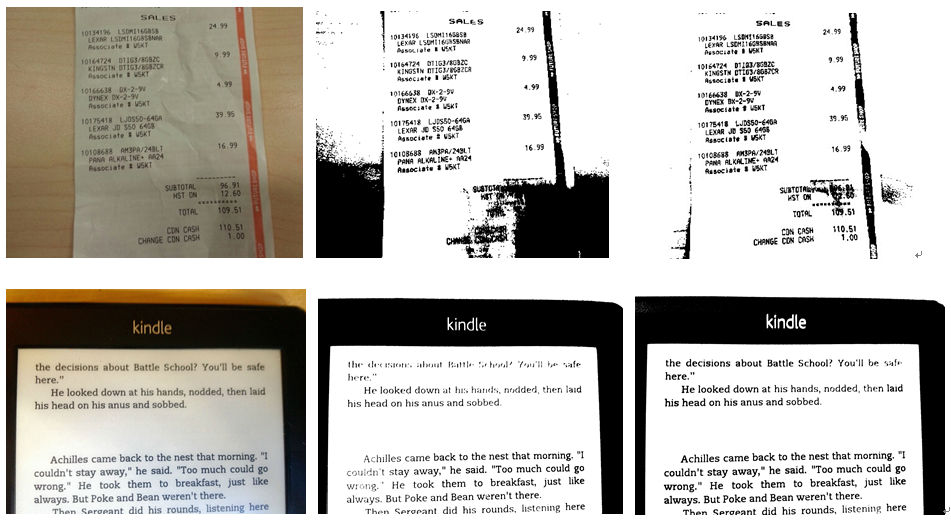
OTSU 是一个全局二值化算法. 如果图片中包含阴影而且阴影不平均,二值化算法效果就会比较差。OCRus利用一个局部的二值化算法,Wolf Jolion, 对包含有阴影的图片也有比较好的二值化结果,以下是一些对比图:(左为原图, 中间为用OTSU算法结果图, 右边为WolfJolion算法结果图):
- 预处理
Remove vertical lines(去除平行线)
This step removes vertical and horizontal lines in the image.
调用栈
main [api/tesseractmain.cpp] ->
TessBaseAPI::ProcessPages [api/baseapi.cpp] ->
TessBaseAPI::ProcessPage [api/baseapi.cpp] ->
TessBaseAPI::Recognize [api/baseapi.cpp] ->
TessBaseAPI::FindLines [api/baseapi.cpp] ->
Tesseract::SegmentPage [ccmain/pagesegmain.cpp] ->
Tesseract::AutoPageSeg [ccmain/ pagesegmain.cpp] ->
Tesseract::SetupPageSegAndDetectOrientation [ccmain/ pagesegmain.cpp]
LineFinder::FindAndRemoveLines [textord/linefind.cpp]
Remove images(去除影像)
This step remove images from the picture.
调用栈
main [api/tesseractmain.cpp] ->
TessBaseAPI::ProcessPages [api/baseapi.cpp] ->
TessBaseAPI::ProcessPage [api/baseapi.cpp] ->
TessBaseAPI::Recognize [api/baseapi.cpp] ->
TessBaseAPI::FindLines [api/baseapi.cpp] ->
Tesseract::SegmentPage [ccmain/pagesegmain.cpp] ->
Tesseract::AutoPageSeg [ccmain/ pagesegmain.cpp] ->
Tesseract::SetupPageSegAndDetectOrientation [ccmain/ pagesegmain.cpp]
ImageFind::FindImages [textord/linefind.cpp]
I never try this function successfully. May be the image needs to satisfy some conditions.
Filter connected component(相关区域)
This step generate all the connected components and filter the noise blobs.
调用栈
main [api/tesseractmain.cpp] ->
TessBaseAPI::ProcessPages [api/baseapi.cpp] ->
TessBaseAPI::ProcessPage [api/baseapi.cpp] ->
TessBaseAPI::Recognize [api/baseapi.cpp] ->
TessBaseAPI::FindLines [api/baseapi.cpp] ->
Tesseract::SegmentPage [ccmain/pagesegmain.cpp] ->
Tesseract::AutoPageSeg [ccmain/ pagesegmain.cpp] ->
Tesseract::SetupPageSegAndDetectOrientation [ccmain/ pagesegmain.cpp] ->
(i) Textord::find_components [textord/tordmain.cpp] ->
{
extract_edges[textord/edgblob.cpp] //extract outlines and assign outlines to blobs
assign_blobs_to_blocks2[textord/edgblob.cpp] //assign normal, noise, rejected blobs to TO_BLOCK_LIST for further filter blobs operations
Textord::filter_blobs[textord/tordmain.cpp] ->
Textord::filter_noise_blobs[textord/tordmain.cpp] //Move small blobs to a separate list
}
(ii) ColumnFinder::SetupAndFilterNoise [textord/colfind.cpp]
This step will generate the intermediate result like this:
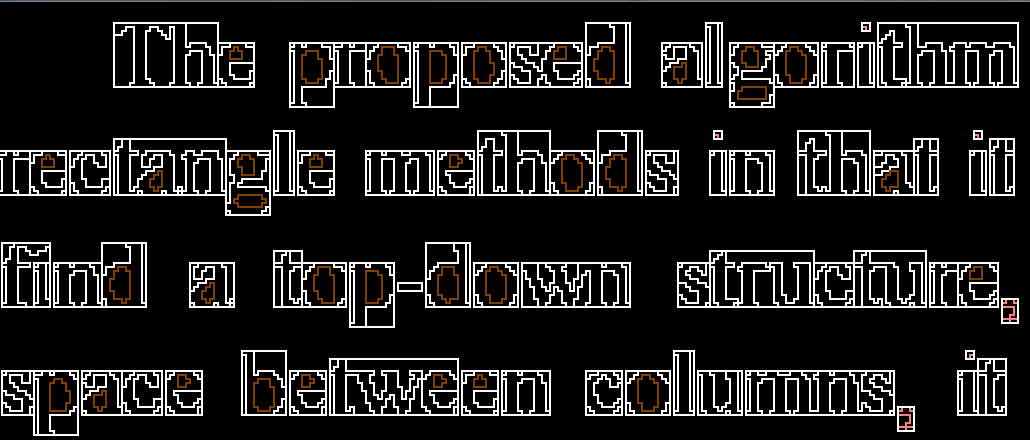
The inner and outer outline of the connected component will be recognized. There will be a box area overlap the connected component. The potential small noise blobs will be marked as pink outlines, such as punctuation and dot in character “i”.
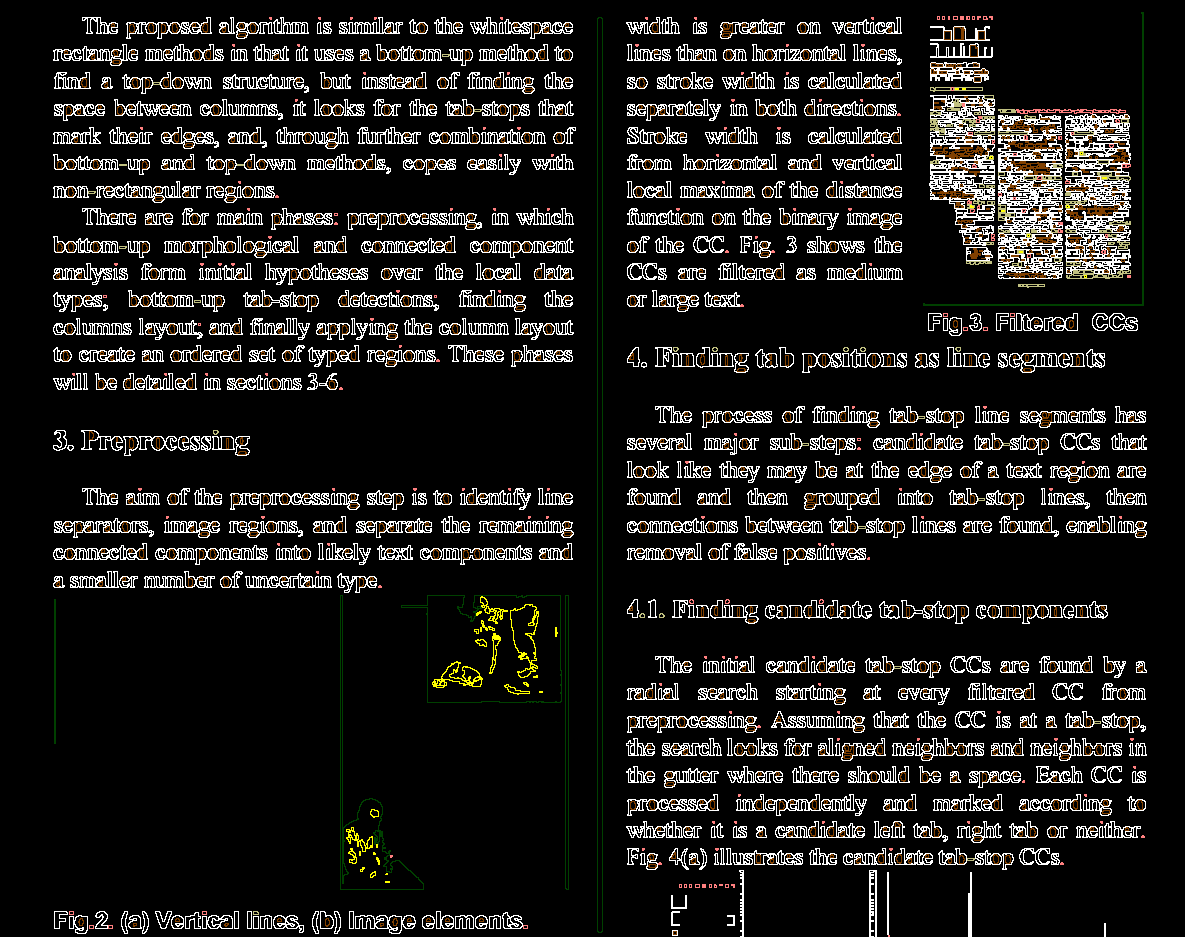
The large blobs will be marked as dark green color:
Finding candidate tab-stop components
调用栈
main [api/tesseractmain.cpp] ->
TessBaseAPI::ProcessPages [api/baseapi.cpp] ->
TessBaseAPI::ProcessPage [api/baseapi.cpp] ->
TessBaseAPI::Recognize [api/baseapi.cpp] ->
TessBaseAPI::FindLines [api/baseapi.cpp] ->
Tesseract::SegmentPage [ccmain/pagesegmain.cpp] ->
Tesseract::AutoPageSeg [ccmain/ pagesegmain.cpp] ->
ColumnFinder::FindBlocks [textord/ colfind.cpp] ->
TabFind::FindInitialTabVectors[textord/tabfind.cpp] ->
TabFind::FindTabBoxes [textord/tabfind.cpp]
This step finds the initial candidate tab-stop CCs by a radial search starting at every filtered CC from preprocessing. The result will be like this:

Finding the column layout(找出行信息)
调用栈
main [api/tesseractmain.cpp] ->
TessBaseAPI::ProcessPages [api/baseapi.cpp] ->
TessBaseAPI::ProcessPage [api/baseapi.cpp] ->
TessBaseAPI::Recognize [api/baseapi.cpp] ->
TessBaseAPI::FindLines [api/baseapi.cpp] ->
Tesseract::SegmentPage [ccmain/pagesegmain.cpp] ->
Tesseract::AutoPageSeg [ccmain/ pagesegmain.cpp] ->
ColumnFinder::FindBlocks [textord/ colfind.cpp] ->
ColumnFinder::FindBlocks (begin at line 369) [textord/ colfind.cpp]
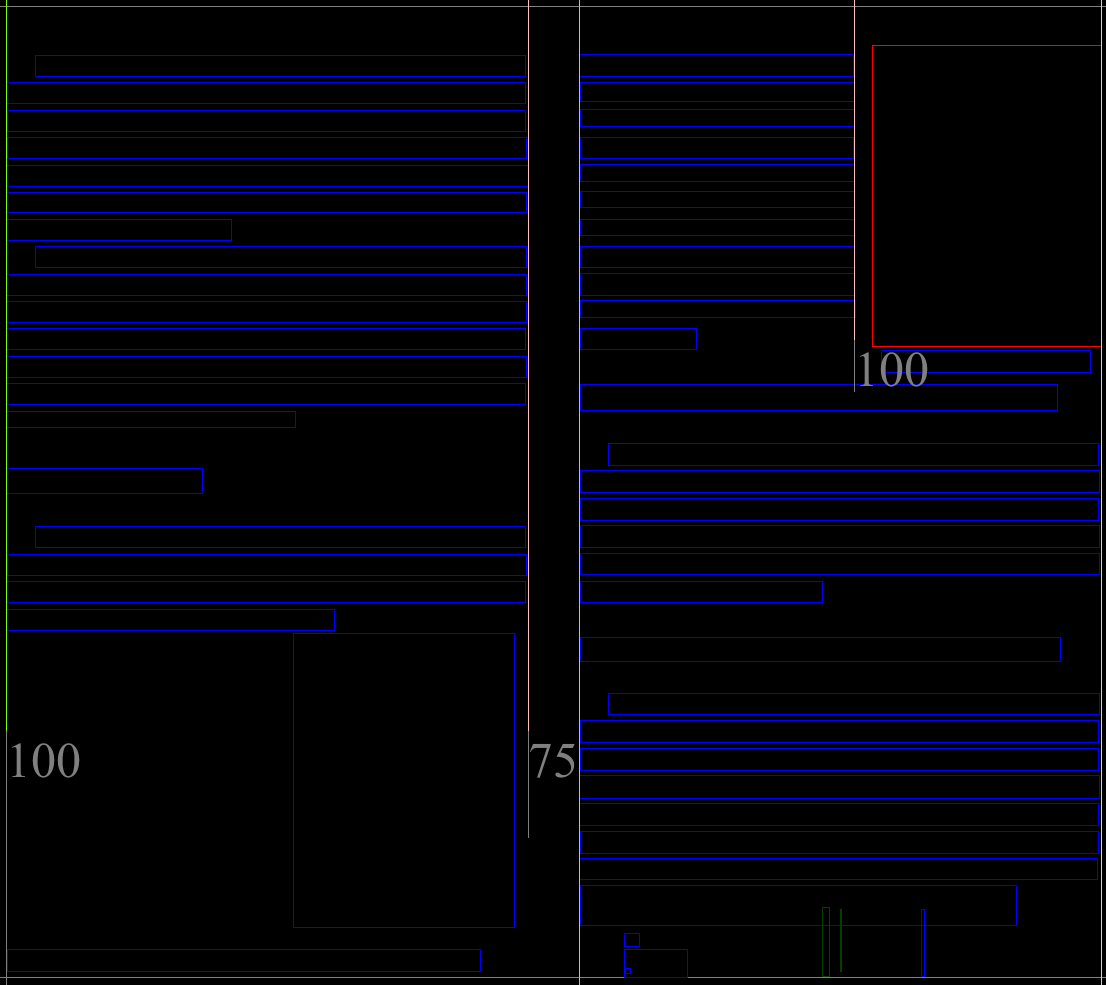
This step finds the column layout of the page:
Finding the regions(找出字符区域)
调用栈
main [api/tesseractmain.cpp] ->
TessBaseAPI::ProcessPages [api/baseapi.cpp] ->
TessBaseAPI::ProcessPage [api/baseapi.cpp] ->
TessBaseAPI::Recognize [api/baseapi.cpp] ->
TessBaseAPI::FindLines [api/baseapi.cpp] ->
Tesseract::SegmentPage [ccmain/pagesegmain.cpp] ->
Tesseract::AutoPageSeg [ccmain/ pagesegmain.cpp] ->
ColumnFinder::FindBlocks [textord/ colfind.cpp]
This step recognizes the different type of blocks:

接下来的工作
找tab-stops及之后处理步骤的算法还不甚清楚,需要继续了解
识别字符部分还没开始看,这部分应该有涉及机器学习的多种算法,有时间需要继续学习
---------------------
作者:kaelsass
来源:CSDN
原文:https://blog.csdn.net/kaelsass/article/details/46874627
版权声明:本文为博主原创文章,转载请附上博文链接!
Tessaract 源码分析(转)的更多相关文章
- ABP源码分析一:整体项目结构及目录
ABP是一套非常优秀的web应用程序架构,适合用来搭建集中式架构的web应用程序. 整个Abp的Infrastructure是以Abp这个package为核心模块(core)+15个模块(module ...
- HashMap与TreeMap源码分析
1. 引言 在红黑树--算法导论(15)中学习了红黑树的原理.本来打算自己来试着实现一下,然而在看了JDK(1.8.0)TreeMap的源码后恍然发现原来它就是利用红黑树实现的(很惭愧学了Ja ...
- nginx源码分析之网络初始化
nginx作为一个高性能的HTTP服务器,网络的处理是其核心,了解网络的初始化有助于加深对nginx网络处理的了解,本文主要通过nginx的源代码来分析其网络初始化. 从配置文件中读取初始化信息 与网 ...
- zookeeper源码分析之五服务端(集群leader)处理请求流程
leader的实现类为LeaderZooKeeperServer,它间接继承自标准ZookeeperServer.它规定了请求到达leader时需要经历的路径: PrepRequestProcesso ...
- zookeeper源码分析之四服务端(单机)处理请求流程
上文: zookeeper源码分析之一服务端启动过程 中,我们介绍了zookeeper服务器的启动过程,其中单机是ZookeeperServer启动,集群使用QuorumPeer启动,那么这次我们分析 ...
- zookeeper源码分析之三客户端发送请求流程
znode 可以被监控,包括这个目录节点中存储的数据的修改,子节点目录的变化等,一旦变化可以通知设置监控的客户端,这个功能是zookeeper对于应用最重要的特性,通过这个特性可以实现的功能包括配置的 ...
- java使用websocket,并且获取HttpSession,源码分析
转载请在页首注明作者与出处 http://www.cnblogs.com/zhuxiaojie/p/6238826.html 一:本文使用范围 此文不仅仅局限于spring boot,普通的sprin ...
- ABP源码分析二:ABP中配置的注册和初始化
一般来说,ASP.NET Web应用程序的第一个执行的方法是Global.asax下定义的Start方法.执行这个方法前HttpApplication 实例必须存在,也就是说其构造函数的执行必然是完成 ...
- ABP源码分析三:ABP Module
Abp是一种基于模块化设计的思想构建的.开发人员可以将自定义的功能以模块(module)的形式集成到ABP中.具体的功能都可以设计成一个单独的Module.Abp底层框架提供便捷的方法集成每个Modu ...
随机推荐
- shell if [[ ]]和[ ]区别 || &&
[]和test 两者是一样的,在命令行里test expr和[ expr ]的效果相同. test的三个基本作用是判断文件.判断字符串.判断整数.支持使用 ”与或非“ 将表达式连接起来. test中可 ...
- BZOJ1195[HNOI2006]最短母串——AC自动机+BFS+状态压缩
题目描述 给定n个字符串(S1,S2,„,Sn),要求找到一个最短的字符串T,使得这n个字符串(S1,S2,„,Sn)都是T的子串. 输入 第一行是一个正整数n(n<=12),表示给定的字符串的 ...
- Django实现websocket完成实时通讯,聊天室,在线客服等
一 什么是Websocket WebSocket是一种在单个TCP连接上进行全双工通信的协议 WebSocket使得客户端和服务器之间的数据交换变得更加简单,允许服务端主动向客户端推送数据.在WebS ...
- java面试题整理(3)
1.Spring有哪些优点? 轻量级:Spring在大小和透明性方面绝对属于轻量级的,基础版本的Spring框架大约只有2MB. 控制反转(IOC):Spring使用控制反转技术实现了松耦合.依赖被注 ...
- 使用JQuery进行DOM操作
获得内容 - text().html() 以及 val() 三个简单实用的用于 DOM 操作的 jQuery 方法: text() - 设置或返回所选元素的文本内容 html() - 设置或返回所选元 ...
- poj1068 【模拟】
Let S = s1 s2...s2n be a well-formed string of parentheses. S can be encoded in two different ways: ...
- Leetcode 283.移动零 By Python
思路 我们可以用python的list comprehension来取出所以非0的元素,而且这样取出来会保持原有的相对顺序,再统计先后变化的长度,补上相应的0即可 代码 class Solution( ...
- emwin 之变量定义位置
@2018-08-13 小记 本意是想在回调函数中定义一变量暂存下拉框操作前的的设定值,与后期更改的设定值作比较后更新操作,但结果失败了 分析后,此变量定义为局部变量,emwin回调函数又是事件触发型 ...
- STM32外设地址查询
问题的提出 DMA传输SDIO驱动的SD卡的数据,其中外设地址的确定 问题的解决 打开数据参考手册,在存储器和总线架构一章存储器映像小节,有一个寄存器组起始地址表,列举所有外设对应的起始地址,再到相应 ...
- linux 用户及用户组管理
主要分为以下三部分: 1. 用户账号的添加.修改及删除 2. 用户口令的管理 3. 用户组管理 用户管理 1.添加新用户账号 $ useradd 选项 用户名 选项: -c comment 指定一段注 ...