
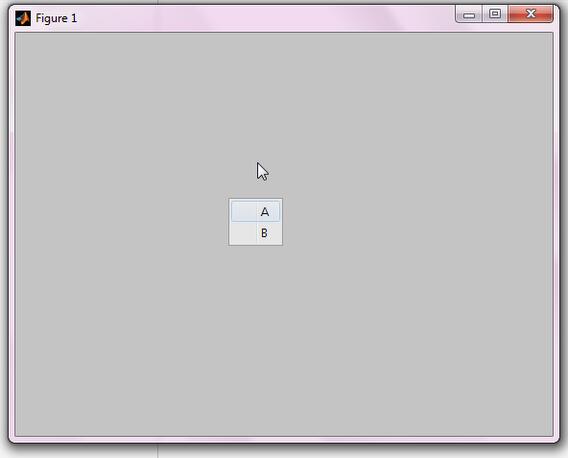
GUI带有右键菜单,带有时间显示的
 %带有右键菜单的GUI

 figure('Menubar','none');

 h = uicontextmenu;

 uimenu(h,'Label','A');

 uimenu(h,'Label','B');

 set(gcf,'Uicontextmenu',h);

 %获得当前时间

 datestr(now)
右键菜单
 function varargout = GUI17(varargin)

 % GUI17 MATLAB code for GUI17.fig

 %      GUI17, by itself, creates a new GUI17 or raises the existing

 %      singleton*.

 %

 %      H = GUI17 returns the handle to a new GUI17 or the handle to

 %      the existing singleton*.

 %

 %      GUI17('CALLBACK',hObject,eventData,handles,...) calls the local

 %      function named CALLBACK in GUI17.M with the given input arguments.

 %

 %      GUI17('Property','Value',...) creates a new GUI17 or raises the

 %      existing singleton*.  Starting from the left, property value pairs are

 %      applied to the GUI before GUI17_OpeningFcn gets called.  An

 %      unrecognized property name or invalid value makes property application

 %      stop.  All inputs are passed to GUI17_OpeningFcn via varargin.

 %

 %      *See GUI Options on GUIDE's Tools menu.  Choose "GUI allows only one

 %      instance to run (singleton)".

 %

 % See also: GUIDE, GUIDATA, GUIHANDLES

 % Edit the above text to modify the response to help GUI17

 % Last Modified by GUIDE v2. -Jan- ::

 % Begin initialization code - DO NOT EDIT

 gui_Singleton = ;

 gui_State = struct('gui_Name',       mfilename, ...

                    'gui_Singleton',  gui_Singleton, ...

                    'gui_OpeningFcn', @GUI17_OpeningFcn, ...

                    'gui_OutputFcn',  @GUI17_OutputFcn, ...

                    'gui_LayoutFcn',  [] , ...

                    'gui_Callback',   []);

 if nargin && ischar(varargin{})

     gui_State.gui_Callback = str2func(varargin{});

 end

 if nargout

     [varargout{:nargout}] = gui_mainfcn(gui_State, varargin{:});

 else

     gui_mainfcn(gui_State, varargin{:});

 end

 % End initialization code - DO NOT EDIT

 % --- Executes just before GUI17 is made visible.

 function GUI17_OpeningFcn(hObject, eventdata, handles, varargin)

 % This function has no output args, see OutputFcn.

 % hObject    handle to figure

 % eventdata  reserved - to be defined in a future version of MATLAB

 % handles    structure with handles and user data (see GUIDATA)

 % varargin   command line arguments to GUI17 (see VARARGIN)

 % Choose default command line output for GUI17

 handles.output = hObject;

 handles.ht = timer;

 set(handles.ht, 'ExecutionMode', 'FixedRate');

 set(handles.ht, 'Period', );

 set(handles.ht, 'TimerFcn', {@dispnow,handles})

 start(handles.ht);

 % Update handles structure

 guidata(hObject, handles);

 % UIWAIT makes GUI17 wait for user response (see UIRESUME)

 % uiwait(handles.figure1);

 % --- Outputs from this function are returned to the command line.

 function varargout = GUI17_OutputFcn(hObject, eventdata, handles)

 % varargout  cell array for returning output args (see VARARGOUT);

 % hObject    handle to figure

 % eventdata  reserved - to be defined in a future version of MATLAB

 % handles    structure with handles and user data (see GUIDATA)

 % Get default command line output from handles structure

 varargout{} = handles.output;

 function dispnow(hObject , eventdata, handles)

 set(handles.disptime, 'String', datestr(now));
带有时间显示

GUI带有右键菜单,带有时间显示的的更多相关文章
- 关于FMX 单击出来右键菜单,并显示在当前下面
关于FMX 单击出来右键菜单,并显示在当前下面 procedure TForm1.btn6MouseDown(Sender: TObject; Button: TMouseButton; Shift ...
- Matlab学习------------带有右键菜单的GUI学习实例
实例步骤: 须要设置UIContextMenu,否则点击右键不显示. 右键点击第一个菜单之后:(在菜单中加入对应的回调函数) function r1_Callback(hObject, eventda ...
- 在windows右键菜单中加入自己的程序 [转载]
原文链接: http://blog.csdn.net/marklr/article/details/4006356 在windows右键菜单中加入自己的程序 标签: windowsattribute ...
- Windows右键菜单设置与应用技巧
http://blog.163.com/lee_honleon/blog/static/555251522008014258896/ 需要修改注册表,挺麻烦的.最好还是把迅雷卸了重装,不会影响什么 ...
- 怎样在Windows资源管理器中添加右键菜单以及修改右键菜单顺序
有时,我们需要在Windows资源管理器的右键菜单中添加一些项,以方便使用某些功能或程序. 比如我的电脑上有一个免安装版的Notepad++,我想在所有文件的右键菜单中添加一项用Notepad++打开 ...
- 【TextBox】重写右键菜单
参考资料 http://bbs.csdn.net/topics/390324356 http://www.cnblogs.com/ycxy/archive/2012/10/09/2716852.htm ...
- (四)Qt之右键菜单
1.右键菜单创建和显示 作为一种交互性强.使用方便的右键菜单在程序中是非常常用的,在Qt中可以轻松的实现. QMenu menu; //添加菜单项,指定图标.名称.响应函数 menu.addActio ...
- 手动添加git到目录右键菜单
1.通过在"运行"中输入'regedit',打开注册表. 2.找到[HKEY_CLASSES_ROOT\Directory\Background]. 3.在[Backgroun ...
- VS2013在右键菜单添加命令插件开发
一.选择Visual Studio Package模板建立插件项目 由于此功能需要在右键菜单上添加命令,所以选择Visual Studio Package模板,根据模板向导步骤插件项目,在Select ...
随机推荐
- 配置svn用户及权限
权限使用的用户名,必须在passwd文件里面存在,权限配置文件的修改立即生效,不必重启SVN: 例如创建一个运维组 用户组格式: [groups] yunwei = ligang,liming 其中, ...
- 下载ez_setup
1.下载ez_setup链接:https://pypi.org/project/ez_setup/#files
- oracle常用分析函数 over(partition by xxx order by xxx)
--over order by 连续累加的意思,把by后面相同的字段,一个组组累加起来SELECT id_,name_,proc_def_id_, count(*) over(order by nam ...
- centos上shellcheck的安装
关于shellcheck的作用和功能,自行查阅. centos7 上安装shellcheck的过程中查了很多资料,大部分都是在ubunt下安装的,centos的比较少,然后好不容易看到一个https: ...
- [LeetCode] 596. Classes More Than 5 Students_Easy tag:SQL
There is a table courses with columns: student and class Please list out all classes which have more ...
- 一个简单的MapReduce示例(多个MapReduce任务处理)
一.需求 有一个列表,只有两列:id.pro,记录了id与pro的对应关系,但是在同一个id下,pro有可能是重复的. 现在需要写一个程序,统计一下每个id下有多少个不重复的pro. 为了写一个完整的 ...
- Cocos Code IDE (下载地址)
Cocos Code IDE 1.2.0 下载地址 Cocos Code IDE 1.2.0 Win32 下载地址: http://www.cocos2d-x.org/filedown/c ...
- sourceInsight工具移除不掉项目 source Insight Add and Remove Project Files
问题描述: sourceInsight创建的项目,有时候会遇到Remove Project 报错,移除不成功的情况. 解决办法: 进入到sourceinsight的安装目录.删除掉保存的工程文件信息即 ...
- WinPE引导硬盘安装64位的Windows_Server_2008系统
用 U盘WinPE引导实现硬盘安装Windows Server 2008 R2系统的方法如果想不用光盘(光盘和光驱总是靠不住的),只用U盘或移动硬盘上的WinPE引导,在电脑硬盘安装一个64位的Win ...
- Unity shader学习之屏幕后期处理效果之高斯模糊
高斯模糊,见 百度百科. 也使用卷积来实现,每个卷积元素的公式为: 其中б是标准方差,一般取值为1. x和y分别对应当前位置到卷积中心的整数距离. 由于需要对高斯核中的权重进行归一化,即使所有权重相加 ...