
IDEA:No SLF4J providers were found.
如果您是用IDEA 的 maven 写的
将slf4j的导入包 更改 为下列代码
         <dependency>

            <groupId>org.slf4j</groupId>

            <artifactId>slf4j-api</artifactId>

            <version>1.8.0-beta2</version>

        </dependency>

        <dependency>

            <groupId>org.slf4j</groupId>

            <artifactId>slf4j-log4j12</artifactId>

            <version>1.8.0-beta2</version>

            <scope>test</scope>

        </dependency>
原因如下:
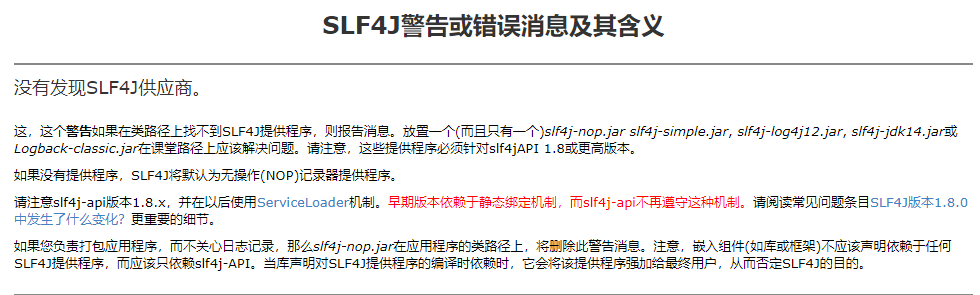
如果图片未加载成功,请看官方回答
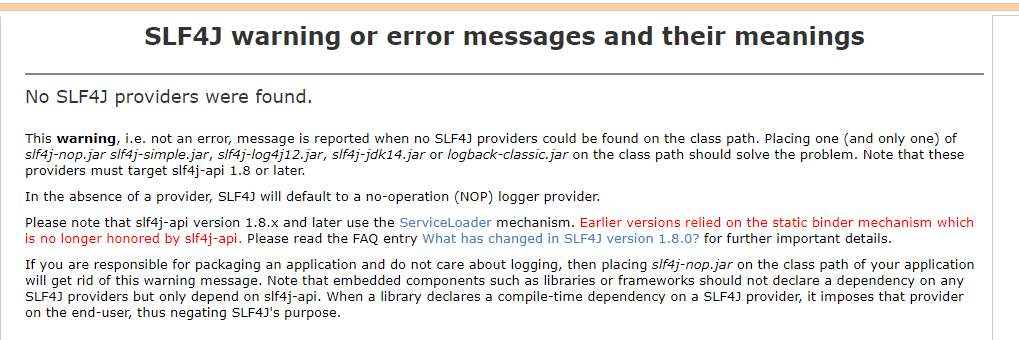
No SLF4J providers were found.

This warning, i.e. not an error, message is reported when no SLF4J providers could be found on the class path. Placing one (and only one) of slf4j-nop.jar slf4j-simple.jar, slf4j-log4j12.jar, slf4j-jdk14.jar or logback-classic.jar on the class path should solve the problem. Note that these providers must target slf4j-api 1.8 or later.

In the absence of a provider, SLF4J will default to a no-operation (NOP) logger provider.

Please note that slf4j-api version 1.8.x and later use the ServiceLoader mechanism. Earlier versions relied on the static binder mechanism which is no longer honored by slf4j-api. Please read the FAQ entry What has changed in SLF4J version 1.8.0? for further important details.

If you are responsible for packaging an application and do not care about logging, then placing slf4j-nop.jar on the class path of your application will get rid of this warning message. Note that embedded components such as libraries or frameworks should not declare a dependency on any SLF4J providers but only depend on slf4j-api. When a library declares a compile-time dependency on a SLF4J provider, it imposes that provider on the end-user, thus negating SLF4J's purpose.
IDEA:No SLF4J providers were found.的更多相关文章
- SLF4J 报错解决:No SLF4J providers were found
1.解决SLF4J报错 我们在自己的项目中使用了SLF4J,或者引入了某开源项目时,他的项目中用了SLF4J,运行时会报如下的错误: SLF4J: Failed to load class " ...
- SLF4J 的几种实际应用模式--之三:JCL-Over-SLF4J+SLF4J
我们前面已经讲过了 SLF4J 的两种用法:SLF4J+Log4J 和 SLF4J+Logback,那是在比较理想的情况下,所用组件只使用了 SLF4J 这一种统一日志框架的时候.可是 JCL 一直 ...
- Error:【SLF4J: Class path contains multiple SLF4J bindings.】
ylbtech-Error:[SLF4J: Class path contains multiple SLF4J bindings.] 1.返回顶部 1. SLF4J: Class path cont ...
- logback:用slf4j+logback实现多功能日志解决方案
slf4j是原来log4j的作者写的一个新的日志组件,意思是简单日志门面接口,可以跟其他日志组件配合使用,常用的配合是slf4j+logback,无论从功能上还是从性能上都较之log4j有了很大的提升 ...
- 常见java日志系统的搭配详解:关于slf4j log4j log4j2 logback jul jcl commons-logging jdk-logging
先看一张图: 是不是有点晕, 晕就对了.这个仅仅是 slf4j 的情况,实际上, 我们不仅要接触到 slf4j ,有时候还会接触其他的日志系统.且看下文分解. 1 直接使用各个日志系统 1.1 直接使 ...
- Angular:ViewProviders和Providers的区别
在Angular中使用依赖注入(DI)的时候,我们一般会使用providers.其实要做同样的事我们还有另外一个选择:viewProviders. viewProviders允许我们定义只对组件的vi ...
- POJ 3911:Internet Service Providers
Internet Service Providers Time Limit: 2MS Memory Limit: 65536KB 64bit IO Format: %I64d & %I ...
- 转:java日志组件介绍(common-logging,log4j,slf4j,logback )
原网址:http://www.blogjava.net/daiyongzhi/archive/2014/04/13/412364.html common-logging common-logging是 ...
- Spring源码学习:第2步--使用SLF4j+Log4j日志框架替换掉其自身的commons-logging日志框架
正如Spring官方文档所述,其底层的实现选择了commons-logging作为日志框架.这一"失足"性的选择,竟连Spring自身都抱怨.但是,谁叫Spring如此优秀呢,即使 ...
随机推荐
- Appium+python自动化(十)- 元素定位秘籍助你打通任督二脉 - 上卷(超详解)
简介 你有道灵光从天灵盖喷出来你知道吗,年纪轻轻就有一身横练的筋骨,简直百年一见的练武奇才啊,如果有一天让你打通任督二脉,那还不飞龙上天啊.正所谓我不入地狱谁入地狱,警恶惩奸维护世界和平这个任务就交个 ...
- 利用org.mybatis.generator生成实体类
springboot+maven+mybatis+mysql 利用org.mybatis.generator生成实体类 1.添加pom依赖: 2.编写generatorConfig.xml文件 ( ...
- Scala 学习之路(十三)—— 隐式转换和隐式参数
一.隐式转换 1.1 使用隐式转换 隐式转换指的是以implicit关键字声明带有单个参数的转换函数,它将值从一种类型转换为另一种类型,以便使用之前类型所没有的功能.示例如下: // 普通人 clas ...
- Scala 学习之路(三)—— 流程控制语句
一.条件表达式if Scala中的if/else语法结构与Java中的一样,唯一不同的是,Scala中的if表达式是有返回值的. object ScalaApp extends App { val x ...
- 基于STM32F429和Cube的主从定时器多通道输出固定个数的PWM波形
主从定时器的原理已在上篇博文: 基于STM32F429+HAL库编写的定时器主从门控模式级联输出固定个数PWM脉冲的程序 讲解了,这篇重点就讲如何实现多通道的PWM级联输出. 1.软件环境 Keil5 ...
- 【linux杂记】Ubuntu查看端口使用情况
转载地址: https://www.linuxidc.com/Linux/2016-01/127345.htm Ubuntu查看端口使用情况,使用netstat命令: 查看已经连接的服务端口(ESTA ...
- Python文件中将print的输出内容重定向到变量中
有时候需要用到别人的代码, 但是又不想修改别人的文件, 想拿到输出的结果, 这时候就需要使用sys模块, 将print输出的内容重定向到变量中. Python调用sys模块中的sys.stdout, ...
- 在windowx的Hyper-v 安装CentOS系统
博客写的很少,一方面是因为我觉得目前很多博客都是相互抄袭,或者有很多部分都是重复的内容.而我自己再去写同样的内容的画,有点浪费时间. 所以,如果我要写,我希望是写一些与众不同,或者重复率比较低的内容, ...
- 论文阅读 <Relocalization, Global Optimization and Map Merging for Monocular Visual-Inertial SLAM>
看了一下港科的基于vins拓展的论文<relocalization, global optimization and merging for vins>,在回环的实现部分总体没有什么变化, ...
- 一个简单的EJB例子
转载自 http://blog.sina.com.cn/s/blog_678530f60100hvwy.html 声明:这个Converter的例子应该是J2EE 1.4 Tutorial上面的.不过 ...