
spring cloud 系列第5篇 —— hystrix+turbine 服务的熔断与监控 (F版本)
源码Gitub地址:https://github.com/heibaiying/spring-samples-for-all
一、hystrix 简介
1.1 熔断器
在分布式系统中,由于服务之间相互的依赖调用,如果一个服务单元发生了故障就有可能导致故障蔓延至整个系统,从而衍生出一系列的保护机制,断路器就是其中之一。
断路器可以在服务单元发生故障的时候,及时切断与服务单元的连接,避免资源被长时间占用。spring cloud hystrix组件实现了断路器、线程隔离等一系列基本功能,并具有服务降级、服务熔断、请求缓存、请求合并以及服务监控等配套功能。
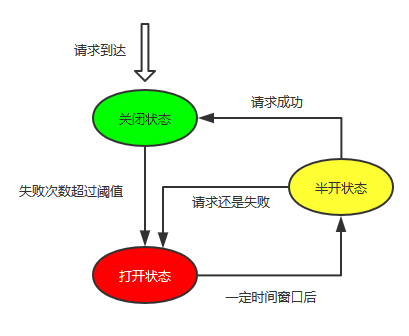
1.2 hystrix 工作机制
- 当一个服务的处理请求的失败次数低于阈值时候,熔断器处于关闭状态,服务正常;
- 当一个服务的处理请求的失败次数大于阈值时候,熔断器开启,这时候所有的请求都会执行快速失败,是不会去调用实际的服务的;
- 当熔断器处于打开状态的一段时间后,熔断器处于半打开状态,这时候一定数量的请求回去调用实际的服务,如果调用成功,则代表服务可用了,熔断器关闭;如果还是失败,则代表服务还是不可用,熔断器继续关闭。
二、项目结构
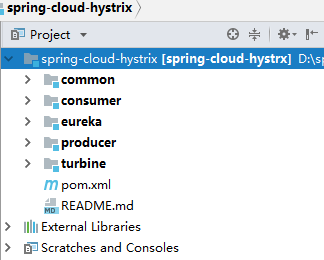
spring-cloud-ribbon用例已经实现通过ribbon+restTemplate实现服务间的调用,本用例在其基础上进行hystrix 的整合。
- common: 公共的接口和实体类;
- consumer: 服务的消费者,采用RestTemplate调用产品服务;
- producer:服务的提供者;
- eureka: 注册中心;
- turbine:多个熔断器的聚合监控。
三、整合 hystrix (以consumer模块为例)
3.1 引入依赖
hystrix的仪表盘功能实际上是从端点获取数据,所以需要actuator starter开启端点的相关功能。
<!--hystrix 依赖-->
<dependency>
    <groupId>org.springframework.cloud</groupId>
    <artifactId>spring-cloud-starter-netflix-hystrix</artifactId>
</dependency>
<!--hystrix 监控仪表盘依赖-->
<dependency>
    <groupId>org.springframework.cloud</groupId>
    <artifactId>spring-cloud-starter-netflix-hystrix-dashboard</artifactId>
</dependency>
<!--健康检查依赖-->
<dependency>
    <groupId>org.springframework.boot</groupId>
    <artifactId>spring-boot-starter-actuator</artifactId>
</dependency>
3.2 暴露端点
management:
  endpoints:
    web:
      exposure:
        # 需要开启hystrix.stream端点的暴露 这样才能获取到监控信息 * 代表开启所有可监控端点
        include: "*"
3.3 在启动类上添加注解@EnableHystrix和@EnableHystrixDashboard
@SpringBootApplication
@EnableDiscoveryClient
@EnableHystrix
@EnableHystrixDashboard
public class ConsumerApplication {

    public static void main(String[] args) {
        SpringApplication.run(ConsumerApplication.class, args);
    }
}
3.4 使用 @HystrixCommand 定义失败回退的方法
@HystrixCommand(fallbackMethod = "queryProductsFail")
public List<Product> queryAllProducts() {
    ResponseEntity<List> responseEntity = restTemplate.getForEntity("http://producer/products", List.class);
    List<Product> productList = responseEntity.getBody();
    return productList;
}

// 如果发送熔断返回空集合,在前端判断处理
public List<Product> queryProductsFail() {
    return new ArrayList<>();
}
<!doctype html>
<html lang="en">
<head>
    <title>产品列表</title>
</head>
<body>
<h3>产品列表:点击查看详情</h3>
<form action="/sell/product" method="post">
    <input type="text" name="productName">
    <input type="submit" value="新增产品">
</form>
<ul>
    <#if (products?size>0) >
        <#list products as product>
            <li>
                <a href="/sell/product/${product.id}">${product.name}</a>
            </li>
        </#list>
    <#else>
        <h4 style="color: red">当前排队人数过多,请之后再购买!</h4>
    </#if>
</ul>
</body>
</html>
3.5 模拟熔断
这里被调用方采用线程休眠的方式模拟服务超时,Hystrix默认超时时间为2s,调用远程服务时候超过这个时间,会触发熔断。
public List<Product> queryAllProducts() {
    // hystrix 默认超时是2秒
    int i = new Random().nextInt(2500);
    try {
        Thread.sleep(i);
    } catch (InterruptedException e) {
        e.printStackTrace();
    }
    return productList;
}
3.5 启动服务,访问http://localhost:8030/sell/products ,多次刷新查看熔断情况

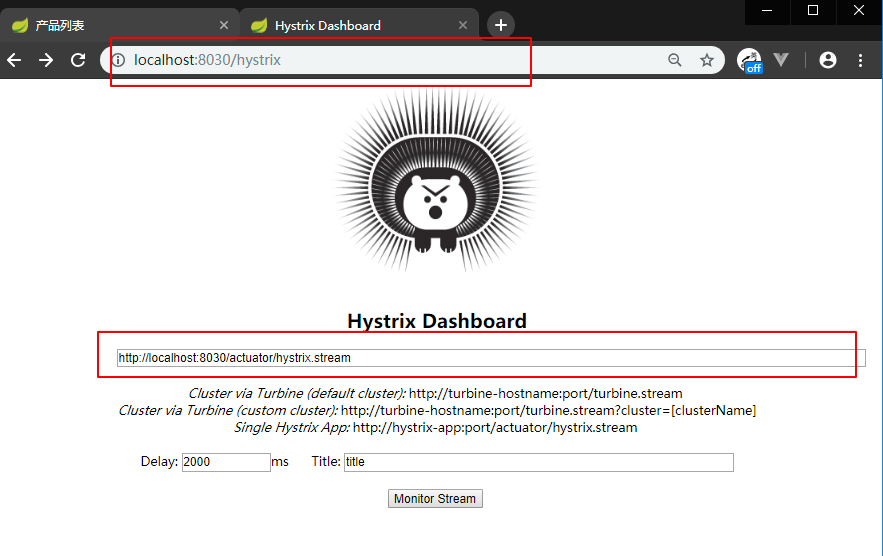
3.5 启动服务,访问 localhost:8030/hystrix
依次输出http://localhost:8030/actuator/hystrix.stream(监控地址) ,2000(延迟时间),title可以任意填写,进入监控台。
需要注意的是在spring cloud Finchley.SR2,监控地址中都是有/actuator的,因为在spring boot 2.x 的所有端点(包括自定义端点)都是暴露在这个路径下,在启动时候的控制台输出的日志可以查看到所有暴露端点的映射。
登录页面:
监控页面:

关于各个参数的说明参见官方wiki提供的图:

四、使用turbine 实现聚合监控
单体监控和聚合监控:

4.1 创建turbine模块,导入依赖
<?xml version="1.0" encoding="UTF-8"?>
<project xmlns="http://maven.apache.org/POM/4.0.0" xmlns:xsi="http://www.w3.org/2001/XMLSchema-instance"
         xsi:schemaLocation="http://maven.apache.org/POM/4.0.0 http://maven.apache.org/xsd/maven-4.0.0.xsd">
    <modelVersion>4.0.0</modelVersion>

    <parent>
        <groupId>com.heibaiying.hystrix</groupId>
        <artifactId>spring-cloud-hystrx</artifactId>
        <version>0.0.1-SNAPSHOT</version>
    </parent>

    <artifactId>turbine</artifactId>

    <dependencies>
        <dependency>
            <groupId>org.springframework.cloud</groupId>
            <artifactId>spring-cloud-starter-netflix-eureka-client</artifactId>
        </dependency>
           <dependency>
            <groupId>org.springframework.boot</groupId>
            <artifactId>spring-boot-starter-actuator</artifactId>
        </dependency>
        <dependency>
            <groupId>org.springframework.cloud</groupId>
            <artifactId>spring-cloud-starter-netflix-hystrix</artifactId>
        </dependency>
        <dependency>
            <groupId>org.springframework.cloud</groupId>
            <artifactId>spring-cloud-starter-netflix-hystrix-dashboard</artifactId>
        </dependency>
        <dependency>
            <groupId>org.springframework.cloud</groupId>
            <artifactId>spring-cloud-starter-netflix-turbine</artifactId>
        </dependency>
    </dependencies>

    <build>
        <plugins>
            <plugin>
                <groupId>org.springframework.boot</groupId>
                <artifactId>spring-boot-maven-plugin</artifactId>
            </plugin>
        </plugins>
    </build>

</project>
4.2 指定注册中心地址和聚合的项目,这里我们监控 consumer,producer 两个项目
server:
  port: 8040
# 指定服务命名
spring:
  application:
    name: turbine
# 指定注册中心地址
eureka:
  client:
    serviceUrl:
      defaultZone: http://localhost:8010/eureka/
# 指定聚合的项目
turbine:
  aggregator:
    cluster-config: default
  combine-host-port: true
  app-config: consumer,producer
  clusterNameExpression: "'default'"
4.3 在启动类上添加注解
@SpringBootApplication
@EnableDiscoveryClient
@EnableHystrix
@EnableHystrixDashboard
@EnableTurbine
public class TurbineApplication {

    public static void main(String[] args) {
        SpringApplication.run(TurbineApplication.class, args);
    }

}
4.4 依次启动eureka、producer、consumer、turbine四个项目
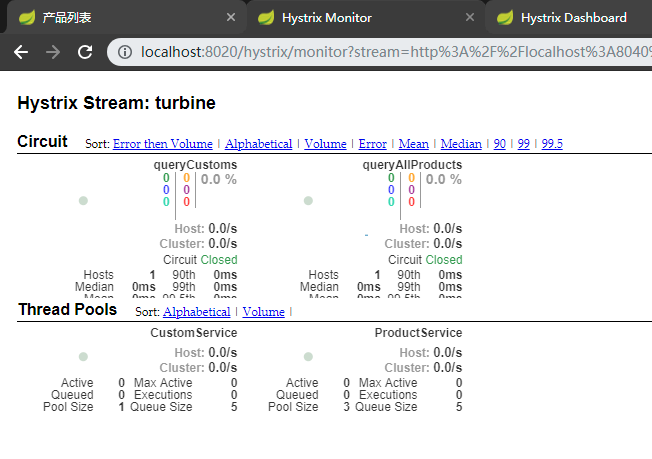
在 localhost:8030/hystrix或者localhost:8030/hystrix(consumer和producer都集成了hystrix) 页面输入http://localhost:8040/turbine.stream,查看断路器聚合信息
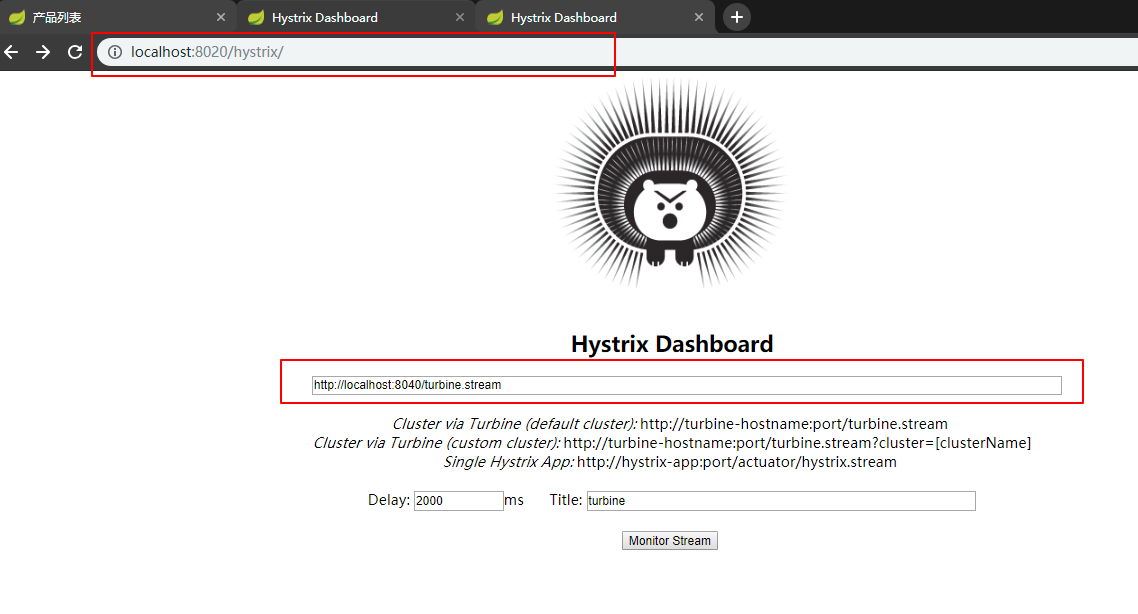
显示了不同服务单元(consumer,producer)的多个断路器信息:
五、整合过程中可能出现的问题
5.1 无法访问监控页面
一般是端点链接输入不对,在F版本的spring cloud 中,输入监控的端点链接是 http://localhost:8030/actuator/hystrix.stream ,中间是有/actuator/(之前版本的没有/actuator/)
没有暴露端点链接,暴露端点链接有两种方式,一种是我们在上文中提到的基于配置的方式
management:
  endpoints:
    web:
      exposure:
        # 需要开启hystrix.stream端点的暴露 这样才能获取到监控信息 * 代表开启所有可监控端点
        include: "*"
第二种方式是基于代码的方式,如下:
 @Bean
public ServletRegistrationBean getServlet() {
    HystrixMetricsStreamServlet streamServlet = new HystrixMetricsStreamServlet();
    ServletRegistrationBean registrationBean = new ServletRegistrationBean(streamServlet);
    registrationBean.setLoadOnStartup(1);
    registrationBean.addUrlMappings("/actuator/hystrix.stream");
    registrationBean.setName("HystrixMetricsStreamServlet");
    return registrationBean;
}
这两种方式二选一即可,就算是采用代码的方式,还是建议将地址设置为/actuator/hystrix.stream,而不是原来的hystrix.stream,因为turbine默认也是从/actuator/hystrix.stream去获取信息。
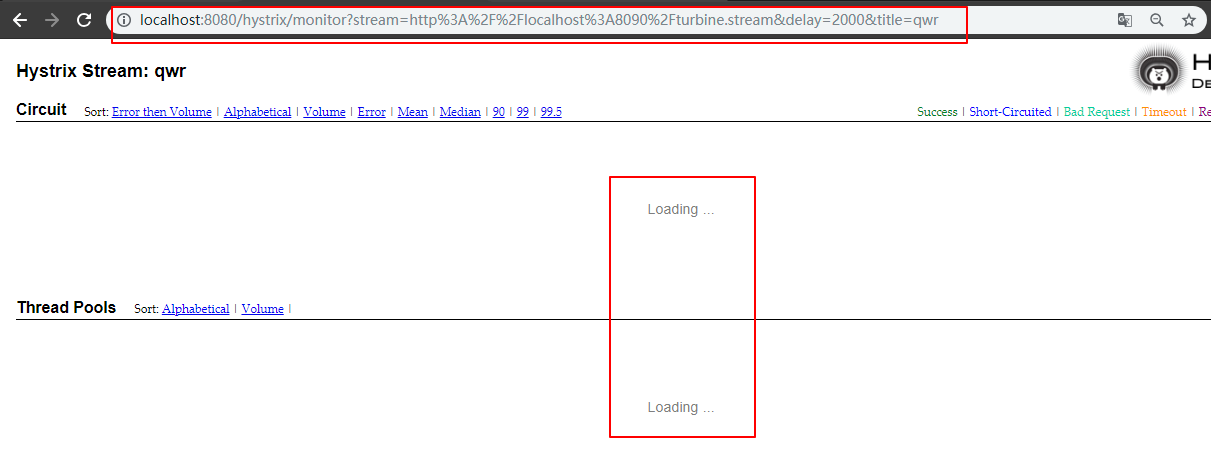
5.2 页面一直loading 或者访问端点页面一直出现ping
这种情况是熔断器所在的方法没有被调用,所以没有产生监控数据,不是整合问题,这时候调用一下熔断器所在方法即可。
源码Gitub地址:https://github.com/heibaiying/spring-samples-for-all
spring cloud 系列第5篇 —— hystrix+turbine 服务的熔断与监控 (F版本)的更多相关文章
- spring cloud 系列第2篇 —— eureka 高可用注册中心的搭建 (F版本)
源码仓库地址:https://github.com/heibaiying/spring-samples-for-all 一.项目结构 eureka-server为服务注册中心,负责服务的管理: eur ...
- spring cloud 系列第7篇 —— sleuth+zipkin 服务链路追踪 (F版本)
源码Gitub地址:https://github.com/heibaiying/spring-samples-for-all 一.简介 在微服务架构中,几乎每一个前端的请求都会经过多个服务单元协调来提 ...
- spring cloud系列教程第一篇-介绍
spring cloud系列教程第一篇-介绍 前言: 现在Java招聘中最常见的是会微服务开发,微服务已经在国内火了几年了,而且也成了趋势了.那么,微服务只是指spring boot吗?当然不是了,微 ...
- Spring cloud系列教程第二篇:支付项目父工程图文搭建
Spring cloud系列教程第二篇:支付项目父工程图文搭建 在讲解spring cloud相关的技术的时候,咱们就模拟订单支付这个流程来讲讲 在这个支付模块微服务搭建过程中,上面的这些技术,都会融 ...
- Spring Cloud系列教程第九篇-Eureka自我保护机制
Spring Cloud系列教程第九篇-Eureka自我保护机制 本文主要内容: 1:自我保护介绍 2:导致原因分析 3:怎么禁止自我保护 本文是由凯哥(凯哥Java:kagejava)发布的< ...
- spring cloud 系列第6篇 —— zuul 服务网关 (F版本)
源码Gitub地址:https://github.com/heibaiying/spring-samples-for-all 一.zuul简介 1.1 API 网关 api 网关是整个微服务系统的门面 ...
- spring cloud 系列第4篇 —— feign 声明式服务调用 (F版本)
源码Gitub地址:https://github.com/heibaiying/spring-samples-for-all 一.feign 简介 在上一个用例中,我们使用ribbon+restTem ...
- spring cloud 系列第1篇 —— eureka 服务的注册与发现 (F版本)
源码仓库地址:https://github.com/heibaiying/spring-samples-for-all 一.eureka 简介 Spring Cloud Eureka使用Netflix ...
- spring cloud 系列第8篇 —— config+bus 分布式配置中心与配置热刷新 (F版本)
源码Gitub地址:https://github.com/heibaiying/spring-samples-for-all 一.config 简介 spring cloud config 分为服务端 ...
随机推荐
- javaS的tring和androidS的tring区别是什么?
这是今天阿里电话面试被问到的,在之前确实没有想过(一直以为是一样的),于是面试完之后,我立即打开了源代码,对这两个String类进行了比較,以下是我的发现. 首先我观察了这两个String类所导入的包 ...
- Matlab Tricks(十八)—— 矩阵间元素距离的计算
两个矩阵间元素(向量)距离的度量,首先想到的是遍历,循环的方式,显然 matlab 下的编程并不推荐,matlab 下矩阵向量化编程效率尤高. 先考虑两个向量距离的计算: ∥x−y∥2=∥x∥2+∥y ...
- 2 abp 领域层创建实体
领域层: LearningMpaAbp.Core项目 基础服务层:EntityFramework对应的项目 1 在领域层新建Tasks文件夹 在文件夹下新建Task类 但是注意 Task类必须要继 ...
- Windows 窗体设计器(Windows Forms Designer)入门
Visual Studio 2010 更新:2010 年 9 月 Windows 窗体设计器提供多个用于生成 Windows 窗体应用程序的工具. 本演练阐释如何使用设计器提供的各种工具生成应用程 ...
- 基于WPF实现双色球
原文:基于WPF实现双色球 版权声明:本文为博主原创文章,未经博主允许不得转载. https://blog.csdn.net/m0_37591671/article/details/82959625 ...
- Haroopad 安装到 Mac OSX
打开Terminal 控制台 粘贴运行代码安装换cask: ruby -e "$(curl -fsSL https://raw.githubusercontent.com/Homebrew/ ...
- AR研究-Demo集
原文:AR研究-Demo集 之前研究了图像处理.图像识别及AR 等相关技术,下载了很多开源源码进行学习和尝试引用,包括c++.c#.Opengl.Emgu. Aforge.OpenCV. ...
- C++使用libcurl做HttpClient(业务观摩,用C++封装过程式代码,post和get的数据,最好url编码,否则+会变成空格)good
当使用C++做HTTP客户端时,目前通用的做法就是使用libcurl.其官方网站的地址是http://curl.haxx.se/,该网站主要提供了Curl和libcurl.Curl是命令行工具,用于完 ...
- 零元学Expression Blend 4 - Chapter 38 看如何使用Clip修出想要的完美曲线(下)
原文:零元学Expression Blend 4 - Chapter 38 看如何使用Clip修出想要的完美曲线(下) 你可以把Clip想成是一个遮罩,运用遮罩达到我们想要的效果 所以在这里我们把文字 ...
- OWIN 托管服务器问题:StartOptions WebApp.Start TargetInvocationException
我有一个与OWIN托管的服务器有一个小问题.我试图让它可以访问本地网络,这意味着我不得不添加一些额外的选择: // Start OWIN host StartOptions options = new ...