
完整SpringBoot Cache整合redis缓存(二)
缓存注解概念
|
名称 |
解释 |
| Cache | 缓存接口,定义缓存操作。实现有:RedisCache、EhCacheCache、ConcurrentMapCache等 |
| CacheManager | 缓存管理器,管理各种缓存(cache)组件 |
| @Cacheable | 主要针对方法配置,能够根据方法的请求参数对其进行缓存 |
| @CacheEvict | 清空缓存 |
| @CachePut | 保证方法被调用,又希望结果被缓存与@Cacheable区别在于是否每次都调用方法,常用于更新 |
| @EnableCaching | 开启基于注解的缓存 |
| keyGenerator | 缓存数据时key生成策略 |
| serialize | 缓存数据时value序列化策略 |
| @CacheConfig | 统一配置本类的缓存注解的属性 |
安装docker、redis
安装docker
yum -y install docker-ce
开机启动docker
systemctl start docker
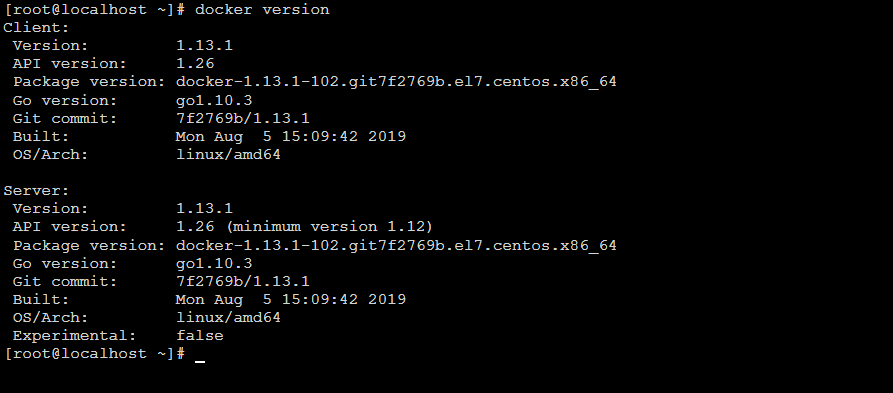
检验docker是否安装成功
docker version
docker安装redis
docker pull redis
docker检测是否安装成功redis
docker images

docker启动redis并设置端口映射(-d表示后台运行)
docker run -p 6379:6379 -d redis:latest myredis
查看redis是否启动成功
docker ps

代码实现
在看代码前先看看目录结构吧(在这里使用ssm来整合redis)

数据库表结构

pom.xml文件,这里主要是引入spring-boot-starter-cache依赖
<dependencies>
        <dependency>
            <groupId>org.springframework.boot</groupId>
            <artifactId>spring-boot-starter-web</artifactId>
        </dependency>

        <dependency>
            <groupId>org.springframework.boot</groupId>
            <artifactId>spring-boot-starter-test</artifactId>
            <scope>test</scope>
        </dependency>

        <dependency>
            <groupId>org.projectlombok</groupId>
            <artifactId>lombok</artifactId>
            <optional>true</optional>
        </dependency>

        <dependency>
            <groupId>org.springframework.boot</groupId>
            <artifactId>spring-boot-starter-cache</artifactId>
        </dependency>

        <!-- mybatis 与 spring boot 2.x的整合包 -->
        <dependency>
            <groupId>org.mybatis.spring.boot</groupId>
            <artifactId>mybatis-spring-boot-starter</artifactId>
            <version>1.3.2</version>
        </dependency>

        <!--mysql JDBC驱动 -->
        <dependency>
            <groupId>mysql</groupId>
            <artifactId>mysql-connector-java</artifactId>
            <version>5.1.39</version>
        </dependency>
    </dependencies>
配置文件application.yml,配置redis
spring:  datasource:    url: jdbc:mysql://localhost:3306/spring_boot_cache?useUnicode=true    driver-class-name: com.mysql.jdbc.Driver    username: root    password: lzh

  redis:    # 这是redis所在服务器的ip    host: 192.168.126.129    timeout: 10000ms    database: 0    lettuce:      pool:        max-wait: -1ms        max-active: 8        max-idle: 8        min-idle: 0  cache:    type: redis
启动类加入@EnableCaching注解
package com.lzh.springbootstudytestcache;

import org.springframework.boot.SpringApplication;
import org.springframework.boot.autoconfigure.SpringBootApplication;
import org.springframework.cache.annotation.EnableCaching;

@SpringBootApplication
@EnableCaching
public class SpringBootStudyTestCacheApplication {

    public static void main(String[] args) {
        SpringApplication.run(SpringBootStudyTestCacheApplication.class, args);
    }
}
UserController 类暴露接口
package com.lzh.springbootstudytestcache.controller;

import com.lzh.springbootstudytestcache.model.User;
import com.lzh.springbootstudytestcache.service.UserService;
import org.springframework.beans.factory.annotation.Autowired;
import org.springframework.web.bind.annotation.GetMapping;
import org.springframework.web.bind.annotation.PathVariable;
import org.springframework.web.bind.annotation.RequestParam;
import org.springframework.web.bind.annotation.RestController;

/**
 * @author lzh
 * create 2019-09-24-20:34
 */
@RestController
public class UserController {

    @Autowired
    UserService userService;

    @GetMapping("/user/save")
    public User saveUser(@RequestParam Integer id,@RequestParam String name,@RequestParam Integer age){
        User user= userService.save(new User(id,name,age));
        return user;
    }

    @GetMapping("/user/{id}")
    public User getUserById(@PathVariable Integer id){

        System.out.println("id="+id);
        User user = userService.findUserById(id);

        System.out.println("getUserById - "+user);
        return user;
    }

    @GetMapping("/user/update")
    public User updateUser(@RequestParam Integer id,@RequestParam String name,@RequestParam Integer age){
        User user= userService.updateUser(new User(id,name,age));

        return user;
    }

    @GetMapping("/user/del/{id}")
    public String deleteUser(@PathVariable Integer id){
        System.out.println("id="+id);
        int num = userService.deleteUser(id);
        if (num > 0){
            return "删除成功";
        } else {
            return "删除失败";
        }
    }

}
UserService接口package com.lzh.springbootstudytestcache.service;
import com.lzh.springbootstudytestcache.model.User;
/**
* @author lzh
* create 2019-09-24-9:14
*/
public interface UserService {
User save(User user);
User findUserById(Integer id);
User updateUser(User user);
int deleteUser(Integer id);
}
UserService实现类
package com.lzh.springbootstudytestcache.service.impl;

import com.lzh.springbootstudytestcache.mapper.UserMapper;
import com.lzh.springbootstudytestcache.model.User;
import com.lzh.springbootstudytestcache.service.UserService;
import lombok.extern.log4j.Log4j2;
import org.springframework.beans.factory.annotation.Autowired;
import org.springframework.cache.annotation.CacheEvict;
import org.springframework.cache.annotation.CachePut;
import org.springframework.cache.annotation.Cacheable;
import org.springframework.stereotype.Service;

/**
 * @author lzh
 * create 2019-09-24-9:14
 */
@Service
@Log4j2
public class UserServiceImpl implements UserService {

    @Autowired
    UserMapper userMapper;

    @Cacheable(value = "user",key = "#user.id")
    @Override
    public User save(User user) {
        int saveNum = userMapper.saveUser(user);
        System.out.println("saveNum="+saveNum);
        return user;
    }

    @Cacheable(value = "user",key = "#id")
    @Override
    public User findUserById(Integer id) {
        log.info("进入findUserById方法");
        return userMapper.findUserById(id);
    }

    @CachePut(value = "user", key = "#user.id")
    @Override
    public User updateUser(User user) {
        int num = userMapper.updateUser(user);
        System.out.println("num="+num);
        return user;
    }

    @CacheEvict(value = "user")
    @Override
    public int deleteUser(Integer id) {
        return userMapper.deleteUser(id);
    }
}
User实体类,加入@Data相当于加入getset方法,@AllArgsConstructor全参构造方法,@ToString重写tostring方法,引入Lombok简化代码
package com.lzh.springbootstudytestcache.model;

import lombok.AllArgsConstructor;
import lombok.Data;
import lombok.ToString;

import java.io.Serializable;

/**
 * @author Levin
 * @since 2018/5/10 0007
 */
@Data
@AllArgsConstructor
@ToString
public class User implements Serializable {

    private Integer id;
    private String name;
    private Integer age;

}
UserMapper持久层,使用mybatis注解@Select、@Update、@Insert、@Delete实现
package com.lzh.springbootstudytestcache.mapper;

import com.lzh.springbootstudytestcache.model.User;
import org.apache.ibatis.annotations.*;

/**
 * @author lzh
 * create 2019-09-24-20:39
 */
@Mapper
public interface UserMapper {

    @Select("SELECT * FROM User WHERE id = #{id}")
    User findUserById(Integer id);

    @Update("update user set name=#{name},age=#{age} where id=#{id}")
    int updateUser(User user);

    @Insert("insert into user set name=#{name},age=#{age}")
    int saveUser(User user);

    @Delete("DELETE FROM USER WHERE id=#{id}")
    int deleteUser(Integer id);
}
改变默认jdk序列化器
package com.lzh.springbootstudytestcache.config;

import com.fasterxml.jackson.annotation.JsonAutoDetect;
import com.fasterxml.jackson.annotation.PropertyAccessor;
import com.fasterxml.jackson.databind.ObjectMapper;
import org.springframework.context.annotation.Bean;
import org.springframework.context.annotation.Configuration;
import org.springframework.data.redis.connection.RedisConnectionFactory;
import org.springframework.data.redis.core.RedisTemplate;
import org.springframework.data.redis.serializer.*;

/**
 * @author lzh
 * create 2019-09-24-22:22
 */
import org.springframework.cache.CacheManager;
import org.springframework.context.annotation.Primary;
import org.springframework.data.redis.cache.RedisCacheConfiguration;
import org.springframework.data.redis.cache.RedisCacheManager;
import org.springframework.data.redis.cache.RedisCacheWriter;

import java.time.Duration;

//@Configuration
public class MyRedisConfig {

    //@Bean(name = "redisTemplate")
    public RedisTemplate<String,Object> redisTemplate(RedisConnectionFactory redisConnectionFactory){

        RedisTemplate<String,Object> redisTemplate = new RedisTemplate<>();

        redisTemplate.setConnectionFactory(redisConnectionFactory);
        redisTemplate.setKeySerializer(keySerializer());
        redisTemplate.setHashKeySerializer(keySerializer());
        redisTemplate.setValueSerializer(valueSerializer());
        redisTemplate.setHashValueSerializer(valueSerializer());
        return redisTemplate;
    }

    //@Primary
    //@Bean
    public CacheManager cacheManager(RedisConnectionFactory redisConnectionFactory){
        //缓存配置对象
        RedisCacheConfiguration redisCacheConfiguration = RedisCacheConfiguration.defaultCacheConfig();

        redisCacheConfiguration = redisCacheConfiguration.entryTtl(Duration.ofMinutes(30L)) //设置缓存的默认超时时间:30分钟
                .disableCachingNullValues()             //如果是空值,不缓存
                .serializeKeysWith(RedisSerializationContext.SerializationPair.fromSerializer(keySerializer()))         //设置key序列化器
                .serializeValuesWith(RedisSerializationContext.SerializationPair.fromSerializer((valueSerializer())));  //设置value序列化器

        return RedisCacheManager
                .builder(RedisCacheWriter.nonLockingRedisCacheWriter(redisConnectionFactory))
                .cacheDefaults(redisCacheConfiguration).build();
    }

    private RedisSerializer<String> keySerializer() {
        return new StringRedisSerializer();
    }

    private RedisSerializer<Object> valueSerializer() {
        return new GenericJackson2JsonRedisSerializer();
    }
}
测试
启动srpingboot访问http://localhost:8080/user/1

使用redis可视化工具查看发现多了一个user对象,这就是在执行查询语句的时候保存的缓存
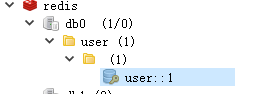
看控制台这里打印出了日志,这是第一次查询,说明执行了sql语句

再次访问http://localhost:8080/user/1,没有执行findUserById方法说明没有执行sql语句,而是直接从redis缓存中读取

完整SpringBoot Cache整合redis缓存(二)的更多相关文章
- SpringBoot缓存管理(二) 整合Redis缓存实现
SpringBoot支持的缓存组件 在SpringBoot中,数据的缓存管理存储依赖于Spring框架中cache相关的org.springframework.cache.Cache和org.spri ...
- SpringBoot简单整合redis
Jedis和Lettuce Lettuce 和 Jedis 的定位都是Redis的client,所以他们当然可以直接连接redis server. Jedis在实现上是直接连接的redis serve ...
- 在springboot中使用redis缓存,将缓存序列化为json格式的数据
背景 在springboot中使用redis缓存结合spring缓存注解,当缓存成功后使用gui界面查看redis中的数据 原因 springboot缓存默认的序列化是jdk提供的 Serializa ...
- SpringBoot入门系列(七)Spring Boot整合Redis缓存
前面介绍了Spring Boot 中的整合Mybatis并实现增删改查,.不清楚的朋友可以看看之前的文章:https://www.cnblogs.com/zhangweizhong/category/ ...
- SpringBoot整合redis缓存(一)
准备工作 1.Linux系统 2.安装redis(也可以安装docker,然后再docker中装redis,本文章就直接用Linux安装redis做演示) redis下载地址: 修改redis,开启远 ...
- springboot整合redis缓存一些知识点
前言 最近在做智能家居平台,考虑到家居的控制需要快速的响应于是打算使用redis缓存.一方面减少数据库压力另一方面又能提高响应速度.项目中使用的技术栈基本上都是大家熟悉的springboot全家桶,在 ...
- SpringBoot 整合 Redis缓存
在我们的日常项目开发过程中缓存是无处不在的,因为它可以极大的提高系统的访问速度,关于缓存的框架也种类繁多,今天主要介绍的是使用现在非常流行的NoSQL数据库(Redis)来实现我们的缓存需求. Spr ...
- 【Spring】17、spring cache 与redis缓存整合
spring cache,基本能够满足一般应用对缓存的需求,但现实总是很复杂,当你的用户量上去或者性能跟不上,总需要进行扩展,这个时候你或许对其提供的内存缓存不满意了,因为其不支持高可用性,也不具备持 ...
- springboot 整合 Redis 方法二
方法一请参考之前博文 spring boot 整合 redis 自己的版本 java8 + redis3.0 + springboot 2.0.0 1 spring boot已经支持集成 redis ...
随机推荐
- Servlet Cookie、Session
HTTP不能保持连接,可使用会话保存用户信息. 常用的会话技术有2种:Cookie.Session. Cookie 1.原理 当用户第一次访问某个网站时,服务器设置Cookie,存储用户信息,放在响应 ...
- 常用maven整合
常用Maven依赖 rt,常用Maven配置整合,不定期更新 一.dependencies 1.jstl开发环境 <!-- jstl开发环境 --> <!-- https://mvn ...
- .netcore 分布式事务CAP2.6之控制台使用
上一编讲了cap2.6的快速入门,这次我们来讲讲在控制台中如何使用cap2.6.因为cap2.6的内存模式目前已经可以使用了,相关组件已经更新,所以这次我们以简单的内存模式为例. 1:创建项目 创建一 ...
- C#开发BIMFACE系列12 服务端API之文件转换
系列目录 [已更新最新开发文章,点击查看详细] 在代表模型的源文件上传到BIMFACE后,一般会进行三种API调用操作: 发起模型转换 查询转换状态 如转换成功,获取模型转换后的BIM数据 在 ...
- Android Studio安卓学习笔记(一)安卓与Android Studio运行第一个项目
一:什么是安卓 1.Android是一种基于Linux的自由及开放源代码的操作系统. 2.Android操作系统最初由AndyRubin开发,主要支持手机. 3.Android一词的本义指“机器人”, ...
- codeforces 794 C. Naming Company(贪心)
题目链接:http://codeforces.com/contest/794/problem/C 题意:有两个人每个人都有一个长度为n的字符串,两人轮流拿出一个字符串,放在一个长度为n的字符串的指定位 ...
- codeforces 743D. Chloe and pleasant prizes(树形dp)
题目链接:http://codeforces.com/contest/743/problem/D 大致思路挺简单的就是找到一个父节点然后再找到其两个字节点总值的最大值. 可以设一个dp[x]表示x节点 ...
- Educational Codeforces Round 69 (Rated for Div. 2)
A. DIY ...
- JavaScript数组方法速查,32个数组的常用方法和属性
JavaScript数组方法速查手册极简版 http://30ke.cn/doc/js-array-method JavaScript数组方法速查手册极简版中共收了32个数组的常用方法和属性,并根据方 ...
- Erlang中的RSA签名
RSA签名校验 -spec check_rsa_sign(DataBin, Sign, RSAPublicKeyBin, DigestType) -> boolean when DataBin ...