
完整SpringBoot Cache整合redis缓存(二)
缓存注解概念
|
名称 |
解释 |
| Cache | 缓存接口,定义缓存操作。实现有:RedisCache、EhCacheCache、ConcurrentMapCache等 |
| CacheManager | 缓存管理器,管理各种缓存(cache)组件 |
| @Cacheable | 主要针对方法配置,能够根据方法的请求参数对其进行缓存 |
| @CacheEvict | 清空缓存 |
| @CachePut | 保证方法被调用,又希望结果被缓存与@Cacheable区别在于是否每次都调用方法,常用于更新 |
| @EnableCaching | 开启基于注解的缓存 |
| keyGenerator | 缓存数据时key生成策略 |
| serialize | 缓存数据时value序列化策略 |
| @CacheConfig | 统一配置本类的缓存注解的属性 |
安装docker、redis
安装docker
yum -y install docker-ce
开机启动docker
systemctl start docker
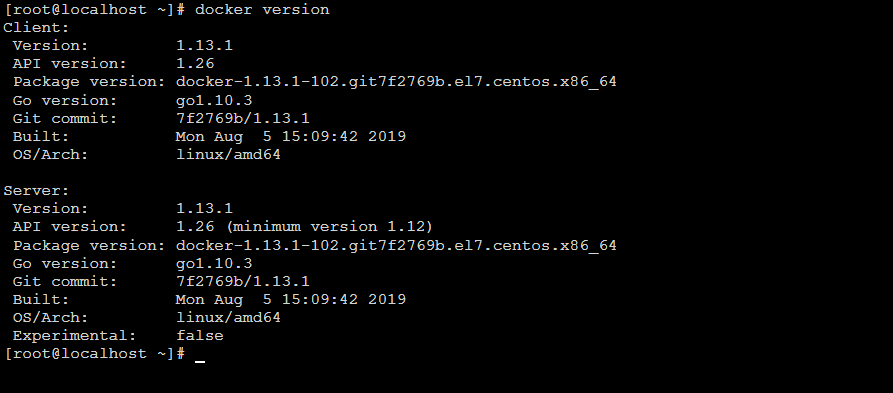
检验docker是否安装成功
docker version
docker安装redis
docker pull redis
docker检测是否安装成功redis
docker images

docker启动redis并设置端口映射(-d表示后台运行)
docker run -p 6379:6379 -d redis:latest myredis
查看redis是否启动成功
docker ps

代码实现
在看代码前先看看目录结构吧(在这里使用ssm来整合redis)

数据库表结构

pom.xml文件,这里主要是引入spring-boot-starter-cache依赖
<dependencies>
        <dependency>
            <groupId>org.springframework.boot</groupId>
            <artifactId>spring-boot-starter-web</artifactId>
        </dependency>

        <dependency>
            <groupId>org.springframework.boot</groupId>
            <artifactId>spring-boot-starter-test</artifactId>
            <scope>test</scope>
        </dependency>

        <dependency>
            <groupId>org.projectlombok</groupId>
            <artifactId>lombok</artifactId>
            <optional>true</optional>
        </dependency>

        <dependency>
            <groupId>org.springframework.boot</groupId>
            <artifactId>spring-boot-starter-cache</artifactId>
        </dependency>

        <!-- mybatis 与 spring boot 2.x的整合包 -->
        <dependency>
            <groupId>org.mybatis.spring.boot</groupId>
            <artifactId>mybatis-spring-boot-starter</artifactId>
            <version>1.3.2</version>
        </dependency>

        <!--mysql JDBC驱动 -->
        <dependency>
            <groupId>mysql</groupId>
            <artifactId>mysql-connector-java</artifactId>
            <version>5.1.39</version>
        </dependency>
    </dependencies>
配置文件application.yml,配置redis
spring:  datasource:    url: jdbc:mysql://localhost:3306/spring_boot_cache?useUnicode=true    driver-class-name: com.mysql.jdbc.Driver    username: root    password: lzh

  redis:    # 这是redis所在服务器的ip    host: 192.168.126.129    timeout: 10000ms    database: 0    lettuce:      pool:        max-wait: -1ms        max-active: 8        max-idle: 8        min-idle: 0  cache:    type: redis
启动类加入@EnableCaching注解
package com.lzh.springbootstudytestcache;

import org.springframework.boot.SpringApplication;
import org.springframework.boot.autoconfigure.SpringBootApplication;
import org.springframework.cache.annotation.EnableCaching;

@SpringBootApplication
@EnableCaching
public class SpringBootStudyTestCacheApplication {

    public static void main(String[] args) {
        SpringApplication.run(SpringBootStudyTestCacheApplication.class, args);
    }
}
UserController 类暴露接口
package com.lzh.springbootstudytestcache.controller;

import com.lzh.springbootstudytestcache.model.User;
import com.lzh.springbootstudytestcache.service.UserService;
import org.springframework.beans.factory.annotation.Autowired;
import org.springframework.web.bind.annotation.GetMapping;
import org.springframework.web.bind.annotation.PathVariable;
import org.springframework.web.bind.annotation.RequestParam;
import org.springframework.web.bind.annotation.RestController;

/**
 * @author lzh
 * create 2019-09-24-20:34
 */
@RestController
public class UserController {

    @Autowired
    UserService userService;

    @GetMapping("/user/save")
    public User saveUser(@RequestParam Integer id,@RequestParam String name,@RequestParam Integer age){
        User user= userService.save(new User(id,name,age));
        return user;
    }

    @GetMapping("/user/{id}")
    public User getUserById(@PathVariable Integer id){

        System.out.println("id="+id);
        User user = userService.findUserById(id);

        System.out.println("getUserById - "+user);
        return user;
    }

    @GetMapping("/user/update")
    public User updateUser(@RequestParam Integer id,@RequestParam String name,@RequestParam Integer age){
        User user= userService.updateUser(new User(id,name,age));

        return user;
    }

    @GetMapping("/user/del/{id}")
    public String deleteUser(@PathVariable Integer id){
        System.out.println("id="+id);
        int num = userService.deleteUser(id);
        if (num > 0){
            return "删除成功";
        } else {
            return "删除失败";
        }
    }

}
UserService接口package com.lzh.springbootstudytestcache.service;
import com.lzh.springbootstudytestcache.model.User;
/**
* @author lzh
* create 2019-09-24-9:14
*/
public interface UserService {
User save(User user);
User findUserById(Integer id);
User updateUser(User user);
int deleteUser(Integer id);
}
UserService实现类
package com.lzh.springbootstudytestcache.service.impl;

import com.lzh.springbootstudytestcache.mapper.UserMapper;
import com.lzh.springbootstudytestcache.model.User;
import com.lzh.springbootstudytestcache.service.UserService;
import lombok.extern.log4j.Log4j2;
import org.springframework.beans.factory.annotation.Autowired;
import org.springframework.cache.annotation.CacheEvict;
import org.springframework.cache.annotation.CachePut;
import org.springframework.cache.annotation.Cacheable;
import org.springframework.stereotype.Service;

/**
 * @author lzh
 * create 2019-09-24-9:14
 */
@Service
@Log4j2
public class UserServiceImpl implements UserService {

    @Autowired
    UserMapper userMapper;

    @Cacheable(value = "user",key = "#user.id")
    @Override
    public User save(User user) {
        int saveNum = userMapper.saveUser(user);
        System.out.println("saveNum="+saveNum);
        return user;
    }

    @Cacheable(value = "user",key = "#id")
    @Override
    public User findUserById(Integer id) {
        log.info("进入findUserById方法");
        return userMapper.findUserById(id);
    }

    @CachePut(value = "user", key = "#user.id")
    @Override
    public User updateUser(User user) {
        int num = userMapper.updateUser(user);
        System.out.println("num="+num);
        return user;
    }

    @CacheEvict(value = "user")
    @Override
    public int deleteUser(Integer id) {
        return userMapper.deleteUser(id);
    }
}
User实体类,加入@Data相当于加入getset方法,@AllArgsConstructor全参构造方法,@ToString重写tostring方法,引入Lombok简化代码
package com.lzh.springbootstudytestcache.model;

import lombok.AllArgsConstructor;
import lombok.Data;
import lombok.ToString;

import java.io.Serializable;

/**
 * @author Levin
 * @since 2018/5/10 0007
 */
@Data
@AllArgsConstructor
@ToString
public class User implements Serializable {

    private Integer id;
    private String name;
    private Integer age;

}
UserMapper持久层,使用mybatis注解@Select、@Update、@Insert、@Delete实现
package com.lzh.springbootstudytestcache.mapper;

import com.lzh.springbootstudytestcache.model.User;
import org.apache.ibatis.annotations.*;

/**
 * @author lzh
 * create 2019-09-24-20:39
 */
@Mapper
public interface UserMapper {

    @Select("SELECT * FROM User WHERE id = #{id}")
    User findUserById(Integer id);

    @Update("update user set name=#{name},age=#{age} where id=#{id}")
    int updateUser(User user);

    @Insert("insert into user set name=#{name},age=#{age}")
    int saveUser(User user);

    @Delete("DELETE FROM USER WHERE id=#{id}")
    int deleteUser(Integer id);
}
改变默认jdk序列化器
package com.lzh.springbootstudytestcache.config;

import com.fasterxml.jackson.annotation.JsonAutoDetect;
import com.fasterxml.jackson.annotation.PropertyAccessor;
import com.fasterxml.jackson.databind.ObjectMapper;
import org.springframework.context.annotation.Bean;
import org.springframework.context.annotation.Configuration;
import org.springframework.data.redis.connection.RedisConnectionFactory;
import org.springframework.data.redis.core.RedisTemplate;
import org.springframework.data.redis.serializer.*;

/**
 * @author lzh
 * create 2019-09-24-22:22
 */
import org.springframework.cache.CacheManager;
import org.springframework.context.annotation.Primary;
import org.springframework.data.redis.cache.RedisCacheConfiguration;
import org.springframework.data.redis.cache.RedisCacheManager;
import org.springframework.data.redis.cache.RedisCacheWriter;

import java.time.Duration;

//@Configuration
public class MyRedisConfig {

    //@Bean(name = "redisTemplate")
    public RedisTemplate<String,Object> redisTemplate(RedisConnectionFactory redisConnectionFactory){

        RedisTemplate<String,Object> redisTemplate = new RedisTemplate<>();

        redisTemplate.setConnectionFactory(redisConnectionFactory);
        redisTemplate.setKeySerializer(keySerializer());
        redisTemplate.setHashKeySerializer(keySerializer());
        redisTemplate.setValueSerializer(valueSerializer());
        redisTemplate.setHashValueSerializer(valueSerializer());
        return redisTemplate;
    }

    //@Primary
    //@Bean
    public CacheManager cacheManager(RedisConnectionFactory redisConnectionFactory){
        //缓存配置对象
        RedisCacheConfiguration redisCacheConfiguration = RedisCacheConfiguration.defaultCacheConfig();

        redisCacheConfiguration = redisCacheConfiguration.entryTtl(Duration.ofMinutes(30L)) //设置缓存的默认超时时间:30分钟
                .disableCachingNullValues()             //如果是空值,不缓存
                .serializeKeysWith(RedisSerializationContext.SerializationPair.fromSerializer(keySerializer()))         //设置key序列化器
                .serializeValuesWith(RedisSerializationContext.SerializationPair.fromSerializer((valueSerializer())));  //设置value序列化器

        return RedisCacheManager
                .builder(RedisCacheWriter.nonLockingRedisCacheWriter(redisConnectionFactory))
                .cacheDefaults(redisCacheConfiguration).build();
    }

    private RedisSerializer<String> keySerializer() {
        return new StringRedisSerializer();
    }

    private RedisSerializer<Object> valueSerializer() {
        return new GenericJackson2JsonRedisSerializer();
    }
}
测试
启动srpingboot访问http://localhost:8080/user/1

使用redis可视化工具查看发现多了一个user对象,这就是在执行查询语句的时候保存的缓存
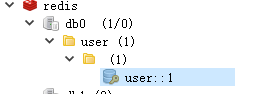
看控制台这里打印出了日志,这是第一次查询,说明执行了sql语句

再次访问http://localhost:8080/user/1,没有执行findUserById方法说明没有执行sql语句,而是直接从redis缓存中读取

完整SpringBoot Cache整合redis缓存(二)的更多相关文章
- SpringBoot缓存管理(二) 整合Redis缓存实现
SpringBoot支持的缓存组件 在SpringBoot中,数据的缓存管理存储依赖于Spring框架中cache相关的org.springframework.cache.Cache和org.spri ...
- SpringBoot简单整合redis
Jedis和Lettuce Lettuce 和 Jedis 的定位都是Redis的client,所以他们当然可以直接连接redis server. Jedis在实现上是直接连接的redis serve ...
- 在springboot中使用redis缓存,将缓存序列化为json格式的数据
背景 在springboot中使用redis缓存结合spring缓存注解,当缓存成功后使用gui界面查看redis中的数据 原因 springboot缓存默认的序列化是jdk提供的 Serializa ...
- SpringBoot入门系列(七)Spring Boot整合Redis缓存
前面介绍了Spring Boot 中的整合Mybatis并实现增删改查,.不清楚的朋友可以看看之前的文章:https://www.cnblogs.com/zhangweizhong/category/ ...
- SpringBoot整合redis缓存(一)
准备工作 1.Linux系统 2.安装redis(也可以安装docker,然后再docker中装redis,本文章就直接用Linux安装redis做演示) redis下载地址: 修改redis,开启远 ...
- springboot整合redis缓存一些知识点
前言 最近在做智能家居平台,考虑到家居的控制需要快速的响应于是打算使用redis缓存.一方面减少数据库压力另一方面又能提高响应速度.项目中使用的技术栈基本上都是大家熟悉的springboot全家桶,在 ...
- SpringBoot 整合 Redis缓存
在我们的日常项目开发过程中缓存是无处不在的,因为它可以极大的提高系统的访问速度,关于缓存的框架也种类繁多,今天主要介绍的是使用现在非常流行的NoSQL数据库(Redis)来实现我们的缓存需求. Spr ...
- 【Spring】17、spring cache 与redis缓存整合
spring cache,基本能够满足一般应用对缓存的需求,但现实总是很复杂,当你的用户量上去或者性能跟不上,总需要进行扩展,这个时候你或许对其提供的内存缓存不满意了,因为其不支持高可用性,也不具备持 ...
- springboot 整合 Redis 方法二
方法一请参考之前博文 spring boot 整合 redis 自己的版本 java8 + redis3.0 + springboot 2.0.0 1 spring boot已经支持集成 redis ...
随机推荐
- 再见 Spring Boot 1.X ,Spring Boot 2.X 走向舞台中心
2019年8月6日,Spring 官方在其博客宣布,Spring Boot 1.x 停止维护,Spring Boot 1.x 生命周期正式结束. 其实早在2018年7月30号,Spring 官方就已经 ...
- vuex详解vue简单使用
vue概念:vuex 是 Vue 配套的 公共数据管理工具,它可以把一些共享的数据,保存到 vuex 中,方便 整个程序中的任何组件直接获取或修改我们的公共数据: 配置vuex的步骤: 1.运行cnp ...
- Http协议4个新的http状态码:428、429、431、511;
1.428 Precondition Required (要求先决条件) 先决条件是客户端发送 HTTP 请求时,必须要满足的一些预设条件.一个好的例子就是 If-None-Match 头,经常用在 ...
- SpringBoot读取配置文件源码探究
1. SpringBoot读取配置文件源码探究 1.1. 概览 springboot的源码是再原来的Spring源码上又包了一层,看过spring源码都知道,当我们从入口debug进去的时候,原来的S ...
- Java IO体系综述
Java IO体系综述 一.流的概念 在Java API中,可以从其中读入一个字节序列的对象称作输入流,而可以向其中写入一个字节序列的对象称作输出流.这些字节序列的来源地和目的地可以是文件,而且通常都 ...
- JavaScript 数据结构与算法之美 - 栈内存与堆内存 、浅拷贝与深拷贝
前言 想写好前端,先练好内功. 栈内存与堆内存 .浅拷贝与深拷贝,可以说是前端程序员的内功,要知其然,知其所以然. 笔者写的 JavaScript 数据结构与算法之美 系列用的语言是 JavaScri ...
- Leetcode之二分法专题-240. 搜索二维矩阵 II(Search a 2D Matrix II)
Leetcode之二分法专题-240. 搜索二维矩阵 II(Search a 2D Matrix II) 编写一个高效的算法来搜索 m x n 矩阵 matrix 中的一个目标值 target.该矩阵 ...
- Storm 系列(五)—— Storm 编程模型详解
一.简介 下图为 Strom 的运行流程图,在开发 Storm 流处理程序时,我们需要采用内置或自定义实现 spout(数据源) 和 bolt(处理单元),并通过 TopologyBuilder 将它 ...
- Springboot源码分析之事务问题
摘要: 事务在后端开发中无处不在,是数据一致性的最基本保证.要明白进事务的本质就是进到事务切面的代理方法中,最常见的是同一个类的非事务方法调用一个加了事务注解的方法没进入事务.我们以cglib代理为例 ...
- CentOS7下使用SonatypeNexus3搭建Docker私有仓库
前置条件:安装docker(如果机器上没有安装的话) //安装一些必要的系统工具: sudo yum install -y yum-utils device-mapper-persistent-dat ...