
windows 10 上源码编译OpenCV并支持CUDA | compile opencv with CUDA support on windows 10
本文首发于个人博客https://kezunlin.me/post/6580691f/,欢迎阅读!
compile opencv with CUDA support on windows 10
Series
- Part 1: compile opencv on ubuntu 16.04
- Part 2: compile opencv with CUDA support on windows 10
- Part 3: opencv mat for loop
- Part 4: speed up opencv image processing with openmp
Guide
requirements:
- windows: 10
- opencv: 3.1.0
- nvidia driver: gtx 1060 382.05 (gtx 970m)
- GPU arch(s): sm_61 (sm_52)
- cuda: 8.0
- cudnn: 5.0.5
- cmake: 3.10.0
- vs: vs2015 64
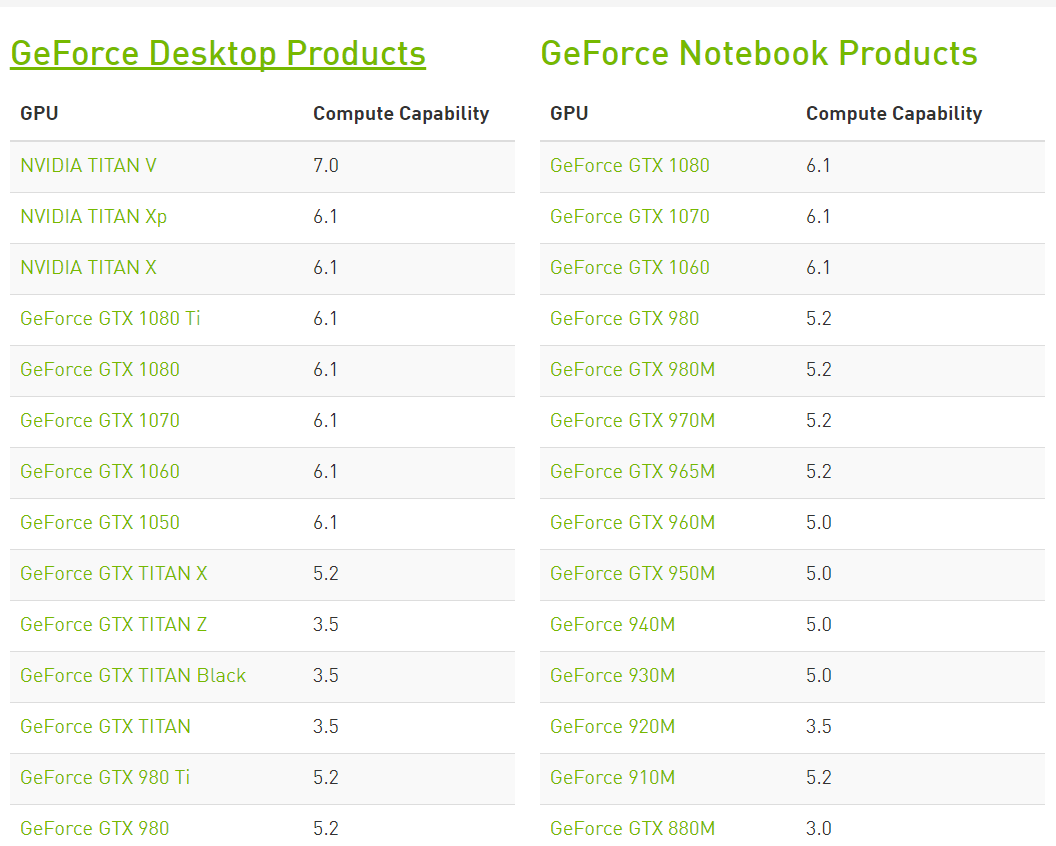
nvidia cuda CC
笔记本版本的显卡和台式机的计算能力是有差距的。
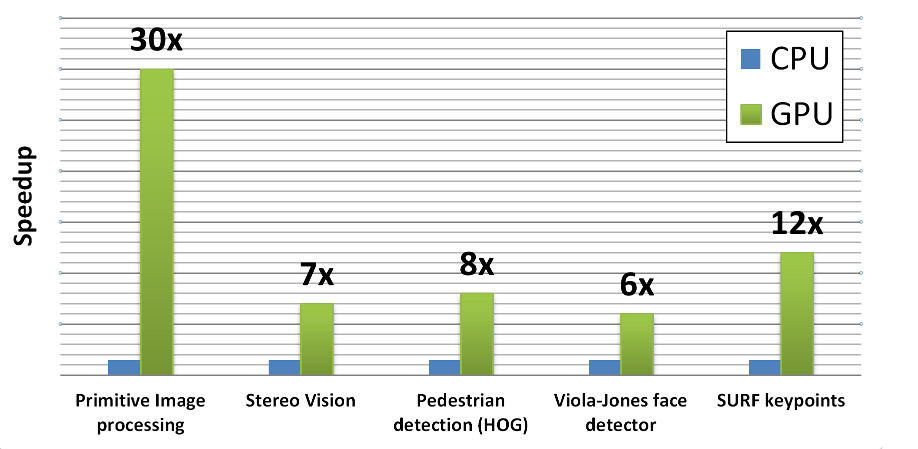
cpu vs gpu
for opencv functions
get source
Get opencv 3.1.0 for git and fix some bugs
git clone https://github.com/opencv/opencv.git

cd opencv

git checkout -b v3.1.0 3.1.0

# fix bugs for 3.1.0

git cherry-pick 10896

git cherry-pick cdb9c

git cherry-pick 24dbb

git branch

master

* v3.1.0
compile
mkdir build && cd build && cmake-gui ..
config
configure with VS 2015 win64 with options
BUILD_SHARED_LIBS  ON

CMAKE_CONFIGURATION_TYPES Release # Release

CMAKE_CXX_FLAGS_RELEASE /MD /O2 /Ob2 /DNDEBUG /MP # for multiple processor

WITH_VTK OFF

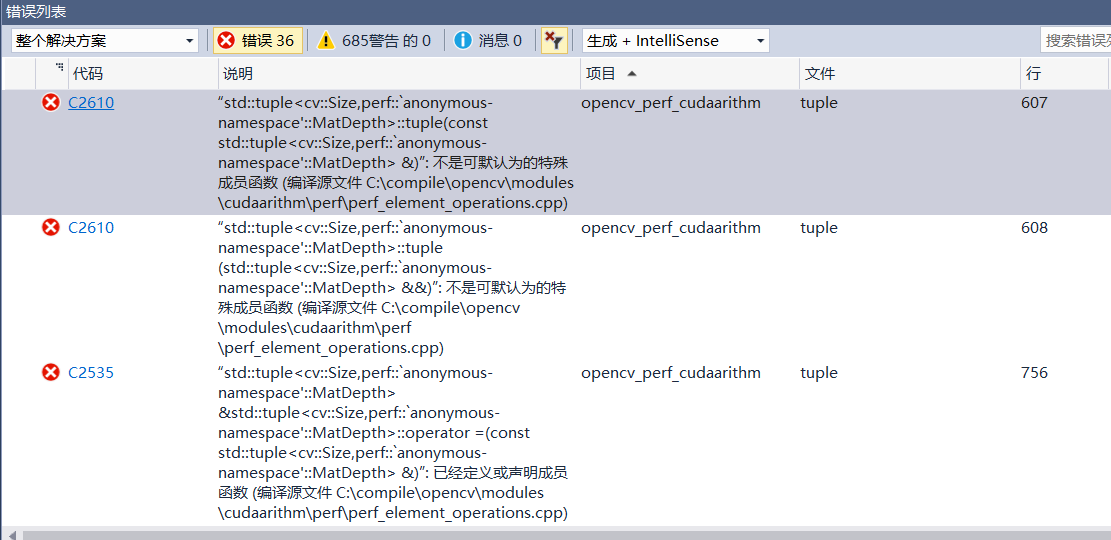
BUILD_PERF_TESTS OFF # if ON, build errors occur

WITH_CUDA ON

CUDA_TOOLKIT_ROOT_DIR  C:/Program Files/NVIDIA GPU Computing Toolkit/CUDA/v8.0

#CUDA_ARCH_BIN  3.0 3.5 5.0 5.2 6.0 6.1 # very time-consuming

CUDA_ARCH_PTX 3.0
for opencv

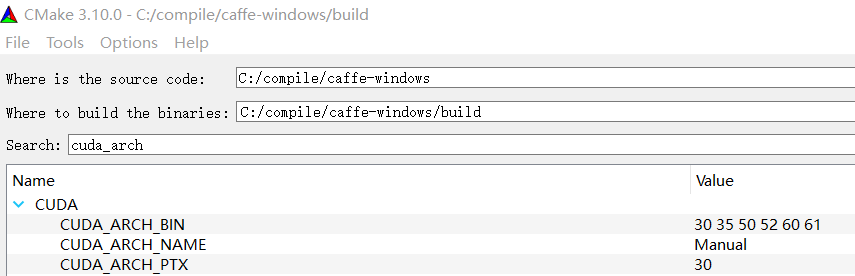
CUDA_ARCH_BIN 3.0 3.5 5.0 5.2 6.0 6.1 relate with
-gencode;arch=compute_30,code=sm_30;-gencode;arch=compute_35,code=sm_35;-gencode;arch=compute_50,code=sm_50;-gencode;arch=compute_52,code=sm_52;-gencode;arch=compute_60,code=sm_60;-gencode;arch=compute_61,code=sm_61;
CUDA_ARCH_PTX 3.0 relate with
-gencode;arch=compute_30,code=compute_30;
for caffe
the
CUDA_ARCH_BINparameter specifies multiple architectures so as to support a variety of GPU boards. otherwise, cuda programs will not run with other type of GPU boards.
为了支持在多个不同计算能力的GPU上运行可执行程序,opencv/caffe编译过程中需要支持多个不同架构,eg. CUDA_ARCH_BIN 3.0 3.5 5.0 5.2 6.0 6.1, 因此编译过程非常耗时。在编译的而过程中尽可能选择需要发布release版本的GPU架构进行配置编译。
configure and output:
Selecting Windows SDK version 10.0.14393.0 to target Windows 10.0.17134.

found IPP (ICV version): 9.0.1 [9.0.1]

at: C:/compile/opencv/3rdparty/ippicv/unpack/ippicv_win

CUDA detected: 8.0

CUDA NVCC target flags: -gencode;arch=compute_30,code=sm_30;-gencode;arch=compute_30,code=compute_30

Could NOT find Doxygen (missing: DOXYGEN_EXECUTABLE)

To enable PlantUML support, set PLANTUML_JAR environment variable or pass -DPLANTUML_JAR=<filepath> option to cmake

Could NOT find PythonInterp: Found unsuitable version "1.4", but required is at least "3.4" (found C:/Users/zunli/.babun/cygwin/bin/python)

Could NOT find PythonInterp: Found unsuitable version "1.4", but required is at least "3.2" (found C:/Users/zunli/.babun/cygwin/bin/python)

Could NOT find Matlab (missing: MATLAB_MEX_SCRIPT MATLAB_INCLUDE_DIRS MATLAB_ROOT_DIR MATLAB_LIBRARIES MATLAB_LIBRARY_DIRS MATLAB_MEXEXT MATLAB_ARCH MATLAB_BIN)

General configuration for OpenCV 3.1.0 =====================================

  Version control:               3.1.0-3-g5e9beb8

  Platform:

    Host:                        Windows 10.0.17134 AMD64

    CMake:                       3.10.0

    CMake generator:             Visual Studio 14 2015 Win64

    CMake build tool:            C:/Program Files (x86)/MSBuild/14.0/bin/MSBuild.exe

    MSVC:                        1900

  C/C++:

    Built as dynamic libs?:      YES

    C++ Compiler:                C:/Program Files (x86)/Microsoft Visual Studio 14.0/VC/bin/x86_amd64/cl.exe  (ver 19.0.24215.1)

    C++ flags (Release):         /DWIN32 /D_WINDOWS /W4 /GR /EHa  /D _CRT_SECURE_NO_DEPRECATE /D _CRT_NONSTDC_NO_DEPRECATE /D _SCL_SECURE_NO_WARNINGS /Gy /bigobj /Oi  /wd4251 /wd4324 /wd4275 /wd4589 /MP8  /MD /O2 /Ob2 /DNDEBUG /MP  /Zi

    C++ flags (Debug):           /DWIN32 /D_WINDOWS /W4 /GR /EHa  /D _CRT_SECURE_NO_DEPRECATE /D _CRT_NONSTDC_NO_DEPRECATE /D _SCL_SECURE_NO_WARNINGS /Gy /bigobj /Oi  /wd4251 /wd4324 /wd4275 /wd4589 /MP8  /MDd /Zi /Ob0 /Od /RTC1

    C Compiler:                  C:/Program Files (x86)/Microsoft Visual Studio 14.0/VC/bin/x86_amd64/cl.exe

    C flags (Release):           /DWIN32 /D_WINDOWS /W3  /D _CRT_SECURE_NO_DEPRECATE /D _CRT_NONSTDC_NO_DEPRECATE /D _SCL_SECURE_NO_WARNINGS /Gy /bigobj /Oi    /MP8  /MD /O2 /Ob2 /DNDEBUG  /Zi

    C flags (Debug):             /DWIN32 /D_WINDOWS /W3  /D _CRT_SECURE_NO_DEPRECATE /D _CRT_NONSTDC_NO_DEPRECATE /D _SCL_SECURE_NO_WARNINGS /Gy /bigobj /Oi    /MP8  /MDd /Zi /Ob0 /Od /RTC1

    Linker flags (Release):      /machine:x64  /INCREMENTAL:NO  /debug

    Linker flags (Debug):        /machine:x64  /debug /INCREMENTAL

    Precompiled headers:         YES

    Extra dependencies:          comctl32 gdi32 ole32 setupapi ws2_32 vfw32 cudart nppc nppi npps cufft -LC:/Program Files/NVIDIA GPU Computing Toolkit/CUDA/v8.0/lib/x64

    3rdparty dependencies:       zlib libjpeg libwebp libpng libtiff libjasper IlmImf

  OpenCV modules:

    To be built:                 cudev core cudaarithm flann imgproc ml video cudabgsegm cudafilters cudaimgproc cudawarping imgcodecs photo shape videoio cudacodec highgui objdetect ts features2d calib3d cudafeatures2d cudalegacy cudaobjdetect cudaoptflow cudastereo stitching superres videostab python2

    Disabled:                    world

    Disabled by dependency:      -

    Unavailable:                 java python3 viz

  Windows RT support:            NO

  GUI:

    QT:                          NO

    Win32 UI:                    YES

    OpenGL support:              NO

    VTK support:                 NO

  Media I/O:

    ZLib:                        build (ver 1.2.8)

    JPEG:                        build (ver 90)

    WEBP:                        build (ver 0.3.1)

    PNG:                         build (ver 1.6.19)

    TIFF:                        build (ver 42 - 4.0.2)

    JPEG 2000:                   build (ver 1.900.1)

    OpenEXR:                     build (ver 1.7.1)

    GDAL:                        NO

  Video I/O:

    Video for Windows:           YES

    DC1394 1.x:                  NO

    DC1394 2.x:                  NO

    FFMPEG:                      YES (prebuilt binaries)

      codec:                     YES (ver 56.41.100)

      format:                    YES (ver 56.36.101)

      util:                      YES (ver 54.27.100)

      swscale:                   YES (ver 3.1.101)

      resample:                  NO

      gentoo-style:              YES

    GStreamer:                   NO

    OpenNI:                      NO

    OpenNI PrimeSensor Modules:  NO

    OpenNI2:                     NO

    PvAPI:                       NO

    GigEVisionSDK:               NO

    DirectShow:                  YES

    Media Foundation:            NO

    XIMEA:                       NO

    Intel PerC:                  NO

  Parallel framework:            Concurrency

  Other third-party libraries:

    Use IPP:                     9.0.1 [9.0.1]

         at:                     C:/compile/opencv/3rdparty/ippicv/unpack/ippicv_win

    Use IPP Async:               NO

    Use Eigen:                   NO

    Use Cuda:                    YES (ver 8.0)

    Use OpenCL:                  YES

    Use custom HAL:              NO

  NVIDIA CUDA

    Use CUFFT:                   YES

    Use CUBLAS:                  NO

    USE NVCUVID:                 NO

    NVIDIA GPU arch:             30 35 50 52 60 61

    NVIDIA PTX archs:            30

    Use fast math:               NO

  OpenCL:

    Version:                     dynamic

    Include path:                C:/compile/opencv/3rdparty/include/opencl/1.2

    Use AMDFFT:                  NO

    Use AMDBLAS:                 NO

  Python 2:

    Interpreter:                 C:/Python27/python.exe (ver 2.7.13)

    Libraries:                   C:/Python27/libs/python27.lib (ver 2.7.13)

    numpy:                       C:/Python27/lib/site-packages/numpy/core/include (ver 1.11.3)

    packages path:               C:/Python27/Lib/site-packages

  Python 3:

    Interpreter:                 NO

  Python (for build):            C:/Python27/python.exe

  Java:

    ant:                         NO

    JNI:                         C:/Program Files/Java/jdk1.8.0_161/include C:/Program Files/Java/jdk1.8.0_161/include/win32 C:/Program Files/Java/jdk1.8.0_161/include

    Java wrappers:               NO

    Java tests:                  NO

  Matlab:                        Matlab not found or implicitly disabled

  Documentation:

    Doxygen:                     NO

    PlantUML:                    NO

  Tests and samples:

    Tests:                       YES

    Performance tests:           NO

    C/C++ Examples:              NO

  Install path:                  C:/compile/opencv/build/install

  cvconfig.h is in:              C:/compile/opencv/build

-----------------------------------------------------------------

Configuring done

Generating done
Notice for gencode
CUDA NVCC target flags: -gencode;arch=compute_30,code=sm_30;-gencode;arch=compute_35,code=sm_35;-gencode;arch=compute_50,code=sm_50;-gencode;arch=compute_52,code=sm_52;-gencode;arch=compute_60,code=sm_60;-gencode;arch=compute_61,code=sm_61;-gencode;arch=compute_30,code=compute_30
build
Open OpenCV.sln with VS 2015 and build release version.
this may take hours to finish.

errors
possible solutions
With
BUILD_PERF_TESTSandBUILD_TESTSdisabled, I managed to build OpenCV 3.1 with CUDA 8.0 on Windows 10 with VS2015 x64 arch target. Without building test/performance modules, the build process costs less time as well : )
I actually got it to work both on my laptop and my desktop (GTX960M and GTX970 respectively) running with OpenCV 3.2 and the latest version of CUDA 8.0 for Win10 in Visual Studio 15 Community! What I did was to enable
WITH_CUBLASaswell asWITH_CUDA. I also turned offBUILD_PERF_TESTSandBUILD_TESTS. The configuration was built using the Visual Studio 14 2015 C++ compiler.
my solution:
disable `BUILD_PERF_TESTS`

configure and build again. this time cost only about 1 minutes.
after error fixed,build results

demo
cuda-module
OpenCV GPU module is written using CUDA, therefore it benefits from the CUDA ecosystem.
GPU modules includes class cv::cuda::GpuMat which is a primary container for data kept in GPU memory. It’s interface is very similar with cv::Mat, its CPU counterpart. All GPU functions receive GpuMat as input and output arguments. This allows to invoke several GPU algorithms without downloading data. GPU module API interface is also kept similar with CPU interface where possible. So developers who are familiar with Opencv on CPU could start using GPU straightaway.
The GPU module is designed as a host-level API. This means that if you have pre-compiled OpenCV GPU binaries, you are not required to have the CUDA Toolkit installed or write any extra code to make use of the GPU.
CMakeLists.txt
find_package(OpenCV REQUIRED COMPONENTS core highgui imgproc features2d calib3d

	cudaarithm cudabgsegm cudafilters cudaimgproc cudawarping cudafeatures2d # for cuda-enabled

) #

MESSAGE( [Main] " OpenCV_INCLUDE_DIRS = ${OpenCV_INCLUDE_DIRS}")

MESSAGE( [Main] " OpenCV_LIBS = ${OpenCV_LIBS}")
demo.cpp
In the sample below an image is loaded from local file, next it is uploaded to GPU, thresholded, downloaded and displayed.
#include <opencv2/cudaarithm.hpp>

#include <opencv2/cudabgsegm.hpp>

#include <opencv2/cudafilters.hpp>

#include <opencv2/cudaimgproc.hpp>

#include <opencv2/cudawarping.hpp>

#include <opencv2/cudafeatures2d.hpp>

int test_opencv_gpu()

{

	try

	{

		cv::Mat src_host = cv::imread("file.png", CV_LOAD_IMAGE_GRAYSCALE);

		cv::cuda::GpuMat dst, src;

		src.upload(src_host);

		cv::cuda::threshold(src, dst, 128.0, 255.0, CV_THRESH_BINARY);

		cv::Mat result_host;

		dst.download(result_host);

		cv::imshow("Result", result_host);

		cv::waitKey();

	}

	catch (const cv::Exception& ex)

	{

		std::cout << "Error: " << ex.what() << std::endl;

	}

	return 0;

}
cpu vs gpu time cost
- (1)对于分辨率不特别大的图片间的ORB特征匹配,CPU运算得比GPU版的快(由于图像上传到GPU消耗了时间)
- (2)但对于分辨率较大的图片,或者GPU比CPU好的机器(比如Nvidia Jetson系列),GPU版的ORB算法比CPU版的程序更高效。
problems
(1) 使用cuda版本的opencv caffe网络的第一次创建非常耗时,后面的网络创建则非常快。
(2) opencv的gpu代码比cpu代码慢,初次启动多耗费20s左右。(事实是由于编译的caffe和GPU计算力不匹配导致的)
reasons
Your problem is that CUDA needs to initialize! And it will generally takes between serveral seconds
Why first function call is slow?
That is because of initialization overheads. On first GPU function callCuda Runtime APIis initialized implicitly.
The first gpu function call is always takes more time, because CUDA initialize context for device.
The following calls will be faster.
Not Reasons:
(1) CPU clockspeed is 10x faster than GPU clockspeed.
(2) memory transfer times between host (CPU) and device (GPU) (upload,downloa data)
deploy
runtime errors
gtx 1060 编译的opencv caffe在gtx 970m上运行出现错误
im2col.cu Check failed: error == cudaSuccess (8 vs. 0) invalid device function
	gtx 1060   sm_61

	gtx 970m   sm_52
im2col 是caffe的源文件,表明gtx 970m的计算能力不支持可执行文件的运行。
reasons
see what-is-the-purpose-of-using-multiple-arch-flags-in-nvidias-nvcc-compiler
Roughly speaking, the code compilation flow goes like this:
CUDA C/C++ device code source --> PTX --> SASS
The virtual architecture (e.g.
compute_20, whatever is specified by-arch compute...) determines what type of PTX code will be generated. The additional switches (e.g.-code sm_21) determine what type of SASS code will be generated. SASS is actually executable object code for a GPU (machine language). An executable can contain multiple versions of SASS and/or PTX, and there is a runtime loader mechanism that will pick appropriate versions based on the GPU actually being used.
win7/win10 deploy
- compile opencv caffe on windows 10 for GTX 1060
- deoply on windows 7 for GTX 1080 Ti successfully
for win7, if we install 398.82-desktop-win8-win7-64bit-international-whql.exe,errors may occur:
> nvidia-smi.exe

Failed to initialize NVML: Unknown error
Solutions: use older drivers 385.69
linux/window performance
(1) api在linux平均耗时3ms;同样的代码在windows平均耗时14ms
(2) vs编译开启代码优化前后性能相差接近5倍,125ms vs 25ms
(3) cmake编译RELEASE选项默认已经开启了代码优化 -O3
Reference
- Building OpenCV for Tegra with CUDA
- opencv with cuda introduction
- ref doc for opencv gpu
- opencv 3.1.0 doc
- std::tuple errors when Building OpenCV (Main Branch) for Microsoft VS 2015 (x64)
- opencv github issues
- building-opencv-3-cuda-errors
- why-opencv-gpu-code-is-slower-than-cpu
- huge-time-to-upload-data-to-gpu
- https://github.com/floydhub/dl-docker/issues/12
- Cuda kernel failed. Error: invalid device function
- offical cuda-c-programming-guide
- what-is-the-purpose-of-using-multiple-arch-flags-in-nvidias-nvcc-compiler
History
- 20180713: created.
Copyright
- Post author: kezunlin
- Post link: https://kezunlin.me/post/6580691f/
- Copyright Notice: All articles in this blog are licensed under CC BY-NC-SA 3.0 unless stating additionally.
windows 10 上源码编译OpenCV并支持CUDA | compile opencv with CUDA support on windows 10的更多相关文章
- windows 10上源码编译libjpeg-turbo和使用教程 | compile and use libjpeg-turbo on windows 10
本文首发于个人博客https://kezunlin.me/post/83828674/,欢迎阅读! compile and use libjpeg-turbo on windows 10 Series ...
- windows 10 上源码编译boost 1.66.0 | compile boost 1.66.0 from source on windows 10
本文首发于个人博客https://kezunlin.me/post/854071ac/,欢迎阅读! compile boost 1.66.0 from source on windows 10 Ser ...
- [Part 4] 在Windows 10上源码编译PCL 1.8.1支持VTK和QT,可视化三维点云
本文首发于个人博客https://kezunlin.me/post/2d809f92/,欢迎阅读! Part-4: Compile pcl with vtk qt5 support from sour ...
- windows 10上源码编译dlib教程 | compile dlib on windows 10
本文首发于个人博客https://kezunlin.me/post/654a6d04/,欢迎阅读! compile dlib on windows 10 Series Part 1: compile ...
- windows 10 上源码编译opengv | compile opengv on windows 10 from source
本文首发于个人博客https://kezunlin.me/post/51cd9fa0/,欢迎阅读! compile opengv on windows 10 from source Series co ...
- Windows 10上源码编译glog和gflags 编写glog-config.cmake和gflags-config.cmake | compile glog and glags on windows from source
本文首发于个人博客https://kezunlin.me/post/bb64e398/,欢迎阅读! compile glog v0.3.5 and glags on windows from sour ...
- Windows 10上源码编译Poco并编写httpserver和tcpserver | compile and install poco cpp library on windows
本文首发于个人博客https://kezunlin.me/post/9587bb47/,欢迎阅读! compile and install poco cpp library on windows Se ...
- [Windows篇] 在windows 10上源码编译gtest 并编写CMakeLists.txt
本文首发于个人博客https://kezunlin.me/post/aca50ff8/,欢迎阅读! compile gtest on windows 10 Guide compile gtest on ...
- ubuntu 16.04上源码编译libjpeg-turbo和使用教程 | compile and use libjpeg-turbo on ubuntu 16.04
本文首发于个人博客https://kezunlin.me/post/9f626e7a/,欢迎阅读! compile and use libjpeg-turbo on ubuntu 16.04 Seri ...
随机推荐
- Linux对目录操作命令
cd /home 进入 '/ home' 目录 cd .. 返回上一级目录 cd ../.. 返回上两级目录 cd 进入个人的主目录 cd ~u ...
- Spring事务传播属性有那么难理解吗?
学习东西要知行合一,如果只是知道理论而没实践过,那么掌握的也不会特别扎实,估计过几天就会忘记,接下来我们一起实践来学习Spring事务的传播属性. 传播属性 传播属性定义的是当一个事务方法碰到另一个事 ...
- 使用zrender.js绘制体温单(2)
今天我们来画折线图 效果图 以下为模拟数据 [{"time":19,"text":"入\n院\n19\n时\n11\n分","po ...
- SpringBoot的Banner
一 官方文档介绍 1 自定义横幅 通过在 classpath 中添加banner.txt文件或将banner.location设置为此类文件的位置,可以更改启动时打印的横幅.如果文件具有异常编码,则可 ...
- SpringBoot注入配置文件的3种方法
方案1:@ConfigurationProperties+@Component 定义spring的一个实体bean装载配置文件信息,其它要使用配置信息是注入该实体bean /** * 将配置文件中配置 ...
- VB.NET 与 SAP RFC连接问题点
与SAP RFC连接,电脑上必须要安装SAP软件,否则会报错ActiveX 输入工单号,无法带出SAP内接口RFC信息. 确认原因为:RFC接口需求的工单参数需要在前面加两位00,例如:1000541 ...
- Linux 下的 redis安装
官网下载链接:https://redis.io/download redis安装流程,记录自己的实践,分享给需要的人. 1.选择Stable(5.0)下的Download 5.0.0 链接进行下载 ( ...
- [考试反思]1105csp-s模拟测试102: 贪婪
还是有点蠢... 多测没清空T3挂40...(只得了人口普查分20) 多测题要把样例复制粘两遍自测一下防止未清空出锅. 然而不算分... 其实到现在了算不算也不重要了吧... 而且其实T3只考虑最长路 ...
- P3665 [USACO17OPEN]Switch Grass
题目描述 N个点M条边的无向图,每个点有一个初始颜色,每次改变一个点的颜色,求改变后整张图上颜色不同的点之间的距离最小值. 思路 考虑整张图的距离最小值一定是一条边,而不可能是一条路径,那么显然这条边 ...
- 2019年10月13日 linux习题 wangqingchao
1. GUN的含义是: GNU's Not UNIX . 2. Linux一般有3个主要部分:内核.命令解释层.实用工具. 3.POSIX是可携式操作系统接口的缩写,重点在规范核心与应用程序之间的接口 ...