
CentOS7安装ffmpeg
首先在官网http://ffmpeg.org/download.html下载ffmpeg-4.2.1.tar.bz2
以下为安装步骤:
1、使用工具将源码包上传至Linux主机

2、解压源码包
进入该文件夹下:cd /usr/ffmpeg/(这里我是安装到usr目录下新建的ffmpeg文件夹中)
解压该源码包:tar -jxvf ffmpeg-4.2.1.tar.bz2
[bhsoft@localhost ~]$ cd /usr/ffmpeg/
[bhsoft@localhost ffmpeg]$ tar -jxvf ffmpeg-4.2.1.tar.bz2

3、进入到解压完成的ffmpeg-4.2.1目录下安装yasm(如已安装跳过此步骤)
安装yasm命令:yum install yasm
[bhsoft@localhost ffmpeg]$ cd ffmpeg-4.2.1/
[bhsoft@localhost ffmpeg-4.2.1]$ yuminstallyasm

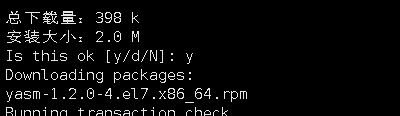
中间遇到Is this ok 选择y,如图
4、
Normal
0
7.8 磅
0
2
false
false
false
EN-US
ZH-CN
X-NONE
/* Style Definitions */
table.MsoNormalTable
{mso-style-name:普通表格;
mso-tstyle-rowband-size:0;
mso-tstyle-colband-size:0;
mso-style-noshow:yes;
mso-style-priority:99;
mso-style-parent:"";
mso-padding-alt:0cm 5.4pt 0cm 5.4pt;
mso-para-margin:0cm;
mso-para-margin-bottom:.0001pt;
mso-pagination:widow-orphan;
font-size:10.0pt;
font-family:"Times New Roman",serif;}
安装yasm完毕后执行命令
[bhsoft@localhost ffmpeg-4.2.1]$ ./configure --enable-shared --prefix=/usr/ffmpeg
5、执行make命令(这一步时间比较长,请耐心等待)
Normal
0
7.8 磅
0
2
false
false
false
EN-US
ZH-CN
X-NONE
/* Style Definitions */
table.MsoNormalTable
{mso-style-name:普通表格;
mso-tstyle-rowband-size:0;
mso-tstyle-colband-size:0;
mso-style-noshow:yes;
mso-style-priority:99;
mso-style-parent:"";
mso-padding-alt:0cm 5.4pt 0cm 5.4pt;
mso-para-margin:0cm;
mso-para-margin-bottom:.0001pt;
mso-pagination:widow-orphan;
font-size:10.0pt;
font-family:"Times New Roman",serif;}
[bhsoft@localhost ffmpeg-4.2.1]$ make
6、
Normal
0
7.8 磅
0
2
false
false
false
EN-US
ZH-CN
X-NONE
/* Style Definitions */
table.MsoNormalTable
{mso-style-name:普通表格;
mso-tstyle-rowband-size:0;
mso-tstyle-colband-size:0;
mso-style-noshow:yes;
mso-style-priority:99;
mso-style-parent:"";
mso-padding-alt:0cm 5.4pt 0cm 5.4pt;
mso-para-margin:0cm;
mso-para-margin-bottom:.0001pt;
mso-pagination:widow-orphan;
font-size:10.0pt;
font-family:"Times New Roman",serif;}
执行make install(安装)命令
[bhsoft@localhost ffmpeg-4.2.1]$ make install
7、
Normal
0
7.8 磅
0
2
false
false
false
EN-US
ZH-CN
X-NONE
/* Style Definitions */
table.MsoNormalTable
{mso-style-name:普通表格;
mso-tstyle-rowband-size:0;
mso-tstyle-colband-size:0;
mso-style-noshow:yes;
mso-style-priority:99;
mso-style-parent:"";
mso-padding-alt:0cm 5.4pt 0cm 5.4pt;
mso-para-margin:0cm;
mso-para-margin-bottom:.0001pt;
mso-pagination:widow-orphan;
font-size:10.0pt;
font-family:"Times New Roman",serif;}
修改文件/etc/ld.so.conf
使用 vim /etc/ld.so.conf命令打开文件
[bhsoft@localhost ffmpeg-4.2.1]$ vim /etc/ld.so.conf
在文件后面添加 /usr/ffmpeg/lib/
然后执行ldconfig命令使其生效
[bhsoft@localhost ffmpeg-4.2.1]$ldconfig
8、
Normal
0
7.8 磅
0
2
false
false
false
EN-US
ZH-CN
X-NONE
/* Style Definitions */
table.MsoNormalTable
{mso-style-name:普通表格;
mso-tstyle-rowband-size:0;
mso-tstyle-colband-size:0;
mso-style-noshow:yes;
mso-style-priority:99;
mso-style-parent:"";
mso-padding-alt:0cm 5.4pt 0cm 5.4pt;
mso-para-margin:0cm;
mso-para-margin-bottom:.0001pt;
mso-pagination:widow-orphan;
font-size:10.0pt;
font-family:"Times New Roman",serif;}
配置环境变量
[bhsoft@localhost ffmpeg-4.2.1]$ vim /etc/profil
使用 vim /etc/profile命令打开profile文件,在文件末添加环境变量:
#set ffmpeg environment

PATH=$PATH:/usr/ffmpeg/bin

export PATH
随后执行 source /etc/profile使配置生效
[bhsoft@localhost ffmpeg-4.2.1]$ source /etc/profile
9、查看是否配置成功
Normal
0
7.8 磅
0
2
false
false
false
EN-US
ZH-CN
X-NONE
/* Style Definitions */
table.MsoNormalTable
{mso-style-name:普通表格;
mso-tstyle-rowband-size:0;
mso-tstyle-colband-size:0;
mso-style-noshow:yes;
mso-style-priority:99;
mso-style-parent:"";
mso-padding-alt:0cm 5.4pt 0cm 5.4pt;
mso-para-margin:0cm;
mso-para-margin-bottom:.0001pt;
mso-pagination:widow-orphan;
font-size:10.0pt;
font-family:"Times New Roman",serif;}
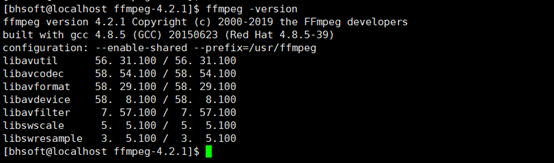
用命令ffmpeg -version查看,出现下图信息即安装成功
  Normal

  0

  7.8 磅

  0

  2

  false

  false

  false

  EN-US

  ZH-CN

  X-NONE


 /* Style Definitions */

 table.MsoNormalTable

	{mso-style-name:普通表格;

	mso-tstyle-rowband-size:0;

	mso-tstyle-colband-size:0;

	mso-style-noshow:yes;

	mso-style-priority:99;

	mso-style-parent:"";

	mso-padding-alt:0cm 5.4pt 0cm 5.4pt;

	mso-para-margin:0cm;

	mso-para-margin-bottom:.0001pt;

	mso-pagination:widow-orphan;

	font-size:10.0pt;

	font-family:"Times New Roman",serif;}


  Normal

  0

  7.8 磅

  0

  2

  false

  false

  false

  EN-US

  ZH-CN

  X-NONE


 /* Style Definitions */

 table.MsoNormalTable

	{mso-style-name:普通表格;

	mso-tstyle-rowband-size:0;

	mso-tstyle-colband-size:0;

	mso-style-noshow:yes;

	mso-style-priority:99;

	mso-style-parent:"";

	mso-padding-alt:0cm 5.4pt 0cm 5.4pt;

	mso-para-margin:0cm;

	mso-para-margin-bottom:.0001pt;

	mso-pagination:widow-orphan;

	font-size:10.0pt;

	font-family:"Times New Roman",serif;}
Normal
0
7.8 磅
0
2
false
false
false
EN-US
ZH-CN
X-NONE
/* Style Definitions */
table.MsoNormalTable
{mso-style-name:普通表格;
mso-tstyle-rowband-size:0;
mso-tstyle-colband-size:0;
mso-style-noshow:yes;
mso-style-priority:99;
mso-style-parent:"";
mso-padding-alt:0cm 5.4pt 0cm 5.4pt;
mso-para-margin:0cm;
mso-para-margin-bottom:.0001pt;
mso-pagination:widow-orphan;
font-size:10.0pt;
font-family:"Times New Roman",serif;}
CentOS7安装ffmpeg的更多相关文章
- centos7 安装 ffmpeg
升级系统 yum install epel-release -yyum update -y 安装Nux Dextop Yum源 由于centos 没有官方软件包,我们可以使用第三方YUM源(Nux D ...
- CentOS7 安装ffmpeg
安装EPEL Release,因为安装需要使用其他的repo源,所以需要EPEL支持:yum install -y epel-release#如果出现缺少Code提示,可以: sudo rpm --i ...
- 在CentOS7 安装ffmpeg
参考自:https://linuxize.com/post/how-to-install-ffmpeg-on-centos-7/ 首先切换至root用户 yum install epel-releas ...
- CentOs7.5安装FFmpeg
一.FFmpeg简介 FFmpeg是一个自由软件,可以运行音频和视频多种格式的录影.转换.流功能,包含了libavcodec ─这是一个用于多个项目中音频和视频的解码器库,以及libavformat— ...
- centos7上安装ffmpeg
FFmpeg介绍 FFmpeg是一个开源免费跨平台的视频和音频流方案,属于自由软件,采用LGPL或GPL许可证(依据你选择的组件).它提供了录制.转换以及流化音视频的完整解决方案.它包含了非常先进的音 ...
- centos7 yum安装ffmpeg,以及ffmpeg的简单用法
yum install ffmpeg: 安装EPEL Release,因为安装需要使用其他的repo源,所以需要EPEL支持: yum install -y epel-release #如果出现缺少C ...
- docker下centos7编译安装ffmpeg
1.安装基础命令 docker下精简版centos没有make等命令,先安装: yum -y install gcc automake autoconf libtool make yum instal ...
- cent7安装ffmpeg
FFmpeg是一个领先的多媒体框架工具集,几乎能够对任何格式的音视频文件进行解码,编码,转码,复用,解复用,流式传输,过滤和播放. 不管这些音视频文件所采用的格式是由某些标准委员会,社区还是公司设计的 ...
- # centos7下FFmpeg环境部署记录
# centos7下FFmpeg环境部署记录 随着视频在网站上的应用越来越多,越来越多的网站服务器需要支持视频转码,视频压缩,FFmpeg是目前最好用的网站服务器后台转码程序,应用最多.FFmpeg是 ...
随机推荐
- 【SSL题解报告】没有上司的舞会
题目: 题目描述 某大学有N个职员,编号为1~N.他们之间有从属关系,也就是说他们的关系就像一棵以校长为根的树,父结点就是子结点的直接上司.现在有个周年庆宴会,宴会每邀请来一个职员都会增加一定的快乐指 ...
- Vue.js 控制css样式
<script src="https://unpkg.com/vue/dist/vue.js"></script> <style type=" ...
- 挑战10个最难的Java面试题(附答案)【下】【华为云技术分享】
版权声明:本文为博主原创文章,遵循CC 4.0 BY-SA版权协议,转载请附上原文出处链接和本声明. 本文链接:https://blog.csdn.net/devcloud/article/detai ...
- 鲲鹏性能优化十板斧——鲲鹏处理器NUMA简介与性能调优五步法
TaiShan特战队六月底成立,至今百日有余,恰逢1024程序员节,遂整理此文,献礼致敬!希望能为广大在鲲鹏处理器上开发软件.性能调优的程序员们,提供一点帮助.从今天开始,将陆续推出性能调优专题文章. ...
- 【Python成长之路】从 零做网站开发 -- 基于Flask和JQuery,实现表格管理平台
[写在前面] 你要开发网站? 嗯.. 会Flask吗? 什么东西,没听过... 会JQuery吗? 是python的库吗 ? 那你会什么? 我会F12打开网站 好吧,那我们来写 ...
- pop 与 popitem
pop给出一个键弹出值 popitem弹出一个项 >>> a.pop(2)'two'>>> a{1: 'one', 3: 'three', 4: 'four'}&g ...
- Json schema 以及在python中的jsonschema
目录 1. JSON Schema简介 2. JSON Schema关键字详解 2.1 $schema 2.2 title和description 2.3 type 3 type常见取值 3.1 当t ...
- ios 测试网络是否连接
转自:http://blog.csdn.net/lwq421336220/article/details/16982857 - (BOOL) connectedToNetwork { //创建零地址, ...
- 2019 湖南多校第一场(2018~2019NCPC) 题解
解题过程 开场shl过B,C,然后lfw写J,J WA了以后shl写A,但是因为OJ上空间开小WA了,而不是MLE?,J加了特判过了.之后一直在检查A错哪了,直到qt发现问题改了空间,浪费许多时间,但 ...
- Vue - 组件通信之$attrs、$listeners
前言 vue通信手段有很多种,props/emit.vuex.event bus.provide/inject 等.还有一种通信方式,那就是 $attrs 和 $listeners,之前早就听说这两个 ...