
React: 研究Flux设计模式
一、简介
一般来说,State管理在React中是一种最常用的实现机制,使用这种state管理系统基本可以开发各种需求的应用程序。然而,随着应用程序规模的不断扩张,原有的这种State管理系统就会暴露出臃肿的弊端,state中大量的数据放在根组件,而且与UI联系紧密,明显会增加系统的维护成本。此时,最明智的做法就是将State数据和自身的层级进行隔离,独立于UI之外。在React外部管理State,可以大量减少类组件的使用,如果不是特别需要生命周期函数,进而转用无状态函数组件,将类的功能与HOC隔离,从而确保组件只包含无状态的UI。由于无状态函数组件是纯函数,所以构架的函数式应用程序非常容易测试。基于这种理念,Facebook团队开发了一种新的设计模式Flux。Flux设计的目的就是保持数据单向流动,它囊括四个组成部分,分别是Store、Action、Dispatcher、View,单向联系,职责不同。在Flux中,应用程序的State数据就是存放到React之外的Store中进行管理的。具体的就是说,Store保存或者修改数据,是唯一可以更新视图的入口;Action则是封装用户的操作指令和需要更新的目标数据;Dispatcher的用途是将接收的Action排队并逐一分发到相应的Store中;View就是视图层了,根据Store中State数据进行更新。注意Action和State一样,都是不可变的数据,Action来源可以是View,也可以是其他源地址,一般是Web服务器。整个数据单向流程图如下所示:
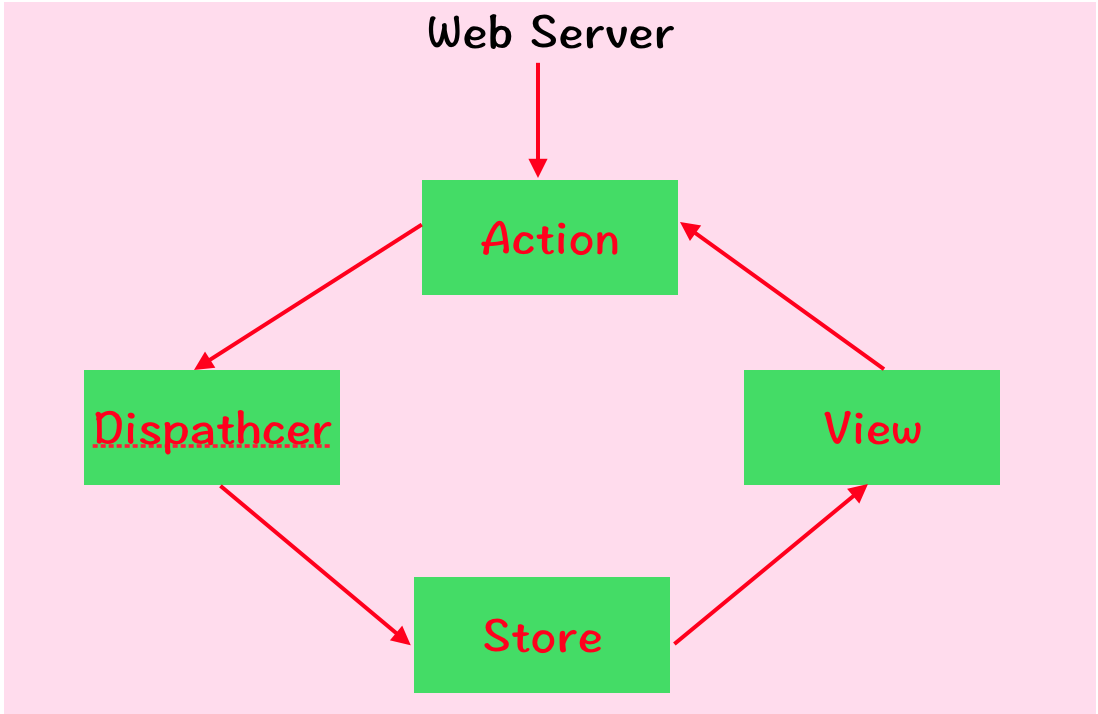
二、View
在Flux中一般用无状态函数式组件表示,Flux会管理应用的State,所以除非特别需要用到生命周期函数,否则不推荐使用类组件。示例如下:
//使用函数式组件创建一个倒计时组件

//倒计时应用的View会将计数作为属性获取。它还会接收一对函数:tick和reset,这对函数定义在下面的Action中。

//当View渲染它之后会显示倒计时,除非值为0,否则会显示点击文案。如果计数值不是0,那么超时函数一秒后执行tick函数。

//当计数值为0时,View不会被任何Action生成器触发,除非用户点击了调起重置reset函数,再次进入倒计时。

const TimeCountDown = ({count, tick, reset}) => {

    if (count){

        setTimeout(() => tick(), );

    }

    return (count) ?

        <h1>{count}</h1> :

        <div onClick={() => reset()}>

            <span>(click to start over)</span>

        </div>

};
三、Action
Action提供的指令和数据主要是Store用来修改State的。Action生成器就是函数,主要用来构造某个Action的具体细节。Action本身是由若干对象构成,并且至少包含一个类型字段用来区分。Action类型一般通过一个大写字母组成的字符串定义type类型。Action也可能打包了任何Store所需的数据,示例如下:
//当倒计时Action生成器被载入时,dispatcher会作为一个参数传递给它。每次某个TICK或者RESET函数被调用时,

//dispatcher的handleAction方法也会被调用,以便"调度"Action对象。

const timeCountDownActions = dispatcher =>

    ({

        tick() {

            dispatcher.handleAction({type: 'TICK'})

        },

        reset(count){

            dispatcher.handleAction({

                type: 'RESET',

                count

            })

        }

    });
四、Dispatcher
Dispatcher在应用程序中一直就只有一个存在。它表示设计模式中的空中管理中心。Dispatcher接收到Action,将与之有关的某些生成源信息一并打包,然后将它发送到相应的Store或者一系列Store中,以便处理这个Action。Dispatcher分派器用于将有效负载广播到已注册的回调。 这与通用的pub-sub系统有两个不同之处:(1)回调未订阅特定事件。 每个有效负载都分派给每个已注册的回调。(2)回调可以全部或部分推迟,直到执行了其他回调为止。
API基本使用如下:
//例如,考虑以下假设的飞行目的地表格,当选择一个国家时,该表格将选择默认城市:

var flightDispatcher = new Dispatcher();

//跟踪选择哪个国家

var CountryStore = {country: null};

//跟踪选择哪个城市

var CityStore = {city: null};

//跟踪选定城市的基本航班价格

var FlightPriceStore = {price: null}

//注册更改所选城市这个有效负载:

flightDispatcher.register(function(payload) {

      if (payload.actionType === 'city-update') {

        CityStore.city = payload.selectedCity;

     }

});

//当用户更改所选城市时,我们将分派有效载荷:

flightDispatcher.dispatch({

      actionType: 'city-update',

      selectedCity: 'paris'

});
详细API,类文件如下:
/**

 * Copyright (c) 2014-present, Facebook, Inc.

 * All rights reserved.

 *

 * This source code is licensed under the BSD-style license found in the

 * LICENSE file in the root directory of this source tree. An additional grant

 * of patent rights can be found in the PATENTS file in the same directory.

 *

 * @providesModule Dispatcher

 * @flow

 * @preventMunge

 */

'use strict';

var invariant = require('invariant');

export type DispatchToken = string;

var _prefix = 'ID_';

/**

 * Dispatcher is used to broadcast payloads to registered callbacks. This is

 * different from generic pub-sub systems in two ways:

 *

 *   1) Callbacks are not subscribed to particular events. Every payload is

 *      dispatched to every registered callback.

 *   2) Callbacks can be deferred in whole or part until other callbacks have

 *      been executed.

 *

 * For example, consider this hypothetical flight destination form, which

 * selects a default city when a country is selected:

 *

 *   var flightDispatcher = new Dispatcher();

 *

 *   // Keeps track of which country is selected

 *   var CountryStore = {country: null};

 *

 *   // Keeps track of which city is selected

 *   var CityStore = {city: null};

 *

 *   // Keeps track of the base flight price of the selected city

 *   var FlightPriceStore = {price: null}

 *

 * When a user changes the selected city, we dispatch the payload:

 *

 *   flightDispatcher.dispatch({

 *     actionType: 'city-update',

 *     selectedCity: 'paris'

 *   });

 *

 * This payload is digested by `CityStore`:

 *

 *   flightDispatcher.register(function(payload) {

 *     if (payload.actionType === 'city-update') {

 *       CityStore.city = payload.selectedCity;

 *     }

 *   });

 *

 * When the user selects a country, we dispatch the payload:

 *

 *   flightDispatcher.dispatch({

 *     actionType: 'country-update',

 *     selectedCountry: 'australia'

 *   });

 *

 * This payload is digested by both stores:

 *

 *   CountryStore.dispatchToken = flightDispatcher.register(function(payload) {

 *     if (payload.actionType === 'country-update') {

 *       CountryStore.country = payload.selectedCountry;

 *     }

 *   });

 *

 * When the callback to update `CountryStore` is registered, we save a reference

 * to the returned token. Using this token with `waitFor()`, we can guarantee

 * that `CountryStore` is updated before the callback that updates `CityStore`

 * needs to query its data.

 *

 *   CityStore.dispatchToken = flightDispatcher.register(function(payload) {

 *     if (payload.actionType === 'country-update') {

 *       // `CountryStore.country` may not be updated.

 *       flightDispatcher.waitFor([CountryStore.dispatchToken]);

 *       // `CountryStore.country` is now guaranteed to be updated.

 *

 *       // Select the default city for the new country

 *       CityStore.city = getDefaultCityForCountry(CountryStore.country);

 *     }

 *   });

 *

 * The usage of `waitFor()` can be chained, for example:

 *

 *   FlightPriceStore.dispatchToken =

 *     flightDispatcher.register(function(payload) {

 *       switch (payload.actionType) {

 *         case 'country-update':

 *         case 'city-update':

 *           flightDispatcher.waitFor([CityStore.dispatchToken]);

 *           FlightPriceStore.price =

 *             getFlightPriceStore(CountryStore.country, CityStore.city);

 *           break;

 *     }

 *   });

 *

 * The `country-update` payload will be guaranteed to invoke the stores'

 * registered callbacks in order: `CountryStore`, `CityStore`, then

 * `FlightPriceStore`.

 */

class Dispatcher<TPayload> {

  _callbacks: {[key: DispatchToken]: (payload: TPayload) => void};

  _isDispatching: boolean;

  _isHandled: {[key: DispatchToken]: boolean};

  _isPending: {[key: DispatchToken]: boolean};

  _lastID: number;

  _pendingPayload: TPayload;

  constructor() {

    this._callbacks = {};

    this._isDispatching = false;

    this._isHandled = {};

    this._isPending = {};

    this._lastID = ;

  }

  /**

   * Registers a callback to be invoked with every dispatched payload. Returns

   * a token that can be used with `waitFor()`.

   */

  register(callback: (payload: TPayload) => void): DispatchToken {

    var id = _prefix + this._lastID++;

    this._callbacks[id] = callback;

    return id;

  }

  /**

   * Removes a callback based on its token.

   */

  unregister(id: DispatchToken): void {

    invariant(

      this._callbacks[id],

      'Dispatcher.unregister(...): `%s` does not map to a registered callback.',

      id

    );

    delete this._callbacks[id];

  }

  /**

   * Waits for the callbacks specified to be invoked before continuing execution

   * of the current callback. This method should only be used by a callback in

   * response to a dispatched payload.

   */

  waitFor(ids: Array<DispatchToken>): void {

    invariant(

      this._isDispatching,

      'Dispatcher.waitFor(...): Must be invoked while dispatching.'

    );

    for (var ii = ; ii < ids.length; ii++) {

      var id = ids[ii];

      if (this._isPending[id]) {

        invariant(

          this._isHandled[id],

          'Dispatcher.waitFor(...): Circular dependency detected while ' +

          'waiting for `%s`.',

          id

        );

        continue;

      }

      invariant(

        this._callbacks[id],

        'Dispatcher.waitFor(...): `%s` does not map to a registered callback.',

        id

      );

      this._invokeCallback(id);

    }

  }

  /**

   * Dispatches a payload to all registered callbacks.

   */

  dispatch(payload: TPayload): void {

    invariant(

      !this._isDispatching,

      'Dispatch.dispatch(...): Cannot dispatch in the middle of a dispatch.'

    );

    this._startDispatching(payload);

    try {

      for (var id in this._callbacks) {

        if (this._isPending[id]) {

          continue;

        }

        this._invokeCallback(id);

      }

    } finally {

      this._stopDispatching();

    }

  }

  /**

   * Is this Dispatcher currently dispatching.

   */

  isDispatching(): boolean {

    return this._isDispatching;

  }

  /**

   * Call the callback stored with the given id. Also do some internal

   * bookkeeping.

   *

   * @internal

   */

  _invokeCallback(id: DispatchToken): void {

    this._isPending[id] = true;

    this._callbacks[id](this._pendingPayload);

    this._isHandled[id] = true;

  }

  /**

   * Set up bookkeeping needed when dispatching.

   *

   * @internal

   */

  _startDispatching(payload: TPayload): void {

    for (var id in this._callbacks) {

      this._isPending[id] = false;

      this._isHandled[id] = false;

    }

    this._pendingPayload = payload;

    this._isDispatching = true;

  }

  /**

   * Clear bookkeeping used for dispatching.

   *

   * @internal

   */

  _stopDispatching(): void {

    delete this._pendingPayload;

    this._isDispatching = false;

  }

}

module.exports = Dispatcher;
可以继承,示例如下:
import { Dispatcher } from 'flux';

//当handleViewAction被某一个action触发时,它会和该Action起始位置的某些数据一起被分发。

//当某一个Store被创建后,她就会被Dispatcher登记注册并开始监听相关的Action。

//当某个Action被分发后,它会按照一定的次序被处理接收,然后发送到相应的Store中

class TimeCountDownDispatcher extends Dispatcher{

    handleAction(action){

        console.log("dispatching actions:",action);

        this.dispatch({

            source: 'VIEW_ACTION',

            action

        })

    }

}
五、Store
Store主要用来存放应用程序逻辑和State数据的若干对象。当前的State数据可以通过访问Store的属性获取。某个Store需要修改State数据的所有操作指令都是由Action提供的。Store将会按照类别处理Action,并修改相关的数据。一旦数据发生了修改,该Store将会发出一个事件通知任何订阅了该Store的View,它们的数据发生了变化。首先介绍EventEmitter的API如下:
//首先安装events包

npm install events --save
EventEmitter是Facebook开发的一个开源的类event.js,完整代码为:
// Copyright Joyent, Inc. and other Node contributors.

//

// Permission is hereby granted, free of charge, to any person obtaining a

// copy of this software and associated documentation files (the

// "Software"), to deal in the Software without restriction, including

// without limitation the rights to use, copy, modify, merge, publish,

// distribute, sublicense, and/or sell copies of the Software, and to permit

// persons to whom the Software is furnished to do so, subject to the

// following conditions:

//

// The above copyright notice and this permission notice shall be included

// in all copies or substantial portions of the Software.

//

// THE SOFTWARE IS PROVIDED "AS IS", WITHOUT WARRANTY OF ANY KIND, EXPRESS

// OR IMPLIED, INCLUDING BUT NOT LIMITED TO THE WARRANTIES OF

// MERCHANTABILITY, FITNESS FOR A PARTICULAR PURPOSE AND NONINFRINGEMENT. IN

// NO EVENT SHALL THE AUTHORS OR COPYRIGHT HOLDERS BE LIABLE FOR ANY CLAIM,

// DAMAGES OR OTHER LIABILITY, WHETHER IN AN ACTION OF CONTRACT, TORT OR

// OTHERWISE, ARISING FROM, OUT OF OR IN CONNECTION WITH THE SOFTWARE OR THE

// USE OR OTHER DEALINGS IN THE SOFTWARE.

'use strict';

var R = typeof Reflect === 'object' ? Reflect : null

var ReflectApply = R && typeof R.apply === 'function'

  ? R.apply

  : function ReflectApply(target, receiver, args) {

    return Function.prototype.apply.call(target, receiver, args);

  }

var ReflectOwnKeys

if (R && typeof R.ownKeys === 'function') {

  ReflectOwnKeys = R.ownKeys

} else if (Object.getOwnPropertySymbols) {

  ReflectOwnKeys = function ReflectOwnKeys(target) {

    return Object.getOwnPropertyNames(target)

      .concat(Object.getOwnPropertySymbols(target));

  };

} else {

  ReflectOwnKeys = function ReflectOwnKeys(target) {

    return Object.getOwnPropertyNames(target);

  };

}

function ProcessEmitWarning(warning) {

  if (console && console.warn) console.warn(warning);

}

var NumberIsNaN = Number.isNaN || function NumberIsNaN(value) {

  return value !== value;

}

function EventEmitter() {

  EventEmitter.init.call(this);

}

module.exports = EventEmitter;

// Backwards-compat with node 0.10.x

EventEmitter.EventEmitter = EventEmitter;

EventEmitter.prototype._events = undefined;

EventEmitter.prototype._eventsCount = ;

EventEmitter.prototype._maxListeners = undefined;

// By default EventEmitters will print a warning if more than 10 listeners are

// added to it. This is a useful default which helps finding memory leaks.

var defaultMaxListeners = ;

Object.defineProperty(EventEmitter, 'defaultMaxListeners', {

  enumerable: true,

  get: function() {

    return defaultMaxListeners;

  },

  set: function(arg) {

    if (typeof arg !== 'number' || arg <  || NumberIsNaN(arg)) {

      throw new RangeError('The value of "defaultMaxListeners" is out of range. It must be a non-negative number. Received ' + arg + '.');

    }

    defaultMaxListeners = arg;

  }

});

EventEmitter.init = function() {

  if (this._events === undefined ||

      this._events === Object.getPrototypeOf(this)._events) {

    this._events = Object.create(null);

    this._eventsCount = ;

  }

  this._maxListeners = this._maxListeners || undefined;

};

// Obviously not all Emitters should be limited to 10. This function allows

// that to be increased. Set to zero for unlimited.

EventEmitter.prototype.setMaxListeners = function setMaxListeners(n) {

  if (typeof n !== 'number' || n <  || NumberIsNaN(n)) {

    throw new RangeError('The value of "n" is out of range. It must be a non-negative number. Received ' + n + '.');

  }

  this._maxListeners = n;

  return this;

};

function $getMaxListeners(that) {

  if (that._maxListeners === undefined)

    return EventEmitter.defaultMaxListeners;

  return that._maxListeners;

}

EventEmitter.prototype.getMaxListeners = function getMaxListeners() {

  return $getMaxListeners(this);

};

EventEmitter.prototype.emit = function emit(type) {

  var args = [];

  for (var i = ; i < arguments.length; i++) args.push(arguments[i]);

  var doError = (type === 'error');

  var events = this._events;

  if (events !== undefined)

    doError = (doError && events.error === undefined);

  else if (!doError)

    return false;

  // If there is no 'error' event listener then throw.

  if (doError) {

    var er;

    if (args.length > )

      er = args[];

    if (er instanceof Error) {

      // Note: The comments on the `throw` lines are intentional, they show

      // up in Node's output if this results in an unhandled exception.

      throw er; // Unhandled 'error' event

    }

    // At least give some kind of context to the user

    var err = new Error('Unhandled error.' + (er ? ' (' + er.message + ')' : ''));

    err.context = er;

    throw err; // Unhandled 'error' event

  }

  var handler = events[type];

  if (handler === undefined)

    return false;

  if (typeof handler === 'function') {

    ReflectApply(handler, this, args);

  } else {

    var len = handler.length;

    var listeners = arrayClone(handler, len);

    for (var i = ; i < len; ++i)

      ReflectApply(listeners[i], this, args);

  }

  return true;

};

function _addListener(target, type, listener, prepend) {

  var m;

  var events;

  var existing;

  if (typeof listener !== 'function') {

    throw new TypeError('The "listener" argument must be of type Function. Received type ' + typeof listener);

  }

  events = target._events;

  if (events === undefined) {

    events = target._events = Object.create(null);

    target._eventsCount = ;

  } else {

    // To avoid recursion in the case that type === "newListener"! Before

    // adding it to the listeners, first emit "newListener".

    if (events.newListener !== undefined) {

      target.emit('newListener', type,

                  listener.listener ? listener.listener : listener);

      // Re-assign `events` because a newListener handler could have caused the

      // this._events to be assigned to a new object

      events = target._events;

    }

    existing = events[type];

  }

  if (existing === undefined) {

    // Optimize the case of one listener. Don't need the extra array object.

    existing = events[type] = listener;

    ++target._eventsCount;

  } else {

    if (typeof existing === 'function') {

      // Adding the second element, need to change to array.

      existing = events[type] =

        prepend ? [listener, existing] : [existing, listener];

      // If we've already got an array, just append.

    } else if (prepend) {

      existing.unshift(listener);

    } else {

      existing.push(listener);

    }

    // Check for listener leak

    m = $getMaxListeners(target);

    if (m >  && existing.length > m && !existing.warned) {

      existing.warned = true;

      // No error code for this since it is a Warning

      // eslint-disable-next-line no-restricted-syntax

      var w = new Error('Possible EventEmitter memory leak detected. ' +

                          existing.length + ' ' + String(type) + ' listeners ' +

                          'added. Use emitter.setMaxListeners() to ' +

                          'increase limit');

      w.name = 'MaxListenersExceededWarning';

      w.emitter = target;

      w.type = type;

      w.count = existing.length;

      ProcessEmitWarning(w);

    }

  }

  return target;

}

EventEmitter.prototype.addListener = function addListener(type, listener) {

  return _addListener(this, type, listener, false);

};

EventEmitter.prototype.on = EventEmitter.prototype.addListener;

EventEmitter.prototype.prependListener =

    function prependListener(type, listener) {

      return _addListener(this, type, listener, true);

    };

function onceWrapper() {

  var args = [];

  for (var i = ; i < arguments.length; i++) args.push(arguments[i]);

  if (!this.fired) {

    this.target.removeListener(this.type, this.wrapFn);

    this.fired = true;

    ReflectApply(this.listener, this.target, args);

  }

}

function _onceWrap(target, type, listener) {

  var state = { fired: false, wrapFn: undefined, target: target, type: type, listener: listener };

  var wrapped = onceWrapper.bind(state);

  wrapped.listener = listener;

  state.wrapFn = wrapped;

  return wrapped;

}

EventEmitter.prototype.once = function once(type, listener) {

  if (typeof listener !== 'function') {

    throw new TypeError('The "listener" argument must be of type Function. Received type ' + typeof listener);

  }

  this.on(type, _onceWrap(this, type, listener));

  return this;

};

EventEmitter.prototype.prependOnceListener =

    function prependOnceListener(type, listener) {

      if (typeof listener !== 'function') {

        throw new TypeError('The "listener" argument must be of type Function. Received type ' + typeof listener);

      }

      this.prependListener(type, _onceWrap(this, type, listener));

      return this;

    };

// Emits a 'removeListener' event if and only if the listener was removed.

EventEmitter.prototype.removeListener =

    function removeListener(type, listener) {

      var list, events, position, i, originalListener;

      if (typeof listener !== 'function') {

        throw new TypeError('The "listener" argument must be of type Function. Received type ' + typeof listener);

      }

      events = this._events;

      if (events === undefined)

        return this;

      list = events[type];

      if (list === undefined)

        return this;

      if (list === listener || list.listener === listener) {

        if (--this._eventsCount === )

          this._events = Object.create(null);

        else {

          delete events[type];

          if (events.removeListener)

            this.emit('removeListener', type, list.listener || listener);

        }

      } else if (typeof list !== 'function') {

        position = -;

        for (i = list.length - ; i >= ; i--) {

          if (list[i] === listener || list[i].listener === listener) {

            originalListener = list[i].listener;

            position = i;

            break;

          }

        }

        if (position < )

          return this;

        if (position === )

          list.shift();

        else {

          spliceOne(list, position);

        }

        if (list.length === )

          events[type] = list[];

        if (events.removeListener !== undefined)

          this.emit('removeListener', type, originalListener || listener);

      }

      return this;

    };

EventEmitter.prototype.off = EventEmitter.prototype.removeListener;

EventEmitter.prototype.removeAllListeners =

    function removeAllListeners(type) {

      var listeners, events, i;

      events = this._events;

      if (events === undefined)

        return this;

      // not listening for removeListener, no need to emit

      if (events.removeListener === undefined) {

        if (arguments.length === ) {

          this._events = Object.create(null);

          this._eventsCount = ;

        } else if (events[type] !== undefined) {

          if (--this._eventsCount === )

            this._events = Object.create(null);

          else

            delete events[type];

        }

        return this;

      }

      // emit removeListener for all listeners on all events

      if (arguments.length === ) {

        var keys = Object.keys(events);

        var key;

        for (i = ; i < keys.length; ++i) {

          key = keys[i];

          if (key === 'removeListener') continue;

          this.removeAllListeners(key);

        }

        this.removeAllListeners('removeListener');

        this._events = Object.create(null);

        this._eventsCount = ;

        return this;

      }

      listeners = events[type];

      if (typeof listeners === 'function') {

        this.removeListener(type, listeners);

      } else if (listeners !== undefined) {

        // LIFO order

        for (i = listeners.length - ; i >= ; i--) {

          this.removeListener(type, listeners[i]);

        }

      }

      return this;

    };

function _listeners(target, type, unwrap) {

  var events = target._events;

  if (events === undefined)

    return [];

  var evlistener = events[type];

  if (evlistener === undefined)

    return [];

  if (typeof evlistener === 'function')

    return unwrap ? [evlistener.listener || evlistener] : [evlistener];

  return unwrap ?

    unwrapListeners(evlistener) : arrayClone(evlistener, evlistener.length);

}

EventEmitter.prototype.listeners = function listeners(type) {

  return _listeners(this, type, true);

};

EventEmitter.prototype.rawListeners = function rawListeners(type) {

  return _listeners(this, type, false);

};

EventEmitter.listenerCount = function(emitter, type) {

  if (typeof emitter.listenerCount === 'function') {

    return emitter.listenerCount(type);

  } else {

    return listenerCount.call(emitter, type);

  }

};

EventEmitter.prototype.listenerCount = listenerCount;

function listenerCount(type) {

  var events = this._events;

  if (events !== undefined) {

    var evlistener = events[type];

    if (typeof evlistener === 'function') {

      return ;

    } else if (evlistener !== undefined) {

      return evlistener.length;

    }

  }

  return ;

}

EventEmitter.prototype.eventNames = function eventNames() {

  return this._eventsCount >  ? ReflectOwnKeys(this._events) : [];

};

function arrayClone(arr, n) {

  var copy = new Array(n);

  for (var i = ; i < n; ++i)

    copy[i] = arr[i];

  return copy;

}

function spliceOne(list, index) {

  for (; index +  < list.length; index++)

    list[index] = list[index + ];

  list.pop();

}

function unwrapListeners(arr) {

  var ret = new Array(arr.length);

  for (var i = ; i < ret.length; ++i) {

    ret[i] = arr[i].listener || arr[i];

  }

  return ret;

}
//列举几个基本API如下:

//1、添加事件监听,一直监听

//type:事件名称

//listener:回调函数

EventEmitter.prototype.addListener = function addListener(type, listener) {};

EventEmitter.prototype.on = EventEmitter.prototype.addListener; //等同上面代码

//2、添加事件监听,只监听一次

EventEmitter.prototype.once = function once(type, listener){}

//3、移除事件监听

EventEmitter.prototype.removeListener = function removeListener(type, listener){}

EventEmitter.prototype.off = EventEmitter.prototype.removeListener;//等同上面代码

//4、移除所有监听

EventEmitter.prototype.removeAllListeners = function removeAllListeners(type){}

//5、触发监听

EventEmitter.prototype.emit = function emit(type){}
可以继承,示例如下:
import { EventEmitter } from 'events';

//Store会保存倒计时应用程序的State,也即计数值。计数值可以通过一个只读属性访问。当Action被分发后,Store会使用它们来修改计数值。

//一个TICK Action会减少计数值。一个RESET Action会重置整个计数值,以及该Action引用的所有数据。

//一旦State发生改变,Store就会发起一个事件到任何正在监听的View

export class TimeCountDownStore extends EventEmitter{

    constructor(count=, dispatcher){

        super();

        this._count = count;

        dispatcher.register(

            this.dispatch.bind(this)

        )

    }

    get count(){

        return this._count;

    }

    dispatch(payload){

        const {type,count} = payload.action;

        switch (type) {

            case 'TICK':

                this._count = this._count - ;

                this.emit("TICK");  //触发TICK事件

                return true;

            case 'RESET':

                this._count = count;

                this.emit("RESET"); //触发RESET事件

                return true;

            default:

                return true;

        }

    }

}
六、整合
首先,创建了appDispatcher,然后使用appDispatcher生成Action生成器。最后,appDispatcher被注册到了Store中,并且Store将初始化的计数值设置为10。render函数用于渲染包含计数值的View,该计数值是通过参数进行传递的。同时还有Action生成器也作为属性被传递给了该View。最后,某些监听器被添加到了Store中,从而完成整个循环流程。当Store发起了一个TICK或者RESET,它会产生一个新的计数,因此需要马上在View中渲染。然后,初始View会根据Store中的计数值进行渲染。每次View发起一个TICK或者RESET时,该Action将会沿着循环节点发送,最终作为准备重现渲染的数据返回该View。
//将这些部分综合连接起来

const appDispatcher = new TimeCountDownDispatcher();

const actions = timeCountDownActions(appDispatcher);

const store = new TimeCountDownStore(, appDispatcher);

const render = count => ReactDOM.render(

    <TimeCountDown count={count} {...actions} />,

    document.getElementById('root')

);

store.on('TICK', ()=>render(store.count));   //监听TICK事件

store.on('RESET', ()=>render(store.count));  //监听RESET事件

render(store.count);
七、演示
myTest.js
import React from 'react';

import {Dispatcher} from 'flux';

import {EventEmitter} from 'events';

//使用函数式组件创建一个倒计时组件

//倒计时应用的View会将计数作为属性获取。它还会接收一对函数:tick和reset。

//当View渲染它之后会显示倒计时,除非值为0,否则会显示点击文案。如果计数值不是0,那么超时函数一秒后执行tick函数。

//当计数值为0时,View不会被任何Action生成器触发,除非用户点击了调起重置reset函数,再次进入倒计时。

export const TimeCountDown = ({count, tick, reset}) => {

    if (count){

        setTimeout(() => tick(), );

    }

    const divStyle = {

        width: ,

        textAlign: "center",

        backgroundColor: "red",

        padding: ,

        fontFamily: "sans-serif",

    };

    const textStyle = {

        color: "white",

        fontSize: ,

        fontFamily: "sans-serif",

    };

    return (

        (count) ?

            <div style={divStyle}><h1 style={textStyle}>{count}</h1></div> :

            <div style={divStyle} onClick={() => reset()}>

                <h1 style={textStyle}>Click Restart</h1>

            </div>

    )

};

//当倒计时Action生成器被载入时,dispatcher会作为一个参数传递给它。每次某个TICK或者RESET函数被调用时,

//dispatcher的handleViewAction方法也会被调用,以便"调度"Action对象。

export const timeCountDownActions = dispatcher =>

    ({

        tick() {

            dispatcher.handleAction({type: 'TICK'})

        },

        reset(count){

            dispatcher.handleAction({

                type: 'RESET',

                count

            })

        }

    });

//当handleViewAction被某一个action触发时,它会和该Action起始位置的某些数据一起被分发。

//当某一个Store被创建后,她就会被Dispatcher登记注册并开始监听相关的Action。

//当某个Action被分发后,它会按照一定的次序被处理接收,然后发送到相应的Store中

export class TimeCountDownDispatcher extends Dispatcher{

    handleAction(action) {

        console.log("dispatching actions:", action);

        this.dispatch({

            source: 'VIEW_ACTION',

            action

        })

    }

}

//export default class App extends Component

//Store会保存倒计时应用程序的State,也即计数值。计数值可以通过一个只读属性访问。当Action被分发后,Store会使用它们来修改计数值。

//一个TICK Action会减少计数值。一个RESET Action会重置整个计数值,以及该Action引用的所有数据。

//一旦State发生改变,Store就会发起一个事件到任何正在监听的View

export class TimeCountDownStore extends EventEmitter{

    constructor(count=, dispatcher){

        super();

        this._count = count;

        dispatcher.register(

            this.dispatch.bind(this)

        )

    }

    get count(){

        return this._count;

    }

    dispatch(payload){

        const {type,count} = payload.action;

        switch (type) {

            case 'TICK':

                this._count = this._count - ;

                this.emit("TICK");  //触发TICK事件

                return true;

            case 'RESET':

                this._count = count;

                this.emit("RESET"); //触发RESET事件

                return true;

            default:

                return true;

        }

    }

}
index.js
import React from 'react';

import ReactDOM from 'react-dom';

import './index.css';

import {TimeCountDown, timeCountDownActions, TimeCountDownDispatcher, TimeCountDownStore} from './myTest'

//将这些部分综合连接起来

const appDispatcher = new TimeCountDownDispatcher();

const actions = timeCountDownActions(appDispatcher);

const store = new TimeCountDownStore(, appDispatcher);

const render = count => ReactDOM.render(

    <TimeCountDown count={count} {...actions} />,

    document.getElementById('root')

);

store.on("TICK", ()=>render(store.count));  //监听TICK事件

store.on("RESET", ()=>render(store.count)); //监听RESET事件

render(store.count);
结果如下:可以看到每一个action被分派执行

八、引用
实现Flux模式的方法有很多种。一些库基于这种设计模式的特定实现已经开源了。如下所示:
Flux(https://facebook.github.io/flux/)。该库包含一个Dispatcher的实现。
Reflux(https://github.com/reflux/reflux.js)。单向数据流的简化版实现,主要聚焦于Action、Store和View。
Flummox(http://acdlite.github.io/flummox)。一个Flux模式的具体实现,允许用户通过扩展JavaScript类来构建Flux模块。
Fluxible(http://fluxble.io)。一个由Yahoo创建的Flux框架,用于同构Flux应用。
Redux(http://redux.js.org)。一个类Flux库,用于函数取代对象来实现模块化。目前最受欢迎的Flux框架之一。
MobX(https://mobx.js.org/getting-started.html)。一个State管理库,使用观察检测来响应State中的变化。
React: 研究Flux设计模式的更多相关文章
- react及flux架构范例Todomvc分析
react及flux架构范例Todomvc分析 通过分析flux-todomvc源码,学习如何通过react构建web程序,了解编写react应用程序的一般步骤,同时掌握Flux的单向数据流动架构思想 ...
- 理顺react,flux,redux这些概念的关系
作者:北溟小鱼hk链接:https://www.zhihu.com/question/47686258/answer/107209140来源:知乎著作权归作者所有.商业转载请联系作者获得授权,非商业转 ...
- React: 研究Redux的使用
一.简介 在上一篇文章中,大概讲了下Flux设计模式的使用,在末尾顺便提了一些基于Flux的脚本库,其中Redux已经毋庸置疑地成为了众多脚本库的翘楚之一.是的,Redux是基于Flux开发的,Red ...
- 使用 React 和 Flux 创建一个记事本应用
React,来自 Facebook,是一个用来创建用户界面的非常优秀的类库.唯一的问题是 React 不会关注于你的应用如何处理数据.大多数人把 React 当做 MV* 中的 V.所以,Facebo ...
- 【转】浅谈React、Flux 与 Redux
本文转自<浅谈React.Flux 与 Redux>,转载请注明出处. React React 是一个 View 层的框架,用来渲染视图,它主要做几件事情: 组件化 利用 props 形成 ...
- 前端框架react研究
摘要: 最近公司要做一个嵌套在app中的应用,考虑着用Facebook的react来开发view,所以就研究了下.下面是我在开发中遇到的坑,希望能给你帮助. 项目地址:https://github.c ...
- [React] 07 - Flux: uni-flow for react
相关资源 Ref: [Android Module] 03 - Software Design and Architecture Ref: Flux 架构入门教程 Ref: 详解React Flux架 ...
- 【11】react 之 flux
Flux 是 Facebook 使用的一套前端应用的架构模式.React 标榜自己是 MVC 里面 V 的部分,那么 Flux 就相当于添加 M 和 C 的部分. 1.1. Flux介绍 Flux并 ...
- 浅谈 React、Flux 与 Redux
React React 是一个 View 层的框架,用来渲染视图,它主要做几件事情: 组件化利用 props 形成单向的数据流根据 state 的变化来更新 view利用虚拟 DOM 来提升渲染性能 ...
随机推荐
- 【Android - 控件】之可悬浮列表StickyHeadersRecyclerView
这是timehop的GitHub上发表的一个控件框架,大家可以去参考它的[GitHub]. 这里先贴出GitHub上提供的效果图: 要使用这个框架,我们需要首先导入它的依赖: compile 'com ...
- Nginx访问日志、日志切割、静态文件不记录日志和过期时间
6月8日任务 12.10 Nginx访问日志12.11 Nginx日志切割12.12 静态文件不记录日志和过期时间 12.10 Nginx访问日志 除了在主配置文件nginx.conf里定义日志格式外 ...
- linux下svn服务器端的操作
1.停止svn服务器端: [root@ www]# ps -ef|grep svnroot 21698 1 0 09:55 ? 00:00:00 svnserve -d -r /www/svn/roo ...
- 【Java】Java中的final关键字和static
0.概述 final关键字表示是不可变的: 下面分别从属性(字段).方法.类中进行说明: 1.属性(or字段),表示常量 final声明在属性(or字段)中,表示常量,有两种初始化方法,1是在声明时直 ...
- vue实例化过程
我们在用vue进行开发项目时,是否存在疑惑,new Vue(xxx)的过程中,究竟发生了什么?定义的数据,是如何绑定到视图上的?本篇主要介绍在实例化vue时,主要做了哪些事,文章比较长,主要篇幅内容为 ...
- openssl的移植
下载openssl1.1并解压,进入openssl根目录,执行配置命令 ./Configure linux-armv4 --prefix=$(pwd)/__install 这里使用当前目录下的__in ...
- error Couldn't find a package.json file in
error Couldn't find a package.json file in解决方法:首先初始化,再安装相应的文件 (1). npm init -f //强迫初始化文件 (2). npm in ...
- 二分查找-Java版
/** * * 二分查找算法 * * * * @param srcArray 有序数组 * * @param target 查找元素 * * @return srcArray数组下标,没找到返回-1 ...
- [Coursera][计算导论与C语言基础][Week 10]对于“数组应用练习”课后习题的思考题的一些想法
(首先,关于Honor Code,我咨询过了Help Center,分享课后练习的思考题的想法是可以的(注意不是代码),但要标明引用,引用格式来源于https://guides.lib.monash. ...
- Python计算IV值
更多大数据分析.建模等内容请关注公众号<bigdatamodeling> 在对变量分箱后,需要计算变量的重要性,IV是评估变量区分度或重要性的统计量之一,python计算IV值的代码如下: ...