
ASP.NET Core框架深度学习(三) Server对象
8、Server 第五个对象
服务器在管道中的职责非常明确,当我们启动应用宿主的WebHost的时候,服务它被自动启动。启动后的服务器会绑定到指定的端口进行请求监听,一旦有请求抵达,服务器会根据该请求创建出代表上下文的HttpContext对象,并将该上下文作为输入调用由所有注册中间件构建而成的RequestDelegate对象。
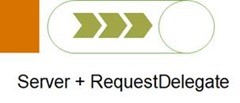
简单起见,我们使用如下这个简写的IServer接口来表示服务器。我们通过定义在IServer接口的唯一方法StartAsync启动服务器,作为参数的handler正是由所有注册中间件共同构建而成的RequestDelegate对象
public interface IServer

{

    Task StartAsync(RequestDelegate handler);

}

public class HttpListenerServer : IServer

{

    private readonly HttpListener _httpListener;// System.Net.HttpListener

    private readonly string[] _urls;

    public HttpListenerServer(params string[] urls)

    {

        _httpListener = new HttpListener();

        _urls = urls.Any() ? urls : new string[] { "http://localhost:5000/" };

    }

    public async Task StartAsync(RequestDelegate handler)

    {

        Array.ForEach(_urls, url => _httpListener.Prefixes.Add(url));

        _httpListener.Start();

        Console.WriteLine("Server started and is listening on: {0}", string.Join(';', _urls));

        while (true)

        {

            var listenerContext = await _httpListener.GetContextAsync();

            var feature = new HttpListenerFeature(listenerContext);

            var features = new FeatureCollection()

                .Set<IHttpRequestFeature>(feature)

                .Set<IHttpResponseFeature>(feature);

            var httpContext = new HttpContext(features);

            await handler(httpContext);

            listenerContext.Response.Close();

        }

    }

}
9、HttpContext和Server之间的适配
面向应用层的HttpContext对象是对请求和响应的封装,但是请求最初来源于服务器,针对HttpContext的任何响应操作也必需作用于当前的服务器才能真正起作用。现在问题来了,所有的ASP.NET Core应用使用的都是同一个HttpContext类型,但是却可以注册不同类型的服务器,我们必需解决两者之间的适配问题。
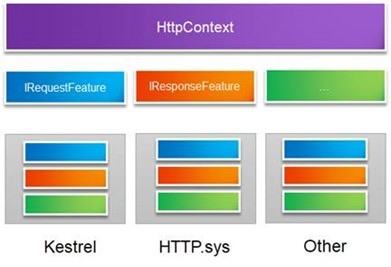
计算机领域有一句非常经典的话:“任何问题都可以通过添加一个抽象层的方式来解决,如果解决不了,那就再加一层”。同一个HttpContext类型与不同服务器类型之间的适配问题也可可以通过添加一个抽象层来解决,我们定义在该层的对象称为Feature。如上图所示,我们可以定义一系列的Feature接口来为HttpContext提供上下文信息,其中最重要的就是提供请求的IRequestFeature和完成响应的IResponseFeature接口。那么具体的服务器只需要实现这些Feature接口就可以了。
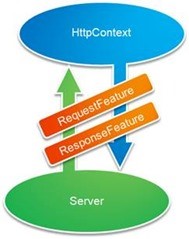
我们接着从代码层面来看看具体的实现。如下面的代码片段所示,我们定义了一个IFeatureCollection接口来表示存放Feature对象的集合。从定义可以看出这是一个以Type和Object作为Key和Value的字典,Key代表注册Feature所采用的类型,而Value自然就代表Feature对象本身,话句话说我们提供的Feature对象最终是以对应Feature类型(一般为接口类型)进行注册的。为了编程上便利,我们定义了两个扩展方法Set<T>和Get<T>来设置和获取Feature对象。
public interface IFeatureCollection : IDictionary<Type, object> { }

public class FeatureCollection : Dictionary<Type, object>, IFeatureCollection { }

public static partial class Extensions

{

    public static T Get<T>(this IFeatureCollection features) => features.TryGetValue(typeof(T), out var value) ? (T)value : default(T);

    public static IFeatureCollection Set<T>(this IFeatureCollection features, T feature)

    {

        features[typeof(T)] = feature;

        return features;

    }

}
如下所示的用来提供请求和响应IHttpRequestFeature和IHttpResponseFeature接口的定义,可以看出它们具有与HttpRequest和HttpResponse完全一致的成员定义。
public interface IHttpRequestFeature

{

    Uri                     Url { get; }

    NameValueCollection     Headers { get; }

    Stream                  Body { get; }

}

public interface IHttpResponseFeature

{

    int                       StatusCode { get; set; }

    NameValueCollection     Headers { get; }

    Stream                  Body { get; }

}
接下来我们来看看HttpContext的具体实现。ASP.NET Core Mini的HttpContext只包含Request和Response两个属性成员,对应的类型分别为HttpRequest和HttpResponse,如下所示的就是这两个类型的具体实现。我们可以看出HttpRequest和HttpResponse都是通过一个IFeatureCollection对象构建而成的,它们对应的属性成员均有分别由包含在这个Feature集合中的IHttpRequestFeature和IHttpResponseFeature对象来提供的。
public class HttpRequest

{

    private readonly IHttpRequestFeature _feature;

    public  Uri Url => _feature.Url;

    public  NameValueCollection Headers => _feature.Headers;

    public  Stream Body => _feature.Body;

    public HttpRequest(IFeatureCollection features) => _feature = features.Get<IHttpRequestFeature>();

}

public class HttpResponse

{

    private readonly IHttpResponseFeature _feature;

    public  NameValueCollection Headers => _feature.Headers;

    public  Stream Body => _feature.Body;

    public int StatusCode { get => _feature.StatusCode; set => _feature.StatusCode = value; }

    public HttpResponse(IFeatureCollection features) => _feature = features.Get<IHttpResponseFeature>();

}
HttpContext的实现就更加简单了。如下面的代码片段所示,我们在创建一个HttpContext对象是同样会提供一个IFeatureCollection对象,我们利用该对象创建对应的HttpRequest和HttpResponse对象,并作为对应的属性值。
public class HttpContext

{

    public  HttpRequest Request { get; }

    public  HttpResponse Response { get; }

    public HttpContext(IFeatureCollection features)

    {

        Request = new HttpRequest(features);

        Response = new HttpResponse(features);

    }

}
IfeatureCollection在源码里面也有定义 Microsoft.AspNetCore.Http.Features AspNetCore-2.2.4lib的http命名空间
//

// 摘要:

//     Represents a collection of HTTP features.

[DefaultMember("Item")]

public interface IFeatureCollection : IEnumerable<KeyValuePair<Type, object>>, IEnumerable

{

    //

    // 摘要:

    //     Gets or sets a given feature. Setting a null value removes the feature.

    //

    // 参数:

    //   key:

    //

    // 返回结果:

    //     The requested feature, or null if it is not present.

    object this[Type key] { get; set; }

    //

    // 摘要:

    //     Indicates if the collection can be modified.

    bool IsReadOnly { get; }

    // 摘要:

    //     Incremented for each modification and can be used to verify cached results.

    int Revision { get; }

    //

    // 摘要:

    //     Retrieves the requested feature from the collection.

    // 类型参数:

    //   TFeature:

    //     The feature key.

    // 返回结果:

    //     The requested feature, or null if it is not present.

    TFeature Get<TFeature>();

    // 摘要:

    //     Sets the given feature in the collection.

    // 参数:

    //   instance:

    //     The feature value.

    // 类型参数:

    //   TFeature:

    //     The feature key.

    void Set<TFeature>(TFeature instance);

}

namespace Microsoft.AspNetCore.Http.Features

{

    /// <summary>

    /// Contains the details of a given request. These properties should all be mutable.

    /// None of these properties should ever be set to null.

    /// </summary>

    public interface IHttpRequestFeature

    {

        /// <summary>

        /// The HTTP-version as defined in RFC 7230. E.g. "HTTP/1.1"

        /// </summary>

        string Protocol { get; set; }

        /// <summary>

        /// The request uri scheme. E.g. "http" or "https". Note this value is not included

        /// in the original request, it is inferred by checking if the transport used a TLS

        /// connection or not.

        /// </summary>

        string Scheme { get; set; }

        /// <summary>

        /// The request method as defined in RFC 7230. E.g. "GET", "HEAD", "POST", etc..

        /// </summary>

        string Method { get; set; }

        /// <summary>

        /// The first portion of the request path associated with application root. The value

        /// is un-escaped. The value may be string.Empty.

        /// </summary>

        string PathBase { get; set; }

        /// <summary>

        /// The portion of the request path that identifies the requested resource. The value

        /// is un-escaped. The value may be string.Empty if <see cref="PathBase"/> contains the

        /// full path.

        /// </summary>

        string Path { get; set; }

        /// <summary>

        /// The query portion of the request-target as defined in RFC 7230. The value

        /// may be string.Empty. If not empty then the leading '?' will be included. The value

        /// is in its original form, without un-escaping.

        /// </summary>

        string QueryString { get; set; }

        /// <summary>

        /// The request target as it was sent in the HTTP request. This property contains the

        /// raw path and full query, as well as other request targets such as * for OPTIONS

        /// requests (https://tools.ietf.org/html/rfc7230#section-5.3).

        /// </summary>

        /// <remarks>

        /// This property is not used internally for routing or authorization decisions. It has not

        /// been UrlDecoded and care should be taken in its use.

        /// </remarks>

        string RawTarget { get; set; }

        /// <summary>

        /// Headers included in the request, aggregated by header name. The values are not split

        /// or merged across header lines. E.g. The following headers:

        /// HeaderA: value1, value2

        /// HeaderA: value3

        /// Result in Headers["HeaderA"] = { "value1, value2", "value3" }

        /// </summary>

        IHeaderDictionary Headers { get; set; }

        /// <summary>

        /// A <see cref="Stream"/> representing the request body, if any. Stream.Null may be used

        /// to represent an empty request body.

        /// </summary>

        Stream Body { get; set; }

    }

}
10、HttpListenerServer
在对服务器和它与HttpContext的适配原理具有清晰的认识之后,我们来尝试着自己定义一个服务器。在前面的Hello World实例中,我们利用WebHostBuilder的扩展方法UseHttpListener注册了一个HttpListenerServer,我们现在就来看看这个采用HttpListener作为监听器的服务器类型是如何实现的。
由于所有的服务器都需要自己的Feature实现来为HttpContext提供对应的上下文信息,所以我们得先来为HttpListenerServer定义相应的接口。对HttpListener稍微了解的朋友应该知道它在接收到请求之后同行会创建一个自己的上下文对象,对应的类型为HttpListenerContext。如果采用HttpListenerServer作为应用的服务器,意味着HttpContext承载的上下文信息最初来源于这个HttpListenerContext,所以Feature的目的旨在解决这两个上下文之间的适配问题。
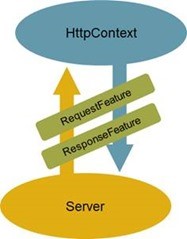
如下所示的HttpListenerFeature就是我们为HttpListenerServer定义的Feature。HttpListenerFeature同时实现了IHttpRequestFeature和IHttpResponseFeature,实现的6个属性成员最初都来源于创建该Feature对象提供的HttpListenerContext对象。
public class HttpListenerFeature : IHttpRequestFeature, IHttpResponseFeature

{

    private readonly HttpListenerContext _context;

    public HttpListenerFeature(HttpListenerContext context) => _context = context;

Uri IHttpRequestFeature.Url => _context.Request.Url;

    NameValueCollection IHttpRequestFeature.Headers => _context.Request.Headers;

NameValueCollection IHttpResponseFeature.Headers => _context.Response.Headers;

    Stream IHttpRequestFeature.Body => _context.Request.InputStream;

Stream IHttpResponseFeature.Body => _context.Response.OutputStream;

    int IHttpResponseFeature.StatusCode { get => _context.Response.StatusCode; set => _context.Response.StatusCode = value; }

}
如下所示的是HttpListenerServer的最终定义。我们在构造一个HttpListenerServer对象的时候可以提供一组监听地址,如果没有提供,会采用“localhost:5000”作为默认的监听地址。在实现的StartAsync方法中,我们启动了在构造函数中创建的HttpListenerServer对象,并在一个循环中通过调用其GetContextAsync方法实现了针对请求的监听和接收。
public class HttpListenerServer : IServer

{

    private readonly HttpListener     _httpListener;

    private readonly string[]             _urls;

    public HttpListenerServer(params string[] urls)

    {

        _httpListener = new HttpListener();

        _urls = urls.Any()?urls: new string[] { "http://localhost:5000/"};

    }

    public async Task StartAsync(RequestDelegate handler)

    {

        Array.ForEach(_urls, url => _httpListener.Prefixes.Add(url));

        _httpListener.Start();

        while (true)

        {

            var listenerContext = await _httpListener.GetContextAsync();

            var feature = new HttpListenerFeature(listenerContext);

            var features = new FeatureCollection()

                .Set<IHttpRequestFeature>(feature)

                .Set<IHttpResponseFeature>(feature);

            var httpContext = new HttpContext(features);

            await handler(httpContext);

            listenerContext.Response.Close();

        }

    }

}
当HttpListener监听到抵达的请求后,我们会得到一个HttpListenerContext对象,此时我们只需要据此创建一个HttpListenerFeature对象并它分别以IHttpRequestFeature和IHttpResponseFeature接口类型注册到创建FeatureCollection集合上。我们最终利用这个FeatureCollection对象创建出代表上下文的HttpContext,然后将它作为参数调用由所有中间件共同构建的RequestDelegate对象即可。
ASP.NET Core框架深度学习(三) Server对象的更多相关文章
- ASP.NET Core框架深度学习(四)宿主对象
11.WebHost 第六个对象 到目前为止我们已经知道了由一个服务器和多个中间件构成的管道是如何完整针对请求的监听.接收.处理和最终响应的,接下来来讨论这样的管道是如何被构建出来的.管道是在作为应 ...
- ASP.NET Core框架深度学习(二) 管道对象
4.HttpContext 第一个对象 我们的ASP.NET Core Mini由7个核心对象构建而成.第一个就是大家非常熟悉的HttpContext对象,它可以说是ASP.NET Core应用开发中 ...
- ASP.NET Core框架深度学习(一) Hello World
对于学习Core的框架,对我帮助最大的一篇文章是Artech的<200行代码,7个对象——让你了解ASP.NET Core框架的本质>,最近我又重新阅读了一遍该文.本系列文章就是结合我的阅 ...
- ASP.NET Core 框架本质学习
本文作为学习过程中的一个记录. 学习文章地址: https://www.cnblogs.com/artech/p/inside-asp-net-core-framework.html 一. ASP.N ...
- 一个Mini的ASP.NET Core框架的实现
一.ASP.NET Core Mini 在2019年1月的微软技术(苏州)俱乐部成立大会上,蒋金楠老师(大内老A)分享了一个名为“ASP.NET Core框架揭秘”的课程,他用不到200行的代码实现了 ...
- 200行代码,7个对象——让你了解ASP.NET Core框架的本质
2019年1月19日,微软技术(苏州)俱乐部成立,我受邀在成立大会上作了一个名为<ASP.NET Core框架揭秘>的分享.在此次分享中,我按照ASP.NET Core自身的运行原理和设计 ...
- 了解ASP.NET Core框架的本质
了解ASP.NET Core框架的本质 ASP.NET Core自身的运行原理和设计思想创建了一个 “迷你版” 的ASP.NET Core框架,并且利用这个 “极简” 的模拟框架阐述了ASP.NET ...
- 200行代码,7个对象——让你了解ASP.NET Core框架的本质
原文:200行代码,7个对象--让你了解ASP.NET Core框架的本质 2019年1月19日,微软技术(苏州)俱乐部成立,我受邀在成立大会上作了一个名为<ASP.NET Core框架揭秘&g ...
- ASP.NET Core框架的本质
源文章地址:http://www.cnblogs.com/artech/p/inside-asp-net-core-framework.html 1.从Hello World谈起 当我们最开始学习一门 ...
随机推荐
- 花了三个月终于把所有的 Python 库全部整理了!可以说很全面了
库名称简介 Chardet字符编码探测器,可以自动检测文本.网页.xml的编码. colorama主要用来给文本添加各种颜色,并且非常简单易用. Prettytable主要用于在终端或浏览器端构建格式 ...
- 调试seanbell/intrinsic遇到的坑
那些遗忘过去的人注定要重蹈覆辙.——乔治•桑塔亚纳 Authorized error 刚开始按作者 GitHub 上的指示,当运行环境配置好,并且 make 之后,因为生成的 decompose.p ...
- 带有Spring Boot和MySQL的Docker:简介(Part 1)
通过优锐课java学习分享中,我们看一下带有Spring Boot和MySQL的Docker教程.非常实用,分享给大家参考学习. Docker是一种技术,开发人员或DevOps团队可以使用容器来构建, ...
- adb devices无法连接mumu模拟器
解决方案: 如果你的android环境能够直接访问 adb 的相关指令.只需要把mumu模拟器打开 然后打开cmd -> 输入 adb connect 127.0.0.1:7555 就能直接连上 ...
- 基于Casbin实现ABAC
最近同事在研究Casbin的权限设计,我们主要是考虑使用ABAC基于属性的访问控制,Casbin给的示例不多,于是自己写了几个示例. 首先我们看看提到ABAC时,一般描述如下: ABAC被一些人称为是 ...
- 可能是最详细的UMD模块入门指南
学习UMD 介绍 这个仓库记录了一些关于javascript UMD模块规范的demo,对我学习UMD规范有了很大帮助,希望也能帮助到你. 回顾 之前也写了几篇关于javascript模块的博客,链接 ...
- Mybatis的原理分析1(@Mapper是如何生效的)
接着我们上次说的SpringBoot自动加载原理.我们大概明白了在maven中引入mybatis后,这个模块是如下加载的. 可能会有人问了,一般我们的dao层都是通过Mapper接口+Mapper.x ...
- C#斐波那契数列求法(比较阶乘和循环所用时间)
using System; namespace ConsoleApp3 { class Program { static void Main(string[] args) { Console.Writ ...
- 数据结构笔记1(c++)_指针
一.数据结构概述 1.定义: 我们如何把现实中大量而复杂的问题,以特定的数据类型和特定的存储结构保存到主存储器(内存)中,以及在此基础上为实现某个功能(比如查找某个元素,删除某个元素,对所有元素进行排 ...
- 新书上线:《Spring Boot+Spring Cloud+Vue+Element项目实战:手把手教你开发权限管理系统》,欢迎大家买回去垫椅子垫桌脚
新书上线 大家好,笔者的新书<Spring Boot+Spring Cloud+Vue+Element项目实战:手把手教你开发权限管理系统>已上线,此书内容充实.材质优良,乃家中必备垫桌脚 ...