
DataGridView中实现点击单元格Cell动态添加自定义控件
场景
鼠标点击DataGridView的某个单元格时,此单元格添加一个自定义的控件,这里以
添加下拉框为例
效果
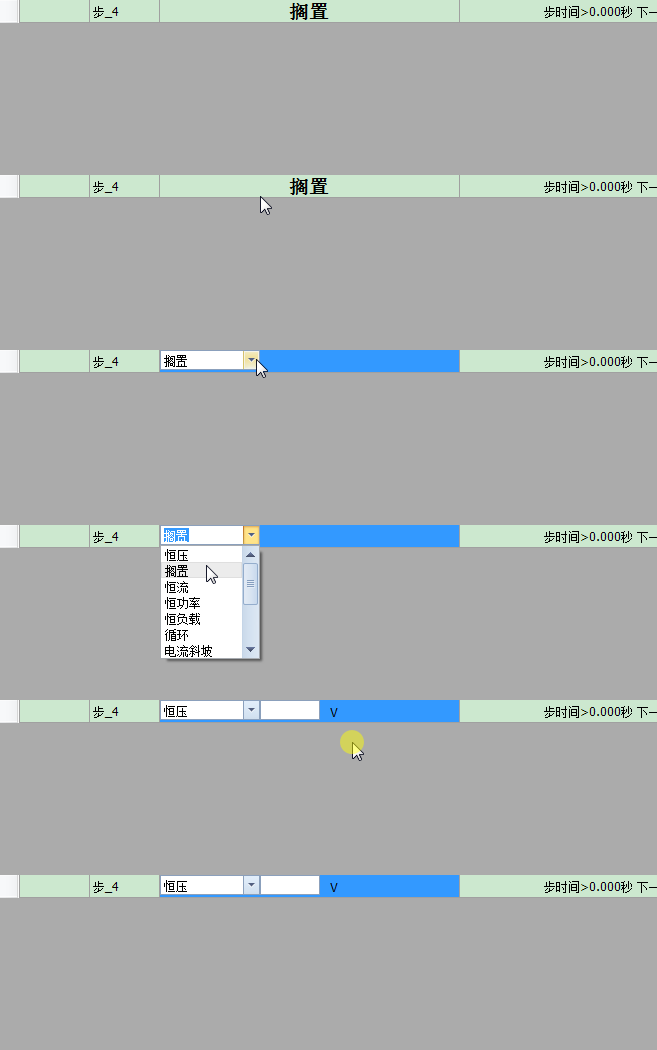
注:
博客主页:
https://blog.csdn.net/badao_liumang_qizhi
关注公众号
霸道的程序猿
获取编程相关电子书、教程推送与免费下载。
实现
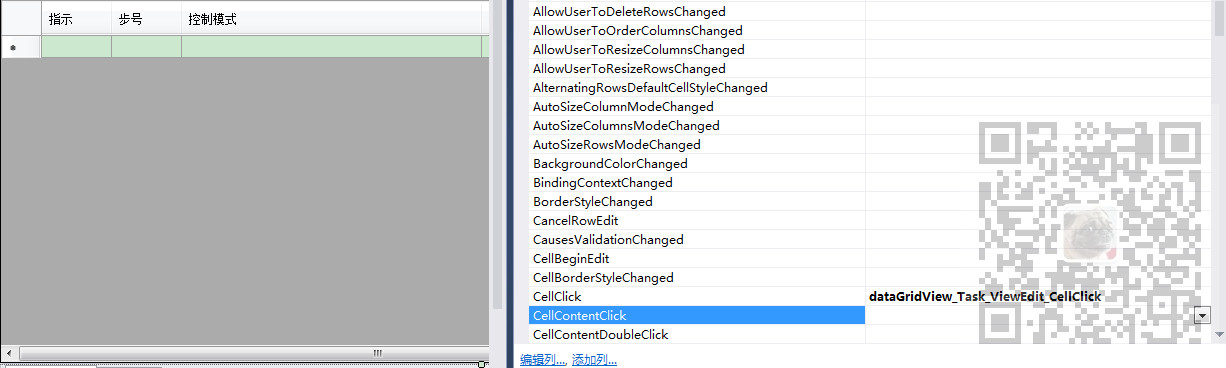
在设计器页面,找到DataGridView的单元格点击事件CellClick,然后双击进入其点击事件中
private void dataGridView_Task_ViewEdit_CellClick(object sender, DataGridViewCellEventArgs e)

        {

            //获取当前点击的列的index

            int currentColumnindex = dataGridView_Task_ViewEdit.CurrentCell.ColumnIndex;

            //获取当前行的index

            int currentRowindex = dataGridView_Task_ViewEdit.CurrentCell.RowIndex;

            switch (currentColumnindex)

            {

                case :

                    //第三列-控制模式

                    Cell2Click(currentColumnindex,currentRowindex);

                    break;

                case :

                    //第四列-跳转条件

                    break;

                case :

                    //第五列-记录条件

                    break;

                case :

                    //第六列-电流量程

                    break;

                default:

                    break;

            }

        }
然后在通过当前列的Index判断是那一列,再执行具体的操作,添加不同的控件。
这里操作第三列,然后执行方法Cell2Click,并将当前行与列的index传递。
private void Cell2Click(int currentColumnindex, int currentRowindex)

        {

            //下拉框控件

            DevExpress.XtraEditors.ComboBoxEdit comboBox = new DevExpress.XtraEditors.ComboBoxEdit();  //添加ComboBox

            comboBox.Name = "ControlModel_ComBox";

            ComboBoxItemCollection coll = comboBox.Properties.Items;

            //添加

            this.dataGridView_Task_ViewEdit.Controls.Add(comboBox);

            //获取当前单元格的内容

            string currentCellValue = this.dataGridView_Task_ViewEdit.Rows[currentRowindex].Cells[currentColumnindex].Value.ToString();

            //清空单元格内容

            this.dataGridView_Task_ViewEdit.Rows[currentRowindex].Cells[currentColumnindex].Value = String.Empty;

            //获取大小

            Rectangle rect = dataGridView_Task_ViewEdit.GetCellDisplayRectangle(currentColumnindex, currentRowindex, true);

            //大小设置

            comboBox.Size = new Size((rect.Width / ), rect.Height);

            //位置设置

            comboBox.Location = new Point(rect.Left, rect.Top);

            //根据配置文件获取下拉框items选项

            int i=;

            List<ControlModelItem> controlModelItems = TaskViewEditHelper.GetComboBoxItems(System.IO.Path.Combine(Global.AppConfig.SysConfigPath, Global.CONTROL_MODEL_ITEMS_FILE_PATH));

            foreach(ControlModelItem controlModelItem in controlModelItems)

            {

                coll.Add(controlModelItem);

                if (controlModelItem.Value == currentCellValue)

                    comboBox.SelectedIndex = i;

                i++;

            }

            //通过下面可以获取选中项的内容

            ////if (comboBox.SelectedItem != null)

            ////{

            ////    string key = (comboBox.SelectedItem as ControlModelItem).Key;

            ////    string value = (comboBox.SelectedItem as ControlModelItem).Value;

            ////}

            //绑定事件--控制模式下拉框选项改变

            comboBox.SelectedValueChanged += comboBox_SelectedValueChanged;

        }
这里是添加了一个DevExpress的下拉框控件ComboBoxEdit控件,并添加下拉框选项,然后绑定下拉框内容改变的事件comboBox_SelectedValueChanged。
同理在改变下拉框选项的事件中在分别实现添加控件
private void comboBox_SelectedValueChanged(object sender, EventArgs e)

        {

            int controlCount = this.dataGridView_Task_ViewEdit.Controls.Count;

            //初始化会有三个控件

            if (controlCount>)

            {

                for (int i = ; i < controlCount; i++)

                {

                    //删除第三个之后的控件,删除后索引减1 所以循环删除第四个控件

                    this.dataGridView_Task_ViewEdit.Controls.RemoveAt();

                }

            }

            DevExpress.XtraEditors.ComboBoxEdit comboBox = sender as ComboBoxEdit;

            ControlModelItem controlModelItem = comboBox.SelectedItem as ControlModelItem;

            string controlModelItemkey = controlModelItem.Key;

            switch (controlModelItemkey)

            {

                //恒压

                case "ConstantVoltage":

                    int currentColumnindex = dataGridView_Task_ViewEdit.CurrentCell.ColumnIndex;

                    int currentRowindex = dataGridView_Task_ViewEdit.CurrentCell.RowIndex;

                    TextEdit textEdit = new TextEdit();

                    textEdit.Name = "ControlMode_ConstantVoltage_textEdit";

                    this.dataGridView_Task_ViewEdit.Controls.Add(textEdit);

                    //获取大小

                    Rectangle rect = dataGridView_Task_ViewEdit.GetCellDisplayRectangle(currentColumnindex, currentRowindex, true);

                    //大小设置

                    textEdit.Size = new Size((rect.Width / ) + Global.CONTROL_DISTANCE, rect.Height);

                    //位置设置

                    textEdit.Location = new Point(rect.Left + (rect.Width / ), rect.Top);

                    LabelControl label = new LabelControl();

                    label.Name = "ControlMode_ConstantVoltage_label";

                    this.dataGridView_Task_ViewEdit.Controls.Add(label);

                    label.Text = "V";

                    //位置设置

                    label.Location = new Point(rect.Left + (rect.Width / ) + (rect.Width / ) + Global.CONTROL_DISTANCE * , rect.Top + Global.LABEL_FROM_TOP_DISTANCE);

                    break;

                case "Shelve":

                    break;

                case "ConstantCurrent":

                    break;

                case "ConstantPower":

                    break;

                case "ConstantLoad":

                    break;

                case "Cycle":

                    break;

                case "CurrentSlope":

                    break;

                case "CurrentLadder":

                    break;

                case "ConstantVoltageLimitCurrent":

                    break;

                case "CurrentPulse":

                    break;

                case "WorkingConditionSimulation":

                    break;

                case "PowerRamp":

                    break;

                case "PowerLadder":

                    break;

                default:

                    break;

            }

        }
DataGridView中实现点击单元格Cell动态添加自定义控件的更多相关文章
- C# 在DataGridView中,点击单元格调出 TreeView控件 或 ListBox控件
1.调出 TreeView控件 或 ListBox控件 private void deductGrid1_CellClick(object sender, DataGridViewCellEvent ...
- Easyui之datagrid实现点击单元格修改单元格背景颜色
前段时间有个需求中有点击datagrid的单元格实现某种事件,调用datagrid的onclickCell这个方法很容易实现,但是体验不好啊,完全不知道自己刚才点击的是哪个单元格,然后就尝试单击单元格 ...
- dev gridview指定单元格cell获取坐标
DevExpress.XtraGrid.Views.Grid.ViewInfo.GridViewInfo Info2 = gvQueryResult.GetViewInfo() as DevExpre ...
- DataGridView获取或者设置当前单元格的内容
当前单元格指的是DataGridView焦点所在的单元格,它可以通过DataGridView对象的CurrentCell属性取得.如果当前单元格不存在的时候,返回null. 取得当前单元格的内容: o ...
- GridView控件点击单元格如何获取该列的列标题
本博文Insus.NET教你实现在GridView控件中,用mouse点击某单元格之后,希望能获取到该列的列标题. 创建一个网页,创建一个GridView控件: 去cs绑定数据给GridView控件: ...
- jxl获取excel中的合并的单元格(主要是方法介绍)
Range[] rangeCells = sheet.getMergedCells();// 返回sheet中合并的单元格数组 for (Range r : rangeCells) {//对数组遍历拿 ...
- Office EXCEL 中如何让一个单元格的数据链接到另一个工作表的数据
比如我在Sheet2中定义了几个数据,这些都是简单的数字,而在Sheet1中让要被绑定的单元格等于Sheet2的对应单元格地址(比如Sheet2!B1,Sheet2!B2之类的) 然后就可以一改全 ...
- EXCEL中对1个单元格中多个数字求和
如A1=3779.3759.3769.3781.3750,A2对A1中4个数字求和怎么求!请高手赐教! 方法一:在B1中输入公式=SUM(MID(A1,{1,6,11,16,21},4)*1) 方法二 ...
- react ,ant Design UI中table组件合并单元格并展开详情的问题
需求:购物车订单列表,如图: 一:单元格合并 遇到这种你会怎么办呢? 单元格合并? 还是其他的方法? 下面是我的处理方式,就是在table 组件的columns上处理,这里拿商品举例,其余的类似, ...
随机推荐
- 可能是最详细的UMD模块入门指南
学习UMD 介绍 这个仓库记录了一些关于javascript UMD模块规范的demo,对我学习UMD规范有了很大帮助,希望也能帮助到你. 回顾 之前也写了几篇关于javascript模块的博客,链接 ...
- jvm虚拟机笔记<五> 编译期优化
JVM的编译器可以分为三个编译器: 1.前端编译器:把.java转变为.class的过程.如Sun的Javac.Eclipse JDT中的增量式编译器(ECJ). 2.JIT编译器:把字节码转变为机器 ...
- ASP.NET图片上传和截取
一.介绍:图片的上传直接使用ajax就可以了,截取图片的话使用到Jcrop插件. 图片上传资料:https://www.jb51.net/article/87654.htm 截取图片插件:http:/ ...
- 面试题:python 中 staticmethod 和 classmethod有什么区别
面试中经常会问到staticmethod 和 classmethod有什么区别? 首先看下官方的解释: staticmethod: class staticmethod staticmethod(fu ...
- JAVA笔记 -- 访问权限控制
访问权限控制 没有权限控制的时候,由于所有的接口都是可以访问的.当一个类库部分代码,发现有更好的方法解决的时候,可能其他接口会发生改动.这会导致另一个地方的引用该类库的程序发生崩溃.为了解决这种问题, ...
- 利用Dynamics 365 Customer Engagement的标准导入功能导入附件。
我是微软Dynamics 365 & Power Platform方面的工程师罗勇,也是2015年7月到2018年6月连续三年Dynamics CRM/Business Solutions方面 ...
- Jupyter Notebooks 配置
重装了三遍(破音) 一.首先进行Anaconda的下载 然后安装,将环境配置到系统变量上,如下 然后,打开 windows 的终端,检查是否配置成功 conda -V 然后就可以开始 Jupyter ...
- Redis 找出大 key
系统: CentOS 7.4 64bit yum install python-pip gcc gcc-c++ python-devel git tmux -y pip install rdbtool ...
- Linux:FTP服务器的搭建
FTP服务器的简介 系统用户 即系统本机的用户.Linux一般不会针对实体用户进行限制,因此实体用户可以针对整个文件 系统进行工作.但通常不希望他们通过FTP方式远程访问系统. 虚拟用户 只能采用FT ...
- May 26th, 2019. Week 22nd, Sunday
A real loser is somebody that's so afraid of not winning, they don't even try. 真正的失败者,是那些因为害怕不能成功,就连 ...