
node-images 进行图片压缩
前置条件:先安装images
npm install images
编写代码
思路: 从指定文件夹遍历图片,执行压缩,压缩完成后放到指定文件夹中,并保持图片名无变化。
var images = require("images");

var fs = require("fs");

var path = "1012";

var outpath = "compress/";

function compress(path){

    fs.readdir(path, function(err, files){

        if(err){

            console.log('error:\n' + err);

            return;

        }

        files.forEach(function(file){

            fs.stat(path + '/' + file, function(err, stat){

                if(err){console.log(err); return;}

                if(stat.isDirectory()){

                    // 如果是文件夹遍历

                    compress(path + '/' + file);

                }else{

                     //遍历图片

                    console.log('文件名:' + path + '/' + file);

                    var name = path + '/' + file;

                    var outName =  outpath+file

               images(name) .save(outName, {

                                quality : 82                    //保存图片到文件,图片质量为50

                            });

                }

            });

        });

    });

}

compress(path)
测试执行: node img.js
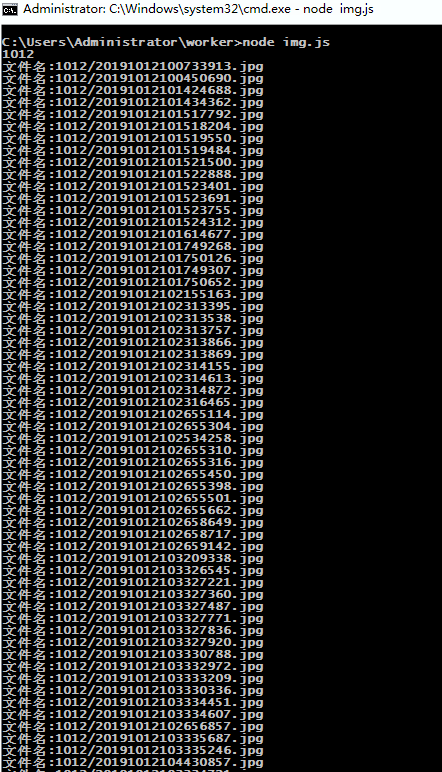
结果
经测试,在不改变图片宽高情况下,手机拍照原图进行压缩,压缩图片大小是原图的4分之1。
附注:api接口
images(file)
Load and decode image from file
从指定文件加载并解码图像
images(width, height)
Create a new transparent image
创建一个指定宽高的透明图像
images(buffer[, start[, end]])
Load and decode image from a buffer
从Buffer数据中解码图像
images(image[, x, y, width, height])
Copy from another image
从另一个图像中复制区域来创建图像
.fill(red, green, blue[, alpha])
eg:images(200, 100).fill(0xff, 0x00, 0x00, 0.5) Fill image with color
以指定颜色填充图像
.draw(image, x, y)
Draw image on the current image position( x , y )
在当前图像( x , y )上绘制 image 图像
.encode(type[, config])
eg:images("input.png").encode("jpg", {operation:50}) Encode image to buffer, config is image setting.
以指定格式编码当前图像到Buffer,config为图片设置,目前支持设置JPG图像质量
Return buffer
返回填充好的Buffer
Note:The operation will cut off the chain
注意:该操作将会切断调用链
See:.save(file[, type[, config]]) 参考:.save(file[, type[, config]])
.save(file[, type[, config]])
eg:images("input.png").encode("output.jpg", {operation:50}) Encoding and save the current image to a file, if the type is not specified, type well be automatically determined according to the file, config is image setting. eg: { operation:50 }
编码并保存当前图像到 file ,如果type未指定,则根据 file 自动判断文件类型,config为图片设置,目前支持设置JPG图像质量
.size([width[, height]])
Get size of the image or set the size of the image,if the height is not specified, then scaling based on the current width and height
获取或者设置图像宽高,如果height未指定,则根据当前宽高等比缩放
.resize(width[, height])
Set the size of the image,if the height is not specified, then scaling based on the current width and height
设置图像宽高,如果height未指定,则根据当前宽高等比缩放, 默认采用 bicubic 算法。
.width([width])
Get width for the image or set width of the image
获取或设置图像宽度
.height([height])
Get height for the image or set height of the image
获取或设置图像高度
images.setLimit(width, height)
Set the limit size of each image
设置库处理图片的大小限制,设置后对所有新的操作生效(如果超限则抛出异常)
images.setGCThreshold(value)
Set the garbage collection threshold
设置图像处理库自动gc的阈值(当新增内存使用超过该阈值时,执行垃圾回收)
images.getUsedMemory()
Get used memory (in bytes)
得到图像处理库占用的内存大小(单位为字节)
images.gc()
Forced garbage collection
强制调用V8的垃圾回收机制
node-images 进行图片压缩的更多相关文章
- node笔记——gulp-imagemin图片压缩
出处:http://blog.csdn.net/kkgege/article/details/49929983 之前用项目用gulp进行前端的构建,用到压缩图片插件gulp-imagemin, 后来发 ...
- 好久没发贴了,最近捣鼓了个基于node的图片压缩小网站解析。
看了下,距离上次发帖都是去年10月份的事,忙于工作的我很少跑博客园里面来玩了. 做这个小网站的初衷是 https://tinypng.com/ 这个网站有时候访问很慢,然后自己去研究了下图片压缩. 网 ...
- 前端构建工具之gulp(一)「图片压缩」
前端构建工具之gulp(一)「图片压缩」 已经很久没有写过博客了,现下终于事情少了,开始写博吧 今天网站要做一些优化:图片压缩,资源合并等 以前一直使用百度的FIS工具,但是FIS还没有提供图片压缩的 ...
- Gulp自动化工具之图片压缩
一.安装node https://nodejs.org/download/ 根据需要选择对应的版本 安装好了之后可以通过node -v参看一下版本 node -v 二.安装gulp npm insta ...
- Golang 编写的图片压缩程序,质量、尺寸压缩,批量、单张压缩
目录: 前序 效果图 简介 全部代码 前序: 接触 golang 不久,一直是边学边做,边总结,深深感到这门语言的魅力,等下要跟大家分享是最近项目 服务端 用到的图片压缩程序,我单独分离了出来,做成了 ...
- 三款不错的图片压缩上传插件(webuploader+localResizeIMG4+LUploader)
涉及到网页图片的交互,少不了图片的压缩上传,相关的插件有很多,相信大家都有用过,这里我就推荐三款,至于好处就仁者见仁喽: 1.名气最高的WebUploader,由Baidu FEX 团队开发,以H5为 ...
- gulp图片压缩
gulp图片压缩 网页性能优化,通常要处理图片,尤其图片量大的时候,更需要工具来批量处理,这里使用gulp,做个简单总结 image-resize压缩尺寸 var gulp = require('gu ...
- Android 图片压缩、照片选择、裁剪,上传、一整套图片解决方案
1.Android一整套图片解决方案 http://mp.weixin.qq.com/s?__biz=MzAxMTI4MTkwNQ==&mid=2650820998&idx=1& ...
- Java中图片压缩处理
原文http://cuisuqiang.iteye.com/blog/2045855 整理文档,搜刮出一个Java做图片压缩的代码,稍微整理精简一下做下分享. 首先,要压缩的图片格式不能说动态图片,你 ...
- android 图片压缩
引用:http://104zz.iteye.com/blog/1694762 第一:我们先看下质量压缩方法: private Bitmap compressImage(Bitmap image) { ...
随机推荐
- Swift编码总结6
1.UILabel的minimumScaleFactor: 需要UIlabel根据字数多少来减小字体大小,使得UIlabel能够显示全所有的文字.你需要做的就是设置minimumScaleFactor ...
- redis(1)---linux下的安装
安装redis 照着官网一波操作即可:https://redis.io/download,如果不能正常编译能是少了gcc,如果能联网直接 yum install gcc再编译. 照着官网操作走一波 1 ...
- WPF外包团队:2019 WPF数据监控系统案例演示
项目版权均为客户所有,如有WPF项目外包欢迎联系我们. QQ:372900288 TEL:13911652504 WX:Liuxiang0884
- Mahalanobia Distance(马氏距离)的解释
马氏距离有多重定义: 1)可以表示 某一个样本与DataSet的距离. 2)可以表示两个DataSet之间的距离. 1) The Mahalanobis distance of an observat ...
- js获取日期时间
获取当前时间 function getNowFormatDate() {//获取当前时间 var date = new Date(); var symbol_gang = "-"; ...
- Java基础笔试练习(十二)
1.(C#.JAVA)扩展方法能访问被扩展对象的public成员 A.能 B.不能 答案: A 解析: 翻译一下,子类方法是否能够访问父类中的public成员. 2.如果子类要调用父类的构造函数,则通 ...
- 遇到了NameError: name ‘name’ is not defined 这样的错误。
改正:__name__ == "__main__" name的左右两边各有两条下划线,不是左右两边各有一条
- go 连接到数据库
package main import ( "fmt" _ "github.com/go-sql-driver/mysql" "github.com/ ...
- 【LEETCODE】47、985. Sum of Even Numbers After Queries
package y2019.Algorithm.array; /** * @ProjectName: cutter-point * @Package: y2019.Algorithm.array * ...
- 【LEETCODE】40、1051. Height Checker
package y2019.Algorithm.array; /** * @ProjectName: cutter-point * @Package: y2019.Algorithm.array * ...