
PHPExcel 导出数据(xls或xlsx)- 助手类(函数)
本文链接:https://www.cnblogs.com/tujia/p/11358096.html
说明:简单好用的导出助手,轻松导出数据到 excel !!
使用示例1:
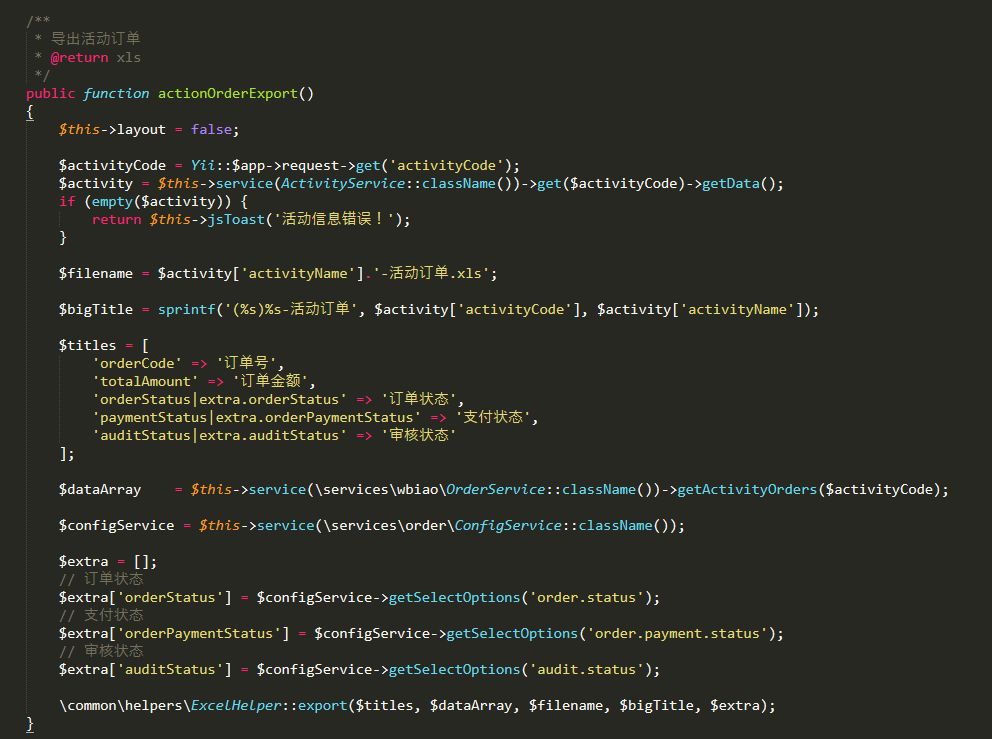
使用示例2:
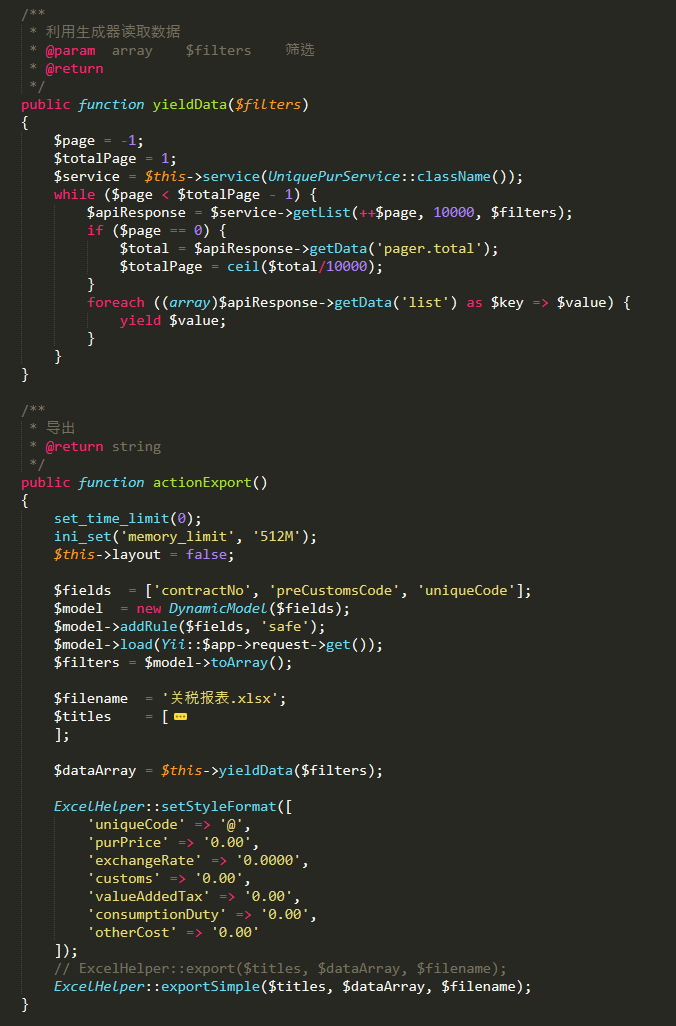
使用示例3:
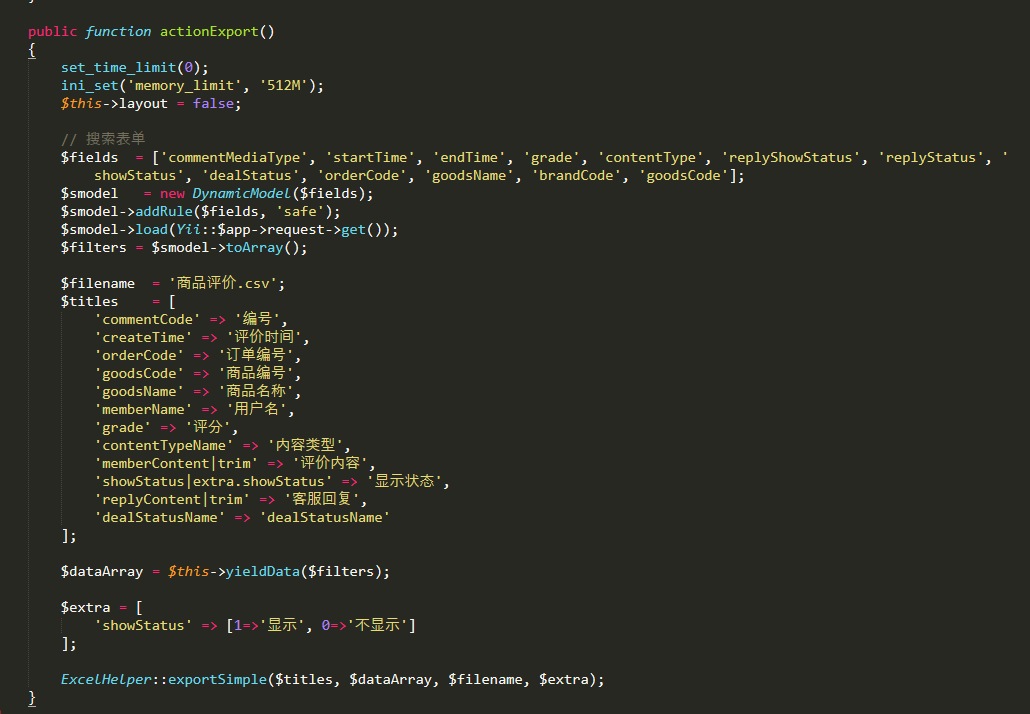
源码:
<?php

namespace common\helpers;

use yii\helpers\ArrayHelper;

/**

 * Excel 助手

 */

class ExcelHelper

{

    public static $styleFormat = [];

    /**

     * @see \PHPExcel_Style_NumberFormat

     */

    public static function setStyleFormat($format)

    {

        self::$styleFormat = $format;

    }

    /**

     * 导出

     * @see    https://www.cnblogs.com/tujia/p/11358096.html

     * @param  array    $titles         标题,一维数组,可传map或单纯标题

     * @param  array    $dataArray      数据,二维数组,可传map或单纯数据

     * @param  string   $filename       文件名,要带后缀

     * @param  string   $bigTitle       居中加粗的大标题,默认为空

     * @param  array    $extra          扩展数据

     * @return file

     */

    public static function export(array $titles, $dataArray, $filename, $bigTitle='', $extra=[])

    {

        set_time_limit(0);

        ini_set('memory_limit', '512M');

        // 后缀

        $suffix = substr($filename, strrpos($filename, '.'));

        empty($titles) && die('标题数组不能为空!');

        empty($dataArray) && die('数据数组不能为空!');

        !in_array($suffix, ['.xls', '.xlsx']) && die('文件名格式错误!');

        $cacheMethod = \PHPExcel_CachedObjectStorageFactory::cache_in_memory_serialized;

        $cacheSettings = array('memoryCacheSize ' => '512MB');

        \PHPExcel_Settings::setCacheStorageMethod($cacheMethod, $cacheSettings);

        $oExcel = new \PHPExcel();

        $oExcel->setActiveSheetIndex(0);

        $sheet = $oExcel->getActiveSheet();

        // 设置列数据格式

        if (!empty(self::$styleFormat)) {

            $fields = array_keys($titles);

            foreach (self::$styleFormat as $field => $formatCode) {

                $offset = array_search($field, $fields);

                $col = chr(65+$offset);

                $sheet->getStyle($col)->getNumberFormat()->setFormatCode($formatCode);

            }

        }

        // 行索引

        $rowIndex = $bigTitle!=''? 2:1;

        $chr = [

            'A','B','C','D','E','F','G','H','I','J','K','L','M','N','O','P','Q','R','S','T','U','V','W','X','Y','Z',

            'AA','AB','AC','AD','AE','AF','AG','AH','AI','AJ','AK','AL','AM','AN','AO','AP','AQ','AR','AS','AT','AU','AV','AW','AX','AY','AZ'

        ];

        // 设置大标题

        if ($bigTitle != '') {

            $sheet->mergeCells('A1:'. $chr[count($titles)-1] .'1');

            $sheet->getStyle('A1')->applyFromArray([

                'font' => ['bold'=>true],

                'alignment' => ['horizontal'=>\PHPExcel_Style_Alignment::HORIZONTAL_CENTER]

            ]);

            $sheet->setCellValue('A1', $bigTitle);

        }

        // 设置标题 A1 B1 C1 ....

        $colIndex = 0;

        $fieldsMap = [];

        foreach ($titles as $key => $title) {

            $fieldsMap[] = $key;

            $sheet->setCellValue($chr[$colIndex] . $rowIndex, $title);

            $colIndex++;

        }

        // 设置内容 A1 B1 C1 ....   A2 B2 C2 ....

        $rowIndex++;

        foreach ($dataArray as $key => $value)

        {

            foreach ($fieldsMap as $colIndex => $field) {

                if (strrpos($field, '|') !== false) {

                    $temp1 = explode('|', $field);

                    $pos = strrpos($temp1[1], '.');

                    $pos === false && $pos = strlen($temp1[1]);

                    $temp2 = [];

                    $temp2[0] = substr($temp1[1], 0, $pos);

                    $temp2[1] = substr($temp1[1], $pos+1);

                    $val = $value[$temp1[0]];

                    $val = self::$temp2[0]($extra, $temp2[1], $val);

                } else {

                    $val = $field? $value[$field] : $value;

                }

                $sheet->setCellValue($chr[$colIndex].$rowIndex, $val);

            }

            $rowIndex++;

        }

        header("Content-Type: application/force-download");

        header("Content-Type: application/octet-stream");

        header("Content-Type: application/download");

        if ($suffix == '.xlsx') {

            header('Content-Type: application/vnd.openxmlformats-officedocument.spreadsheetml.sheet');

        } else {

            header('Content-Type: application/vnd.ms-excel');

        }

        header('Content-Disposition: attachment;filename="'. $filename .'"');

        header("Content-Transfer-Encoding: binary");

        header("Pragma: no-cache");

        $oWriter = \PHPExcel_IOFactory::createWriter($oExcel, 'Excel2007');

        $oWriter->save('php://output');

        $oExcel->disconnectWorksheets();

        exit;

    }

    /**

     * 导出

     * @see    https://www.cnblogs.com/tujia/p/5999806.html

     * @param  array    $titles         标题,一维数组,可传map或单纯标题

     * @param  array    $dataArray      数据,二维数组,可传map或单纯数据

     * @param  string   $filename       文件名,要带后缀

     * @param  array    $extra          扩展数据

     * @return file

     */

    public static function exportSimple(array $titles, $dataArray, $filename, $extra=[])

    {

        // 后缀

        $suffix = substr($filename, strrpos($filename, '.'));

        empty($titles) && die('标题数组不能为空!');

        empty($dataArray) && die('数据数组不能为空!');

        !in_array($suffix, ['.xls', '.xlsx', '.csv']) && die('文件名格式错误!');

        // 导出准备

        set_time_limit(0);

        ini_set('memory_limit', '512M');

        header("Content-Type: application/force-download");

        header("Content-Type: application/octet-stream");

        header("Content-Type: application/download");

        header('Content-Disposition: attachment; filename='.$filename);

        if ($suffix == '.xlsx') {

            header('Content-Type: application/vnd.openxmlformats-officedocument.spreadsheetml.sheet');

        } elseif ($suffix == '.xls') {

            header('Content-Type: application/vnd.ms-excel');

        } elseif ($suffix == '.csv') {

            header('Content-Type: application/vnd.ms-excel; charset=GB2312');

        }

        header("Content-Transfer-Encoding: binary");

        header("Pragma: no-cache");

        $isCsv = ($suffix == '.csv');

        $fieldsCount = count($titles);

        if ($isCsv) {

            echo mb_convert_encoding(implode(',', array_values($titles)), 'gbk') . "\n";

        } else {

            echo '<table>';

            echo '<tr>';

            foreach ($titles as $key => $value) {

                echo sprintf('<td>%s</td>', $value);

            }

            echo '</tr>';

        }

        foreach ($dataArray as $key => $value) {

            $i = 0;

            $isCsv==false && print('<tr>');

            foreach ($titles as $field => $title) {

                if (strrpos($field, '|') !== false) {

                    $temp1 = explode('|', $field);

                    $pos = strrpos($temp1[1], '.');

                    $pos === false && $pos = strlen($temp1[1]);

                    $temp2 = [];

                    $temp2[0] = substr($temp1[1], 0, $pos);

                    $temp2[1] = substr($temp1[1], $pos+1);

                    $val = $value[$temp1[0]];

                    $val = self::$temp2[0]($extra, $temp2[1], $val);

                } else {

                    $val = $field? $value[$field] : $value;

                }

                if ($isCsv) {

                    echo mb_convert_encoding($val . ($i == $fieldsCount-1? "\n":','), 'gbk');

                } else {

                    if (isset(self::$styleFormat[$field])) {

                        echo sprintf("<td style='mso-number-format:\"%s\";'>%s</td>", self::$styleFormat[$field], $val);

                    } else {

                        echo sprintf('<td>%s</td>', $val);

                    }

                }

                $i++;

            }

            $isCsv==false && print('</tr>');

        }

        $isCsv==false && print('</table>');

        exit;

    }

    public static function extra($extra, $extra_key, $val)

    {

        $arr = ArrayHelper::getValue($extra, $extra_key, []);

        return ArrayHelper::getValue($arr, $val, '');

    }

    public static function dateIsEmpty($extra, $extra_key, $val)

    {

        return strtotime($val)>1000? $val:'';

    }

    public static function toFixed($extra, $extra_key, $val)

    {

        return (string)sprintf("%.{$extra_key}f", floatval($val));

    }

    public static function dateFormat($extra, $extra_key, $val)

    {

        return date('Y-m-d H:i:s',$val/1000);

    }

    public static function trim($extra, $extra_key, $val)

    {

        return str_replace(["\r", "\n", ","], ["", "", ","], $val);

    }

}
原创内容,转载请声明出处!
本文链接:https://www.cnblogs.com/tujia/p/11358096.html
PHPExcel 导出数据(xls或xlsx)- 助手类(函数)的更多相关文章
- php利用phpexcel导出数据
php中利用phpexcel导出数据的实现代码.对phpexcel类库不熟悉的朋友,可以阅读下<phpexcel中文帮助手册>中的内容,具体实例大家可以phpexcel快速开发指南中的相关 ...
- php 使用PHPExcel 导出数据为Excel
<?php require_once 'PHPExcel/Classes/PHPExcel.php'; /** * 导出数据为Excel * @param array $fieldArr 标题数 ...
- Thinkphp解决phpExcel导出数据量大导致内存溢出
工作需要导出几万的数据量.操作比较频繁.之前数据在七八千是数据导出很慢.phpExcel是方便但是性能一般.现在改为使用csv导出数据:可以缓解内存压力,一次导出两三万是没问题的.当然服务器内存给力, ...
- phpexcel导出数据 出现Formula Error的解决方案
phpexcel导出数据报错 Uncaught exception 'Exception' with message 'Sheet1!A1364 -> Formula Error: Unexpe ...
- phpexcel导出数据表格
1.下载phpexcel(李昌辉) 2.在页面引入phpexcel的类文件,并且造该类的对象 include("../chajian/phpexcel/Classes/PHPExcel.ph ...
- thinkphp中使用PHPEXCEL导出数据
thinkphp中导出二维数组到Excel 1.解决时间长度导致EXCEL出现###问题 2.解决长数值型 带来的科学记数法导出问题 订单号不再变为科学记数法 而是直接字符串类型 代码如下: < ...
- PHP:引用PhpExcel导出数据到excel表格
我使用的是tp3.2框架(下载地址:http://www.thinkphp.cn/topic/38123.html) 1.首先要下载PhpExcel类库,放在如下图目录下 2.调用方法 public ...
- C#自定义导出数据到Excel中的类封装
using System; using System.IO; using System.Data; using System.Collections; using System.Data.OleDb; ...
- 使用PHPExcel导出数据
最近要求做增加客流数据等导出为Excel的功能,phpExcel包功能强大,根据实际需求,我只学习了简单的功能. 安装PHPExcel 在composer.json中添加: "require ...
随机推荐
- runloop事件、UI更新、observer与coranimation
一.触摸事件派发与视图绘制打包 __CFRUNLOOP_IS_CALLING_OUT_TO_A_SOURCE0_PERFORM_FUNCTION__ __dispatchPreprocessedEve ...
- 第9章 MyBatis的关系映射
在实际开发中,对数据库的操作通常涉及多张表,涉及了对象和对象之间的关联关系.针对多表之间的操作,MyBatis提供了关联映射,通过关联映射就可以很好的处理对象与对象之间的关联关系 9.1 关联关系概述 ...
- 基于数组的栈(Java)
package com.rao.linkList; /** * @author Srao * @className ArrayStack * @date 2019/12/3 13:41 * @pack ...
- strings命令(转)
以前我用strings命令的频率不高, 现在越用越顺手, 而且已经是离不开strings命令了.虽然以前说过strings命令, 但今天还是要说. 主要是两大用途, 下面来说明一下: 一. 确认代码编 ...
- CT107D电路解析
1.译码器: 其中,A.B.C为输入端, 对应关系如下: CBA 十进制 输出(低电平) 000 0 Y0 001 1 Y1 010 ...
- 洛谷 P5614题解
吐槽:数据好像有点水,直接枚举到200可以得80 points. 另:我还是太弱了,比赛的时候只有90 points,#7死卡不过去,最后发现是没有判断 \(z_1\) 和 \(z_2\) 的范围-- ...
- 【luoguP3000】 [USACO10DEC]牛的健美操Cow Calisthenics
题目链接 二分答案,判断需要断几条边,用\(f[i]\)表示以\(i\)为根的子树断边后的最长路径,对于一个点\(u\),存在\(f[v]>mid\)时就删到\(v\)的边\(f[v1]+f[v ...
- shell中的字符串操作——字符串的切割
default.yaml {default_baseurl: 'http://10.113.10.68:8082'} test.sh a=`cat default.yaml` t=":&qu ...
- 在Eclipse打开css文件时,会自动调用文本编辑器打开,而不是在Eclipse中打开
问题描述 在Eclipse中打开css文件时候,如下图,使用系统自带的文本编辑器打开 解决方案 点击Window下的Preference,找到File Associations,然后点击Add,将cs ...
- javascript的Map使用
setExpenseAndAmountSum: function() { var detailList = vehicleVueObj.vehicleData; var expenseAmountSu ...