
Activiti6 应用安装 activiti-admin,activiti-app,activiti-rest
activiti6安装包中
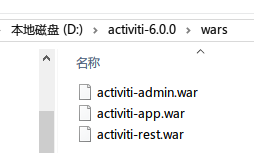
1/直接将三个war包放入tomcat中,即可运行,使用H2内存数据库
2/使用mysql数据库运行
2.1/activiti-admin
# security configuration (this key should be unique for your application, and kept secret)

security.rememberme.key=activitis3cr3tk3y

# H2 example (default)

#datasource.driver=org.h2.Driver

#datasource.url=jdbc:h2:tcp://localhost/activitiadmin

# MySQL example

datasource.driver=com.mysql.jdbc.Driver

datasource.url=jdbc:mysql://127.0.0.1:3306/test-wf-admin?characterEncoding=UTF-8&useSSL=false

#datasource.driver=org.postgresql.Driver

#datasource.url=jdbc:postgresql://localhost:5432/activitiadmin

#datasource.driver=com.microsoft.sqlserver.jdbc.SQLServerDriver

#datasource.url=jdbc:sqlserver://localhost:1433;databaseName=activitiadmin

#datasource.driver=oracle.jdbc.driver.OracleDriver

#datasource.url=jdbc:oracle:thin:@localhost:1521:ACTIVITIADMIN

#datasource.driver=com.ibm.db2.jcc.DB2Driver

#datasource.url=jdbc:db2://localhost:50000/activitiadmin

datasource.username=root

datasource.password=root

# JNDI CONFIG

# If uncommented, the datasource will be looked up using the configured JNDI name.

# This will have preference over any datasource configuration done below that doesn't use JNDI

#

# Eg for JBoss: java:jboss/datasources/activitiDS

#

#datasource.jndi.name=jdbc/activitiDS

# Set whether the lookup occurs in a J2EE container, i.e. if the prefix "java:comp/env/" needs to be added if the JNDI

# name doesn't already contain it. Default is "true".

#datasource.jndi.resourceRef=true

#hibernate.dialect=org.hibernate.dialect.H2Dialect

#hibernate.dialect=org.hibernate.dialect.MySQLDialect

#hibernate.dialect=org.hibernate.dialect.Oracle10gDialect

#hibernate.dialect=org.hibernate.dialect.SQLServerDialect

#hibernate.dialect=org.hibernate.dialect.DB2Dialect

#hibernate.dialect=org.hibernate.dialect.PostgreSQLDialect

#hibernate.show_sql=false

#hibernate.generate_statistics=false

#

# Connection pool (see http://www.mchange.com/projects/c3p0/#configuration)

#

datasource.min-pool-size=2

datasource.max-pool-size=10

datasource.acquire-increment=2

# test query for H2, MySQL, PostgreSQL and Microsoft SQL Server

#datasource.preferred-test-query=select 1

# test query for Oracle

#datasource.preferred-test-query=SELECT 1 FROM DUAL

# test query for DB2

#datasource.preferred-test-query=SELECT current date FROM sysibm.sysdummy1

#datasource.test-connection-on-checkin=true

#datasource.test-connection-on-checkout=true

#datasource.max-idle-time=1800

#datasource.max-idle-time-excess-connections=1800

#

# Cluster settings

#

# This a period of time, expressed in milliseconds, that indicates

# when a node is deemed to be inactive and is removed from the list

# of nodes of a cluster (nor will it appear in the 'monitoring' section of the application).

#

# When a node is properly shut down, it will send out an event indicating

# it is shut down. From that point on, the data will be kept in memory for the amount

# of time indicated here.

# When a node is not properly shut down (eg hardware failure), this is the period of time

# before removal, since the time the last event is received.

#

# Make sure the value here is higher than the sending interval of the nodes, to avoid

# that nodes incorrectly removed.

#

# By default 10 minutes

cluster.monitoring.max.inactive.time=600000

# A cron expression that configures when the check for inactive nodes is made.

# When executed, this will mark any node that hasn't been active for 'cluster.monitoring.max.inactive.time'

# seconds, as an inactive node. Default: every 5 minutes.

cluster.monitoring.inactive.check.cronexpression=0 0/5 * * * ?

# REST endpoint config

rest.app.name=Activiti app

rest.app.description=Activiti app Rest config

rest.app.host=http://localhost

rest.app.port=8080

rest.app.contextroot=activiti-app

rest.app.restroot=api

rest.app.user=admin

rest.app.password=test

# Passwords for rest endpoints and master configs are stored encrypted in the database using AES/CBC/PKCS5PADDING

# It needs a 128-bit initialization vector (http://en.wikipedia.org/wiki/Initialization_vector)

# and a 128-bit secret key represented as 16 ascii characters below

#

# Do note that if these properties are changed after passwords have been saved, all existing passwords

# will not be able to be decrypted and the password would need to be reset in the UI.

security.encryption.credentialsIVSpec=j8kdO2hejA9lKmm6

security.encryption.credentialsSecretSpec=9FGl73ngxcOoJvmL

# BPMN 2.0 Modeler config

modeler.url=https://activiti.alfresco.com/activiti-app/api/

# Enable multi tenant support, disabled by default

#multi-tenant.enabled=true
2.2 activiti-app
#
# SECURITY
#
security.rememberme.key=testkey #
# DATABASE
# #datasource.driver=org.h2.Driver
#datasource.url=jdbc:h2:mem:activiti;DB_CLOSE_DELAY=-1 datasource.driver=com.mysql.jdbc.Driver
datasource.url=jdbc:mysql://127.0.0.1:3306/test-wf-app?characterEncoding=UTF-8&useSSL=false datasource.username=root
datasource.password=root #hibernate.dialect=org.hibernate.dialect.H2Dialect
#hibernate.dialect=org.hibernate.dialect.MySQLDialect
#hibernate.dialect=org.hibernate.dialect.Oracle10gDialect
#hibernate.dialect=org.hibernate.dialect.SQLServerDialect
#hibernate.dialect=org.hibernate.dialect.DB2Dialect
#hibernate.dialect=org.hibernate.dialect.PostgreSQLDialect #
# #email.enabled=true
#email.host=localhost
#email.port=1025
#email.useCredentials=false
#email.username=
#email.password= # The base url that will be used to create urls in emails.
#email.base.url=http://localhost:9999/activiti-app #email.from.default=no-reply@activiti.alfresco.com
#email.from.default.name=Activiti
#email.feedback.default=activiti@alfresco.com #
# ACTIVITI
# activiti.process-definitions.cache.max=500 #
# DEFAULT ADMINISTRATOR ACCOUNT
# admin.email=admin
admin.password=test
admin.lastname=Administrator admin.group=Superusers # The maximum file upload limit. Set to -1 to set to 'no limit'. Expressed in bytes
file.upload.max.size=104857600 # For development purposes, data folder is created inside the sources ./data folder
contentstorage.fs.rootFolder=data/
contentstorage.fs.createRoot=true
contentstorage.fs.depth=4
contentstorage.fs.blockSize=1024
2.3/ activit-rest
#db=h2

#jdbc.driver=org.h2.Driver

#jdbc.url=jdbc:h2:mem:activiti;DB_CLOSE_DELAY=-1

#jdbc.username=sa

#jdbc.password=

db=mysql

jdbc.driver=com.mysql.jdbc.Driver

jdbc.url=jdbc:mysql://127.0.0.1:3306/test-wf-rest?characterEncoding=UTF-8&useSSL=false

jdbc.username=root

jdbc.password=root
Activiti6 应用安装 activiti-admin,activiti-app,activiti-rest的更多相关文章
- Activiti实战01_认识Activiti
什么是Activiti Activiti是为解决工作流而创建的一套流程引擎.举个最简单的例子,请假流程就是一个工作流,从开始到审批到结束,像流一样的贯穿整个流程.在工作中最常见的就是OA了.工作流总是 ...
- linux -小记(2)问题:yum 安装报错"Another app is currently holding the yum lock; waiting for it to exit... ...: yum Memory : 26 M RSS (868 MB VSZ) Started: Wed Oct 26 22:48:24 2016 - 0"
yum 安装报错 "Another app is currently holding the yum lock; waiting for it to exit... The other ap ...
- iOS企业版应用发布(部分低版本系统)无法安装到最新版app的问题-缓存导致
通过自己网站发布企业版app时,经过测试发现在部分已安装过旧版app的低版本ios手机存在这样的问题 :扫码覆盖安装新版app,安装到的仍然是就版本的app.这样就导致部分用户一直无法更新到最新版本. ...
- 【Activiti学习之一】Activiti入门
环境 JDK1.7 MySQL5.6 Tomcat7 Eclipse-Luna activiti 6.0 一.概念1.工作流(Workflow):是一系列相互衔接.自动进行的业务活动或任务.采用工作流 ...
- Activiti系列:为什么Activiti 5.18 的REST的api总是返回404错误
REST api可以访问了,如下 1.修改db.properties配置文件,让他访问sql server 2.在浏览器中输入如下地址,注意中间有一个service,这点和之前的不一样,在<Ac ...
- activiti 5.13 使用activiti设置用户组任务的 工作流的角色
1.设置activiti 流程引擎的用户,组别,关系/**在部署流程定义和启动流程实例的中间,设置组任务的办理人,向Activiti表中存放组和用户的信息*/ IdentityService iden ...
- Activiti(一) activiti数据库表说明
activiti介绍: activiti是一个业务流程管理(BPM)框架.它是覆盖了业务流程管理.工作流.服务协作等领域的一个开源的.灵活的.易扩展的可执行流程语言框架.开发人员可以通过插件直接绘画出 ...
- activiti 发布异常 org.activiti.engine.ActivitiException: Error parsing XML
三月 23, 2015 1:58:31 下午 org.apache.catalina.core.StandardWrapperValve invoke 严重: Servlet.service() fo ...
- 【Activiti学习之四】Activiti API(三)
环境 JDK 1.8 MySQL 5.6 Tomcat 7 Eclipse-Luna activiti 6.0 一.启动流程 多种方式启动 package com.wjy.pro; import or ...
随机推荐
- H3C 帧聚合
- Pods
Pods Pod概念 Pod是kubernetes集群应用中的创建和部署的最小.最简单的kubernetes对象模型单元的基本执行单元.Pod表示在集群中运行的进程. Pod 封装了应用程序的容器(一 ...
- Python入门篇-类型注解
Python入门篇-类型注解 作者:尹正杰 版权声明:原创作品,谢绝转载!否则将追究法律责任. 一.函数定义的弊端 1>.动态语言很灵活,但是这种特性也是弊端 Python是动态语言,变量随时可 ...
- python关于time几种格式处理方法总结
一.日期时间的表示方法: 时间戳 timestamp: 简介:时间戳表示的是从1970年1月1日00:00:00开始按秒计算的偏移量,是一个float类型 展示形式:1575278720.331 时间 ...
- QA流程
一.测试人员的介入时间 1.当产品经理与业务人员制定需求的时候,测试人员不宜介入: 2.当下一期的需求原型出来以后,这个时候就进入了需求评审.需求分析阶段,此时,测试人员应该介入: 3.当开发人员在编 ...
- 逆向破解之160个CrackMe —— 006
CrackMe —— 006 160 CrackMe 是比较适合新手学习逆向破解的CrackMe的一个集合一共160个待逆向破解的程序 CrackMe:它们都是一些公开给别人尝试破解的小程序,制作 c ...
- Python 爬虫js加密破解(四) 360云盘登录password加密
登录链接:https://yunpan.360.cn/mindex/login 这是一个md5 加密算法,直接使用 md5加密即可实现 本文讲解的是如何抠出js,运行代码 第一部:抓包 如图 第二步: ...
- @Scope("prototype")
spring中bean的scope属性,有如下5种类型: singleton 表示在spring容器中的单例,通过spring容器获得该bean时总是返回唯一的实例prototype表示每次获得bea ...
- Map遍历效率比较
1.由来 上次博客提到了Map的四种遍历方法,其中有的只是获取了key值或者是value值,但我们应该在什么时刻选择什么样的遍历方式呢,必须通过实践的比较才能看到效率. 也看了很多文章,大家建议使用e ...
- treegrid 折叠全部节点
$(".easyui-treegrid").treegrid({ url: '@Url.Action("GetDataDictionaryList", &quo ...