
关于jupyter notebook密码设置
对于一个jupyter编辑器使用的新手,更换浏览器或者Logout后,需要输入密码进行登陆时
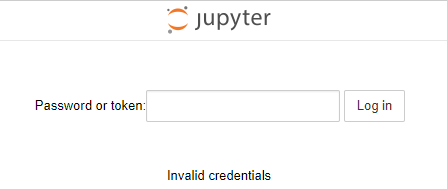
按照网上的教程怎么设置都不行,那么自己整理了一个适用于初学者的操作。
1.windows下,打开命令行,重新生成一个jupyter配置文件:
jupyter notebook --generate-config
2.修个配置文件,找到这个新生成的文件:Windows: C:\Users\USERNAME\.jupyter\jupyter_notebook_config.py
搜索 NotebookApp.allow_password_change,改为:NotebookApp.allow_password_change=False ,记得去掉注释的#
3.回到windows命令行,运行jupyter notebook password
C:\Windows\System32>jupyter notebook password

Enter password:             #键入密码,不显示的

Verify password:            #再次重复键入密码

[NotebookPasswordApp] Wrote hashed password to C:\Users\用户\.jupyter\jupyter_notebook_config.json     #密码生成的一串sha1,写入到了这个文件,等下要把这串sha1,复制到第一个生成的配置文件中
4.还差一步密码才可以生效使用,在第一个jupyter_notebook_config.py配置文件中找到“c.NotebookApp.password“,等于,刚生成的那个密码sha1,效果如下:去掉前面的”#“
c.NotebookApp.password = u'sha1:xxxxxxxxxxxxxxxxxxxxxxxxxxxxxxxxxx'
5.保险起见,把jupyter重启,之后,无论是更换浏览器还是Logout登陆,新密码都可以正常使用了。
≡≡≡≡≡≡≡≡≡≡≡≡≡≡≡≡≡≡≡≡≡≡≡≡≡≡≡≡≡≡≡≡≡≡≡≡≡≡≡≡≡≡≡≡≡≡≡≡≡≡≡≡≡≡≡≡≡≡≡≡≡≡≡≡≡≡≡≡≡≡≡≡≡≡≡
第3步也可以换成:ipython执行
C:\Windows\System32>ipython

Python 3.6.4 |Anaconda, Inc.| (default, Jan 16 2018, 10:22:32) [MSC v.1900 64 bit (AMD64)]

Type 'copyright', 'credits' or 'license' for more information

IPython 6.2.1 -- An enhanced Interactive Python. Type '?' for help.

In [1]: from notebook.auth import passwd

In [2]: passwd()

Enter password:

Verify password:

Out[2]: 'sha1:xxxxxxxxxxxxxxxxxxxxxxxxxxxxxxxxxxxxxxx'
关于jupyter notebook密码设置的更多相关文章
- 环境搭建:Jupyter Notebook 密码设置
原文参考:关于jupyter notebook密码设置 原文博主: 一.windows下,打开命令行,重新生成一个jupyter配置文件 jupyter notebook --generate-con ...
- Jupyter NoteBook 系列之 安装启动和常用设置
介绍 Jupyter Notebook(此前被称为 IPython notebook)是一个交互式笔记本,目前支持运行 40 多种编程语言. Jupyter Notebook 的本质是一个 Web 应 ...
- 设置 Jupyter notebook 工作空间 / 默认路径
常用的启动 Jupyter notebook 的两种方式是:命令行窗口启动和开始菜单启动.设置 Jupyter notebook 的默认路径也有两种常用方式: 修改配置文件 设置快捷方式. 1 通过修 ...
- 配置本地访问远程Linux系统服务器的jupyter notebook
环境情况 远程服务器上配置了anaconda 本地主机没有安装anaconda(其实安不安装都无所谓,有浏览器就行) 配置步骤如下 登录远程服务器 生成配置文件 jupyter notebook -- ...
- 使用阿里云服务器部署jupyter notebook远程访问
安装annaconda 与jupyter notebook annaconda在已经自带了jupyter notebook.jupyter lab.ipython 等一系列工具,不需要再单独安装这些工 ...
- Jupyter NoteBook功能介绍
一.Jupyter Notebook 介绍 文学编程 在介绍 Jupyter Notebook 之前,让我们先来看一个概念:文学编程 ( Literate programming ),这是由 Dona ...
- Jupyter Notebook修改默认的工作目录
Jupyter Notebook修改默认的工作目录 方法1:通过配置文件修改 只适合从命令行启动notebook生成配置文件,如果你已经在windows环境变量中设置好了jupyter noteboo ...
- [转载]Jupyter Notebook中自动补全代码
原文地址:https://yq.aliyun.com/articles/667928 在公众号之前的文章中,已经介绍了在Jupyter Notebook中设置主题以及输出代码文件到pdf文件中,本文来 ...
- ubuntu下设置jupyter notebook 2017年07月29日 19:28:34 小旋锋 阅读数:8329 标签: ubuntu 更多 个人分类: python 二三事 来源:http://blog.csdn.net/suzyu12345/article/details/51037905 Ipython Notebook现在已经改名为Ipython jupyter,是最知名最好用的
ubuntu下设置jupyter notebook 来源:http://blog.csdn.net/suzyu12345/article/details/51037905 Ipython No ...
随机推荐
- Linux(CentOS)安装JDK1.8
1.JDK的RPM包安装方式: https://www.cnblogs.com/hunttown/p/5450463.html 2.JDK的tar包安装方式: 首先,从SUN公司网站下载最新的JDK ...
- Javascript判斷function是否定義
jQuery可以用 isFunction() 來進行判斷 如果僅使用Javascript可以使用以下的方法 function isFunction(fn){ return typeof fn === ...
- Oracle Spatial分区应用研究之四:不同分区粒度+全局空间索引效率对比
1.实验目的 在实验之前先回答这样一个问题——对同一份数据使用不同的分区粒度,但均创建全局空间索引,问:它们的全局空间索引一致吗? 怎样算是一致的呢?R-TREE的树结构一致算一致吗?空间索引条目数及 ...
- Gradle之dependenciens的各种依赖说明
implementation:对于使用了该命令编译的依赖,对该项目有依赖的项目将无法访问到使用该命令编译的依赖中的任何程序,也就是将该依赖隐藏在内部,而不对外部公开.api 完全等同于compile指 ...
- spring较为常用注解
@Configuration 从Spring3.0,@Configuration用于定义配置类,可替换xml配置文件,被注解的类内部包含有一个或多个被@Bean注解的方法,这些方法将会被Annotat ...
- 抽象工厂(AbstractFactory)模式
抽象工厂模式又称工具箱模式.其实抽象工厂模式可以简单的理解为一个工厂生成一个产品族的产品. 抽象工厂模式可以向客户端提供一个接口,使得客户端在不指定产品的具体类型的情况下,创建多个产品族中的产品对象. ...
- Word 插入脚注、尾注与题注 -- 视频教程(5)
>> 视频教程链接:B站,速度快,清晰 未完 ...... 点击访问原文(进入后根据右侧标签,快速定位到本文)
- 大数据之路【第十篇】:kafka消息系统
一.简介 1.简介 简 介• Kafka是Linkedin于2010年12月份开源的消息系统• 一种分布式的.基于发布/订阅的消息系统 2.特点 – 消息持久化:通过O(1)的磁盘数据结构提供数据的持 ...
- Linux基础(08)信号通信机制
1.Linux中的信号(有32个) 信号会中断一些函数的阻塞 https://zhidao.baidu.com/question/1766690354480323100.html #define S ...
- 选择类排序 (简单选择排序,堆排序)— c语言实现
选择类排序包括: (1) 简单选择排序 (2)树形选择排序 (3)堆排序 简单选择排序: [算法思想]:在第 i 趟简单选择排序中,从第 i 个记录开始,通过 n - i 次关键字比较,从 n - ...