
Spring使用DriverManagerDataSource和C3P0分别配置MySql6.0.6数据源
首先,看一下项目路径
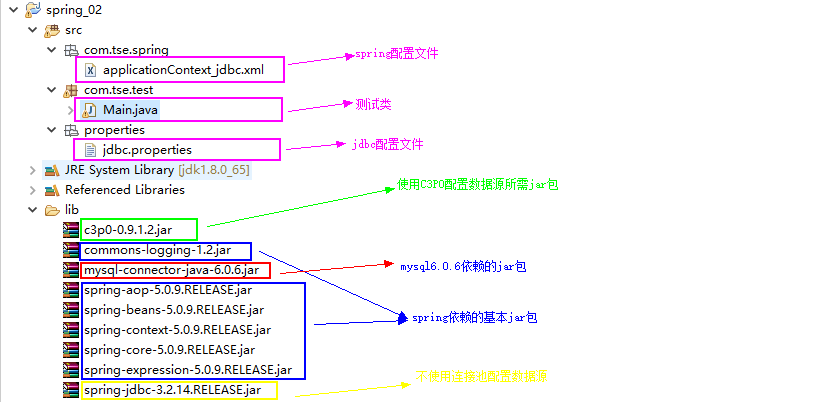
先说spring配置文件吧,这个比较重要
 <?xml version="1.0" encoding="UTF-8"?>

 <beans xmlns="http://www.springframework.org/schema/beans"

     xmlns:xsi="http://www.w3.org/2001/XMLSchema-instance"

     xmlns:aop="http://www.springframework.org/schema/aop"

     xmlns:context="http://www.springframework.org/schema/context"

     xmlns:tx="http://www.springframework.org/schema/tx"

     xsi:schemaLocation="http://www.springframework.org/schema/beans http://www.springframework.org/schema/beans/spring-beans-2.5.xsd

         http://www.springframework.org/schema/context http://www.springframework.org/schema/context/spring-context-2.5.xsd

         http://www.springframework.org/schema/tx http://www.springframework.org/schema/tx/spring-tx-2.5.xsd

         http://www.springframework.org/schema/aop http://www.springframework.org/schema/aop/spring-aop-2.5.xsd">

     <!-- 导入属性文件 -->

     <context:property-placeholder location="classpath:properties/jdbc.properties"/>

     <bean id="dataSourceSpring" class="org.springframework.jdbc.datasource.DriverManagerDataSource">

         <property name="username" value="${jdbc.user}"></property>

         <property name="password" value="${jdbc.pwd}"></property>

         <property name="url" value="${jdbc.url}"></property>

         <property name="driverClassName" value="${jdbc.driver}"></property>

     </bean>

     <bean id="dataSourceC3p0" class="com.mchange.v2.c3p0.ComboPooledDataSource">

         <property name="user" value="root"></property>

         <property name="password" value="1234"></property>

         <property name="jdbcUrl" value="jdbc:mysql://127.0.0.1:3306/test?serverTimezone=Hongkong"></property>

         <property name="driverClass" value="com.mysql.cj.jdbc.Driver"></property>

     </bean>

 </beans>
bean的id使用不同的来进行区分,主要区别在于class指向不同,dataSourceSpring 并没有连接池作用,另一个使用了C3P0进行配置
properties文件
 jdbc.user=root

 jdbc.pwd=1234

 jdbc.url=jdbc:mysql://127.0.0.1:3306/test?serverTimezone=Hongkong

 jdbc.driver=com.mysql.cj.jdbc.Driver
main方法文件
 package com.tse.test;

 import java.sql.SQLException;

 import javax.sql.DataSource;

 import org.springframework.context.ApplicationContext;

 import org.springframework.context.support.ClassPathXmlApplicationContext;

 public class Main {

     public static void main(String[] args) throws SQLException {

         ApplicationContext aContext = new ClassPathXmlApplicationContext("com/tse/spring/applicationContext_jdbc.xml");

         DataSource dataSources = (DataSource) aContext.getBean("dataSourceSpring");

         DataSource dataSources1 = (DataSource) aContext.getBean("dataSourceC3p0");

         System.out.println(dataSources.getConnection());

         System.out.println(dataSources1.getConnection());

     }

 }
执行结果
九月 13, 2018 12:04:35 下午 org.springframework.context.support.ClassPathXmlApplicationContext prepareRefresh

信息: Refreshing org.springframework.context.support.ClassPathXmlApplicationContext@1a6c5a9e: startup date [Thu Sep 13 12:04:35 CST 2018]; root of context hierarchy

九月 13, 2018 12:04:35 下午 org.springframework.beans.factory.xml.XmlBeanDefinitionReader loadBeanDefinitions

信息: Loading XML bean definitions from class path resource [com/tse/spring/applicationContext_jdbc.xml]

九月 13, 2018 12:04:35 下午 org.springframework.jdbc.datasource.DriverManagerDataSource setDriverClassName

信息: Loaded JDBC driver: com.mysql.cj.jdbc.Driver

九月 13, 2018 12:04:35 下午 com.mchange.v2.log.MLog <clinit>

信息: MLog clients using java 1.4+ standard logging.

九月 13, 2018 12:04:35 下午 com.mchange.v2.c3p0.C3P0Registry banner

信息: Initializing c3p0-0.9.1.2 [built 21-May-2007 15:04:56; debug? true; trace: 10]

Thu Sep 13 12:04:36 CST 2018 WARN: Establishing SSL connection without server's identity verification is not recommended. According to MySQL 5.5.45+, 5.6.26+ and 5.7.6+ requirements SSL connection must be established by default if explicit option isn't set. For compliance with existing applications not using SSL the verifyServerCertificate property is set to 'false'. You need either to explicitly disable SSL by setting useSSL=false, or set useSSL=true and provide truststore for server certificate verification.

com.mysql.cj.jdbc.ConnectionImpl@1ffe63b9

九月 13, 2018 12:04:36 下午 com.mchange.v2.c3p0.impl.AbstractPoolBackedDataSource getPoolManager

信息: Initializing c3p0 pool... com.mchange.v2.c3p0.ComboPooledDataSource [ acquireIncrement -> 3, acquireRetryAttempts -> 30, acquireRetryDelay -> 1000, autoCommitOnClose -> false, automaticTestTable -> null, breakAfterAcquireFailure -> false, checkoutTimeout -> 0, connectionCustomizerClassName -> null, connectionTesterClassName -> com.mchange.v2.c3p0.impl.DefaultConnectionTester, dataSourceName -> 1hge13c9x1m0nuop1yft6fk|2173f6d9, debugUnreturnedConnectionStackTraces -> false, description -> null, driverClass -> com.mysql.cj.jdbc.Driver, factoryClassLocation -> null, forceIgnoreUnresolvedTransactions -> false, identityToken -> 1hge13c9x1m0nuop1yft6fk|2173f6d9, idleConnectionTestPeriod -> 0, initialPoolSize -> 3, jdbcUrl -> jdbc:mysql://127.0.0.1:3306/test?serverTimezone=Hongkong, maxAdministrativeTaskTime -> 0, maxConnectionAge -> 0, maxIdleTime -> 0, maxIdleTimeExcessConnections -> 0, maxPoolSize -> 15, maxStatements -> 0, maxStatementsPerConnection -> 0, minPoolSize -> 3, numHelperThreads -> 3, numThreadsAwaitingCheckoutDefaultUser -> 0, preferredTestQuery -> null, properties -> {user=******, password=******}, propertyCycle -> 0, testConnectionOnCheckin -> false, testConnectionOnCheckout -> false, unreturnedConnectionTimeout -> 0, usesTraditionalReflectiveProxies -> false ]

Thu Sep 13 12:04:36 CST 2018 WARN: Establishing SSL connection without server's identity verification is not recommended. According to MySQL 5.5.45+, 5.6.26+ and 5.7.6+ requirements SSL connection must be established by default if explicit option isn't set. For compliance with existing applications not using SSL the verifyServerCertificate property is set to 'false'. You need either to explicitly disable SSL by setting useSSL=false, or set useSSL=true and provide truststore for server certificate verification.

Thu Sep 13 12:04:36 CST 2018 WARN: Establishing SSL connection without server's identity verification is not recommended. According to MySQL 5.5.45+, 5.6.26+ and 5.7.6+ requirements SSL connection must be established by default if explicit option isn't set. For compliance with existing applications not using SSL the verifyServerCertificate property is set to 'false'. You need either to explicitly disable SSL by setting useSSL=false, or set useSSL=true and provide truststore for server certificate verification.

Thu Sep 13 12:04:36 CST 2018 WARN: Establishing SSL connection without server's identity verification is not recommended. According to MySQL 5.5.45+, 5.6.26+ and 5.7.6+ requirements SSL connection must be established by default if explicit option isn't set. For compliance with existing applications not using SSL the verifyServerCertificate property is set to 'false'. You need either to explicitly disable SSL by setting useSSL=false, or set useSSL=true and provide truststore for server certificate verification.

com.mchange.v2.c3p0.impl.NewProxyConnection@769f71a9
代码上传位置,请自行获取
https://download.csdn.net/download/lijian0420/10664103
Spring使用DriverManagerDataSource和C3P0分别配置MySql6.0.6数据源的更多相关文章
- ssh整合hibernate 使用spring管理hibernate二级缓存,配置hibernate4.0以上二级缓存
ssh整合hibernate 使用spring管理hibernate二级缓存,配置hibernate4.0以上二级缓存 hibernate : Hibernate是一个持久层框架,经常访问物理数据库 ...
- spring boot配置MySQL8.0 Druid数据源
创建spring boot项目,在pom中添加相应依赖 <!--web--> <dependency> <groupId>org.springframework.b ...
- Spring+SpringMVC+MyBatis+LogBack+C3P0+Maven+Git小结(转)
摘要 出于兴趣,想要搭建一个自己的小站点,目前正在积极的准备环境,利用Spring+SpringMVC+MyBatis+LogBack+C3P0+Maven+Git,这里总结下最近遇到的一些问题及解决 ...
- Spring 数据源配置二:多数据源
通过上一节 Spring 数据源配置一: 单一数据源 我们了解单一数据源的配置, 这里我们继续多个数据源的配置 如下(applicationContent.xml 内容) 一: Spring ...
- Spring IOC之基于JAVA的配置
基础内容:@Bean 和 @Configuration 在Spring中新的支持java配置的核心组件是 @Configuration注解的类和@Bean注解的方法. @Bean注解被用于表明一个方法 ...
- Spring事物管理--相关要点及配置事物管理器
事务的四大特征 1.原子性:一个事务中所有对数据库的操作是一个不可分割的操作序列,要么全做要么全不做 2.一致性:数据不会因为事务的执行而遭到破坏 3.隔离性:一个事物的执行,不受其他事务的干扰,即并 ...
- 8 -- 深入使用Spring -- 1...4 重写占位符配置器
8.1.5 重写占位符配置器 (PropertyOverrideConfigurer) PropertyOverrideConfigurer是Spring提供的另一个容器后处理器.PropertyOv ...
- 8 -- 深入使用Spring -- 1...4 属性占位符配置器
8.1.4 属性占位符配置器 PropertyPlaceholderConfigurer 是一个容器后处理器,负责读取Properties属性文件里的属性值,并将这些属性值设置成Spring配置文件的 ...
- Spring Security(08)——intercept-url配置
http://elim.iteye.com/blog/2161056 Spring Security(08)--intercept-url配置 博客分类: spring Security Spring ...
随机推荐
- C#面向过程之冒泡排序
//定义一个数组,准备冒泡排序 ,,-,,,,-,}; //定义一个中间变量 ; //n个数字比较需要进行n-1次比较 ; j < arr.Length - - i; j++) { //每一趟的 ...
- VS快捷键整理
Ctrl+J 自动提示Ctrl+. 解析ctrl+e,d 格式化代码ctrl+e,s 辅助横线Ctrl+m,o 全部合闭Ctrl+m,l 全部打开Ctrl + Shift + space 方法提示调用 ...
- Linux系统基本信息查看
Linux下如何查看版本信息, 包括位数.版本信息以及CPU内核信息.CPU具体型号等等,整个CPU信息一目了然. 1.# uname -a (Linux查看版本当前操作系统内核信息) 2.# ...
- P3349 [ZJOI2016]小星星
传送门 题意都需要看题解才能明白我是不是已经废了 题意就是求一个从树\(S\)到图\(T\)的映射,满足若树上的两个点有边,则它们映射在图中的两个点也连有边,且不能有多个点映射到同一个点 我们先不考虑 ...
- 使用JS分页 <span> beta 2.0 未封装的分页
<html> <head> <title>分页</title> <style> #titleDiv{ width:500px; backgr ...
- 387 First Unique Character in a String 字符串中的第一个唯一字符
给定一个字符串,找到它的第一个不重复的字符,并返回它的索引.如果不存在,则返回 -1.案例:s = "leetcode"返回 0.s = "loveleetcode&qu ...
- IDE 快捷键汇总
一.webstorm div.head + tab-------------------- div#btn + tab---------------------------- div.head#btn ...
- Sublime——基本操作
基本安装 程序下载地址:https://www.sublimetext.com/ package control安装 View -> Show Console打开控制台或者用快捷键ctrl+~打 ...
- HDU_1207_汉诺塔2
汉诺塔II Time Limit: 2000/1000 MS (Java/Others) Memory Limit: 65536/32768 K (Java/Others)Total Submi ...
- 梦想CAD控件COM接口光栅图处理
在CAD操作过程中,我们在设计绘图时,光栅图像也就是我们常说的图片,应用非常广泛,在CAD中可以直接插入光栅图像,并且可以对光栅图像进行裁剪.透明度调整等一些操作,在网页可以快速实现我们所需功能. 一 ...