
C#导出word [无规则表结构+模板遇到的坑]
1)当然可以考虑使用aspose.word。使用书签替换的方案替换模板中对应的书签值。
2)但是我使用了Interop.Word,下面记录使用类及要注意的地方
3)使用类
Report.cs 来自于网上 修改了在添加表格时焦点移动到最后并新建一页
using System;

using System.Collections.Generic;

using System.Text;

using Microsoft.Office.Interop.Word;

namespace Song_Public //这边需要换成自己的命名空间名

{

    public class Report

    {

        private _Application wordApp = null;

        private _Document wordDoc = null;

        public _Application Application

        {

            get

            {

                return wordApp;

            }

            set

            {

                wordApp = value;

            }

        }

        public _Document Document

        {

            get

            {

                return wordDoc;

            }

            set

            {

                wordDoc = value;

            }

        }

        //通过模板创建新文档

        public void CreateNewDocument(string filePath)

        {

            killWinWordProcess();

            wordApp = new ApplicationClass();//此类不被识别请看下列问题对应的解决方法

            wordApp.DisplayAlerts = WdAlertLevel.wdAlertsNone;

            wordApp.Visible = false;

            object missing = System.Reflection.Missing.Value;

            object templateName = filePath;

            wordDoc = wordApp.Documents.Open(ref templateName, ref missing,

              ref missing, ref missing, ref missing, ref missing, ref missing,

              ref missing, ref missing, ref missing, ref missing, ref missing,

              ref missing, ref missing, ref missing, ref missing);

        }

        //保存新文件

        public void SaveDocument(string filePath)

        {

            object fileName = filePath;

            object format = WdSaveFormat.wdFormatDocument;//保存格式

            object miss = System.Reflection.Missing.Value;

            wordDoc.SaveAs(ref fileName, ref format, ref miss,

              ref miss, ref miss, ref miss, ref miss,

              ref miss, ref miss, ref miss, ref miss,

              ref miss, ref miss, ref miss, ref miss,

              ref miss);

            //关闭wordDoc,wordApp对象

            object SaveChanges = WdSaveOptions.wdSaveChanges;

            object OriginalFormat = WdOriginalFormat.wdOriginalDocumentFormat;

            object RouteDocument = false;

            wordDoc.Close(ref SaveChanges, ref OriginalFormat, ref RouteDocument);

            wordApp.Quit(ref SaveChanges, ref OriginalFormat, ref RouteDocument);

        }

        //在书签处插入值

        public bool InsertValue(string bookmark, string value)

        {

            object bkObj = bookmark;

            if (wordApp.ActiveDocument.Bookmarks.Exists(bookmark))

            {

                wordApp.ActiveDocument.Bookmarks.get_Item(ref bkObj).Select();

                wordApp.Selection.TypeText(value);

                return true;

            }

            return false;

        }

        //插入表格,bookmark书签

        public Table InsertTable(string bookmark, int rows, int columns, float width)

        {

            object miss = System.Reflection.Missing.Value;

            object oStart = bookmark;

            //Range range = wordDoc.Bookmarks.get_Item(ref oStart).Range;//表格插入位置

            // Range range = wordDoc.Bookmarks.get_Item(ref oStart).Range;//表格插入位置

            // wordApp.Selection.EndKey(6, 0);

            wordApp.Selection.EndKey(WdUnits.wdStory);

            wordApp.Selection.InsertNewPage();

            //object start = 0;

            //object end = 0;

            //Range tableLocation = wordDoc.Range(ref start, ref end);

            Table newTable = wordDoc.Tables.Add(wordApp.Selection.Range, rows, columns, ref miss, ref miss);

            //设置表的格式

            newTable.Borders.Enable = 1; //允许有边框,默认没有边框(为0时报错,1为实线边框,2、3为虚线边框,以后的数字没试过)

            newTable.Borders.OutsideLineWidth = WdLineWidth.wdLineWidth050pt;//边框宽度

            if (width != 0)

            {

                newTable.PreferredWidth = width;//表格宽度

            }

            newTable.AllowPageBreaks = false;

            //object oMissing = System.Reflection.Missing.Value;

            //wordApp.Visible = true;

            //wordDoc = wordApp.Documents.Add(ref oMissing, ref oMissing, ref oMissing, ref oMissing);

            //object start = 0;

            //object end = 0;

            //Microsoft.Office.Interop.Word.Range tableLocation = wordDoc.Range(ref start, ref end);

            //Table newTable = wordDoc.Tables.Add(tableLocation, rows, columns, ref oMissing, ref oMissing);

            return newTable;

        }

        /// <summary>

        /// 添加一个新表 参考

        /// </summary>

        public  Table AddTable(int rows, int columns)

        {

            object oMissing = System.Reflection.Missing.Value;

            Microsoft.Office.Interop.Word.Application WordApp;

            Microsoft.Office.Interop.Word.Document WordDoc;

            WordApp = new Microsoft.Office.Interop.Word.ApplicationClass();

            WordApp.Visible = true;

            WordDoc = WordApp.Documents.Add(ref oMissing, ref oMissing, ref oMissing, ref oMissing);

            object start = 0;

            object end = 0;

            Microsoft.Office.Interop.Word.Range tableLocation = WordDoc.Range(ref start, ref end);

            Table newTable = WordDoc.Tables.Add(tableLocation, rows, columns, ref oMissing, ref oMissing);//3行4列的表

                                                                                                          //设置表的格式

            newTable.Borders.Enable = 1; //允许有边框,默认没有边框(为0时报错,1为实线边框,2、3为虚线边框,以后的数字没试过)

            newTable.Borders.OutsideLineWidth = WdLineWidth.wdLineWidth050pt;//边框宽度

            newTable.AllowPageBreaks = false;

            return newTable;

        }

        //合并单元格 表名,开始行号,开始列号,结束行号,结束列号

        public void MergeCell(Microsoft.Office.Interop.Word.Table table, int row1, int column1, int row2, int column2)

        {

            table.Cell(row1, column1).Merge(table.Cell(row2, column2));

        }

        //设置表格内容对齐方式Align水平方向,Vertical垂直方向(左对齐,居中对齐,右对齐分别对应Align和Vertical的值为-1,0,1)

        public void SetParagraph_Table(Microsoft.Office.Interop.Word.Table table, int Align, int Vertical)

        {

            switch (Align)

            {

                case -1: table.Range.ParagraphFormat.Alignment = WdParagraphAlignment.wdAlignParagraphLeft; break;//左对齐

                case 0: table.Range.ParagraphFormat.Alignment = WdParagraphAlignment.wdAlignParagraphCenter; break;//水平居中

                case 1: table.Range.ParagraphFormat.Alignment = WdParagraphAlignment.wdAlignParagraphRight; break;//右对齐

            }

            switch (Vertical)

            {

                case -1: table.Range.Cells.VerticalAlignment = WdCellVerticalAlignment.wdCellAlignVerticalTop; break;//顶端对齐

                case 0: table.Range.Cells.VerticalAlignment = WdCellVerticalAlignment.wdCellAlignVerticalCenter; break;//垂直居中

                case 1: table.Range.Cells.VerticalAlignment = WdCellVerticalAlignment.wdCellAlignVerticalBottom; break;//底端对齐

            }

        }

        //设置表格字体

        public void SetFont_Table(Microsoft.Office.Interop.Word.Table table, string fontName, double size)

        {

            if (size != 0)

            {

                table.Range.Font.Size = Convert.ToSingle(size);

            }

            if (fontName != "")

            {

                table.Range.Font.Name = fontName;

            }

        }

        //是否使用边框,n表格的序号,use是或否

        public void UseBorder(int n, bool use)

        {

            if (use)

            {

                wordDoc.Content.Tables[n].Borders.Enable = 1; //允许有边框,默认没有边框(为0时无边框,1为实线边框,2、3为虚线边框,以后的数字没试过)

            }

            else

            {

                wordDoc.Content.Tables[n].Borders.Enable = 2; //允许有边框,默认没有边框(为0时无边框,1为实线边框,2、3为虚线边框,以后的数字没试过)

            }

        }

        //给表格插入一行,n表格的序号从1开始记

        public void AddRow(int n)

        {

            object miss = System.Reflection.Missing.Value;

            wordDoc.Content.Tables[n].Rows.Add(ref miss);

            wordDoc.Content.Tables[n].Rows.Height = 100;//设置新增加的这行表格的高度

        }

        //给表格添加一行

        public void AddRow(Microsoft.Office.Interop.Word.Table table)

        {

            object miss = System.Reflection.Missing.Value;

            table.Rows.Height = 40;

            table.Rows.Add(ref miss);

        }

        //给表格插入rows行,n为表格的序号

        public void AddRow(int n, int rows)

        {

            object miss = System.Reflection.Missing.Value;

            Microsoft.Office.Interop.Word.Table table = wordDoc.Content.Tables[n];

            for (int i = 0; i < rows; i++)

            {

                table.Rows.Add(ref miss);

            }

        }

        //给表格中单元格插入元素,table所在表格,row行号,column列号,value插入的元素

        public void InsertCell(Microsoft.Office.Interop.Word.Table table, int row, int column, string value)

        {

            table.Cell(row, column).Range.Text = value;

        }

        //给表格中单元格插入元素,n表格的序号从1开始记,row行号,column列号,value插入的元素

        public void InsertCell(int n, int row, int column, string value)

        {

            wordDoc.Content.Tables[n].Cell(row, column).Range.Text = value;

        }

        //给表格插入一行数据,n为表格的序号,row行号,columns列数,values插入的值

        public void InsertCell(int n, int row, int columns, string[] values)

        {

            Microsoft.Office.Interop.Word.Table table = wordDoc.Content.Tables[n];

            for (int i = 0; i < columns; i++)

            {

                table.Cell(row, i + 1).Range.Text = values[i];

            }

        }

        //插入图片

        public void InsertPicture(string bookmark, string picturePath, float width, float hight)

        {

            object miss = System.Reflection.Missing.Value;

            object oStart = bookmark;

            Object linkToFile = false;    //图片是否为外部链接

            Object saveWithDocument = true; //图片是否随文档一起保存

            object range = wordDoc.Bookmarks.get_Item(ref oStart).Range;//图片插入位置

            wordDoc.InlineShapes.AddPicture(picturePath, ref linkToFile, ref saveWithDocument, ref range);

            wordDoc.Application.ActiveDocument.InlineShapes[1].Width = width; //设置图片宽度

            wordDoc.Application.ActiveDocument.InlineShapes[1].Height = hight; //设置图片高度

        }

        //插入一段文字,text为文字内容

        public void InsertText(string bookmark, string text)

        {

            object oStart = bookmark;

            object range = wordDoc.Bookmarks.get_Item(ref oStart).Range;

            Paragraph wp = wordDoc.Content.Paragraphs.Add(ref range);

            wp.Format.SpaceBefore = 6;

            wp.Range.Text = text;

            wp.Format.SpaceAfter = 24;

            wp.Range.InsertParagraphAfter();

            wordDoc.Paragraphs.Last.Range.Text = "\n";

        }

        //杀掉winword.exe进程

        public void killWinWordProcess()

        {

            System.Diagnostics.Process[] processes = System.Diagnostics.Process.GetProcessesByName("WINWORD");

            foreach (System.Diagnostics.Process process in processes)

            {

                bool b = process.MainWindowTitle == "";

                if (process.MainWindowTitle == "")

                {

                    process.Kill();

                }

            }

        }

    }

}
4)使用方式
1)按书签导入值 书签设置见下方
            Report report = new Report();

            var path = System.Web.HttpContext.Current.Server.MapPath("/files/word/2.doc");

            var savapath = System.Web.HttpContext.Current.Server.MapPath("/files/word/" + RandomStr.GetSerialNumber(4) + ".doc");

            report.CreateNewDocument(path); //模板路径

            report.InsertValue("name", "世界杯");//在书签“name”处插入值
2)导入表格
Table table2 = report.InsertTable("table2", 4, 4, 0); //在书签“table2”处插入2行3列行宽
3)导入表格数据
report.InsertCell(table2, 1, 1, "项目名称");//表名,行号,列号,值
4)合并单元格
report.MergeCell(table2, 1, 2, 1, 4); //表名,开始行号,开始列号,结束行号,结束列号
5)设置字体大小
report.SetFont_Table(table2, "宋体", 11);//宋体14磅
6)文档保存
report.SaveDocument(savapath);
7)类中可修改的叮当
table.Rows.Height = 40; //添加行时可 修改当前行的高度AddRow方法
//InsertTable方法修改回按书签的位置来添加表格 此方法不适用多个表格的导出
 public Table InsertTable(string bookmark, int rows, int columns, float width)

        {

            object miss = System.Reflection.Missing.Value;

            object oStart = bookmark;

            Range range = wordDoc.Bookmarks.get_Item(ref oStart).Range;//表格插入位置

            Table newTable = wordDoc.Tables.Add(range, rows, columns, ref miss, ref miss);

            //设置表的格式

            newTable.Borders.Enable = 1; //允许有边框,默认没有边框(为0时报错,1为实线边框,2、3为虚线边框,以后的数字没试过)

            newTable.Borders.OutsideLineWidth = WdLineWidth.wdLineWidth050pt;//边框宽度

            if (width != 0)

            {

                newTable.PreferredWidth = width;//表格宽度

            }

            newTable.AllowPageBreaks = false;

            return newTable;

        }
wordApp.Selection.EndKey(WdUnits.wdStory);//焦点放到文档最后
5)注意点
1)表格导出时会嵌套表
原因 :表格导入完成后 焦点的位置默认会在表格里 在次插入会导致在表格内嵌套
解决:把焦点放到文档末尾 wordApp.Selection.EndKey(WdUnits.wdStory);
2)合并时会报所要求的的成员不存在
原因:这个错误的原因就是没有找到单元格,会有几种情况1)没有代码中定义的书签,2)表格前一项合并完 多列合成一列 后面再用之前的列值来合并。肯定找不到
解决:先输出对应的列与值,最后在处理合并。每次合并都记录,当前行的合并列数 如下
                    //处理合并

                    var pans = 0;//合并数

                    foreach (var o in lo)   //lo为一个list<other>

                    {

                        report.MergeCell(table2, o.row, o.col1-pans, o.row, o.col2- pans);

                        pans++;

                    }
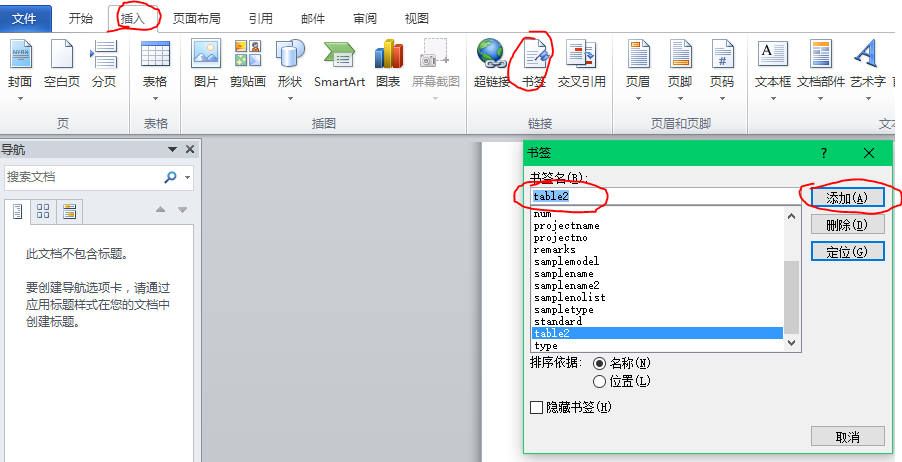
3)书签的插入
word->插入->书签->输入书签名称->添加
4)检索 COM 类工厂中 CLSID 为 {000209FF-0000-0000-C000-000000000046} 的组件失败,原因是出现以下错误: 80070005 拒绝访问
原因:没有权限读取word.dll
解决:http://blog.csdn.net/ououou123456789/article/details/6102036
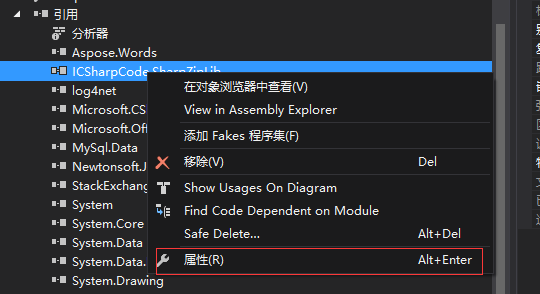
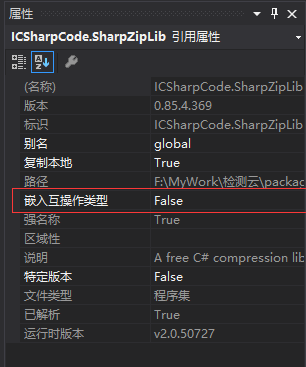
5)ApplicationClass() 不被识别
C#导出word [无规则表结构+模板遇到的坑]的更多相关文章
- 导入导出Mysql数据库、表结构、表数据
由sql文件导入 mysql -uusername -ppwd < ./abc.sql 导出整个数据库的表结构 mysqldump -uroot -pdbpasswd -d dbname > ...
- linux 之 导出远程oracle数据库表结构及数据
导出用户下所有表结构及数据 exp 用户名/密码@ip/数据库 file=文件路径/文件名.dmp owner='用户' 导出用户下所有表结构,不导出数据 exp 用户名/密码@ip/数据库 file ...
- 导出db2数据库的表结构和数据(转载)
对于db2数据库,导入和导出表结构和数据其实很简单,只需要用到db2look和db2move两个命令即可.这两个命令都需要在客户端的命令行处理器 中执行,但对于数据库服务器和客户端不在同一机器上的 ...
- Mysql 只导出数据,不包含表结构
mysqldump -u${user} -p${passwd} --no-create-info --database ${dbname} --table ${tablename} > ${ta ...
- MySQL导出数据库、数据库表结构、存储过程及函数【用】
一.导出数据库 我的mysql安装目录是D:\Program Files\MySQL\MySQL Server 5.5\bin\,导出文件预计放在D:\sql\ 在mysql的安装目录执行命令: my ...
- mysql导出数据库数据及表结构
1,导出远程数据库数据到本地 mysql -A wj_sms -h192.168.1.105 -uroot -p4321 -ss -e "set NAMES 'utf8';SELECT * ...
- freemarker 嵌套循环 (导出word时,修改ftl模板)
1.循环 (循环输出reportList列表的每行的姓名) <#list reportList as report> ${report.name} </$list> 2.嵌套循 ...
- Hive改表结构的两个坑|避坑指南
Hive在大数据中可能是数据工程师使用的最多的组件,常见的数据仓库一般都是基于Hive搭建的,在使用Hive时候,遇到了两个奇怪的现象,今天给大家聊一下,以后遇到此类问题知道如何避坑! 坑一:改变字段 ...
- mysql导出数据表结构,必须退出mysql命令.重新使用msyqldump命令
只导出数据库中所有表结构(-d 减去数据) 导出所有表结构和数据 mysqldump -uroot --default-character-set=utf8 -p123-d必须空格good>H: ...
随机推荐
- 第十八周 Leetcode 72. Edit Distance(HARD) O(N^2)DP
Leetcode72 看起来比较棘手的一道题(列DP方程还是要大胆猜想..) DP方程该怎么列呢? dp[i][j]表示字符串a[0....i-1]转化为b[0....j-1]的最少距离 转移方程分三 ...
- UI:简单的SQL语句
一.SQL语句如果要在程序运行过程中操作数据库中的数据,那得先学会使用SQL语句1.什么是SQLSQL(structured query language):结构化查询语言SQL是一种对关系型数据库中 ...
- iOS编码的一些规范
1.实例变量instance variable,最好带上前缀下划线,例如 @interface Person:NSObject { NSString *_name; int *_age; } @en ...
- windows server 2003 修改远程链接端口
服务器默认的远程链接的端口是3389,只能内网访问,外网不能访问,现映射了8400端口给服务器,内外网都可以访问,因此需要修改服务器的远程链接的端口. 运行中 输入:regedit 选择十进制,将33 ...
- NDK相关收藏【转】
http://blog.csdn.net/column/details/anidea-ndk.html [转] 作者:conowen@大钟
- Java 集合系列
1.http://www.cnblogs.com/skywang12345/p/3308498.html
- [App Store Connect帮助]七、在 App Store 上发行(2.3)设定价格与销售范围:为您的 App 选择地区
您可以选择希望您的 App 在 App Store 上可用的地区.默认情况下,所有地区都被选中,但您可以取消选中您不想销售您 App 的地区.新地区或已更改地区的 App Store 会在 24 小时 ...
- web项目tomcat启动url自定义(去掉项目名)
通常,使用maven构建web项目,启动时默认的访问路径: http://ip:port/项目名 很多时候我们不喜欢这样 访问,我们希望下面的访问方式: http://ip:port 如果是本地的to ...
- ubuntu下进入xampp mysql命令行
在命令行下进入到/opt/lampp/bin目录,使用命令:sudo ./mysql,回车即可. 注意:运行这个命令需要加上sudo,以root权限来运行,不然有些数据库没有权限查看.
- bitset优化背包问题
https://blog.csdn.net/HowardEmily/article/details/77340566 留坑待填