
2016/05/05 smarty ① 登录 ②主页面 ③删除 ④让缩略信息显示完整 (补:增加 修改 )
共 八个页面
①login.php
 <?php

 include("init.inc.php");

 $smarty->display("login.html");

  ?>
②login.html 显示模板 在templates模板文件夹中
<!DOCTYPE html>
<html lang="en">
<head>
<meta charset="UTF-8">
<title>Document</title>
</head>
<body>
<h1>登录页面</h1>
<form action="chuli.php" method="post">
<div>用户名:<input type="text" name="uid"></div>
<div>密 码:<input type="text" name="pwd"></div>
<div><input type="submit" value="登录"></div>
</form>
</body>
</html>
③chuli.php
 <?php

 session_start();

 $uid=$_POST["uid"];

 $pwd=$_POST["pwd"];

 include("DBDA.php");

 $db=new DBDA();

 $sql="select count(*) from users where username='{$uid}' and password='{$pwd}'";

 $result=$db->StrQuery($sql,1,"mydb2");

 if ($result==1) {

     $_SESSION["uid"]=$uid;

     header("location:main.php");

 }

 else{

     header("location:login.php");

 }

  ?>
④main.php
 <?php

 session_start();

 include("init.inc.php");

 include("DBDA.php");

 $db=new DBDA();

 if (!empty($_SESSION["uid"])) {

     ;

     $sqlf="select * from news";

     $attr=$db->Query($sqlf,1,"mydb");

     $smarty->assign("news",$attr);

     $smarty->assign("jsurl","./js/jquery-1.11.2.min.js");

     $smarty->display("main.html");

 }

 else{

     header("location:login.php");

 }

  ?>
⑤main.html 显示模板 在templates模板文件夹中
 <!DOCTYPE html>

 <html lang="en">

 <head>

     <meta charset="UTF-8">

     <title>Document</title>

     <script src="<{$jsurl}>"></script>

     <style type="text/css">

     .fu

     {

         width:360px;

         background-color: yellow;

         position: absolute;

     }

     </style>

 </head>

 <body>

     <h1>主页面</h1>

     <table style="position:absolute" width="100%" border="1" cellpadding="0" cellspacing="0">

         <tr>

             <td>编号</td>

             <td>标题</td>

             <td>内容</td>

             <td>时间</td>

             <td>类型</td>

             <td>操作</td>

         </tr>

         <{foreach $news as $guo}>

         <tr>

             <td><{$guo[0]}></td>

             <td class='dq' bs='<{$guo[1]}>'><{$guo[1]|truncate:20}></td>

             <td><{$guo[2]|truncate:40}></td>

             <td><{$guo[3]}></td>

             <td><{$guo[4]}></td>

             <td><a href="shanchu.php?code=<{$guo[0]}>">删除</a></td>

         </tr>

         <{/foreach}>

     </table>

 </body>

 <script type="text/javascript">

 $(document).ready(function(e){

     $(".dq").mouseover(function(e){

         var top=e.clientY;  //获取鼠标位置

         var name=$(this).attr("bs");

         var div="<div class='fu' style='top:"+top+"px;left:100px'>"+name+"</div>";

         $(".fu").remove();

         $("body").append(div);

     })

     $(".dq").mouseleave(function(e){

         $(".fu").remove();

     })

 });

 </script>

 </html>
⑥shanchu.php
 <?php

 $code=$_GET["code"];

 include("DBDA.php");

 $db=new DBDA();

 $sqls="delete from news where ids='{$code}'";

 $db->Query($sqls,0,"mydb");

 header("location:main.php");

  ?>
⑦init.inc.php (smarty.class.php 核心的配置文件/在libs文件夹下)需要应用smarty模板的php 页面引入
 <?php

 define("ROOT",str_replace("\\","/",dirname(__FILE__)).'/'); //常量ROOT中指定项目根目录

 //echo str_replace("\\","/",dirname(__FILE__))."/";

 require ROOT.'libs/Smarty.class.php'; //加载Smarty类文件

 $smarty = new Smarty(); //实例化Smarty对象<br>

 //$smarty -> auto_literal = false; //就可以让定界符号使用空格

 $smarty->setTemplateDir(ROOT.'templates/'); //设置所有模板文件存放位置

 //$smarty->addTemplateDir(ROOT.'templates2/'); //添加一个模板文件夹

 $smarty->setCompileDir(ROOT.'templates_c/'); //设置编译过的模板存放的目录

 $smarty->addPluginsDir(ROOT.'plugins/'); //设置为模板扩充插件存放目录

 $smarty->setCacheDir(ROOT.'cache/'); //设置缓存文件存放目录

 $smarty->setConfigDir(ROOT.'configs/'); //设置模板配置文件存放目录

 $smarty->caching = false; //设置Smarty缓存开关功能

 $smarty->cache_lifetime = 60*60*24; //设置缓存模板有效时间一天

 $smarty->left_delimiter = '<{'; //设置模板语言中的左结束符

 $smarty->right_delimiter = '}>'; //设置模板语言中的右结束符

 ?>
⑧DBDA.php (query方法查询输出数组,StrQuery方法查询输出字符串,显示时需要拆)
 <?php

 class DBDA

 {

     public $host = "localhost"; //服务器地址

     public $uid = "root"; //数据库的用户名

     public $pwd = "123"; //数据库的密码

     //执行SQL语句,返回相应结果的函数

     //$sql是要执行的SQL语句

     //$type是SQL语句的类型,0代表增删改,1代表查询

     //$db代表要操作的数据库

     public function Query($sql,$type,$db)

     {

         //造连接对象

         $conn = new MySQLi($this->host,$this->uid,$this->pwd,$db);

         //判断连接是否成功

         !mysqli_connect_error() or die("连接失败!");

         //执行SQL语句

         $result = $conn->query($sql);

         //判断SQL语句类型

         if($type==1)

         {

             //如果是查询语句返回结果集的二维数组

             return $result->fetch_all();

         }

         else

         {

             //如果是其他语句,返回true或false

             return $result;

         }

     }

     //Ajax调用返回JSON

     public function JsonQuery($sql,$type=1,$db="test2")

     {

         //定义数据源

         $dsn = "mysql:dbname={$db};host={$this->host}";

         //造pdo对象

         $pdo = new PDO($dsn,"{$this->uid}","{$this->pwd}");

         //准备执行SQL语句

         $st = $pdo->prepare($sql);

         //执行预处理语句

         if($st->execute())

         {

             if($type==1)

             {

                 $attr = $st->fetchAll(PDO::FETCH_ASSOC);

                 return json_encode($attr);

             }

             else

             {

                 if($st)

                 {

                     return "OK";

                 }

                 else

                 {

                     return "NO";

                 }

             }

         }

         else

         {

             echo "执行失败!";

         }

     }

     //Ajax调用返回字符串

     public function StrQuery($sql,$type,$db)

     {

         //造连接对象

         $conn = new MySQLi($this->host,$this->uid,$this->pwd,$db);

         //判断连接是否成功

         !mysqli_connect_error() or die("连接失败!");

         //执行SQL语句

         $result = $conn->query($sql);

         //判断SQL语句类型

         if($type==1)

         {

             $attr = $result->fetch_all();

             $str = "";

             //如果是查询语句返回字符串

             for($i=0;$i<count($attr);$i++)

             {

                 for($j=0;$j<count($attr[$i]);$j++)

                 {

                     $str = $str.$attr[$i][$j];

                     $str = $str."^";

                 }

                 $str = substr($str,0,strlen($str)-1);

                 $str = $str."|";

             }

             $str = substr($str,0,strlen($str)-1);

             return $str;

         }

         else

         {

             //如果是其他语句,返回true或false

             if($result)

             {

                 return "OK";

             }

             else

             {

                 return "NO";

             }

         }

     }

 }
显示效果:
登录:
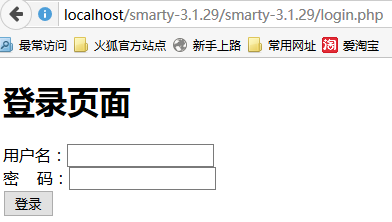
经过 login.html chuli.php 到达 main.php 通过main.html 模板显示出来
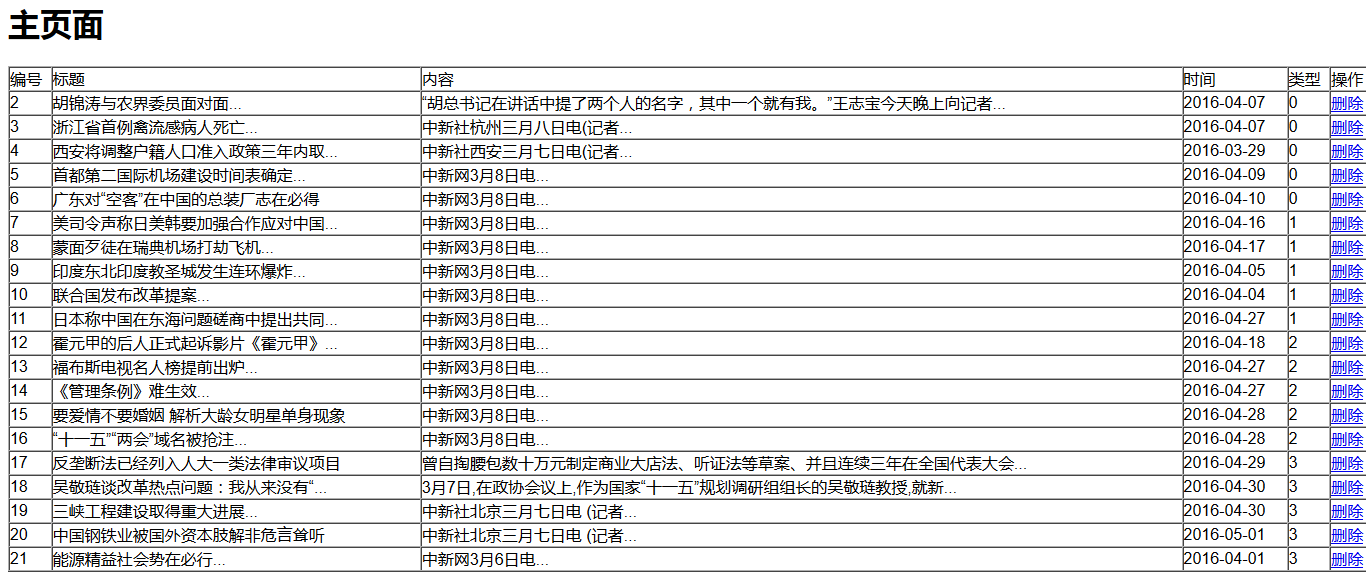
位于编号为1 的新闻 被 点击右侧 删除掉
main.html页面 传值
<td><a href="shanchu.php?code=<{$guo[0]}>">删除</a></td>
通过 shanchu.php 页面链接数据库 做删除动作
让缩略信息显示完整 通过js完成
 <script type="text/javascript">

 $(document).ready(function(e){

     $(".dq").mouseover(function(e){

         var top=e.clientY;  //获取鼠标位置

         var name=$(this).attr("bs");

         var div="<div class='fu' style='top:"+top+"px;left:100px'>"+name+"</div>";

         $(".fu").remove();

         $("body").append(div);

     })

     $(".dq").mouseleave(function(e){

         $(".fu").remove();

     })

 });

 </script>

2016/05/05 smarty ① 登录 ②主页面 ③删除 ④让缩略信息显示完整 (补:增加 修改 )的更多相关文章
- http://tedhacker.top/2016/08/05/Spring%E7%BA%BF%E7%A8%8B%E6%B1%A0%E4%BD%BF%E7%94%A8%E6%96%B9%E6%B3%95/
http://tedhacker.top/2016/08/05/Spring%E7%BA%BF%E7%A8%8B%E6%B1%A0%E4%BD%BF%E7%94%A8%E6%96%B9%E6%B3%9 ...
- Murano Weekly Meeting 2016.07.05
Meeting time: 2016.July.05 1:00~2:00 Chairperson: Kirill Zaitsev, from Mirantis Meeting summary: 1. ...
- Oracle 增加修改删除字段
Oracle 增加修改删除字段 添加字段的语法:alter table tablename add (column datatype [default value][null/not null],…. ...
- 2016/05/05 smarty ①分页 ② 查询后分页 ③缓存
samrty 分页 查询后分页 0505fch.php <?php include("init.inc.php"); include("DBDA.php&qu ...
- “耐撕”团队 2016.04.05 站立会议
1. 时间: 20:10--20:25 共计15分钟. 2. 成员: Z 郑蕊 * 组长 (博客:http://www.cnblogs.com/zhengrui0452/), P 濮成林(博客:ht ...
- extern “C”原理,用法以及使用场景-2016.01.05
1 问题提出 在编程过程中,经常发现如下用法: #ifndef _FILE_NAME_H_ #define _FILE_NAME_H_ #ifdef __cplusplus extern " ...
- iOS常识名词解释 2016/04/05
Bundle : http://www.cnblogs.com/BigPolarBear/archive/2012/03/28/2421802.html http://blog.sina.com.cn ...
- 2016/07/05 zend optimizer
Zend Optimizer是由PHP核心引擎“Zend” http://www.zend.com 创建者Zend技术公司所开的免费PHP优化软件.据Zend公司透露使用这个软件某些情况下至少可以提高 ...
- 2016.01.05 DOM笔记(一) 查找元素
DOM节点的种类 元素和标签是一个意思,例如<body>标签或者称为<body>元素 节点DOM的节点分为三类 元素节点,文本节点,属性节点 例如 <div id=‘b ...
随机推荐
- Linux 命令学习(1): head和tail
版权声明:本文为博主原创文章,未经允许,不得转载. head head 命令可以将一段文本的开头一部分输出到标准输出. head命令既可以处理文本文件也可以处理标准输入. 基本应用 处理文本文件: h ...
- 3.3.3 使用 join 连接字段
join 命令可以将多个文件结合在一起,每个文件里的每条记录,都共享一个键值(key),键值指的是记录中的主字段,通常会是用户名称.个人姓氏.员工编号之类的数据.举例来说,两个文件,一个列出所 ...
- Haproxy的安装与配置
一.Haproxy概念 Haproxy提供高可用性.负载均衡以及基于TCP和HTTP应用的代理,支持虚拟主机,它是免费.快速并且可靠的一种解决方案.Haproxy特别适用于那些负载特大的web站点,这 ...
- bootspring + mybaits +mysql Date 类型的处理
mysql 中有date 类型的属性,java实体类中对应的属性是java.sql.Date 类的. 最初的bug是怎么新增,joinDate 值都是null. 千辛万苦学会了用String转Date ...
- Ubuntu 16.04安装JDK7/JDK8的两种方式
ubuntu 安装jdk 的两种方式:1:通过ppa(源) 方式安装. 2:通过官网下载安装包安装. 这里推荐第1种,因为可以通过 apt-get upgrade 方式方便获得jdk的升级 使用ppa ...
- [Go]字典(map)的操作和约束
字典(map)存储的是键值对(key-value pair,一个键值对代表了一对键和值.一个键和一个值分别代表了一个从属于某一类型的独立值,把它们两个捆绑在一起就是键值对,也称“键-元素对”)的集合 ...
- [BZOJ4052][Cerc2013]Magical GCD
[BZOJ4052][Cerc2013]Magical GCD 试题描述 给出一个长度在 100 000 以内的正整数序列,大小不超过 10^12. 求一个连续子序列,使得在所有的连续子序列中,它们 ...
- [luoguP1198][JSOI2008] 最大数(线段树 || 单调栈)
题目传送门 1.线段树 线段树可以搞. 不过慢的要死1300+ms #include <cstdio> #include <iostream> using namespace ...
- mappedBy的作用
mappedBy的意思就是"被映射",即mappedBy这方不用管关联关系,关联关系交给另一方处理 1.规律:凡是双向关联,mapped必设,因为根本都没必要在2个表中都存在一个外 ...
- java Web项目Service层通用接口和entityVo对象与entity对象转化问题的解决方案
Service层的接口中有一些比较常用方法,一次又一次的在新的Service层中被书写,所以懒惰的程序员又烦了,他们决定写个通用接口来解决这个问题. 有些项目中,实体类即承担接收表单数据的任务,又承担 ...