
Tkinter(一)
采集小工具,目前采集主要针对知乎文章与评论,今天刚开始弄,会不断更新完善
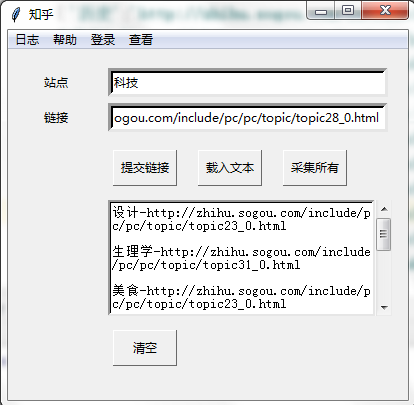
目前效果(测试站点 :科技;测试连接:http://zhihu.sogou.com/include/pc/pc/topic/topic2_0.html)
1.输入框输入站点与连接
2.点击提交链接进行采集(会判断链接是否有效,文本框显示输入的站点与连接)
3.每次输入的站点与连接存到同目录下的txt文件中
4.点击采集所有采集(将txt中所有链接进行采集)
数据库显示


tkinter 代码
import tkinter

import tkinter.filedialog

import tkinter.messagebox

from tkinter.scrolledtext import ScrolledText

from threading import Thread

from yanshi.hot import *

class Cmpfile:

    def __init__(self) :

        self.list1=[]

        self.list2=[]

        self.item={}

        root=tkinter.Tk()

        self.root=root

        self.root.title('知乎')

        self.root.minsize(400,350)

        self.Menu1()

        self.Label1()

        self.root.mainloop()

    def thread_up(self,func):

        t = Thread(target=func)  # 此时线程是新建状态

        t.setDaemon(True)

        t.start()  # 启动线程

    def up(self):

        entry1=self.entry1.get()

        entry2=self.entry2.get()

        self.text.insert('insert',entry1+'-'+entry2+'\n')

        tkinter.messagebox.showinfo('温馨提示', '开始采集')

        self.item[entry1]=entry2

        print(self.item)

        self.list1.append(self.item)

        a=zhihu(self.list1)

        b=a.starts()

        tkinter.messagebox.showinfo('温馨提示',b)

        if b=='采集结束':

            f = open('./1.txt', 'a')

            f.write(entry1 + ':' + entry2 + '\n')

            f.close

        self.entry1.delete(0,'end')

        self.entry2.delete(0,'end')

        self.item={}

        self.list1=[]

    def load(self):

        self.clear()

        f=open('./1.txt','r')

        one_list=f.readlines()

        for one in one_list:

            self.text.insert('insert',one+'\n')

        f.close()

    def clear(self):

        self.text.delete(0.0,'end')

    def all(self):

        f=open('./1.txt','r')

        one_list=f.readlines()

        for one in one_list:

            self.text.insert('insert', one)

            item = {}

            pattern='(.*?)-(.*?)\n'

            re_list=re.findall(pattern,one)

            if re_list==[]:

                pass

            else:

                item[re_list[0][0]]=re_list[0][1]

                self.list2.append(item)

        self.list2=[]

        f.close()

    #用place基础布局

    def Menu1(self):

        # 添加菜单

        menu = tkinter.Menu(self.root)

        # 添加查看子menu

        lookmenu = tkinter.Menu(menu, tearoff=0, bg='purple', fg='white')

        # 添加编辑子menu

        menu.add_cascade(menu=lookmenu, label='日志')

        # 添加帮助子menu

        menu.add_cascade(menu=lookmenu, label='帮助')

        #添加登录子menu

        menu.add_cascade(menu=lookmenu, label='登录')

        # 添加查看子menu

        menu.add_cascade(menu=lookmenu, label='查看')

        self.root.config(menu=menu)

    def Label1(self):

        label1=tkinter.Label(self.root,text = 'sitename',height=1,width=1,pady=3,bd=3).place(relx=0.02,rely=0.05,relwidth=0.2)

        label2=tkinter.Label(self.root,text = 'link',height=1,width=1,pady=3,bd=3).place(relx=0.02,rely=0.15,relwidth=0.2)

        self.entry1 = tkinter.Entry(self.root, width=40, bg='white', bd=5)

        self.entry1.place(relx=0.25, rely=0.05, relwidth=0.7)

        self.entry2 = tkinter.Entry(self.root, width=40, bg='white', bd=5)

        self.entry2.place(relx=0.25, rely=0.15, relwidth=0.7)

        button1 = tkinter.Button(self.root, text='提交链接', height=1, width=8, pady=5, bd=1,command=lambda :self.thread_up(self.up)).place(x=105, y=100)

        button2 = tkinter.Button(self.root, text='载入文本', height=1, width=8, pady=5, bd=1,command=self.load).place(x=190, y=100)

        button3 = tkinter.Button(self.root, text='采集所有', height=1, width=8, pady=5, bd=1,command=self.all).place(x=275, y=100)

        self.text=ScrolledText(self.root,height=8,width=37,bg='white',pady=3,bd=3)

        self.text.place(x=100, y=150)

        button4 = tkinter.Button(self.root, text='清空', height=1, width=8, pady=5, bd=1,command=self.clear).place(x=105 ,y=280)

#实例化对象

one=Cmpfile()
采集代码另外的py文件中,运行时引用
import re

import pymysql

import time

import datetime

import requests

from lxml import etree

from multiprocessing.dummy import Pool as ThreadPool

class zhihu(object):

    def __init__(self,urls):

        self.url_list=urls

        self.headers={

        'User-Agent':'Mozilla/5.0 (Windows NT 6.1; Win64; x64) AppleWebKit/537.36 (KHTML, like Gecko) Chrome/63.0.3239.108 Safari/537.36',

        'Connection':'keep-alive',

        'Host':'zhihu.sogou.com',

        'Referer':'http://zhihu.sogou.com/',}

        self.headers1={

            'User-Agent': 'Mozilla/5.0 (Windows NT 6.1; Win64; x64) AppleWebKit/537.36 (KHTML, like Gecko) Chrome/63.0.3239.108 Safari/537.36',

            'Referer': 'https://www.zhihu.com/',

        }

    def ToResponse(self,res):

        res.encoding=res.apparent_encoding

        args=etree.HTML(res.text)

        return args

    def request_url(self,url):

        response=requests.get(url,headers=self.headers)

        response=self.ToResponse(response)

        link_list = response.xpath('//li/p[@class="tit"]/a/@href')

        return link_list

    def connectdb(self):

        print('连接到mysql服务器...')

        # 打开数据库连接

        db = pymysql.connect("服务器", "root", "123456", "zhihu",charset='utf8')

        print('连接上了!')

        return db

    def get_link(self,item):

        for key,value in item.items():

            url=value

            groupname=key

            link_list=self.request_url(url)

            db = self.connectdb()

            cursor = db.cursor()

            for link in link_list:

                print(link)

                response = requests.get(url=link, headers=self.headers1)

                response = self.ToResponse(response)

                IR_GROUPNAME = '问答社区'

                IR_SITENAME='搜狗知乎'

                IR_CHANNEL=groupname

                IR_URLNAME=link

                BBSNUM='0'

                IR_LASTTIME = datetime.datetime.now().strftime('%Y-%m-%d %H:%M:%S')

                try:

                    IR_URLTITLE = response.xpath('//h1[@class="QuestionHeader-title"]/text()')[0]

                    IR_QUESTION = ''.join(response.xpath("//span[@class='RichText']//text()")) if response.xpath(

                        "//span[@class='RichText']//text()") else ''

                    IR_RETURN = response.xpath("//div[@class='List-header']//h4/span/text()")[0]

                    IR_FOLLOW = \

                        response.xpath("//div[@class='QuestionFollowStatus']//div[@class='NumberBoard-item'][1]//strong/text()")[0]

                    IR_VIEW = response.xpath("//div[@class='QuestionFollowStatus']//div[@class='NumberBoard-item'][2]//strong/text()")[

                        0]

                    print(IR_GROUPNAME, IR_URLTITLE, IR_QUESTION, IR_RETURN, IR_FOLLOW, IR_VIEW)

                    sql = "INSERT INTO wenda (IR_GROUPNAME,IR_SITENAME,IR_CHANNEL,IR_URLTITLE,IR_QUESTION,IR_URLNAME,IR_LASTTIME,IR_VIEW,IR_FOLLOW,IR_RETURN,BBSNUM) VALUES ('" + IR_GROUPNAME + "','" + IR_SITENAME + "','" + IR_CHANNEL + "','" + IR_URLTITLE + "','" + IR_QUESTION + "','" + IR_URLNAME + "','" + IR_LASTTIME + "','" + IR_VIEW+ "','" + IR_FOLLOW + "','" + IR_RETURN + "','" + BBSNUM + "')"

                    try:

                        # 执行sql语句

                        cursor.execute(sql)

                        # 提交到数据库执行

                        db.commit()

                    except Exception as e:

                        # Rollback in case there is any error

                        print('插入数据失败!')

                        print(e)

                        db.rollback()

                    #回帖

                    huifu = response.xpath("//div[@class='List']//div[@class='List-item']")

                    print(huifu)

                    num=1

                    for one in huifu:

                        IR_AUTHOR = one.xpath(".//div[@class='AuthorInfo-head']//a[@class='UserLink-link']/text()")[0] if one.xpath(

                            ".//div[@class='AuthorInfo-head']//a[@class='UserLink-link']/text()") else '匿名用户'

                        if IR_AUTHOR == '匿名用户':

                            IR_AUTHOR_LINK = ''

                        else:

                            IR_AUTHOR_LINK = 'https:' + one.xpath(".//div[@class='AuthorInfo-head']//a[@class='UserLink-link']/@href")[

                                0]

                        IR_RESPONSE = ''.join(one.xpath(".//div[@class='RichContent-inner']//text()"))

                        IR_URLTIME = one.xpath(".//div[@class='ContentItem-time']//span/text()")[0]

                        pattern = r'((\u53d1\u5e03\u4e8e|\u7f16\u8f91\u4e8e).*?(\d+-\d+-\d+|\d+:\d+))'

                        gone = re.search(pattern, IR_URLTIME).group(1)

                        gtwo = re.search(pattern, IR_URLTIME).group(3)

                        if '昨天' not in gone and '-' not in gtwo:

                            IR_URLTIME = time.strftime("%Y/%m/%d") + ' ' + gtwo

                        elif '-' in gtwo:

                            IR_URLTIME = gtwo

                        else:

                            IR_URLTIME = str(datetime.date.today() - datetime.timedelta(days=1)) + ' ' + gtwo

                        IR_AGREE = one.xpath(".//button[@aria-label='赞同']/text()")[0]

                        if 'K' in IR_AGREE:

                            IR_AGREE=str(int(float(IR_AGREE.replace('K',''))*1000))

                        print(IR_AGREE)

                        pattern='\d+'

                        IR_COMMENT = one.xpath(".//div[@class='ContentItem-actions RichContent-actions']/button[1]/text()")[0]

                        try:

                            IR_COMMENT = re.search(pattern, IR_COMMENT).group()

                        except:

                            IR_COMMENT = '0'

                        BBSNUM=str(num)

                        sql = "INSERT INTO wenda (IR_GROUPNAME,IR_SITENAME,IR_CHANNEL,IR_URLTITLE,IR_URLNAME,IR_URLTIME,IR_LASTTIME,BBSNUM,IR_AUTHOR,IR_RESPONSE,IR_AGREE,IR_COMMENT) VALUES ('" + IR_GROUPNAME + "','" + IR_SITENAME + "','" + IR_CHANNEL + "','" + IR_URLTITLE + "','" + IR_URLNAME + "','" + IR_URLTIME + "','" + IR_LASTTIME + "','" + BBSNUM + "','" + IR_AUTHOR + "','" + IR_RESPONSE + "','" + IR_AGREE + "','" + IR_COMMENT + "')"

                        try:

                            # 执行sql语句

                            cursor.execute(sql)

                            # 提交到数据库执行

                            db.commit()

                        except Exception as e:

                            # Rollback in case there is any error

                            print('插入数据失败!')

                            print(e)

                            db.rollback()

                        num+=1

                        time.sleep(1)

                except Exception as e:

                    print(e)

    def starts(self):

        try:

            pool = ThreadPool(5)

            time3 = time.time()

            pool.map(self.get_link, self.url_list)

            pool.close()

            pool.join()

            time4 = time.time()

            print ('多线程耗时 : ' + str(time4 - time3) + ' s')

            return '采集结束'

        except:

            return '链接错误'
Tkinter(一)的更多相关文章
- tkinter事件机制
一.tkinter.Event tkinter的事件机制跟js是一样的,也是只有一个Event类,这个类包罗万象,集成了键盘事件,鼠标事件,包含各种参数. 不像java swing那种强类型事件,sw ...
- 【Pyhon 3】: 170104:优品课堂: GUI -tkinter
from tkinter import * root = Tk() root.title("BMS 图书管理系统") lbl = Label(root, text='书名:') # ...
- Python3的tkinter写一个简单的小程序
一.这个学期开始学习python,但是看了python2和python3,最后还是选择了python3 本着熟悉python的原因,并且也想做一些小程序来增加自己对python的熟练度.所以写了一个简 ...
- python tkinter
1. 在python3中使用 import tkinter 异常:no module named _tkinter apt-get install python-tk
- Python 2.7 - CentOS 7 - ImportError: No module named Tkinter
It's simple. sudo yum -y install tkinter Just want to say, "I'm back".
- NE Upgrade python script. Need to write a Tkinter GUI for it
# -*- coding: utf-8 -*-#from ftplib import FTP __authour__='CC' import osimport telnetlibimport time ...
- [小菜随笔]python tkinter实现简单的ping命令
本文主要是介绍python图形界面上的按键与实际功能的对接,其实编程掌握了基础之后的学习应该都是靠自己去挖掘其他的 在网上发现多半教程都是2的,故本文使用的是python3.5,其实也没什么区别,就有 ...
- python安装tkinter
python2安装tkinter sudo apt-get install python-tk python3 安装tkinter sudo apt-get install python3-tk
- Python GUI编程--Tkinter
今天看到了GUI编程,书上推荐用wxPython,去官网上看了看,发现Windows的最高支持到2.7,我用的是3.4版本,咋办,用自带的库--Tkinter呗,它是Python的默认GUI库,几乎是 ...
- [转]pyhon之Tkinter实例化学习
本文转自:http://www.cnblogs.com/kaituorensheng/p/3287652.html 阅读目录 1. 产品介绍 2. 设计规划 3. 相关知识 4. 源码附件 Tkint ...
随机推荐
- HDU 4386 Quadrilateral(四边形的海伦公式的应用)
题目链接:http://acm.hust.edu.cn/vjudge/contest/view.action?cid=115760#problem/G 题目大意是给出四条边,问能否组成一个四边形,如果 ...
- linux密码忘记的处理步骤
linux忘记密码 centos7忘记密码如何解决?进入到单用户模式下去修改root密码step 1:开机时按住向下箭头,选择第一个,按住e进入gurb界面:step 2:在编辑模式下找ro 修改为 ...
- instr动态模糊查询
String sqlSearchtext = ""; if(!"".equals(model.getXzqhdm())&&model.getXz ...
- dd 命令
dd:用指定大小的块拷贝一个文件,并在拷贝的同时进行指定的转换. 注意:指定数字的地方若以下列字符结尾,则乘以相应的数字:b=512:c=1:k=1024:w=2 参数注释: if=文件名:输入文件名 ...
- [MyBatis]浅谈如何实现事务处理
要实现事务处理,就得从SqlSession中取出connection来,然后对connection采用setAutoCommit,commit,rollback等操作,最后的时候,不能像JDBC一样关 ...
- Python常用模块安装
1. python操作MySQL数据库的依赖包MySQLdb ImportError: No module named MySQLdb 安装方式: yum install MySQL-python 2 ...
- js模块化编程之彻底弄懂CommonJS和AMD/CMD
转自 http://www.cnblogs.com/chenguangliang/p/5856701.html
- Spring Boot连接MySQL长时间不连接后报错`com.mysql.cj.core.exceptions.ConnectionIsClosedException: No operations allowed after connection closed.`的解决办法
报错:com.mysql.cj.core.exceptions.ConnectionIsClosedException: No operations allowed after connection ...
- .Netcore 2.0 Ocelot Api网关教程(8)- 缓存
Ocelot中使用 CacheManager 来支持缓存,官方文档中强烈建议使用该包作为缓存工具.以下介绍通过使用CacheManager来实现Ocelot缓存. 1.通过Nuget添加 Ocelot ...
- Quartz任务调度系统,克隆表达式
Quartz任务调度系统,克隆表达式 (1).克隆表达式可以包括7个字段:秒.分.小时.月内日期.月.周内日期.年(可选字段) (2).特殊字符: 一.反斜线(/)字符表示增量."5/15& ...