
React生命周期, 兄弟组件之间通信
1、一个demo(https://www.reactjscn.com/docs/state-and-lifecycle.html)
class Clock extends React.Component {

    constructor(props) {

      super(props);

      this.state = {date: new Date()};

    }

    componentDidMount() {

      this.timerID = setInterval(

        () => this.tick(),

        1000

      );

    }

    componentWillUnmount() {

      clearInterval(this.timerID);

    }

    tick() {

      this.setState({

        date: new Date()

      });

    }

    render() {

      return (

        <div>

          <h1>Hello, world!</h1>

          <h2>It is {this.state.date.toLocaleTimeString()}.</h2>

        </div>

      );

    }

  }

  ReactDOM.render(

    <Clock />,

    document.getElementById('root')

  );
2、demo: 兄弟组件之间通信,使用到生命周期钩子componentWillReceiveProps
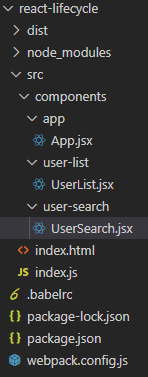
项目结构:
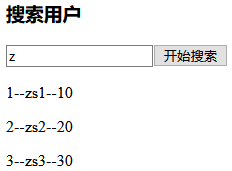
demo效果:“搜索组件”传递keyword参数给父组件,然后父组件将keyword参数传递给“显示子组件”
App.jsx
import React from 'react'

import UserSearch from '../user-search/UserSearch.jsx'

import UserList from '../user-list/UserList.jsx'

export default class App extends React.Component {

    constructor(props) {

        super(props)

        this.state = {

            keyword: ''

        }

        this.setKeyword = this.setKeyword.bind(this)

    }

    setKeyword(keyword) {

        console.log(`App组件setKeyword被调用, keyword=${keyword}`)

        this.setState({ keyword })

    }

    render() {

        return (

            <div>

                <UserSearch setKeyword={this.setKeyword} />

                <UserList keyword={this.state.keyword} />

            </div>

        )

    }

}
UserSearch.jsx
import React from 'react'

import PropTypes from 'prop-types'

export default class UserSearch extends React.Component {

    state = {

        keyword: ''

    }

    static propTypes = {

        setKeyword: PropTypes.func.isRequired

    }

    render() {

        const { keyword} = this.state

        return (

            <div>

                <h3>搜索用户</h3>

                <input type="text" placeholder="请输入搜索关键字" name="keyword" value={keyword} onChange={(e) => this.keywordInputOnChangeHandler(e)} />

                <input type="button" value="开始搜索" onClick={() => this.searchClickHandler()} />

            </div>

        )

    }

    keywordInputOnChangeHandler = (e) => {

        const keyword = e.target.value

        this.setState({ keyword })

    }

    searchClickHandler = () => {

        const { keyword } = this.state

        console.log(`keyword.trim()=${keyword.trim()}`)

        if (!keyword.trim()) return

        this.props.setKeyword(keyword)

    }

}
UserList.jsx
import React from 'react'

import PropTypes from 'prop-types'

import Axios from 'axios'

export default class UserList extends React.Component {

    state = {

        userList: []

    }

    componentWillReceiveProps(newProps) {

        const { keyword } = newProps

        Axios.get(`http://localhost:4000/react-db-crud/user/search?keyword=${keyword}`)

            .then(res => {

                if (res.data.code == 0) {

                    const userList = res.data.data

                    console.log(`userList=${JSON.stringify(userList)}`)

                    this.setState({ userList })

                }

            })

    }

    render() {

        return (

            <div>

                {

                    this.state.userList.map(user => <p>{user.id + "--" + user.name + "--" + user.age}</p>)

                }

            </div>

        )

    }

}

UserList.propTypes = {

    keyword: PropTypes.string.isRequired

}
React生命周期, 兄弟组件之间通信的更多相关文章
- react复习总结(2)--react生命周期和组件通信
这是react项目复习总结第二讲, 第一讲:https://www.cnblogs.com/wuhairui/p/10367620.html 首先我们来学习下react的生命周期(钩子)函数. 什么是 ...
- 在npm Vue单页面的环境下,兄弟组件之间通信Bus
参考1:https://www.cnblogs.com/wangruifang/p/7772631.html 参考2:https://www.jianshu.com/p/b3d09c6c87bf 在m ...
- react生命周期和组件生命周期
React的组件在第一次挂在的时候首先获取父组件传递的props,接着获取初始的state值,接着经历挂载阶段的三个生命周期函数,也就是ComponentWillMount,render,Compon ...
- vue工程利用pubsub-js实现兄弟组件之间的通信
前言 项目是基于vue-cli创建的,不会搭建vue开发环境的同学可以百度,这里不再赘述. 步骤流程 vue项目搭建完成之后的文件图如下: 我的上一篇博客已经详细叙述vue工程中各个文件的作用,不清楚 ...
- React 组件之间通信 All in One
React 组件之间通信 All in One 组件间通信 1. 父子组件之间通信 props 2. 兄弟组件之间通信 3. 跨多层级的组件之间通信 Context API https://react ...
- Vue 组件之间通信 All in One
Vue 组件之间通信 All in One 组件间通信 1. 父子组件之间通信 https://stackblitz.com/edit/vue-parent-child-commutation?fil ...
- React中组件之间通信的方式
一.是什么 我们将组件间通信可以拆分为两个词: 组件 通信 回顾Vue系列的文章,组件是vue中最强大的功能之一,同样组件化是React的核心思想 相比vue,React的组件更加灵活和多样,按照不同 ...
- 使用EventBus实现兄弟组件之间的通信
使用EventBus实现兄弟组件之间的通信 需求:为了实现菜单折叠的效果,例如http://blog.gdfengshuo.com/example/work/#/dashboard header组件和 ...
- Vue2.0父子组件之间和兄弟组件之间的数据交互
熟悉了Vue.js的同级组件之间通信,写此文章,以便记录. Vue是一个轻量级的渐进式框架,对于它的一些特性和优点,请在官网上进行查看,不再赘述. 使用NPM及相关命令行工具初始化的Vue工程,目录结 ...
随机推荐
- 【AtCoder】ARC079
ARC079题解 C - Cat Snuke and a Voyage #include <bits/stdc++.h> #define fi first #define se secon ...
- xss level11
Level11 (1) (2)毫无头绪,查看PHP源代码发现,是从头文件的referer获取的输入. (3)用Burp抓包,修改头文件如下: (4)再点击Proxy界面的forward,回到浏览器页面 ...
- 内存溢出,内存泄漏,CPU溢出区别
内存溢出 out of memory,就是你要的内存空间超过了系统实际分配给你的空间,此时系统相当于没法满足你的需求,就会报内存溢出的错误 内存泄漏是指你向系统申请分配内存进行使用(new),可是使用 ...
- Android Monkey压测命令
测试步骤:1.安装ADB2.连接被测手机和电脑3.打开CMD命令行4.输入monkey命令adb shell monkey -p your.package.name --pct-touch 30 -- ...
- LeetCode 答案(python)18-24
18.四个数之和 给定一个包含 n 个整数的数组 nums 和一个目标值 target,判断 nums 中是否存在四个元素 a,b,c 和 d ,使得 a + b + c + d 的值与 target ...
- java统计字符串中每个字符出现的次数
package MapTest; import java.util.HashMap; public class MapTest { public static void Count(String st ...
- 移动端测试之APP安全测试
现在APP测试已经是测试行业的一个重要分支,对APP测试技能和经验的要求也越来越高,看到一篇关于APP安全测试的总结,分享给需要的朋友.1.软件权限1)扣费风险:包括发送短信.拨打电话.连接网络等2) ...
- SpringBoot下实现MongoDB字段类型转换器
1 目的 MongoDB Java String LocalDateTime 2 实现 先定义实体类 @Data // lombok @Accessors(chain = true) @Documen ...
- JS 验证字符串是否能转为json格式
var isJSON=function (str) { if (typeof str == 'string') { try { var obj = JSON.parse(str); if (typeo ...
- ASP .NET依赖注入理解
ASP .NET依赖注入理解[转]: https://www.cnblogs.com/wzk153/p/10892444.html