
jQuery属性操作之值操作
值操作是对DOM属性value进行读取和设置操作。 比如html()、 text()、 val().
1. html
1. 1 html()获取值
返回值:String
描述:获取集合中第一个匹配元素的HTML内容
格式:
$(selector).html()
这个方法不接受任何元素
作用:在一个HTML文档中, 可以使用.html()方法来获取任意一个元素的内容。 如果选择器匹配多个元素, 那么只有第一个匹配元素的HTML内容会被获取。
实例代码:
<!doctype html>

<html lang="en">

<head>

    <meta charset="UTF-8">

    <title>html Demo</title>

    <script type="text/javascript" src="jquery.js"></script>

    <script>

        $("div.demo-container").html();

    </script>

</head>

<body>

    <div class="demo-container">

        <div class="demo-box">Demonstration Box</div>

    </div>

</body>

</html>
执行结果为:
Demonstration Box
1.2 html() 设置值
格式:
$(selector).html(htmlString);
返回值:jQuery
作用: 用来设置每个匹配元素的一个HTML字符串
htmlString 类型:string
代码示例:
 <!doctype html>

 <html lang="en">

 <head>

     <meta charset="UTF-8">

     <title>html Demo</title>

     <style type="text/css">

         .red{

             coler: red;

         }

     </style>

     <script type="text/javascript" src="jquery.js"></script>

     <script type="text/javascript">

         $(function () {

             $("div").html("<span class='red'>Hello <b>Again</b></span>");

         })

     </script>

 </head>

 <body>

     <span>Hello</span>

     <div></div>

     <div></div>

     <div></div>

 </body>

 </html>
执行结果:

2. text()
2.1 使用text()获取值
语法:
$("selector").text()
返回值:String
作用:得到匹配元素集合中每个元素的合并文本, 包括他们的后代
示例代码:
<!doctype html>

<html lang="en">

<head>

    <meta charset="UTF-8">

    <title>text Demo</title>

    <script type="text/javascript" src="jquery.js"></script>

    <script type="text/javascript">

        $(function () {

            $("div.demo-container").text()

        })

    </script>

</head>

<body>

    <div class="demo-container">

            <div class="demo-box">Demonstration Box</div>

            <ul>

                <li>list item 1</li>

                <li>list <strong>item</strong> 2</li>

            </ul>

    </div>

</body>

</html>
执行结果为:

注意:
.text()方法不能使用在input元素或scripts元素上。
.input 或 textarea 需要使用.val()方法获取或者设置文本值。
得到scripts元素的值, 会使用.html()方法。
2.2 使用Text() 设置文本内容
格式:
$(selector).text(text)
返回值:jQuery
text(参数类型): String 或 Number 或 Boolean
作用:用于设置匹配元素内容的文本。当提供的是一个Number或者Boolean的时候,那么将被转换成一个String表现形式, 提供给这个方法
代码示例:
 <!doctype html>

 <html lang="en">

 <head>

     <meta charset="UTF-8">

     <title>text Demo</title>

     <style type="text/css">

         p{

             color: blue;

             margin: 8px;

         }

     </style>

     <script type="text/javascript" src="jquery.js"></script>

     <script type="text/javascript">

         $(function () {

             $("p").text("<b>Some</b> new text.")

         })

     </script>

 </head>

 <body>

     <p>Test Paragraph.</p>

 </body>

 </html>
执行结果为:

3. val()
3.1 使用val()方法获取值
格式:
$(selector).vall();
返回值:String
参数: 不接收任何参数
作用:获取匹配的元素集合中第一个元素的当前值
.val()方法主要用于获取表单元素的值, 如input, select 和 textarea。
当在一个空集合上调用, 它返回undefined。
当该集合中的第一个元素是一个select-multiple(即, select元素设置了multiple属性), .val()返回一个包含每个选择项值的数组。
对于选择框(select), 复选框(checkbox)和单选按钮(radio button), 也可以使用 :selected 和checked选择器来获取值。例如:
//从一个下拉选择框中获取值
$("select.foo option: selected").val();
// 简单的从一个下拉选择框中获取值
$("select.foo").val();
//Get the value form a checked checkbox
$("input: checkbox: checked).val();
//Get the value from a set of radio buttons
$("input: radio[name=bar]: checked).val();
注意: 通过.val()方法从<textarea>元素中获取的值是不含有回车(\r)字符的。
示例代码:
 <!doctype html>

 <html lang="en">

 <head>

     <meta charset="UTF-8">

     <title>val Demo</title>

     <style type="text/css">

         p{

             color: blue;

             margin: 8px;

         }

     </style>

     <script type="text/javascript" src="jquery.js"></script>

     <script>

         $(function () {

             $("input").keyup(function () {

                 var value = $(this).val();

                 $("p").text(value);

             });

         })

     </script>

 </head>

 <body>

     <input type="text" value="some text"></input>

     <p></p>

 </body>

 </html>
执行结果为:
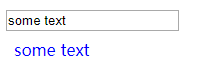
3.2 使用val()设置值
格式:
$(selector).val(value);
返回值: jQuery
参数(value):String 或 Number 或 Array
作用:一个String , Number 或 一个以字符串形式的数组来设定每个匹配元素的值。
此方法通常用于设置表单字段的值。
val()允许你传递一个元素值的数组。 当使用在包含像<input type='checkbox">, <input type="radio>和<select>中的<option>元素的jQuery对象上的时候是非常有用的。在这种情况下, input和option和value与数组元素相匹配的情况下将被选中(checked)或选定(selencted) ,而那些与数组元素值不匹配的value是未选中(unchecked)或未被选(unselected), 这取决于元素类型。
对于<input type="radio"> 属于一个单选按钮组, 还有<select>的其他元素都将被取消选中。
使用这个方法设置值, 不会触发change事件。为此, 相关的时间处理程序不会被执行。如果要执行他们, 应该在设置值之后调用.trigger("change")
代码示例:
点击按钮时, 在文本框中显示按钮的值。
<!doctype html>

<html lang="en">

<head>

    <meta charset="UTF-8">

    <title>val Demo</title>

    <style type="text/css">

        button{

            margin: 4px;

            cursor: pointer;

        }

        input{

            margin: 4px;

            color: blue;

        }

    </style>

    <script type="text/javascript" src="jquery.js"></script>

    <script>

        $(function () {

            $("button").click(function () {

            var text = $(this).text();

            $("input").val(text);

        });

        })

    </script>

</head>

<body>

    <div>

        <button>Feed</button>

        <button>the</button>

        <button>Input</button>

    </div>

    <input type="text" value="click a button">

</body>

</html>
执行结果为:
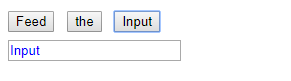
jQuery属性操作之值操作的更多相关文章
- jQuery 效果函数,jquery文档操作,jQuery属性操作方法,jQuerycss操作函数,jQuery参考手册-事件,jQuery选择器
jQuery 效果函数 方法 描述 animate() 对被选元素应用“自定义”的动画 clearQueue() 对被选元素移除所有排队的函数(仍未运行的) delay() 对被选元素的所有排队函数( ...
- jQuery属性遍历、HTML操作
jQuery 拥有可操作 HTML 元素和属性的强大方法. jQuery 遍历函数 jQuery 遍历函数包括了用于筛选.查找和串联元素的方法. .add() 将元素添加到匹配元素的集合中. . ...
- jQuery源代码学习之八——jQuery属性操作模块
一.jQuery属性模块整体介绍 jQuery的属性操作模块分四个部分:html属性操作,dom属性操作,类样式操作,和值操作. html属性操作(setAttribute/getAttribute) ...
- python全栈开发day48-jqurey自定义动画,jQuery属性操作,jQuery的文档操作,jQuery中的ajax
一.昨日内容回顾 1.jQuery初识 1).使用jQuery而非JS的六大理由 2).jQuery对象和js对象转换 3).jQuery的两大特点 4).jQuery的入口函数三大写法 5).jQu ...
- Jquery框架1.选择器|效果图|属性、文档操作
1.JavaScript和jquery的对比 书写繁琐,代码量大 代码复杂 动画效果,很难实现.使用定时器 各种操作和处理 <!DOCTYPE html> <html lang=&q ...
- 前端开发之jQuery属性和文档操作
主要内容: 1.jQuery属性操作 2.jQuery文档操作 一.jQuery属性操作 1.什么是jQuery的属性操作? jQuery的属性操作模块包括四个部分:html属性操作,dom属性操作, ...
- jQuery属性操作
jQuery 的属性操作的核心部分其实就是对底层 getAttribute().setAttributes()等方法的一系列兼容性处理 ...if ( notxml ) { name = name.t ...
- jQuery 属性操作和CSS 操作
如有在jQuery方法中涉及到函数,此函数必定会返回一个数值(函数由于运行次数不同触发一些不同效果) jQuery 属性操作方法(以下方法前些日子学习过,不再赘述) addClass() attr() ...
- JQuery DOM操作 、属性和CSS样式操作、其他函数
DOM操作 1.在div1内部最后追加一个节点 $("#div1").append("<img src='../01-HTML基本标签/img/Male.gif'/ ...
随机推荐
- 使用JavaScript和React编写原生移动应用
使用JavaScript和React编写原生移动应用 React Native使你只使用JavaScript也能编写原生移动应用. 它在设计原理上和React一致,通过声明式的组件机制来搭建丰富多彩的 ...
- linux系统TCP协议之Send(转)
tcp协议本身是可靠的,并不等于应用程序用tcp发送数据就一定是可靠的.不管是否阻塞,send发送的大小,并不代表对端recv到多少的数据. 在阻塞模式下, send函数的过程是将应用程序请求发送的数 ...
- O056、Extend Volume 操作
参考https://www.cnblogs.com/CloudMan6/p/5645305.html 今天学习如何扩大volume的容量,为了保护现有的数据,cinder不允许缩小volume. ...
- django 中间键重定向
1,定义和注册中间件 在注册的中间件中使用: from django.http import HttpResponseRedirect '''下面的书写方法会陷入死循环,所以必须加判断条件只调用一次' ...
- MySQL之常用查询
1) 查询字符集 show variables like 'character%'; 2)查看版本 select version(); 3) 共享表空间的数据文件存储路径 show variables ...
- JavaScript和Java是不同公司开发的不同产品
首先,JavaScript和Java是不同公司开发的不同产品.javascript是Netscape的产品.它的目的是扩展Netscape Navigator功能,开发一种可以嵌入到网页中的对象和事件 ...
- layui弹出层基础参数
一.type-层类型 类型:Number 默认为0(信息框); 1(页面层),可以在页面添加HTML内容 2(iframe层) 3(加载层)加载时显示的弹出框 4(tips层) 需要绑定ID就不展示 ...
- 注解【Annotation】、反射
注解:Annotation是从JDK5.0开始引入的新技术.Annotation的作用:如果没有注解信息处理流程,则注解毫无意义)- 不是程序本身,可以对程序作出解释.(这一点,跟注释没什么区别)- ...
- deep_learning_Function_np.newaxis参数理解
功能:np.newaxis是用来给数组a增加维度的格式:a[np.newaxis和:的组合],如a[:,np.newaxis],a[np.newaxis, np.newaxis, :]详解:np.ne ...
- python网络编程:socket半连接池、UDP通讯模板
一.TCP半连接池原理 二.UDP通讯 三.UDP聊天 四.UDP聊天2 五.UDP会粘包吗 六.UDP总结 七.UDP与TCP对比 一.TCP半连接池原理 客户端 import socket cli ...