
高级UI-DrawerLayout侧滑
侧滑的方案有很多种,早期的开源SliddingMenu,以及后来的DrawerLayout以及NavigationView等都可实现侧滑效果,这里介绍的是DrawerLayout,下一节将介绍NavigationView
原理
DrawerLayout位于v4包,为了做到最低限度的兼容,使得更低版本的Android也可以使用这个侧滑效果
其就是一个自定义的容器,继承自ViewGroup
在解析DrawerLayout布局的时候,根据android:layout_gravity="start"标签确定主布局和侧滑布局
例如下面的布局,就直接呈现出一个侧滑菜单
<?xml version="1.0" encoding="utf-8"?>

<android.support.v4.widget.DrawerLayout xmlns:android="http://schemas.android.com/apk/res/android"

    android:layout_width="match_parent"

    android:layout_height="match_parent">

    <!--内容部分-->

    <LinearLayout

        android:layout_width="match_parent"

        android:layout_height="match_parent"

        android:orientation="vertical">

        <TextView

            android:layout_width="match_parent"

            android:layout_height="match_parent"

            android:background="@android:color/holo_green_light"

            android:text="内容部分" />

    </LinearLayout>

    <!--侧滑菜单部分-->

    <LinearLayout

        android:layout_width="200dp"

        android:layout_height="match_parent"

        android:layout_gravity="start"

        android:orientation="vertical">

        <TextView

            android:layout_width="match_parent"

            android:layout_height="wrap_content"

            android:background="@android:color/holo_blue_light"

            android:text="item 1" />

        <TextView

            android:layout_width="match_parent"

            android:layout_height="wrap_content"

            android:background="@android:color/holo_orange_light"

            android:text="item 2" />

        <TextView

            android:layout_width="match_parent"

            android:layout_height="wrap_content"

            android:background="@android:color/holo_red_light"

            android:text="item 3" />

    </LinearLayout>

</android.support.v4.widget.DrawerLayout>
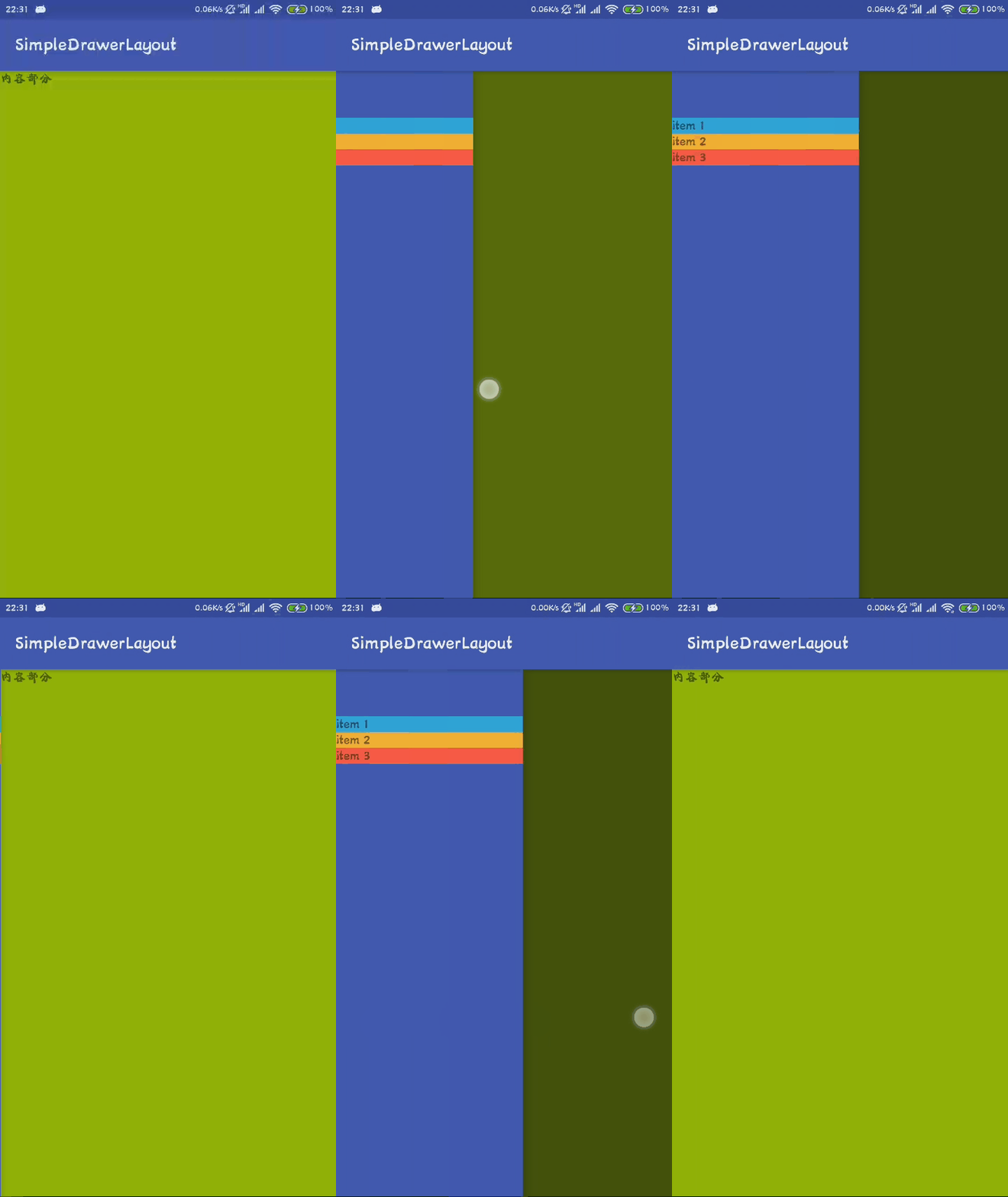
直接运行,效果图如下
使用Toolbar
因为要使用Toolbar,就要去掉其ActionBar,故直接修改style文件
<resources>

    <!-- Base application theme. -->

    <style name="AppTheme" parent="Theme.AppCompat.Light.NoActionBar">

        <!-- Customize your theme here. -->

        <item name="colorPrimary">@color/colorPrimary</item>

        <item name="colorPrimaryDark">@color/colorPrimaryDark</item>

        <item name="colorAccent">@color/colorAccent</item>

    </style>

</resources>
更改布局,使其符合MD标准
<?xml version="1.0" encoding="utf-8"?>

<LinearLayout xmlns:android="http://schemas.android.com/apk/res/android"

    android:layout_width="match_parent"

    android:layout_height="match_parent"

    android:orientation="vertical">

    <android.support.v7.widget.Toolbar

        android:id="@+id/tool_bar"

        android:layout_width="match_parent"

        android:layout_height="wrap_content"

        android:background="?attr/colorPrimary" />

    <android.support.v4.widget.DrawerLayout

        android:id="@+id/drawer_layout"

        android:layout_width="match_parent"

        android:layout_height="match_parent">

        <!--内容部分-->

        <LinearLayout

            android:layout_width="match_parent"

            android:layout_height="match_parent"

            android:orientation="vertical">

            <TextView

                android:layout_width="match_parent"

                android:layout_height="match_parent"

                android:background="@android:color/holo_green_light"

                android:text="内容部分" />

        </LinearLayout>

        <!--侧滑菜单部分-->

        <LinearLayout

            android:layout_width="200dp"

            android:layout_height="match_parent"

            android:layout_gravity="start"

            android:background="@color/colorPrimary"

            android:orientation="vertical"

            android:paddingTop="50dp">

            <TextView

                android:layout_width="match_parent"

                android:layout_height="wrap_content"

                android:background="@android:color/holo_blue_light"

                android:text="item 1" />

            <TextView

                android:layout_width="match_parent"

                android:layout_height="wrap_content"

                android:background="@android:color/holo_orange_light"

                android:text="item 2" />

            <TextView

                android:layout_width="match_parent"

                android:layout_height="wrap_content"

                android:background="@android:color/holo_red_light"

                android:text="item 3" />

        </LinearLayout>

    </android.support.v4.widget.DrawerLayout>

</LinearLayout>
在活动处设置Toolbar
public class MainActivity extends AppCompatActivity {

    private Toolbar toolbar;

    private DrawerLayout drawerLayout;

    @Override

    protected void onCreate(Bundle savedInstanceState) {

        super.onCreate(savedInstanceState);

        setContentView(R.layout.activity_main);

        toolbar = findViewById(R.id.tool_bar);

        //将ActionBar替换成Toolbar

        setSupportActionBar(toolbar);

        drawerLayout = findViewById(R.id.drawer_layout);

        ActionBarDrawerToggle drawerToggle = new ActionBarDrawerToggle(this,

                drawerLayout, toolbar, R.string.drawer_open, R.string.drawer_close);

        //同步状态

        drawerToggle.syncState();

        //给侧滑控件设置监听

        drawerLayout.setDrawerListener(drawerToggle);

    }

}
至此便完成了侧滑功能的实现,其效果图如下

实现右侧滑入,这个其实很简单,将之前设置的android:layout_gravity="start"更改为android:layout_gravity="end"便实现右侧滑入,同时还可以实现左右都可以滑入
实现类似QQ的效果
在监听的状态里面设置即可
public class MainActivity extends AppCompatActivity {

    private Toolbar toolbar;

    private DrawerLayout drawerLayout;

    @Override

    protected void onCreate(Bundle savedInstanceState) {

        super.onCreate(savedInstanceState);

        setContentView(R.layout.activity_main);

        toolbar = findViewById(R.id.tool_bar);

        //将ActionBar替换成Toolbar

        setSupportActionBar(toolbar);

        drawerLayout = findViewById(R.id.drawer_layout);

        ActionBarDrawerToggle drawerToggle = new ActionBarDrawerToggle(this,

                drawerLayout, toolbar, R.string.drawer_open, R.string.drawer_close);

        //同步状态

        drawerToggle.syncState();

        //给侧滑控件设置监听

        //drawerLayout.setDrawerListener(drawerToggle);

        drawerLayout.setDrawerListener(new DrawerLayout.DrawerListener() {

            @Override

            public void onDrawerSlide(@NonNull View view, float slideOffset) {

                //滑动过程中回调,其中slideOffset的值为 0~1

                View content = drawerLayout.getChildAt(0);

                View menu = view;

                float scale = 1 - slideOffset;//1~0

                float leftScale = (float) (1f - 0.3 * scale);//1~0.7

                //float rightScale = (float) (0.7f + 0.3 * scale);//0.7~1

                menu.setScaleX(leftScale);//1~0.7

                menu.setScaleY(leftScale);//1~0.7

                //content.setScaleX(rightScale);

                //content.setScaleY(rightScale);

                content.setTranslationX(menu.getMeasuredWidth() * (1 - scale));//0~width

            }

            @Override

            public void onDrawerOpened(@NonNull View view) {

                //打开时回调

            }

            @Override

            public void onDrawerClosed(@NonNull View view) {

                //关闭时回调

            }

            @Override

            public void onDrawerStateChanged(int i) {

                //状态改变时回调

            }

        });

    }

}
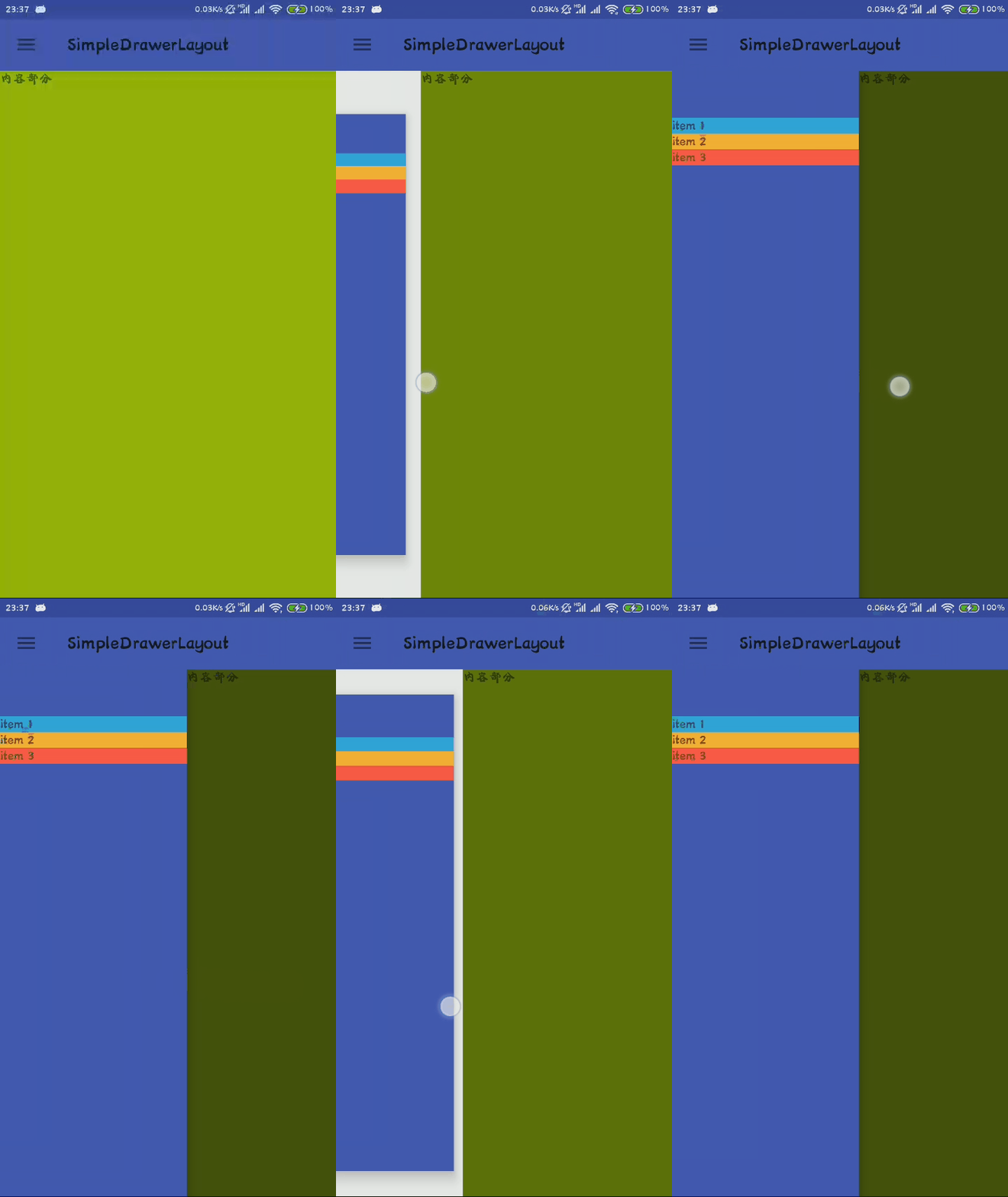
效果图如下
高级UI-DrawerLayout侧滑的更多相关文章
- firefox 扩展开发笔记(三):高级ui交互编程
firefox 扩展开发笔记(三):高级ui交互编程 前言 前两篇链接 1:firefox 扩展开发笔记(一):jpm 使用实践以及调试 2:firefox 扩展开发笔记(二):进阶开发之移动设备模拟 ...
- Android 高级UI设计笔记07:RecyclerView 的详解
1. 使用RecyclerView 在 Android 应用程序中列表是一个非常重要的控件,适用场合非常多,如新闻列表.应用列表.消息列表等等,但是从Android 一出生到现在并没有非常 ...
- 高级UI晋升之自定义View实战(六)
更多Android高级架构进阶视频学习请点击:https://space.bilibili.com/474380680本篇文章将从Android 自定义属性动画&Camera动画来介绍自定义V ...
- iOS开发——高级UI&带你玩转UITableView
带你玩装UITableView 在实际iOS开发中UITableView是使用最多,也是最重要的一个控件,如果你不会用它,那别说什么大神了,菜鸟都不如. 其实关于UItableView事非常简单的,实 ...
- Android: DrawerLayout 侧滑菜单栏
DrawerLayout是SupportLibrary包中实现的侧滑菜单效果的控件. 分为主内容区域和侧边菜单区域 drawerLayout本身就支持:侧边菜单根据手势展开与隐藏, 开发者只需要实现: ...
- Android学习总结——DrawerLayout 侧滑栏点击事件穿透
使用DrawerLayout实现侧滑栏功能时,点击侧滑栏空白处时,主界面会获得事件. 解决方法:侧滑栏布局添加 android:clickable="true"
- DrawerLayout侧滑
DrawerLayout是Support Library包中实现了侧滑菜单效果的控件,可以说DrawerLayout是因为第三方控件如SlidingMenu等出现之后,google借鉴而出现的产物.D ...
- 高级UI晋升之布局ViewGroup(四)
更多Android高级架构进阶视频学习请点击:https://space.bilibili.com/474380680本篇文章将从LinearLayout.RelativeLayout.FrameLa ...
- 高级UI晋升之常用View(三)中篇
更多Android高级架构进阶视频学习请点击:https://space.bilibili.com/474380680本篇文章将从ViewPager来介绍常用View:文章目录 一.简介 二.基本使用 ...
- 高级UI晋升之View渲染机制(二)
更多Android高级架构进阶视频学习请点击:https://space.bilibili.com/474380680 优化性能一般从渲染,运算与内存,电量三个方面进行,今天开始说聊一聊Android ...
随机推荐
- Codeforces Round #459 (Div. 2) C题【思维好题--括号匹配问题】
题意:给出一个串,只包含 ( ? ) 三种符号,求出有多少个子串是完美匹配的. ( ) ? ) => ( ) ( ) 完美匹配( ( ) ? => ( ( ) )完美匹配? ? ? ? = ...
- php面向对象之静态方法使用
什么是静态方法? 不是所有的变量和方法都要通过创建对象来调用.可以通过给变量和方法加上static关键字来直接调用.无锡大理石测量平台 调用静态成员的语法格式为: 关键字::静态成员 关键字可以是: ...
- bzoj 5206
$n$ 点 $m$ 边图的有限制三元环个数 首先将所有左右端点并且属性相同的边的权值相加,合并为一条边 在这只之前得先排序排序之前得先判断是否需要交换左右端点的位置 T_T 然后统计三元环 补充说明按 ...
- 代码 | 自适应大邻域搜索系列之(6) - 判断接受准则SimulatedAnnealing的代码解析
前言 前面三篇文章对大家来说应该很简单吧?不过轻松了这么久,今天再来看点刺激的.关于判断接受准则的代码.其实,判断接受准则有很多种,效果也因代码而异.今天介绍的是模拟退火的判断接受准则.那么,相关的原 ...
- linux系列(十):cat命令
1.命令格式: cat [选项] [文件] 2.命令功能: cat主要有三大功能: (1).一次显示整个文件:cat filename (2).从键盘创建一个文件:cat > filename ...
- C++中的平方、开方、绝对值怎么计算
#include <math.h> //平方 pow() ,);// 4的平方=16 //开方 ,0.5);// 4的平方根=2 );// 4的平方根=2 //整数绝对值 int c = ...
- 查询sqlserver中所有的数据库表 与 查询表中的说明注释字段
1.查询数据库中所有的数据库表 SELECT * FROM sysobjects WHERE xtype = 'u' AND name != 'sysdiagrams'; 2.查询数据库表中的说明字段 ...
- Java基础系列 - HashMap
package com.test3; import java.util.ArrayList; import java.util.HashMap; import java.util.List; impo ...
- Java核心复习—— 原子性、有序性与Happens-Before
一. 产生并发Bug的源头 可见性 缓存导致的可见性问题 原子性 线程切换带来的原子性问题 有序性 编译优化带来的有序性问题 上面讲到了 volatile 与可见性,本章再主要讲下原子性.有序性与Ha ...
- 监控、日志、APM整个监控体系思考 我为峰2014 简书作者 4.6092018-11-19 11:39打开App 序言
监控.日志.APM整个监控体系思考 我为峰2014 简书作者 4.6092018-11-19 11:39打开App 序言