
Qt应用Redis实现消息队列
类似BS模式,客户端发送任务请求给服务端,服务端将处理结果返回给客户端。 redis负责消息的存储和转发。
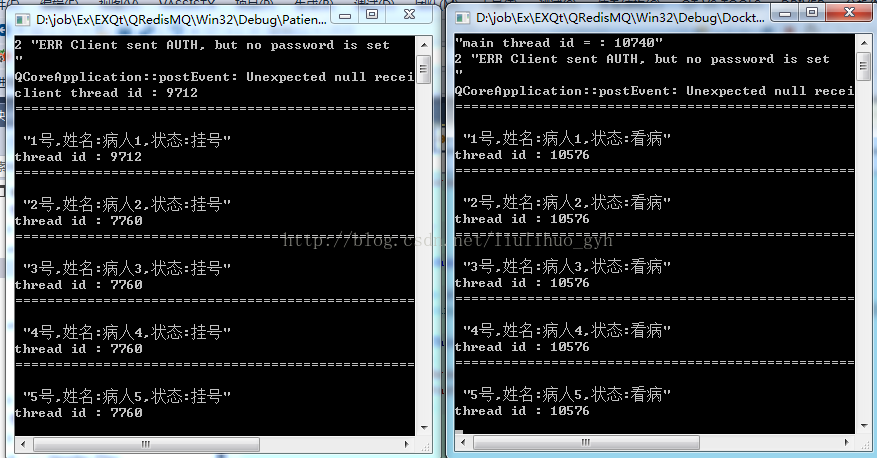
仿真病人挂号看病,Patient进程进行挂号,Doctor进程进行看病 ,程序代码如下:
////////////////////////////////////////////Patient////////////////////////////////////////////
Patient.h:
- #include <QObject>
- class QRedis;
- class Patient : public QObject
- {
- Q_OBJECT
- public:
- Patient(QObject *parent = nullptr);
- ~Patient();
- public slots:
- void pushTask(); //push任务
- private:
- void popResult(); //pop结果
- QRedis * m_redis;
- };
Patient.cpp
- #include "patient.h"
- #include "qredis.h"
- #include <QTimer>
- #include <QEventLoop>
- #include <QThread>
- static const QString KEYTASK = "MARKTASK";
- static const QString KEYRESULT = "MARKRESULT";
- Patient::Patient(QObject *parent)
- : QObject(parent)
- {
- //初始化通道
- m_redis = new QRedis(this);
- m_redis->connectHost("127.0.0.1", 6379);
- m_redis->auth("1234");
- qDebug() << "client thread id :" << int(QThread::currentThreadId());
- //轮询任务
- QTimer * timer = new QTimer(this);
- connect(timer, &QTimer::timeout, this, &Patient::popResult);
- timer->start(20);
- m_redis->del(KEYRESULT);
- m_redis->del(KEYTASK);
- pushTask();
- }
- Patient::~Patient()
- {
- }
- void Patient::pushTask()
- {
- static int i = 0;
- QString task = QStringLiteral("%1号,姓名:%2,状态:%3").arg(++i).arg(QStringLiteral("病人%1").arg(i)).arg(QStringLiteral("挂号"));
- qDebug() <<"========================================================\n\n"<< task;
- qDebug() << "thread id :" << int(QThread::currentThreadId());
- qint64 ret = m_redis->rpush(KEYTASK, task);
- }
- void Patient::popResult()
- {
- QString state;
- QString taskData = m_redis->lpop(KEYRESULT);
- if (taskData.compare("nil", Qt::CaseInsensitive) == 0 || taskData.isEmpty())
- {
- return;
- }
- QEventLoop loop;
- QTimer::singleShot(5000, &loop, &QEventLoop::quit);
- loop.exec();
- pushTask();
- }
main.cpp
- #include <QtCore/QCoreApplication>
- #include <QDebug>
- #include <QThread>
- #include "patient.h"
- int main(int argc, char *argv[])
- {
- QCoreApplication a(argc, argv);
- qDebug() << QString("main thread id = : %1").arg(int(QThread::currentThreadId()));
- QThread patientThread;
- Patient patient;
- patient.moveToThread(&patientThread);
- patientThread.start();
- return a.exec();
- }
/////////////////////////////////////////////////Docktor/////////////////////////////////////////////////
Docktor.h
- #pragma once
- #include <QObject>
- class QRedis;
- class Docktor : public QObject
- {
- Q_OBJECT
- public:
- Docktor(QObject *parent = nullptr);
- ~Docktor();
- public slots:
- void popTask(); //pop任务
- private:
- void pushResult(const QString &task); //push结果
- QRedis * m_redis;
- };
Docktor.cpp
- #include "docktor.h"
- #include "qredis.h"
- #include <QTimer>
- #include <QEventLoop>
- #include <QThread>
- static const QString KEYTASK = "MARKTASK";
- static const QString KEYRESULT = "MARKRESULT";
- Docktor::Docktor(QObject *parent)
- : QObject(parent)
- {
- //初始化通道
- m_redis = new QRedis(this);
- m_redis->connectHost("127.0.0.1", 6379);
- m_redis->auth("1234");
- QTimer * timer = new QTimer(this);
- connect(timer, &QTimer::timeout, this, &Docktor::popTask);
- timer->start(20);
- }
- Docktor::~Docktor()
- {
- }
- void Docktor::popTask()
- {
- //获取任务
- QString taskData = m_redis->lpop(KEYTASK);
- if (taskData.compare("nil", Qt::CaseInsensitive) == 0 || taskData.isEmpty())
- {
- //qDebug() << QString("wait..............................");
- return;
- }
- //处理任务
- pushResult(taskData);
- }
- void Docktor::pushResult(const QString &task)
- {
- QStringList taskDatas = task.split(",");
- QString state = taskDatas.at(2);
- taskDatas.removeLast();
- taskDatas.append(QStringLiteral("状态:看病"));
- //push处理结果
- qDebug() <<"========================================================\n\n" << taskDatas.join(",");
- qDebug() << "thread id :" << int(QThread::currentThreadId());
- qint64 ret = m_redis->rpush(KEYRESULT, taskDatas.join(","));
- }
main.cpp
- #include <QtCore/QCoreApplication>
- #include <QDebug>
- #include <QThread>
- #include "docktor.h"
- int main(int argc, char *argv[])
- {
- QCoreApplication a(argc, argv);
- qDebug() << QString("main thread id = : %1").arg(int(QThread::currentThreadId()));
- QThread docktorThread;
- Docktor docktor;
- docktor.moveToThread(&docktorThread);
- docktorThread.start();
- return a.exec();
- }
/////////////////截图/////////////
Qt应用Redis实现消息队列的更多相关文章
- Redis 做消息队列
一般来说,消息队列有两种场景,一种是发布者订阅者模式,一种是生产者消费者模式.利用redis这两种场景的消息队列都能够实现.定义: 生产者消费者模式:生产者生产消息放到队列里,多个消费者同时监听队列, ...
- Redis作为消息队列服务场景应用案例
NoSQL初探之人人都爱Redis:(3)使用Redis作为消息队列服务场景应用案例 一.消息队列场景简介 “消息”是在两台计算机间传送的数据单位.消息可以非常简单,例如只包含文本字符串:也可以更 ...
- redis resque消息队列
Resque 目前正在学习使用resque .resque-scheduler来发布异步任务和定时任务,为了方便以后查阅,所以记录一下. resque和resque-scheduler其优点在于功能比 ...
- 【springboot】【redis】springboot+redis实现发布订阅功能,实现redis的消息队列的功能
springboot+redis实现发布订阅功能,实现redis的消息队列的功能 参考:https://www.cnblogs.com/cx987514451/p/9529611.html 思考一个问 ...
- 【Redis】php+redis实现消息队列
在项目中使用消息队列一般是有如下几个原因: 把瞬间服务器的请求处理换成异步处理,缓解服务器的压力 实现数据顺序排列获取 redis实现消息队列步骤如下: 1).redis函数rpush,lpop 2) ...
- Lumen开发:结合Redis实现消息队列(1)
1.简介 Lumen队列服务为各种不同的后台队列提供了统一的API.队列允许你推迟耗时任务(例如发送邮件)的执行,从而大幅提高web请求速度. 1.1 配置 .env文件的QUEUE_DRIVER选项 ...
- Redis除了做缓存--Redis做消息队列/Redis做分布式锁/Redis做接口限流
1.用Redis实现消息队列 用命令lpush入队,rpop出队 Long size = jedis.lpush("QueueName", message);//返回存放的数据条数 ...
- sping+redis实现消息队列的乱码问题
使用spring支持redis实现消息队列,参考官方样例:https://spring.io/guides/gs/messaging-redis/ 实现后在运行过程中发现消费者在接收消息时会出现乱码的 ...
- 程序员过关斩将--redis做消息队列,香吗?
Redis消息队列 在程序员这个圈子打拼了太多年,见过太多的程序员使用redis,其中一部分喜欢把redis做缓存(cache)使用,其中最典型的当属存储用户session,除此之外,把redis作为 ...
随机推荐
- js重点——作用域——作用域分类(三)
一.作用域可以分为全局作用域,局部作用域(函数作用域)和块级作用域. 1.全局作用域 代码在程序中的任何位置都能被访问到,window对象的内置属性都拥有全局作用域. <script> v ...
- 解决No module named 'sklearn.cross_validation'
sklearn中已经废弃cross_validation,将其中的内容整合到model_selection中 将sklearn.cross_validation 替换为 sklearn.model_s ...
- Django项目实战—分页
自定义分页 未封装版: 优点:直观 缺点:代码乱,不易维护,可拓展性差 data = [] for i in range(1, 302): tmp = {"id": i, &quo ...
- Linux系统上对其他用户隐藏进程的简单方法
mount -o remount,rw,hidepid=2 /proc 我使用的是多用户系统,大部分的用户通过ssh客户端访问他们的资源.我如何(怎么样)避免泄露进程信息给他们?如何(怎么样)在Deb ...
- input子系统驱动
input子系统驱动 框架分析 核心层 文件为:/drivers/input/input.c: 首先找到入口函数为**static int __init input_init(void)**,在该函数 ...
- C# 核心基础(1) 持续更新
using System; namespace ConsoleApplicationCShape { class Program { static void Main(string[] args) { ...
- UUID值
生成这种值:b28043c8-fdb7-4c9e-8df5-b869d38f829d
- dockerfile-maven plugin自动镜像制作并发布
环境准备:win10+docker 1.打开hyper-v 2.下载最新版本docker:https://store.docker.com/editions/community/docker-ce-d ...
- ACM-ICPC 2017 西安赛区现场赛 K. LOVER II && LibreOJ#6062. 「2017 山东一轮集训 Day2」Pair(线段树)
题目链接:西安:https://nanti.jisuanke.com/t/20759 (计蒜客的数据应该有误,题目和 LOJ 的大同小异,题解以 LOJ 为准) LOJ:https://l ...
- Luogu P5048 [Ynoi2019模拟赛]Yuno loves sqrt technology III 分块
这才是真正的$N\sqrt{N}$吧$qwq$ 记录每个数$vl$出现的位置$s[vl]$,和每个数$a[i]=vl$是第几个$vl$,记为$P[i]$,然后预处理出块$[i,j]$区间的答案$f[i ...