
powershell自动添加静态IP
声明:其中脚本有参考其他作者,由于当时参考仓促,未能把作者一一列出,有机会会再找出原作者文件链接并附上,请见谅
参考:
https://ss64.com/nt/netsh.html
https://www.520mwx.com/view/11790
http://www.voidcn.com/article/p-rnrwftqs-bro.html
https://thinkpowershell.com/change-dns-servers-for-computers-with-static-ip-addresses/
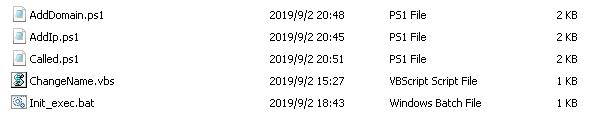
在Init_file文件中一共有5个文件,双击Init_exec.bat文件即可选择加IP或者加域名等;
执行步骤
1、Init_exec.bat,此脚本是调用Called.ps1脚本,然后有Called.ps1脚本调用AddIp.ps1和AddDomain.ps1脚本,而AddIp.ps1调用的是ChangeName.vbs脚本
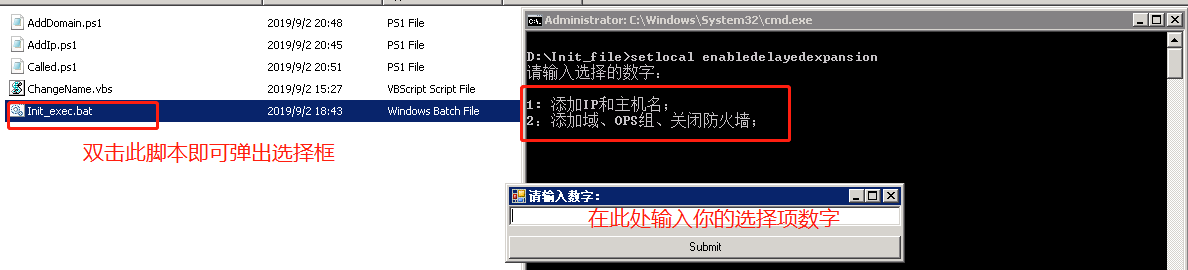
2、添加IP和主机名
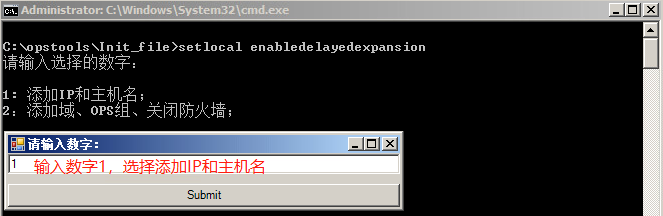
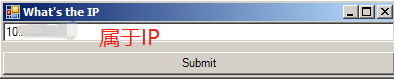
输入IP
输入主机名
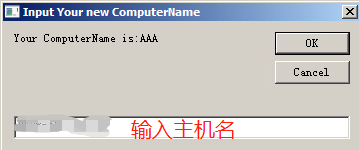
输入后可以设定一定时间重启服务器
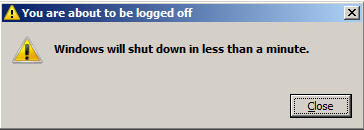
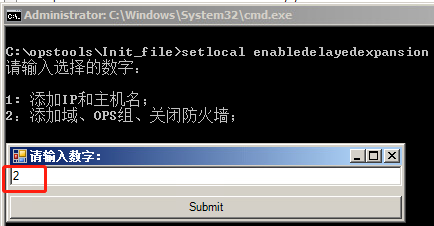
2、重启后继续执行Init_exec.bat脚本,添加域、OPS组和关闭防火墙
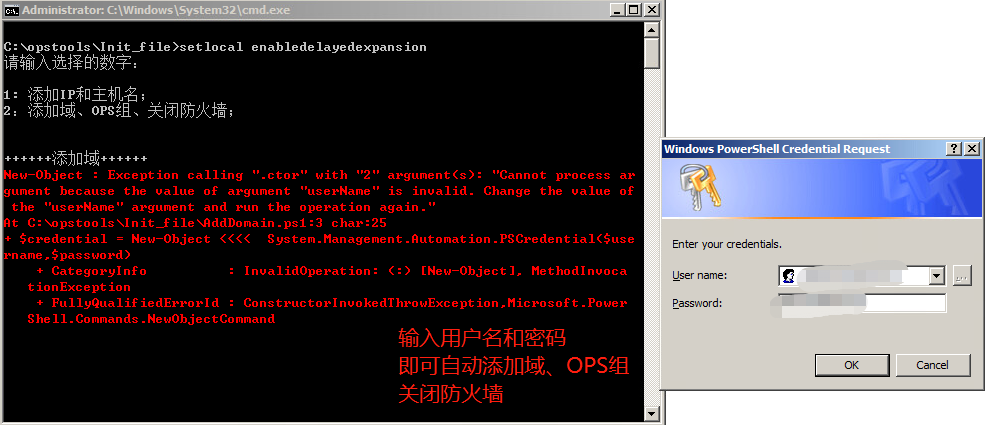
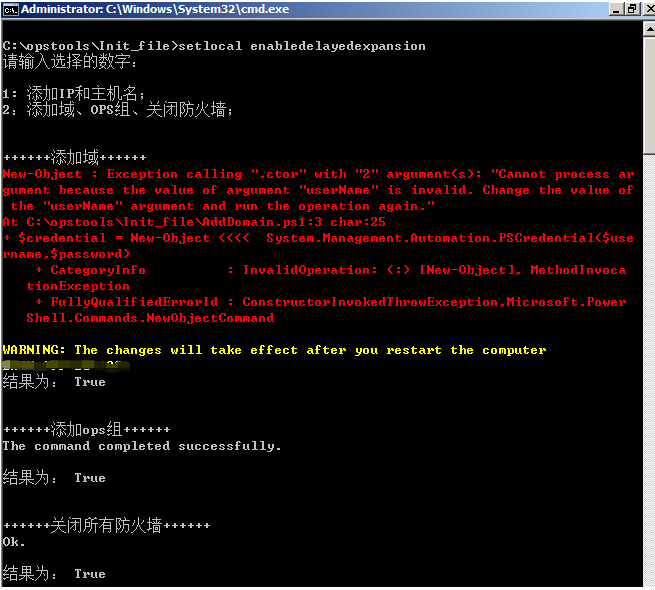
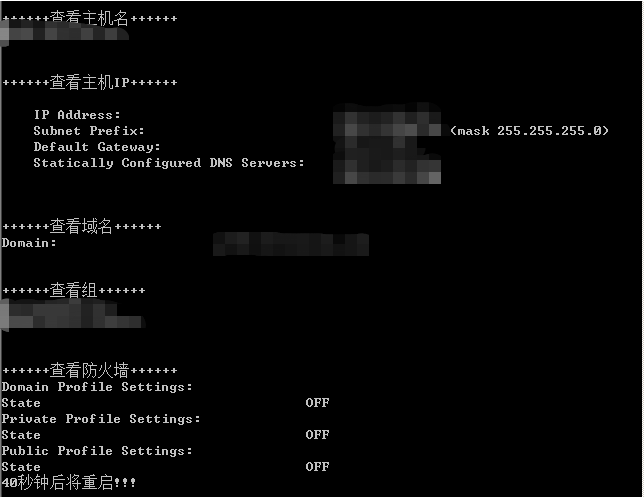
以上就配置好了
Init_exec.bat脚本
setlocal enabledelayedexpansion

@echo off

% mshta vbscript:CreateObject("Shell.Application").ShellExecute("cmd.exe","/c %~s0 ::","","runas",)(window.close)&&exit

powershell -File "Called.ps1"
Called.ps1脚本
echo "请输入选择的数字:"

echo " "

echo "1: 添加IP和主机名;"

echo "2:添加域、OPS组、关闭防火墙;"

echo " "

echo " "

<#

    Intro: This function will display a form to communicate with the user.

    Input: -FormText -ButtonText

    Example: MakeForm -FormText "ForInput" -ButtonText "Submit"

    Use: To make the PowerShell program's interactivity better.

#>

function MakeForm{

    param($FormText,$ButtonText)

    $null = [Reflection.Assembly]::LoadWithPartialName("System.Windows.Forms")

    $form = New-Object Windows.Forms.Form

    $form.size = New-Object Drawing.Size -Arg ,

    $form.StartPosition = "CenterScreen"

    $form.Text = $FormText.toString()

    $textBox = New-Object Windows.Forms.TextBox

    $textBox.Dock = "fill"

    $form.Controls.Add($textBox)

    $button = New-Object Windows.Forms.Button

    $button.Text = $ButtonText

    $button.Dock = "Bottom"

    $button.add_Click(

    {$global:resultText = $textBox.Text;$form.Close()})

    $form.Controls.Add($button)

    [Void]$form.ShowDialog()

}

MakeForm -FormText "请输入数字:" -ButtonText "Submit"

#echo $resultText

if( $resultText -eq  )

{

    powershell -File "AddIp.ps1"

}

elseif( $resultText -eq )

{

   powershell -File "AddDomain.ps1"

}

else

{

   echo "请输入数字!!!"

   echo "请输入数字!!!"

   echo "请输入数字!!!"

   sleep

}
AddIp.ps1脚本
<#

    Intro: This function will display a form to communicate with the user.

    Input: -FormText -ButtonText

    Example: MakeForm -FormText "ForInput" -ButtonText "Submit"

    Use: To make the PowerShell program's interactivity better.

#>

function MakeForm{

    param($FormText,$ButtonText)

    $null = [Reflection.Assembly]::LoadWithPartialName("System.Windows.Forms")

    $form = New-Object Windows.Forms.Form

    $form.size = New-Object Drawing.Size -Arg ,

    $form.StartPosition = "CenterScreen"

    $form.Text = $FormText.toString()

    $textBox = New-Object Windows.Forms.TextBox

    $textBox.Dock = "fill"

    $form.Controls.Add($textBox)

    $button = New-Object Windows.Forms.Button

    $button.Text = $ButtonText

    $button.Dock = "Bottom"

    $button.add_Click(

    {$global:resultText = $textBox.Text;$form.Close()})

    $form.Controls.Add($button)

    [Void]$form.ShowDialog()

}

MakeForm -FormText "What's the IP" -ButtonText "Submit"

echo $resultText

$wmi = Get-WmiObject win32_networkadapterconfiguration -filter "ipenabled = 'true'"

$wmi.EnableStatic("$resultText", "255.255.255.0")

$a = $resultText.split(".",)[]

$b = $resultText.split(".",)[]

$c = $resultText.split(".",)[]

$gateway = "$a.$b.$c.1"

$wmi.SetGateways("$gateway")

$dns = "DNS1", "DNS2"

$wmi.SetDNSSERVERSearchOrder($dns)

ipconfig /flushdns

#$CurrentyDir = Split-Path -Parent $MyInvocation.MyCommand.Definition

C:\opstools\Init_file\ChangeName.vbs

sleep

netsh interface ip show config

sleep

ping www.baidu.com

netsh interface ip show config

sleep

ping www.baidu.com
ChangeName.vbs脚本
Dim reval

Set objnet = CreateObject ("WScript.Network")

Set R = CreateObject("WScript.Shell")

reval = InputBox ("Your ComputerName is:" & objnet.ComputerName,"Input Your new ComputerName")

On Error Resume Next

strComputer = "."

Set objWMIService = GetObject("winmgmts:" _

    & "{impersonationLevel=impersonate}!\\" _

    & strComputer & "\root\cimv2")

Set colComputers = objWMIService.ExecQuery _

    ("Select * from Win32_ComputerSystem")

For Each objComputer in colComputers

    errReturn = ObjComputer.Rename (reval)

    If reval <> "" Then

                return=MsgBox ("Reboot Computer?",vbokcancel+vbexclamation,"tips!")

                If return=vbok Then

                        R.run("Shutdown.exe -r -t 10")

                End if

    End If

Next
AddDomain.ps1脚本
echo "++++++添加域++++++"

$domain = "域名"

$credential = New-Object System.Management.Automation.PSCredential($username,$password)

Add-Computer -DomainName $domain -Credential $credential

echo "结果为: $?"

echo " "

echo " "

sleep

echo "++++++添加ops组++++++"

net localgroup Administrators 组名 /add

echo "结果为: $?"

echo " "

echo " "

sleep

#只关闭域防火墙

#netsh firewall set opmode mode=disable

echo "++++++关闭所有防火墙++++++"

netsh advfirewall set allprofiles state off

echo "结果为: $?"

echo " "

echo " "

sleep

echo "++++++查看主机名++++++"

hostname

echo " "

echo " "

sleep

echo "++++++查看主机IP++++++"

netsh interface ip show config | select-string "10."

echo " "

echo " "

sleep

echo "++++++查看域名++++++"

systeminfo | select-string "Domain"

echo " "

echo " "

sleep

echo "++++++查看组++++++"

net localgroup Administrators | select-string "CORP|PROD"

echo " "

echo " "

sleep

echo "++++++查看防火墙++++++"

netsh advfirewall show allprofiles | select-string "Profile|State"

echo "40秒钟后将重启!!!"

echo " "

echo " "

echo " "

sleep

echo " "

echo " "

shutdown.exe -r -t
powershell自动添加静态IP的更多相关文章
- Linux:自动获取静态IP地址,清空iptable,修改selinux脚本
自动获取静态IP地址,清空iptable,修改selinux脚本 环境:VMware 平台:centos6.8全新 功能: 1)应用ifconfig -a,route -n,cat /etc/reso ...
- 从零开始学安全(四)●Vmware CentOS 7 添加静态ip联网
一.虚拟网络编辑器配置 1.VMnet8设置(不需要改动) 2.NAT设置(不需要改动) 3.DHCP设置(CentOS IP地址段设置,不需要改动) 二.虚拟机设置(网络适配器选择NAT模式) 三. ...
- 家中路由添加静态IP映射(二)
家中的路由器普遍通过DHCP向连接到此路由器的客户主机提供IP配置方式,但是一般都是动态IP: 假设需要静态IP配置到个人电脑,就要在路由器上进行配置IP和MAC地址映射关系.如上篇截图.路由器端配置 ...
- 家中路由添加静态IP映射(一)
登录路由器配置页面,选择更多功能来添加IP和MAC地址映射关系
- bat文件设置ip自动和静态ip切换
下载地址:https://i.cnblogs.com/Files.aspx win10系统: @echo off cd /d %~dp0 %1 start "" mshta vbs ...
- linux 添加静态ip dns
/etc/network 下:interfaces auto loiface lo inet loopbackauto eth0iface eth0 inet staticaddress 192.16 ...
- 在VMware中使用Nat方式设置静态IP, 宿主机可以 ssh
坑很多: 麻痹, 主要还是要先 防火墙关掉,永久关掉. seliux 也永久关掉. 临时关闭防火墙:systemctl stop firewalld 开机不启动: systemctl di ...
- 自动拒绝恶意IP远程登录Linux服务器脚本
当我们已经配置了iptables防火墙,我们允许22端口对外网所有人访问,当然这也是为了方便,我们在任何地方都连接上,没有做VPN,也没有做ssh密钥验证,但是我们的密码设置得非常复杂,大小写.特殊符 ...
- deepin 2014 静态IP无法保存,临时方法
打开终端: #临时添加静态IP ifconfig eth0 [ip] netmask [掩码] #添加默认网关 route add default gw [网关] #添加DNS vim /etc/re ...
随机推荐
- 启动Tomcat报错:A child container failed during start
在之前的工作和学习当中,有碰到过很多未知的,在当时看来十分令人疑惑的问题.当时的解决手段简单粗暴,就是直接百度,搜到对应的解决方案,直接抄过来试试,不行再换,直到问题消失,程序可以正常跑了,立马就不管 ...
- [转载]springboot--常用注解--@configration、@Bean
springboot--常用注解--@configration.@Bean @Target({ElementType.TYPE}) @Retention(RetentionPolicy.RUNTIME ...
- WinForm DevExpress使用之ChartControl控件绘制图表二——进阶
1. 多坐标折线图 在这个项目中,我需要做不同采集地方和不同数据类型的数据对比,自然而然就用到了多重坐标轴,多重坐标轴可以是多个X轴,也可以是Y轴,它们的处理方式类似.本文通过项目中的实际例子介绍多重 ...
- 记一次 解决 vue 兼容ie11 的问题
vue2.0 最近项目需要做到兼容ie11,找问题找半天,于是各种百度, 发现引入 babel-polyfill 还是有问题 空白页面 参考它的配置 ( 最后一句代码为引入的资源路径 ) 我跟他差 ...
- ibatis调用存储过程(无返回参数)
ibatis调用存储过程例子: java: getSqlMapClientTemplate().insert(sql, paraMap) ibatis xml: <parameterMap id ...
- kubernetes 存储volume,pv和pvc的使用
emptyDIR 临时目录 hostPath :使用主机的路径 网络存储: 传统的设备存储:NAS,SAN 分布式存储:glusterfs,rbd,cephfs 云存储:EBS,Azure,阿里云的 ...
- Word:自动编号超过9后缩进太大
造冰箱的大熊猫,本文适用于Microsoft Office 2007@cnblogs 2019/7/30 文中图片可通过点击鼠标右键查看大图 1.场景 如下图所示,使用Word的自动编号功能时,当编 ...
- HGOI20191115 模拟赛 题解
Problem A 表演 有$n$个有点权的点,$m$个有边权的边.对于每个点$u$,输出从这个点出发到$v$,其路径权值的两倍加上v的点权和最小的值. 对于$100\%$的数据,满足$1 \leq ...
- js面向对象学习笔记
1.函数的定义方式 第一种定义方式 function fn1() { alert("fn1"); } alert(fn) 函数就是一个特殊的对象,是一个Function类的实例,其 ...
- 用javascript来判别回文数
什么是回文数?通俗的说就是正着读和倒着读都一样的字符串(即使是数字也是可以看成字符串的). 所以下面回文数都是用字符串来表示的,即判断回文数就是对字符串的判断. 举几个回文数的例子: i love u ...