
powershell自动添加静态IP
声明:其中脚本有参考其他作者,由于当时参考仓促,未能把作者一一列出,有机会会再找出原作者文件链接并附上,请见谅
参考:
https://ss64.com/nt/netsh.html
https://www.520mwx.com/view/11790
http://www.voidcn.com/article/p-rnrwftqs-bro.html
https://thinkpowershell.com/change-dns-servers-for-computers-with-static-ip-addresses/
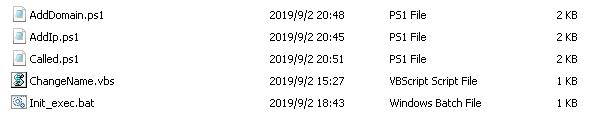
在Init_file文件中一共有5个文件,双击Init_exec.bat文件即可选择加IP或者加域名等;
执行步骤
1、Init_exec.bat,此脚本是调用Called.ps1脚本,然后有Called.ps1脚本调用AddIp.ps1和AddDomain.ps1脚本,而AddIp.ps1调用的是ChangeName.vbs脚本
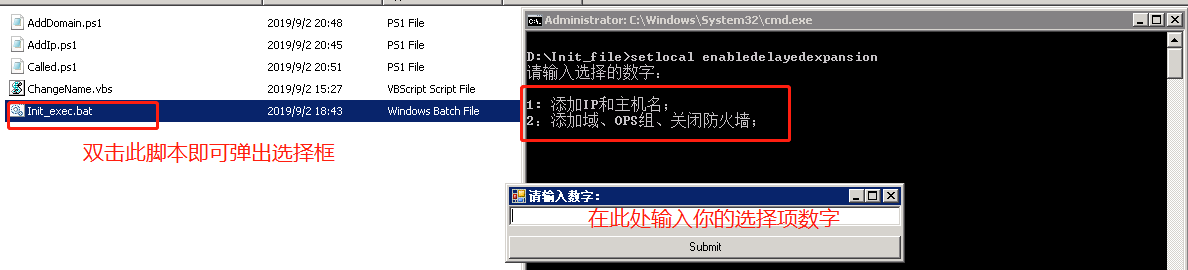
2、添加IP和主机名
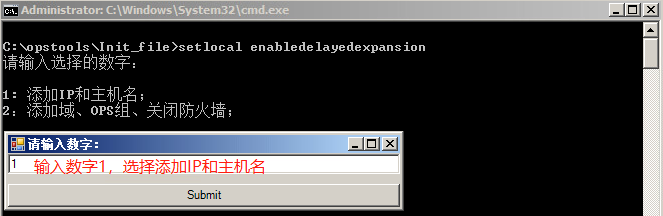
输入IP
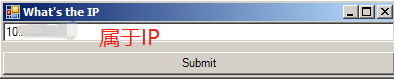
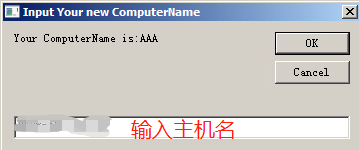
输入主机名
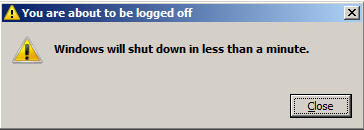
输入后可以设定一定时间重启服务器
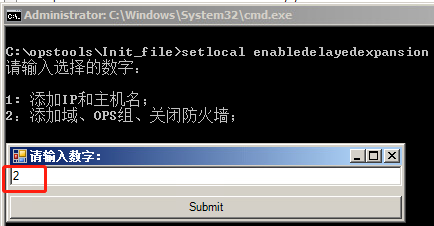
2、重启后继续执行Init_exec.bat脚本,添加域、OPS组和关闭防火墙
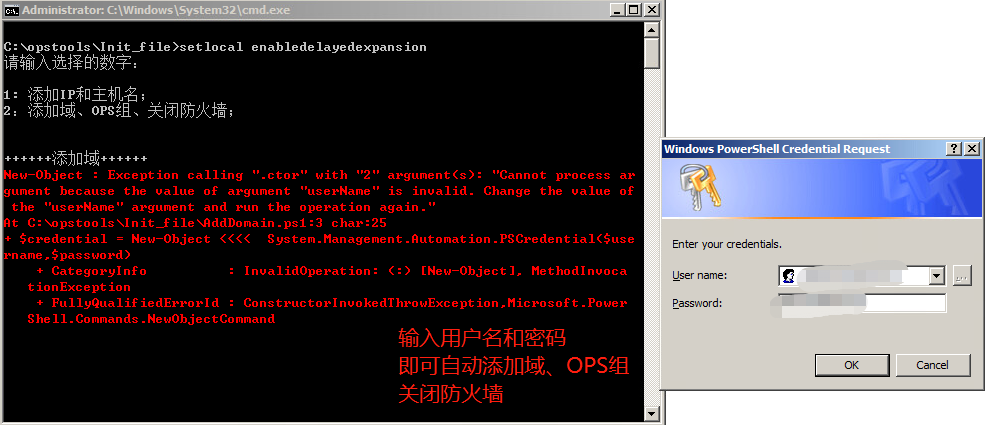
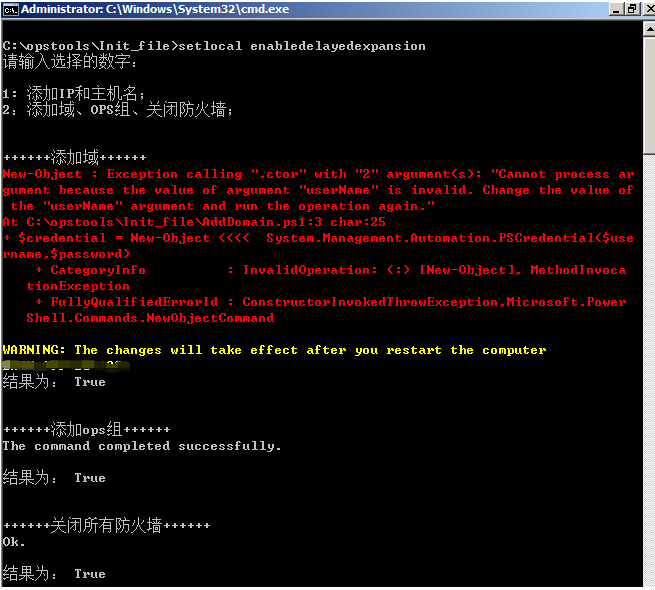
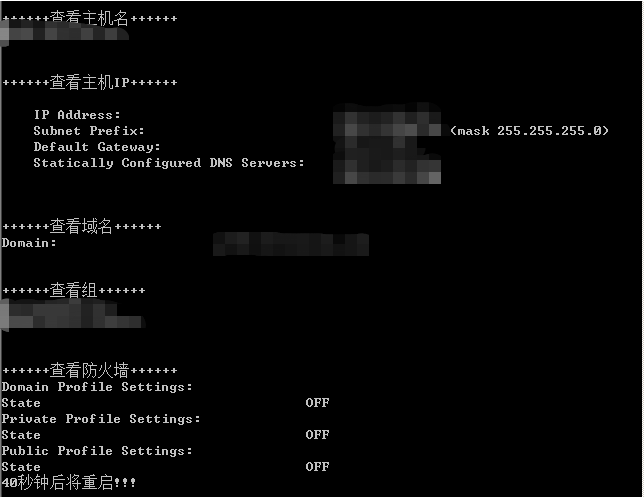
以上就配置好了
Init_exec.bat脚本
setlocal enabledelayedexpansion

@echo off

% mshta vbscript:CreateObject("Shell.Application").ShellExecute("cmd.exe","/c %~s0 ::","","runas",)(window.close)&&exit

powershell -File "Called.ps1"
Called.ps1脚本
echo "请输入选择的数字:"

echo " "

echo "1: 添加IP和主机名;"

echo "2:添加域、OPS组、关闭防火墙;"

echo " "

echo " "

<#

    Intro: This function will display a form to communicate with the user.

    Input: -FormText -ButtonText

    Example: MakeForm -FormText "ForInput" -ButtonText "Submit"

    Use: To make the PowerShell program's interactivity better.

#>

function MakeForm{

    param($FormText,$ButtonText)

    $null = [Reflection.Assembly]::LoadWithPartialName("System.Windows.Forms")

    $form = New-Object Windows.Forms.Form

    $form.size = New-Object Drawing.Size -Arg ,

    $form.StartPosition = "CenterScreen"

    $form.Text = $FormText.toString()

    $textBox = New-Object Windows.Forms.TextBox

    $textBox.Dock = "fill"

    $form.Controls.Add($textBox)

    $button = New-Object Windows.Forms.Button

    $button.Text = $ButtonText

    $button.Dock = "Bottom"

    $button.add_Click(

    {$global:resultText = $textBox.Text;$form.Close()})

    $form.Controls.Add($button)

    [Void]$form.ShowDialog()

}

MakeForm -FormText "请输入数字:" -ButtonText "Submit"

#echo $resultText

if( $resultText -eq  )

{

    powershell -File "AddIp.ps1"

}

elseif( $resultText -eq )

{

   powershell -File "AddDomain.ps1"

}

else

{

   echo "请输入数字!!!"

   echo "请输入数字!!!"

   echo "请输入数字!!!"

   sleep

}
AddIp.ps1脚本
<#

    Intro: This function will display a form to communicate with the user.

    Input: -FormText -ButtonText

    Example: MakeForm -FormText "ForInput" -ButtonText "Submit"

    Use: To make the PowerShell program's interactivity better.

#>

function MakeForm{

    param($FormText,$ButtonText)

    $null = [Reflection.Assembly]::LoadWithPartialName("System.Windows.Forms")

    $form = New-Object Windows.Forms.Form

    $form.size = New-Object Drawing.Size -Arg ,

    $form.StartPosition = "CenterScreen"

    $form.Text = $FormText.toString()

    $textBox = New-Object Windows.Forms.TextBox

    $textBox.Dock = "fill"

    $form.Controls.Add($textBox)

    $button = New-Object Windows.Forms.Button

    $button.Text = $ButtonText

    $button.Dock = "Bottom"

    $button.add_Click(

    {$global:resultText = $textBox.Text;$form.Close()})

    $form.Controls.Add($button)

    [Void]$form.ShowDialog()

}

MakeForm -FormText "What's the IP" -ButtonText "Submit"

echo $resultText

$wmi = Get-WmiObject win32_networkadapterconfiguration -filter "ipenabled = 'true'"

$wmi.EnableStatic("$resultText", "255.255.255.0")

$a = $resultText.split(".",)[]

$b = $resultText.split(".",)[]

$c = $resultText.split(".",)[]

$gateway = "$a.$b.$c.1"

$wmi.SetGateways("$gateway")

$dns = "DNS1", "DNS2"

$wmi.SetDNSSERVERSearchOrder($dns)

ipconfig /flushdns

#$CurrentyDir = Split-Path -Parent $MyInvocation.MyCommand.Definition

C:\opstools\Init_file\ChangeName.vbs

sleep

netsh interface ip show config

sleep

ping www.baidu.com

netsh interface ip show config

sleep

ping www.baidu.com
ChangeName.vbs脚本
Dim reval

Set objnet = CreateObject ("WScript.Network")

Set R = CreateObject("WScript.Shell")

reval = InputBox ("Your ComputerName is:" & objnet.ComputerName,"Input Your new ComputerName")

On Error Resume Next

strComputer = "."

Set objWMIService = GetObject("winmgmts:" _

    & "{impersonationLevel=impersonate}!\\" _

    & strComputer & "\root\cimv2")

Set colComputers = objWMIService.ExecQuery _

    ("Select * from Win32_ComputerSystem")

For Each objComputer in colComputers

    errReturn = ObjComputer.Rename (reval)

    If reval <> "" Then

                return=MsgBox ("Reboot Computer?",vbokcancel+vbexclamation,"tips!")

                If return=vbok Then

                        R.run("Shutdown.exe -r -t 10")

                End if

    End If

Next
AddDomain.ps1脚本
echo "++++++添加域++++++"

$domain = "域名"

$credential = New-Object System.Management.Automation.PSCredential($username,$password)

Add-Computer -DomainName $domain -Credential $credential

echo "结果为: $?"

echo " "

echo " "

sleep

echo "++++++添加ops组++++++"

net localgroup Administrators 组名 /add

echo "结果为: $?"

echo " "

echo " "

sleep

#只关闭域防火墙

#netsh firewall set opmode mode=disable

echo "++++++关闭所有防火墙++++++"

netsh advfirewall set allprofiles state off

echo "结果为: $?"

echo " "

echo " "

sleep

echo "++++++查看主机名++++++"

hostname

echo " "

echo " "

sleep

echo "++++++查看主机IP++++++"

netsh interface ip show config | select-string "10."

echo " "

echo " "

sleep

echo "++++++查看域名++++++"

systeminfo | select-string "Domain"

echo " "

echo " "

sleep

echo "++++++查看组++++++"

net localgroup Administrators | select-string "CORP|PROD"

echo " "

echo " "

sleep

echo "++++++查看防火墙++++++"

netsh advfirewall show allprofiles | select-string "Profile|State"

echo "40秒钟后将重启!!!"

echo " "

echo " "

echo " "

sleep

echo " "

echo " "

shutdown.exe -r -t
powershell自动添加静态IP的更多相关文章
- Linux:自动获取静态IP地址,清空iptable,修改selinux脚本
自动获取静态IP地址,清空iptable,修改selinux脚本 环境:VMware 平台:centos6.8全新 功能: 1)应用ifconfig -a,route -n,cat /etc/reso ...
- 从零开始学安全(四)●Vmware CentOS 7 添加静态ip联网
一.虚拟网络编辑器配置 1.VMnet8设置(不需要改动) 2.NAT设置(不需要改动) 3.DHCP设置(CentOS IP地址段设置,不需要改动) 二.虚拟机设置(网络适配器选择NAT模式) 三. ...
- 家中路由添加静态IP映射(二)
家中的路由器普遍通过DHCP向连接到此路由器的客户主机提供IP配置方式,但是一般都是动态IP: 假设需要静态IP配置到个人电脑,就要在路由器上进行配置IP和MAC地址映射关系.如上篇截图.路由器端配置 ...
- 家中路由添加静态IP映射(一)
登录路由器配置页面,选择更多功能来添加IP和MAC地址映射关系
- bat文件设置ip自动和静态ip切换
下载地址:https://i.cnblogs.com/Files.aspx win10系统: @echo off cd /d %~dp0 %1 start "" mshta vbs ...
- linux 添加静态ip dns
/etc/network 下:interfaces auto loiface lo inet loopbackauto eth0iface eth0 inet staticaddress 192.16 ...
- 在VMware中使用Nat方式设置静态IP, 宿主机可以 ssh
坑很多: 麻痹, 主要还是要先 防火墙关掉,永久关掉. seliux 也永久关掉. 临时关闭防火墙:systemctl stop firewalld 开机不启动: systemctl di ...
- 自动拒绝恶意IP远程登录Linux服务器脚本
当我们已经配置了iptables防火墙,我们允许22端口对外网所有人访问,当然这也是为了方便,我们在任何地方都连接上,没有做VPN,也没有做ssh密钥验证,但是我们的密码设置得非常复杂,大小写.特殊符 ...
- deepin 2014 静态IP无法保存,临时方法
打开终端: #临时添加静态IP ifconfig eth0 [ip] netmask [掩码] #添加默认网关 route add default gw [网关] #添加DNS vim /etc/re ...
随机推荐
- 中国大学MOOC课程信息爬取与数据存储
版权声明:本文为博主原创文章,转载 请注明出处: https://blog.csdn.net/sc2079/article/details/82016583 10月18日更:MOOC课程信息D3.js ...
- redis,windows设置记录
windows下载 github地址 : https://github.com/MicrosoftArchive/redis/releases #设置内存 redis-server.exe redis ...
- JavaScript(JS)入门篇
<script type="text/javascript"> 表示在<script></script>之间的是文本类型(text),javas ...
- Spring入门篇——第4章 Spring Bean装配(下)
第4章 Spring Bean装配(下) 介绍Bean的注解实现,Autowired注解说明,基于java的容器注解说明,以及Spring对JSR支持的说明 4-1 Spring Bean装配之Bea ...
- mpvue打小程序预览码
喂,快给我打一个小程序预览码 前端大全 昨天 (点击上方公众号,可快速关注) 来源:写Bug segmentfault.com/a/1190000015336845 需求 开发小程序的朋友们随时都会听 ...
- python_函数高级
1.函数名当变量来使用 def func(): print('wdc') # 可以将函数赋值给变量 v1 = func v1() func() def func(): print('wdc')# 可以 ...
- 性能分析之TCP全连接队列占满问题分析及优化过程(转载)
前言 在对一个挡板系统进行测试时,遇到一个由于TCP全连接队列被占满而影响系统性能的问题,这里记录下如何进行分析及解决的. 理解下TCP建立连接过程与队列 从图中明显可以看出建立 TCP 连接的时候, ...
- 多种view视图和序列化--django2
models.py from django.db import models # Create your models here. class Idc(models.Model): name = mo ...
- SpringBoot——》WebMvcConfigurerAdapter详解
一.WebMvcConfigurerAdapter是什么二.WebMvcConfigurerAdapter常用的方法1.addInterceptors:拦截器2.addCorsMappings:跨域3 ...
- [转]vue解决刷新页面vuex数据、params参数消失的问题
一般项目都会有一些逻辑需要传递值给另一个页面,那么有的时候就会出现一个问题:用户刷新了页面,诶?数据没了,参数错误.那么今天经过总结,解决了这个问题.我在最新的项目中,通过了一下几种情况进行传值: 1 ...