
opencv 检测人脸、人眼
This tutorial code’s is shown lines below. You can also download it from here . The second version (using LBP for face detection) can be found here
 #include "opencv2/objdetect/objdetect.hpp"

 #include "opencv2/highgui/highgui.hpp"

 #include "opencv2/imgproc/imgproc.hpp"

 #include <iostream>

 #include <stdio.h>

 using namespace std;

 using namespace cv;

 /** Function Headers */

 void detectAndDisplay( Mat frame );

 /** Global variables */

 String face_cascade_name = "haarcascade_frontalface_alt.xml";

 String eyes_cascade_name = "haarcascade_eye_tree_eyeglasses.xml";

 CascadeClassifier face_cascade;

 CascadeClassifier eyes_cascade;

 string window_name = "Capture - Face detection";

 RNG rng();

 /** @function main */

 int main( int argc, const char** argv )

 {

   CvCapture* capture;

   Mat frame;

   //-- 1. Load the cascades

   if( !face_cascade.load( face_cascade_name ) ){ printf("--(!)Error loading\n"); return -; };

   if( !eyes_cascade.load( eyes_cascade_name ) ){ printf("--(!)Error loading\n"); return -; };

   //-- 2. Read the video stream

   capture = cvCaptureFromCAM( - );

   if( capture )

   {

     while( true )

     {

   frame = cvQueryFrame( capture );

   //-- 3. Apply the classifier to the frame

       if( !frame.empty() )

       { detectAndDisplay( frame ); }

       else

       { printf(" --(!) No captured frame -- Break!"); break; }

       int c = waitKey();

       if( (char)c == 'c' ) { break; }

      }

   }

   return ;

 }

/** @function detectAndDisplay */

void detectAndDisplay( Mat frame )

{

  std::vector<Rect> faces;

  Mat frame_gray;

  cvtColor( frame, frame_gray, CV_BGR2GRAY );

  equalizeHist( frame_gray, frame_gray );

  //-- Detect faces

  face_cascade.detectMultiScale( frame_gray, faces, 1.1, , |CV_HAAR_SCALE_IMAGE, Size(, ) );

  for( size_t i = ; i < faces.size(); i++ )

  {

    Point center( faces[i].x + faces[i].width*0.5, faces[i].y + faces[i].height*0.5 );

    ellipse( frame, center, Size( faces[i].width*0.5, faces[i].height*0.5), , , , Scalar( , ,  ), , ,  );

    Mat faceROI = frame_gray( faces[i] );

    std::vector<Rect> eyes;

    //-- In each face, detect eyes

    eyes_cascade.detectMultiScale( faceROI, eyes, 1.1, ,  |CV_HAAR_SCALE_IMAGE, Size(, ) );

    for( size_t j = ; j < eyes.size(); j++ )

     {

       Point center( faces[i].x + eyes[j].x + eyes[j].width*0.5, faces[i].y + eyes[j].y + eyes[j].height*0.5 );

       int radius = cvRound( (eyes[j].width + eyes[j].height)*0.25 );

       circle( frame, center, radius, Scalar( , ,  ), , ,  );

     }

  }

  //-- Show what you got

  imshow( window_name, frame );

 }
Explanation
Result
Here is the result of running the code above and using as input the video stream of a build-in webcam:
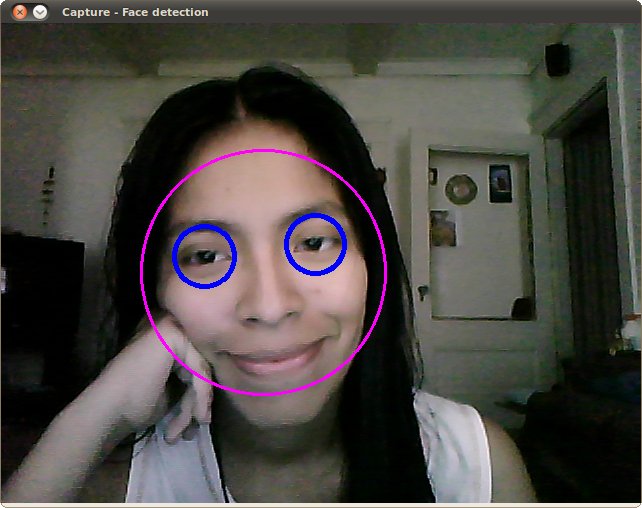
Remember to copy the files haarcascade_frontalface_alt.xml and haarcascade_eye_tree_eyeglasses.xml in your current directory. They are located in opencv/data/haarcascades
This is the result of using the file lbpcascade_frontalface.xml (LBP trained) for the face detection. For the eyes we keep using the file used in the tutorial.
opencv 检测人脸、人眼的更多相关文章
- SmileyFace——基于OpenCV的人脸人眼检测、面部识别程序
项目地址 https://github.com/guoyaohua/SmileyFace 开发环境 Visual Studio 2010 MFC + OpenCV 功能描述 静态图像人脸检测 视频人脸 ...
- OpenCV检测人脸实例代码
下面是使用OpenCV通过在硬盘中读入图像来对其进行Haar人脸检测的代码. //包含头文件 #include <opencv2/core/core.hpp> #include " ...
- 用opencv检测人眼并定位瞳孔位置
最近的研究要用到定位瞳孔的位置,所以上网搜了下相关的代码.总结如下: 1) 定位瞳孔可以直接使用opencv中的自带的分类器(haarcascade_eye_tree_eyeglasses.xml)来 ...
- OpenCV&Qt学习之四——OpenCV 实现人脸检测与相关知识整理
开发配置 OpenCV的例程中已经带有了人脸检测的例程,位置在:OpenCV\samples\facedetect.cpp文件,OpenCV的安装与这个例子的测试可以参考我之前的博文Linux 下编译 ...
- Python学习--使用dlib、opencv进行人脸检测标注
参考自https://www.pyimagesearch.com/2017/04/03/facial-landmarks-dlib-opencv-python/ 在原有基础上有一部分的修改(image ...
- OpenCV + Python 人脸检测
必备知识 Haar-like opencv api 读取图片 灰度转换 画图 显示图像 获取人脸识别训练数据 探测人脸 处理人脸探测的结果 实例 图片素材 人脸检测代码 人脸检测结果 总结 下午的时候 ...
- 【转载】opencv实现人脸检测
全文转载自CSDN的博客(不知道怎么将CSDN的博客转到博客园,应该没这功能吧,所以直接复制全文了),转载地址如下 http://blog.csdn.net/lsq2902101015/article ...
- Java+opencv实现人脸检测
版本 Java1.8 opencv3.4 代码: import java.awt.Graphics; import java.awt.image.BufferedImage; import javax ...
- OpenCV学习系列(一) Mac下OpenCV + xcode人脸检测实现
# OpenCV学习系列(一) Mac下OpenCV + xcode人脸检测实现 [-= 博客目录 =-] 1-学习目标 1.1-本章介绍 1.2-实践内容 1.3-相关说明 2-学习过程 2.1-环 ...
随机推荐
- Python中的上下文管理器(contextlib模块)
上下文管理器的任务是:代码块执行前准备,代码块执行后收拾 1 如何使用上下文管理器: 打开一个文件,并写入"hello world" filename="my.txt&q ...
- mysql(单表查询,多表查询,MySQl创建用户和授权,可视化工具Navicat的使用)
单表查询 语法: 一.单表查询的语法 SELECT 字段1,字段2... FROM 表名 WHERE 条件 GROUP BY field HAVING 筛选 ORDER BY field LIMIT ...
- java - day019 - 反射
网络程序,难点在线程 反射 reflect 实用 类对象 来执行反射操作 反射获得一个类的定义信息 反射创建对象 反射调用成员变量, 方法 方法 获得类对象的三种方式 A.class Class.fo ...
- java - day014 - 编译期,运行期
编译期 静态成员 私有变量 成员变量 运行期 非静态方法 package day1401; public class Test1 { public static void main(String[] ...
- 用js刷剑指offer(最小的K个数)
题目描述 输入n个整数,找出其中最小的K个数.例如输入4,5,1,6,2,7,3,8这8个数字,则最小的4个数字是1,2,3,4,. 牛客网链接 js代码 function GetLeastNumbe ...
- 用js刷剑指offer(字符串的排列)
题目描述 题目描述 输入一个字符串,按字典序打印出该字符串中字符的所有排列.例如输入字符串abc,则打印出由字符a,b,c所能排列出来的所有字符串abc,acb,bac,bca,cab和cba. 输入 ...
- 除了不要 SELECT * ,程序员使用数据库还应知道的11个技巧
SQL:sum里加条件SELECT SUM( CASE WHEN "V7010" BETWEEN 0 AND 0.1 THEN 1 ELSE 0 END) FROM "C ...
- fsLayuiPlugin入门使用
简介 源码下载后,不能直接打开,必须运行在容器下,例如:nginx.tomcat.jetty等容器. 源码中默认配置了nginx容器,可以直接启动nginx访问. 本文主要介绍下载源码后的使用,避免在 ...
- 转: java 双向map
package tools; import java.util.HashMap; public class DuplexMap<K,V> { class Entry{ K k; V v; ...
- 记录从裸机到TensorFlow GPU版运行 的配置过程
实验室原来有一台装Ubuntu Server系统的服务器,安装有tensorflow,在使用过程中经常出现断网.死机.自动关机等毛病,忍无可忍,决定重装系统 配置如下:Dell工作站,Xeon-E5 ...