
ELK日志解决方案
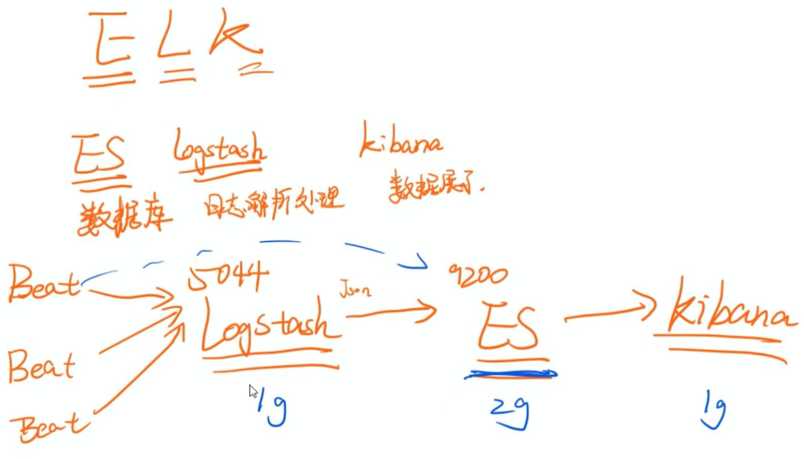
1、方案整体设计
FileBeats+Logstash+ElasticSearch+Kibana
1)ElasticSearch
简称ES,用来做日志数据的存储,当然也可以存储其他数据,
ES是互联网应用全文检索的大杀器。
2)LogStash
用来做日志的收集、整理、拆分,负责将数据存储到ES中。
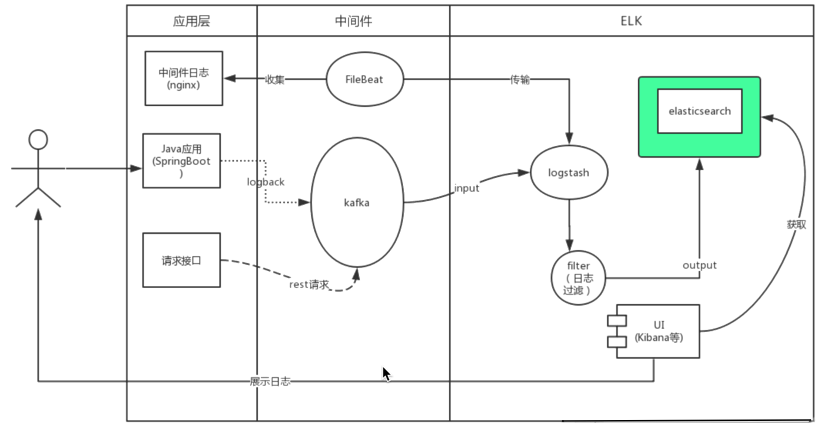
由于Logstash本身消耗资源较多,因此官方建议使用Filebeat来进行日志收集。
3)Kibana
用来做图形化页面,将ES中的数据用可视化的方式展现给用户,并支持多种功能,
例如:多维度查询、大盘监控、统计报表等等。
4)FileBeat
轻量级日志文件收集工具,占用资源特别少,收集到的日志数据可以输出到ES或LogStash中。
FileBeat只负责文件的收集,它是Beat家族的成员之一,关于Beat家族的其他成员可以查看官网。
当然,日志这块也可以有其他多种玩法,
例如我们可以将日志不打到xxx.log文件中,而是直接打到ES或LogStash里,或者中间再加一个mq来做异步。
本文的内容是基于xxx.log的玩法。
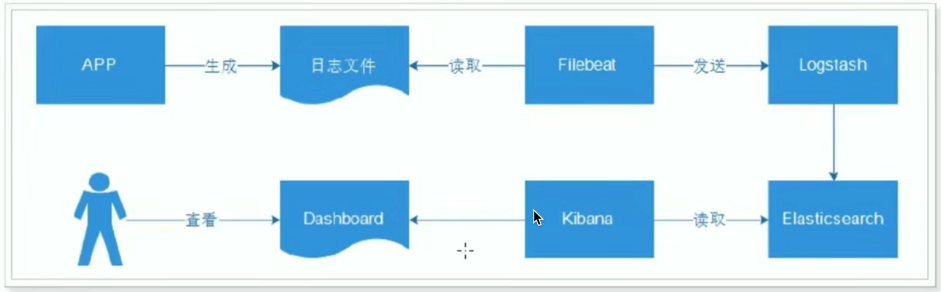
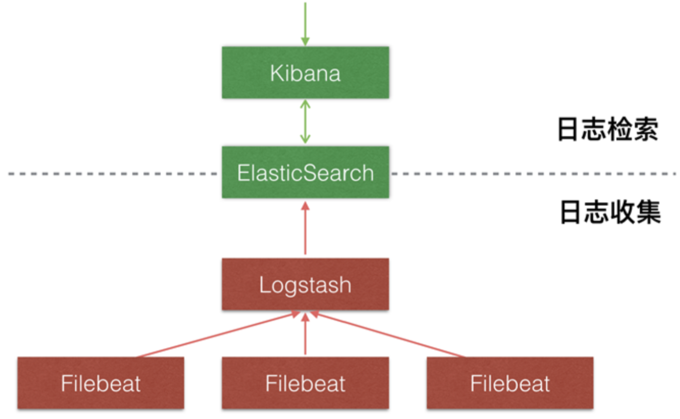
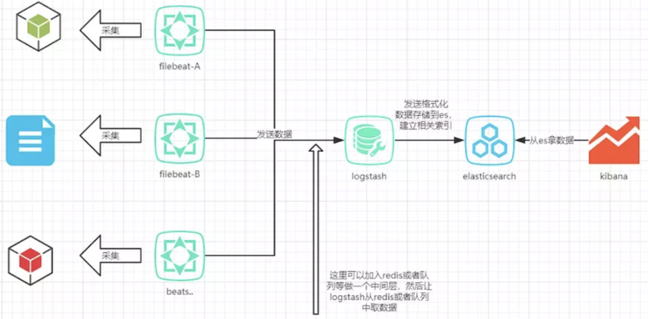
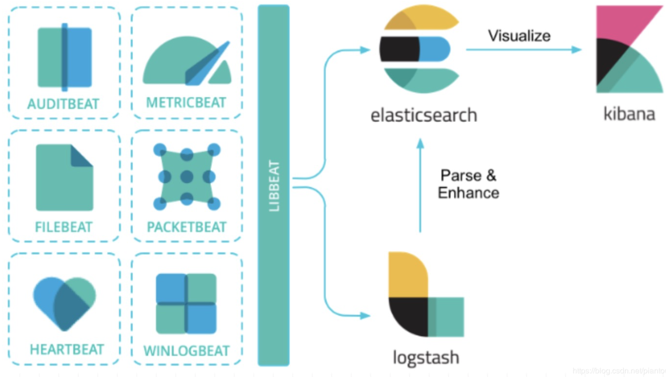
其它解决方案
2、ES配置和启动
1)主节点配置文件(data节点类似)
/opt/app/elasticsearch-7.4.1/elasticsearch.yml
cluster.name: escluster

node.name: ip101      #node.name: node-2#node.name: node-3

node.master: true

node.data: true

network.host: 0.0.0.0

http.port: 9200

transport.tcp.port: 9300

#Elasticsearch7新增参数,写入候选主节点的设备地址,来开启服务时就可以被选为主节点,由discovery.zen.ping.unicast.hosts:参数改变而来

discovery.seed_hosts: ["ip101","ip102","ip103"]

#Elasticsearch7新增参数,写入候选主节点的设备地址,来开启服务时就可以被选为主节点

cluster.initial_master_nodes: ["ip101"]

#ES7后参数被废弃

#discovery.zen.ping.unicast.hosts: ["192.168.8.101:9300", "192.168.8.102:9300", "192.168.8.103:9300"]

http.cors.enabled: true

http.cors.allow-origin: "*"
2)启动
/bin/elasticsearch
3、Logstash 配置和启动
1) 配置
input {

  beats {

    type => "log"

    port => "5044" #开始本机的5044端口,监听

  }

}

filter{

  mutate{

    split=>["message","|"]

      add_field => {

        "log_date" => "%{[message][0]}"

      }

      add_field => {

        "log_level" => "%{[message][1]}"

      }

      add_field => {

        "log_thread" => "%{[message][2]}"

      }

      add_field => {

        "log_class" => "%{[message][3]}"

      }

      add_field => {

        "log_content" => "%{[message][4]}"

      }

      remove_field => ["message"]

  }

}

output {

  stdout { codec => rubydebug }

  elasticsearch {

    hosts => ["ip101:9200"]

    index => "%{type}-%{+YYYY.MM.dd}"

  }

}
2)启动
[root@ip101 config]# ../bin/logstash -f logstash.conf
4、Filebeat 配置和启动
1) 配置
#=========================== Filebeat inputs ==============

filebeat.inputs:

- type: log

  enabled: true

  paths:

    - /var/log/test.log

#============================== Dashboards ===============

#setup.dashboards.enabled: false

#============================== Kibana ==================

#setup.kibana:

#       host: "192.168.101.5:5601"

#-------------------------- Elasticsearch output ---------

#output.elasticsearch:

#  hosts: ["192.168.8.101:9200"]

output.logstash:

  hosts: ["192.168.8.101:5044"]
2)启动
./filebeat -e -c my_filebeat.yml -d "publish"
5、Kibana配置和启动
1)配置
vi /opt/app/kibana-7.4.2-linux-x86_64/config/kibana.yml
# Kibana is served by a back end server. This setting specifies the port to use.

server.port: 5601

# Specifies the address to which the Kibana server will bind. IP addresses and host names are both valid values.

# The default is 'localhost', which usually means remote machines will not be able to connect.

# To allow connections from remote users, set this parameter to a non-loopback address.

server.host: "192.168.8.101"

# The URLs of the Elasticsearch instances to use for all your queries.

elasticsearch.hosts: ["http://192.168.8.101:9200"]
2)启动
bin/kibana
3)日志生成
[root@ip101 ~]# echo "2019-03-21 09:20:01,104|INFO|restartedMain|com.xxx.xxx.XXXApplication|xx1" >> /var/log/test.log
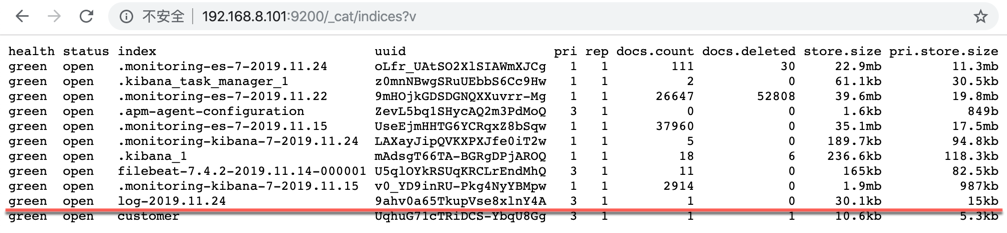
查看索引

{

	"took": 614,

	"timed_out": false,

	"_shards": {

		"total": 3,

		"successful": 3,

		"skipped": 0,

		"failed": 0

	},

	"hits": {

		"total": {

			"value": 1,

			"relation": "eq"

		},

		"max_score": 1.0,

		"hits": [{

			"_index": "log-2019.11.24",

			"_type": "_doc",

			"_id": "PVRinm4BNN16ymxsWjw_",

			"_score": 1.0,

			"_source": {

				"ecs": {

					"version": "1.1.0"

				},

				"input": {

					"type": "log"

				},

				"host": {

					"name": "ip101"

				},

				"log_level": "INFO",

				"type": "log",

				"log_thread": "restartedMain",

				"log_date": "2019-03-21 09:20:01,104",

				"log_class": "com.xxx.xxx.XXXApplication",

				"log": {

					"file": {

						"path": "/var/log/test.log"

					},

					"offset": 76

				},

				"@timestamp": "2019-11-24T17:07:38.924Z",

				"tags": ["beats_input_codec_plain_applied"],

				"@version": "1",

				"log_content": "xx1",

				"agent": {

					"hostname": "ip101",

					"version": "7.4.2",

					"type": "filebeat",

					"id": "b3f6ef05-d0b1-4861-99cf-3fa6d0619644",

					"ephemeral_id": "dc9170bf-becf-48c7-af03-21df118a8ee0"

				}

			}

		}]

	}

}
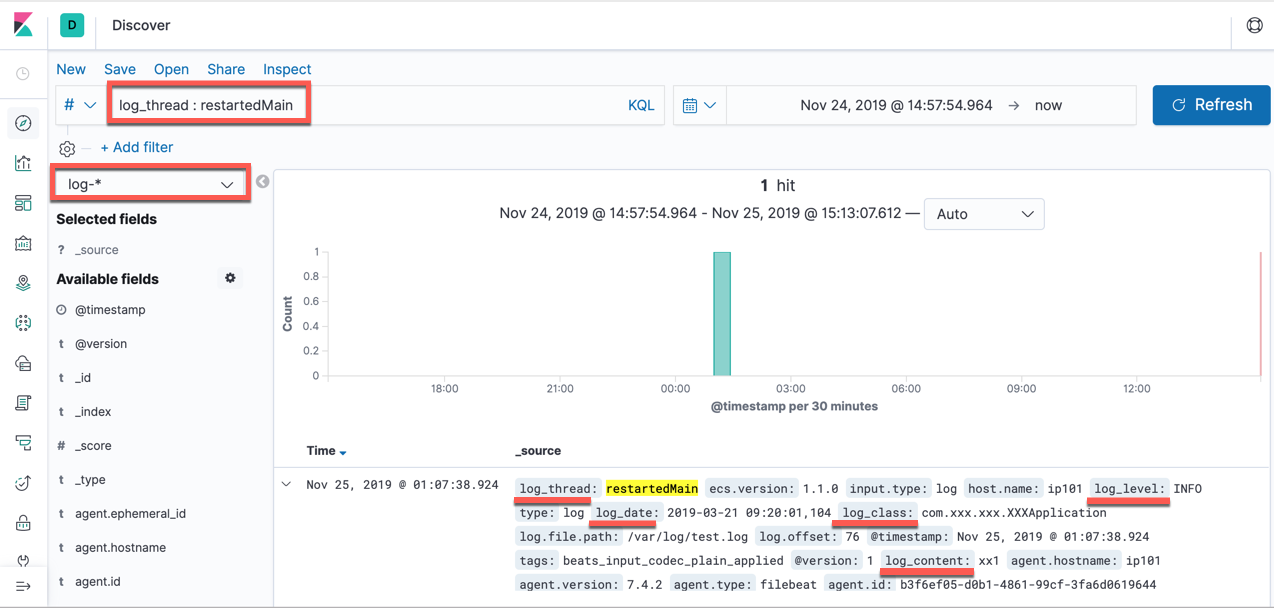
新增一条日志:
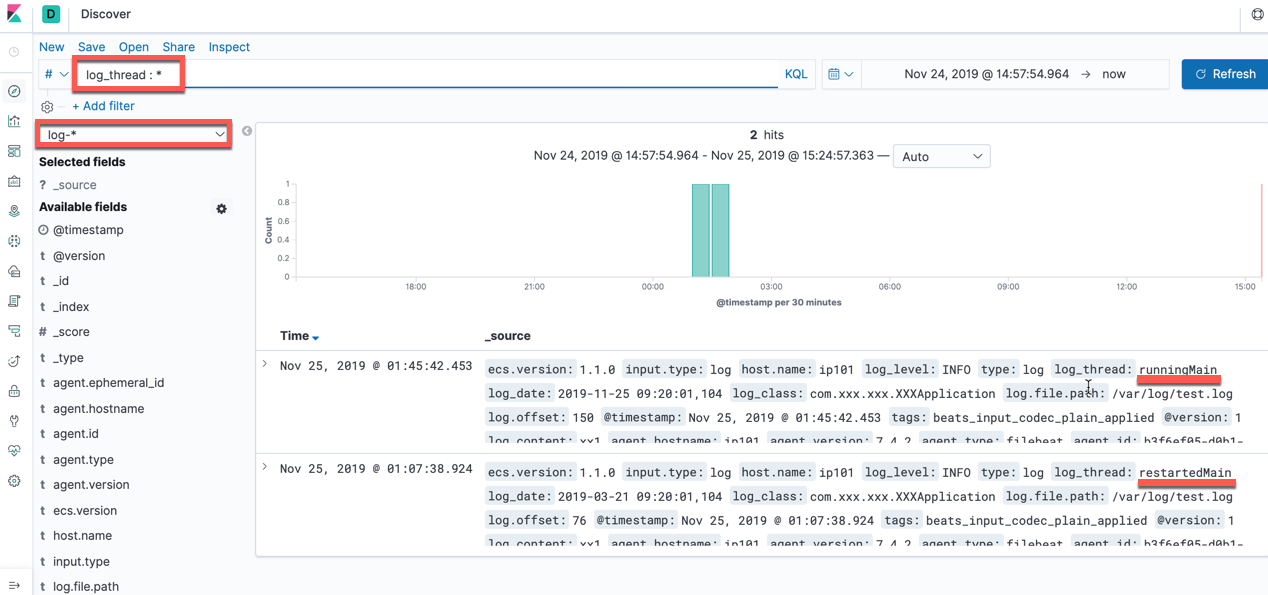

通过RestAPI获取:

MacBookPro:Chrome_Download zhangxm$ curl -X GET "192.168.8.101:9200/log-2019.11.24/_search" -H 'Content-Type: application/json' -d'

> {

>   "query": { "match": {"log_thread": "runningMain"} }

> }

> '

{"took":25,"timed_out":false,"_shards":{"total":3,"successful":3,"skipped":0,"failed":0},"hits":{"total":{"value":1,"relation":"eq"},"max_score":0.2876821,"hits":[{"_index":"log-2019.11.24","_type":"_doc","_id":"BFSFnm4BNN16ymxsDj6J","_score":0.2876821,"_source":{"ecs":{"version":"1.1.0"},"input":{"type":"log"},"host":{"name":"ip101"},"log_level":"INFO","type":"log","log_thread":"runningMain","log_date":"2019-11-25 09:20:01,104","log_class":"com.xxx.xxx.XXXApplication","log":{"file":{"path":"/var/log/test.log"},"offset":150},"@timestamp":"2019-11-24T17:45:42.453Z","tags":["beats_input_codec_plain_applied"],"@version":"1","log_content":"xx1","agent":{"hostname":"ip101","version":"7.4.2","type":"filebeat","id":"b3f6ef05-d0b1-4861-99cf-3fa6d0619644","ephemeral_id":"dc9170bf-becf-48c7-af03-21df118a8ee0"}}}]}}MacBookPro:Chrome_Download zhangxm$
另一个搜索条件
MacBookPro:Chrome_Download zhangxm$ curl -X GET "192.168.8.101:9200/log-2019.11.24/_search" -H 'Content-Type: application/json' -d'

{

  "query": { "match": {"log_thread": "restartedMain"} }

}

'

{"took":15,"timed_out":false,"_shards":{"total":3,"successful":3,"skipped":0,"failed":0},"hits":{"total":{"value":1,"relation":"eq"},"max_score":0.2876821,"hits":[{"_index":"log-2019.11.24","_type":"_doc","_id":"PVRinm4BNN16ymxsWjw_","_score":0.2876821,"_source":{"ecs":{"version":"1.1.0"},"input":{"type":"log"},"host":{"name":"ip101"},"log_level":"INFO","type":"log","log_thread":"restartedMain","log_date":"2019-03-21 09:20:01,104","log_class":"com.xxx.xxx.XXXApplication","log":{"file":{"path":"/var/log/test.log"},"offset":76},"@timestamp":"2019-11-24T17:07:38.924Z","tags":["beats_input_codec_plain_applied"],"@version":"1","log_content":"xx1","agent":{"hostname":"ip101","version":"7.4.2","type":"filebeat","id":"b3f6ef05-d0b1-4861-99cf-3fa6d0619644","ephemeral_id":"dc9170bf-becf-48c7-af03-21df118a8ee0"}}}]}}MacBookPro:Chrome_Download zhangxm$
ELK日志解决方案的更多相关文章
- ELK日志解决方案安装配置与使用
官方网站:https://www.elastic.co/products/elasticsearch logstash,elasticsearch,kibana作用如下: logstash:分布在每一 ...
- ELK+Filebeat 集中式日志解决方案详解
链接:https://www.ibm.com/developerworks/cn/opensource/os-cn-elk-filebeat/index.html?ca=drs- ELK Stack ...
- ELK集中化日志解决方案——看这一篇全搞定
一.前言 在软件发开技术管理里有两个永恒经典的问题,适合我们初到一家软件企业或一家公司的科技团队,来判断自己该从哪里入手帮助整个团队提升科技水平和产能.问题一是"在我们团队里,只涉及一行代码 ...
- ELK日志分析系统的应用
收集和分析日志是应用开发中至关重要的一环,互联网大规模.分布式的特性决定了日志的源头越来越分散, 产生的速度越来越快,传统的手段和工具显得日益力不从心.在规模化场景下,grep.awk 无法快速发挥作 ...
- ELK日志收集平台部署
需求背景 由于公司的后台服务有三台,每当后台服务运行异常,需要看日志排查错误的时候,都必须开启3个ssh窗口进行查看,研发们觉得很不方便,于是便有了统一日志收集与查看的需求. 这里,我用ELK集群,通 ...
- ELK日志监控平台安装部署简介--Elasticsearch安装部署
最近由于工作需要,需要搭建一个ELK日志监控平台,本次采用Filebeat(采集数据)+Elasticsearch(建立索引)+Kibana(展示)架构,实现日志搜索展示功能. 一.安装环境描述: 1 ...
- ES系列十七、logback+ELK日志搭建
一.ELK应用场景 在复杂的企业应用服务群中,记录日志方式多种多样,并且不易归档以及提供日志监控的机制.无论是开发人员还是运维人员都无法准确的定位服务.服务器上面出现的种种问题,也没有高效搜索日志内容 ...
- 创业公司做数据分析(四)ELK日志系统 (转)
http://blog.csdn.net/zwgdft/article/details/53842574 作为系列文章的第四篇,本文将重点探讨数据采集层中的ELK日志系统.日志,指的是后台服务中产生的 ...
- elk日志分析与发掘深入分析
elk日志分析与挖掘深入分析 1 为什么要做日志采集? 2 挖财自己的日志采集和分析体系应该怎么建? 2.1 日志的采集 2.2 日志的汇总与过滤 2.3 日志的存储 2.4 日志的分析与查询 3 需 ...
随机推荐
- Async await 解析
Async 定义:使异步函数以同步函数的形式书写(Generator函数语法糖) 原理:将Generator函数和自动执行器spawn包装在一个函数里 形式:将Generator函数的*替换成asyn ...
- 根据导入xlxs的文件,来写入数据库
今天讲解一下上传文件.前台必须保持传参类型"multipart/form-data" 后台可以设定 public static final String MULTIPART_FOR ...
- ARC模式下获取retainCount的方法
_objc_rootRetainCount(obj)可以获取obj的retainCount,不过不清楚是不是私有api,因此建议调试时使用.
- xposed 泛型参数怎么设置
以下是hook一个方法,A(List<class>,bool b); 百度查了好多都没能解决,自己琢磨了挺久才搞定.直接用List.class就可以了,因为重载不能相同参数,所以List就 ...
- CSS复合选择器和div盒子模型
一.复合选择器(3种) 1.交集复合选择器 特点:由2个选择器组成,其中第一个必须是标签选择器,第二个是类或id选择器.两个选择器之间没有空格(有空格属于层级选择器) <h3 class=&qu ...
- LeetCode--字符串
1.给定字符串s,分区s使得分区的每个子字符串都是回文. 返回s的所有可能的回文分区.例如,给定s =“aab”,返回 [ ["aa","b"], [" ...
- 使用IDEA快速搭建基于Maven的SpringBoot项目(集成使用Redis)
迫于好久没写博客心慌慌,随便写个简单版的笔记便于查阅. 新建项目 新建项目 然后起名 继续next netx finish. 首先附上demo的项目结构图 配置pom.xml <?xml ver ...
- Vulkan 02
https://www.imgtec.com/blog/vulkan-high-efficiency-on-mobile/ vulkan性能上的优势 降低CPU开销 drawcall上限数量增加 Ho ...
- Angular4的dom事件
Angular4的dom事件 差值表达式和属性绑定其实是一样的(例) <!-- 这两个是一样的效果,使用哪个都可以 --> <img src="{{imgUrl}}&quo ...
- Python进阶:都说好用的 Python 命令行库click
click 是一个以尽可能少的代码.以组合的方式创建优美的命令行程序的 Python 包.它有很高的可配置性,同时也能开箱即用. 它旨在让编写命令行工具的过程既快速又有趣,还能防止由于无法实现预期的 ...