
GridFS文件操作
1. GridFS介绍
GridFS是MongoDB提供的用于持久化存储文件的模块,CMS使用MongoDB存储数据,使用GridFS可以快速集成
开发。
它的工作原理是:
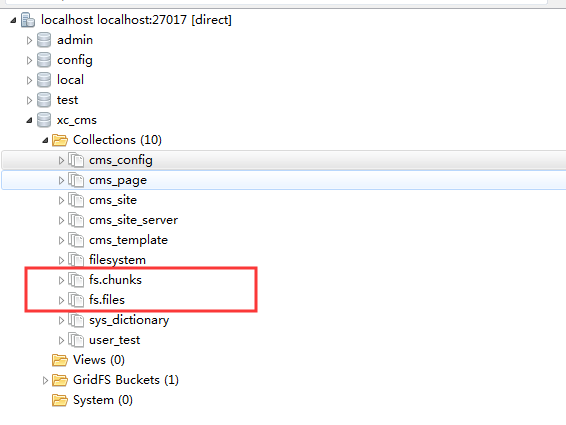
在GridFS存储文件是将文件分块存储,文件会按照256KB的大小分割成多个块进行存储,GridFS使用两个集合
(collection)存储文件,一个集合是chunks, 用于存储文件的二进制数据;一个集合是files,用于存储文件的元数据信息(文件名称、块大小、上传时间等信息)。
从GridFS中读取文件要对文件的各各块进行组装、合并。
详细参考:https://docs.mongodb.com/manual/core/gridfs/
2. GridFS 存取文件测试
2.1 新建项目配置pom.xml
<?xml version="1.0" encoding="UTF-8"?>

<project xmlns="http://maven.apache.org/POM/4.0.0" xmlns:xsi="http://www.w3.org/2001/XMLSchema-instance"

         xsi:schemaLocation="http://maven.apache.org/POM/4.0.0 https://maven.apache.org/xsd/maven-4.0.0.xsd">

    <modelVersion>4.0.0</modelVersion>

    <parent>

        <groupId>org.springframework.boot</groupId>

        <artifactId>spring-boot-starter-parent</artifactId>

        <version>2.2.2.RELEASE</version>

        <relativePath/> <!-- lookup parent from repository -->

    </parent>

    <groupId>com.example</groupId>

    <artifactId>demo-monogo</artifactId>

    <version>0.0.1-SNAPSHOT</version>

    <name>demo-monogo</name>

    <description>Demo project for Spring Boot</description>

    <properties>

        <java.version>1.8</java.version>

    </properties>

    <dependencies>

        <dependency>

            <groupId>org.springframework.boot</groupId>

            <artifactId>spring-boot-starter-data-mongodb</artifactId>

        </dependency>

        <dependency>

            <groupId>org.springframework.boot</groupId>

            <artifactId>spring-boot-starter-test</artifactId>

            <scope>test</scope>

            <exclusions>

                <exclusion>

                    <groupId>org.junit.vintage</groupId>

                    <artifactId>junit-vintage-engine</artifactId>

                </exclusion>

            </exclusions>

        </dependency>

    </dependencies>

    <build>

        <plugins>

            <plugin>

                <groupId>org.springframework.boot</groupId>

                <artifactId>spring-boot-maven-plugin</artifactId>

            </plugin>

        </plugins>

    </build>

</project>
2.2 在application.yml配置mongodb
spring:

  data:

    mongodb:

      uri: mongodb://root:root@localhost:27017

      database: xc_cms
2.3 GridFS 存取文件测试
1、存文件
使用GridFsTemplate存储文件测试代码:
向测试程序注入GridFsTemplate。
package com.example.demomonogo;

import org.bson.types.ObjectId;

import org.junit.jupiter.api.Test;

import org.springframework.beans.factory.annotation.Autowired;

import org.springframework.boot.test.context.SpringBootTest;

import org.springframework.data.mongodb.gridfs.GridFsTemplate;

import java.io.File;

import java.io.FileInputStream;

import java.io.FileNotFoundException;

@SpringBootTest

class DemoMonogoApplicationTests {

    @Autowired

    GridFsTemplate gridFsTemplate;

    @Test

    public void testGridFs() throws FileNotFoundException {

        //要存储的文件

        File file = new File("D:\\test\\user_selected.png");

        //定义输入流

        FileInputStream inputStram = new FileInputStream(file);

        //向GridFS存储文件

        ObjectId objectId = gridFsTemplate.store(inputStram, "user_selected.png", "image/png");

        //得到文件ID

        String fileId = objectId.toString();

        System.out.println(fileId);

    }

}
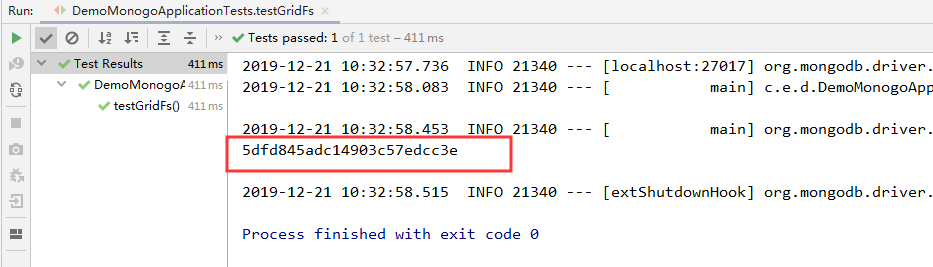

文件以及成功被存入到GridFS
2.4 读取文件
1)在config包中定义Mongodb的配置类,如下:
GridFSBucket用于打开下载流对象
package com.example.demomonogo.config;

/**

 * @author john

 * @date 2019/12/21 - 10:39

 */

import com.mongodb.MongoClient;

import com.mongodb.client.MongoDatabase;

import com.mongodb.client.gridfs.GridFSBucket;

import com.mongodb.client.gridfs.GridFSBuckets;

import org.springframework.beans.factory.annotation.Value;

import org.springframework.context.annotation.Bean;

import org.springframework.context.annotation.Configuration;

@Configuration

public class MongoConfig {

    @Value("${spring.data.mongodb.database}")

    String db;

    @Bean

    public GridFSBucket getGridFSBucket(MongoClient mongoClient) {

        MongoDatabase database = mongoClient.getDatabase(db);

        GridFSBucket bucket = GridFSBuckets.create(database);

        return bucket;

    }

}
2)测试代码如下
package com.example.demomonogo;

import com.mongodb.client.gridfs.GridFSBucket;

import com.mongodb.client.gridfs.GridFSDownloadStream;

import com.mongodb.client.gridfs.model.GridFSFile;

import org.junit.jupiter.api.Test;

import org.springframework.beans.factory.annotation.Autowired;

import org.springframework.boot.test.context.SpringBootTest;

import org.springframework.data.mongodb.core.query.Criteria;

import org.springframework.data.mongodb.core.query.Query;

import org.springframework.data.mongodb.gridfs.GridFsResource;

import org.springframework.data.mongodb.gridfs.GridFsTemplate;

import java.io.File;

import java.io.FileOutputStream;

import java.io.IOException;

import java.io.InputStream;

@SpringBootTest

class DemoMonogoApplicationTests {

    @Autowired

    GridFsTemplate gridFsTemplate;

    @Autowired

    GridFSBucket gridFSBucket;

    @Test

    public void queryFile() throws IOException {

        String fileId = "5dfd851306322e6b12057a40";

        //根据id查询文件

        GridFSFile gridFSFile =

                gridFsTemplate.findOne(Query.query(Criteria.where("_id").is(fileId)));

        //打开下载流对象

        GridFSDownloadStream gridFSDownloadStream =

                gridFSBucket.openDownloadStream(gridFSFile.getObjectId());

        //创建gridFsResource,用于获取流对象

        GridFsResource gridFsResource = new GridFsResource(gridFSFile, gridFSDownloadStream);

        //获取流中的数据

        InputStream inputStream = gridFsResource.getInputStream();

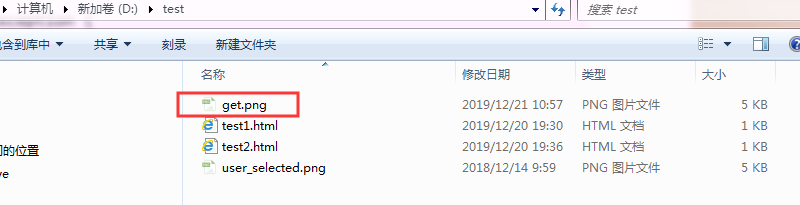
        File f1 = new File("D:\\test\\get.png");

        if (!f1.exists()) {

            f1.getParentFile().mkdirs();

        }

        byte[] bytes = new byte[1024];

        // 创建基于文件的输出流

        FileOutputStream fos = new FileOutputStream(f1);

        int len = 0;

        while ((len = inputStream.read(bytes)) != -1) {

            fos.write(bytes, 0, len);

        }

        inputStream.close();

        fos.close();

    }

}
2.5 删除文件
package com.example.demomonogo;

import org.junit.jupiter.api.Test;

import org.springframework.beans.factory.annotation.Autowired;

import org.springframework.boot.test.context.SpringBootTest;

import org.springframework.data.mongodb.core.query.Criteria;

import org.springframework.data.mongodb.core.query.Query;

import org.springframework.data.mongodb.gridfs.GridFsTemplate;

import java.io.IOException;

@SpringBootTest

class DemoMonogoApplicationTests {

    @Autowired

    GridFsTemplate gridFsTemplate;

    //删除文件

    @Test

    public void testDelFile() throws IOException {

        //根据文件id删除fs.files和fs.chunks中的记录

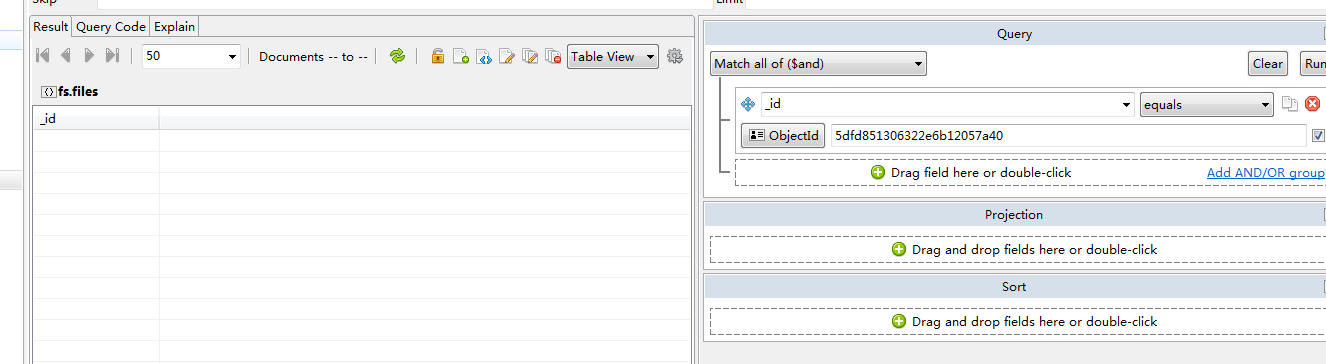
        gridFsTemplate.delete(Query.query(Criteria.where("_id").is("5dfd851306322e6b12057a40")));

    }

}

GridFS文件操作的更多相关文章
- 【.NET深呼吸】Zip文件操作(1):创建和读取zip文档
.net的IO操作支持对zip文件的创建.读写和更新.使用起来也比较简单,.net的一向作风,东西都准备好了,至于如何使用,请看着办. 要对zip文件进行操作,主要用到以下三个类: 1.ZipFile ...
- 野路子出身PowerShell 文件操作实用功能
本文出处:http://www.cnblogs.com/wy123/p/6129498.html 因工作需要,处理一批文件,本想写C#来处理的,后来想想这个是PowerShell的天职,索性就网上各种 ...
- Node基础篇(文件操作)
文件操作 相关模块 Node内核提供了很多与文件操作相关的模块,每个模块都提供了一些最基本的操作API,在NPM中也有社区提供的功能包 fs: 基础的文件操作 API path: 提供和路径相关的操作 ...
- 归档NSKeyedArchiver解归档NSKeyedUnarchiver与文件管理类NSFileManager (文件操作)
========================== 文件操作 ========================== 一.归档NSKeyedArchiver 1.第一种方式:存储一种数据. // 归档 ...
- SQL Server附加数据库报错:无法打开物理文件,操作系统错误5
问题描述: 附加数据时,提示无法打开物理文件,操作系统错误5.如下图: 问题原因:可能是文件访问权限方面的问题. 解决方案:找到数据库的mdf和ldf文件,赋予权限即可.如下图: 找到mdf ...
- 通过cmd完成FTP上传文件操作
一直使用 FileZilla 这个工具进行相关的 FTP 操作,而在某一次版本升级之后,发现不太好用了,连接老是掉,再后来完全连接不上去. 改用了一段时间的 Web 版的 FTP 工具,后来那个页面也 ...
- Linux文件操作的主要接口API及相关细节
操作系统API: 1.API是一些函数,这些函数是由linux系统提供支持的,由应用层程序来使用,应用层程序通过调用API来调用操作系统中的各种功能,来干活 文件操作的一般步骤: 1.在linux系统 ...
- C语言的fopen函数(文件操作/读写)
头文件:#include <stdio.h> fopen()是一个常用的函数,用来以指定的方式打开文件,其原型为: FILE * fopen(const char * path, c ...
- Python的文件操作
文件操作,顾名思义,就是对磁盘上已经存在的文件进行各种操作,文本文件就是读和写. 1. 文件的操作流程 (1)打开文件,得到文件句柄并赋值给一个变量 (2)通过句柄对文件进行操作 (3)关闭文件 现有 ...
随机推荐
- 初学Javascript,写一个简易的登陆框
<!--下面是源代码--> <!DOCTYPE html> <html> <head> <meta charset = "utf-8&q ...
- Clion + 树莓派/Ubuntu 远程调试
Clion进行远程调试 在大三下半学期学习Linux高级编程时,老师布置的作业要在linux机器上进行,当时完成的十分艰苦,调试难受的一匹,当时就萌生了这个想法,因为Jetbrains官方文档的晦涩( ...
- node.js由浅入深教程
https://blog.csdn.net/qq_39985511/article/details/80075051
- 在CUDA8.0下指定位置编译安装OpenCV3.1.0来实现GPU加速(Compiling OpenCV3.1.0 with CUDA8.0 support)
在CUDA8.0下指定位置编译安装OpenCV3.1.0 一.本人电脑配置:ubuntu 14.04, NVIDIA GTX1060. 二.编译OpenCV3.1.0前,读者需要成功安装CUDA8.0 ...
- mac使用frida
mac使用frida 安装 https://github.com/frida/frida/releases 根据手机的cpu的版本,选择相应的文件,一般通过手机信息可以看到 我这里是frida-ser ...
- QString介绍
QString stores a string of 16-bit QChars, where each QChar corresponds one Unicode 4.0 character. 一. ...
- Linux系统Docker配置阿里云镜像加速器
vim /etc/docker/daemon.json # 替换为 "registry-mirrors": ["https://v2ltjwbg.mirror.aliyu ...
- Kafka 概述
Kafka 是一个分布式的基于发布/订阅模式的消息队列(Message Queue),主要应用于大数据实时处理领域. Kafka 中,客户端和服务器之间的通信是通过 TCP 协议完成的. 一.传统消息 ...
- Ajax/Highcharts—动态图表
前面写过“Highcharts的用法总结”,当然了,在实际应用中,图表数据都是要从后台获取的,根据之前的使用,贴一些例子来分享学习. 首先,如果没有获取后台数据,又希望呈现一个动态图表的话,可以很轻易 ...
- Scrapy教程——搭建环境、创建项目、爬取内容、保存文件
1.创建项目 在开始爬取之前,您必须创建一个新的Scrapy项目.进入您打算存储代码的目录中,运行新建命令. 例如,我需要在D:\00Coding\Python\scrapy目录下存放该项目,打开命令 ...