
MySQL_(Java)使用preparestatement解决SQL注入的问题
MySQL_(Java)使用JDBC向数据库发起查询请求 传送门
MySQL_(Java)使用JDBC创建用户名和密码校验查询方法 传送门
MySQL数据库中的数据,数据库名garysql,表名garytb,数据库中存在的用户表
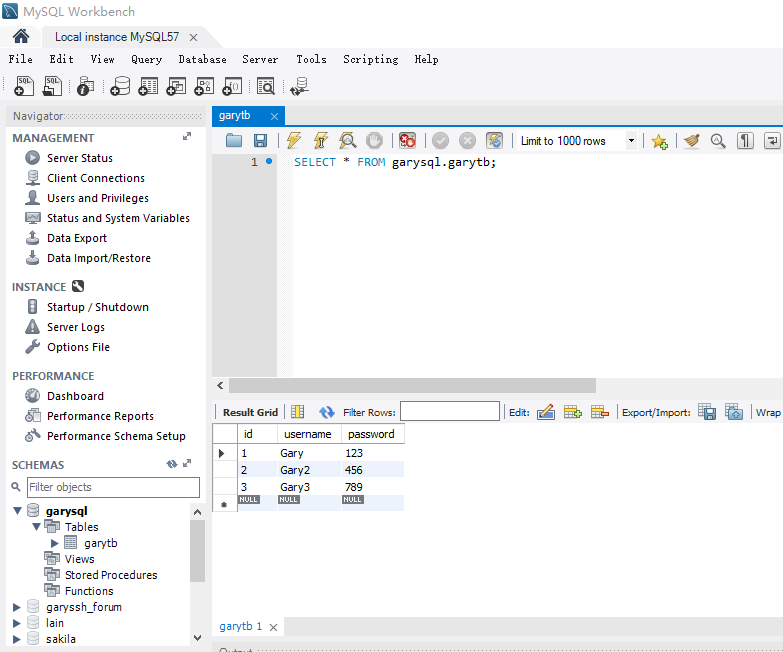
存在SQL注入问题
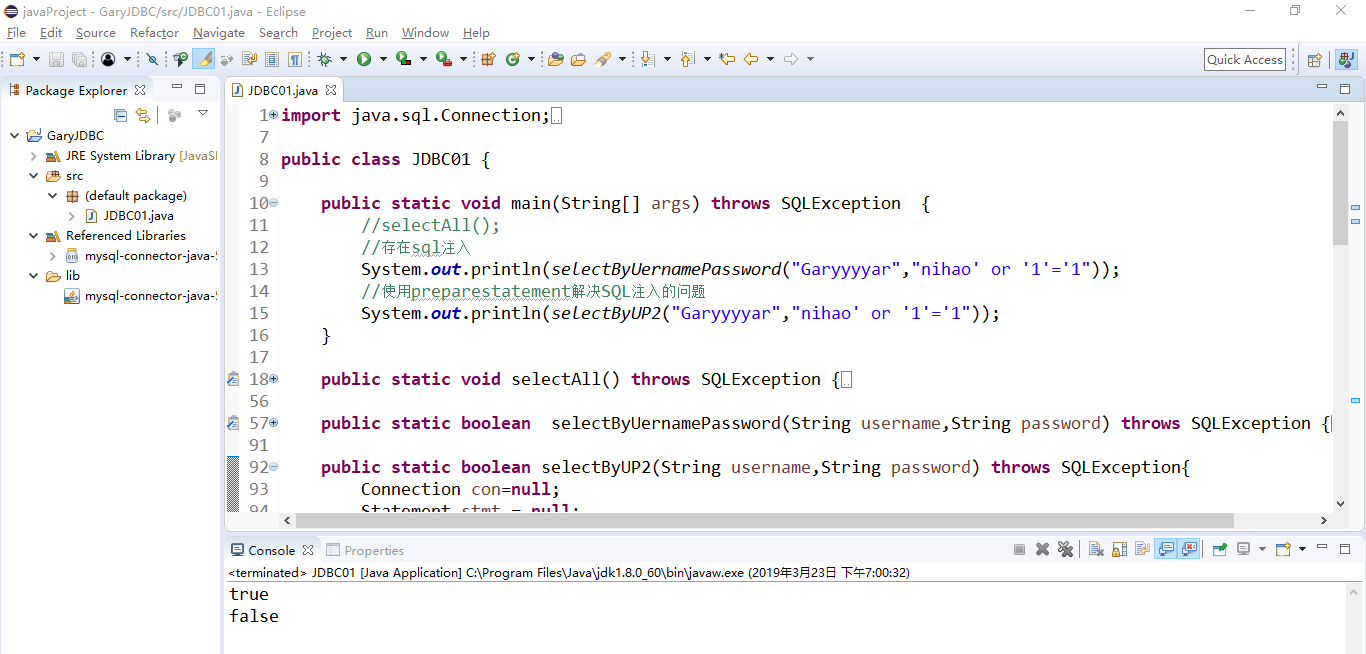
使用preparestatement做查询语句时可解决SQL注入的问题
pstmt.setString(1, username)将username作为一个结果传入到"where username = ?"的问号中
String sql = "select * from garytb where username = ? and password = ?";

            PreparedStatement pstmt = con.prepareStatement(sql);

            //添加参数

            pstmt.setString(1, username);

            pstmt.setString(2, password);

            //进行查询

            rs = pstmt.executeQuery();

            if(rs.next()) {

                return true;

            }else {

                return false;

            }
import java.sql.Connection;

import java.sql.DriverManager;

import java.sql.PreparedStatement;

import java.sql.ResultSet;

import java.sql.SQLException;

import java.sql.Statement;

public class JDBC01 {

    public static void main(String[] args) throws SQLException  {

        //selectAll();

        //存在sql注入

        System.out.println(selectByUernamePassword("Garyyyyar","nihao' or '1'='1"));

        //使用preparestatement解决SQL注入的问题

        System.out.println(selectByUP2("Garyyyyar","nihao' or '1'='1"));

    }

    public static void selectAll() throws SQLException {

        //注册驱动    使用驱动连接数据库

        Connection con = null;

        Statement stmt = null;

        ResultSet rs = null;

        try {

            Class.forName("com.mysql.jdbc.Driver");

            //String url ="jdbc:mysql://localhost:3306/garysql";

            //指定编码查询数据库

            String url ="jdbc:mysql://localhost:3306/garysql?useUnicode=true&characterEncoding=UTF8&useSSL=false";

            String user = "root";

            String password = "123456";

            //建立和数据库的连接

            con = DriverManager.getConnection(url,user,password);

            //数据库的增删改查

            stmt = con.createStatement();

            //返回一个结果集

            rs =stmt.executeQuery("select * from garytb");

            while(rs.next()) {

                //System.out.println(rs.getString(1)+","+rs.getString(2)+","+rs.getString(3));

                System.out.println(rs.getString("id")+","+rs.getString("username")+","+rs.getString("password"));

            }

        } catch (Exception e) {

            // TODO Auto-generated catch block

            e.printStackTrace();

        }finally {

            if(rs!=null)

                rs.close();

            if(stmt!=null)

                stmt.close();

            if(con!=null)

                con.close();

        }

    }

    public static boolean  selectByUernamePassword(String username,String password) throws SQLException {

        Connection con=null;

        Statement stmt = null;

        ResultSet rs = null;

        try {

            Class.forName("com.mysql.jdbc.Driver");

            String url ="jdbc:mysql://localhost:3306/garysql?useUnicode=true&characterEncoding=UTF8&useSSL=false";

            con = DriverManager.getConnection(url,"root","123456");

            stmt =con.createStatement();

            String sql = "select * from garytb where username = '"+username+"' and password = '"+password+"'";

            //System.out.println(sql);

            rs = stmt.executeQuery(sql);

            if(rs.next()) {

                return true;

            }else {

                return false;

            }

        } catch (Exception e) {

            // TODO Auto-generated catch block

            e.printStackTrace();

        }finally {

            if(rs!=null)

                rs.close();

            if(stmt!=null)

                stmt.close();

            if(con!=null)

                con.close();

        }

        return false;

    }

    public static boolean selectByUP2(String username,String password) throws SQLException{

        Connection con=null;

        Statement stmt = null;

        ResultSet rs = null;

        try {

            Class.forName("com.mysql.jdbc.Driver");

            String url ="jdbc:mysql://localhost:3306/garysql?useUnicode=true&characterEncoding=UTF8&useSSL=false";

            con = DriverManager.getConnection(url,"root","123456");

            String sql = "select * from garytb where username = ? and password = ?";

            PreparedStatement pstmt = con.prepareStatement(sql);

            //添加参数

            pstmt.setString(1, username);

            pstmt.setString(2, password);

            //进行查询

            rs = pstmt.executeQuery();

            if(rs.next()) {

                return true;

            }else {

                return false;

            }

        } catch (Exception e) {

            // TODO Auto-generated catch block

            e.printStackTrace();

        }finally {

            if(rs!=null)

                rs.close();

            if(stmt!=null)

                stmt.close();

            if(con!=null)

                con.close();

        }

        return false;

    }

}
JDBC01.java
public static boolean selectByUP2(String username,String password) throws SQLException{

        Connection con=null;

        Statement stmt = null;

        ResultSet rs = null;

        try {

            Class.forName("com.mysql.jdbc.Driver");

            String url ="jdbc:mysql://localhost:3306/garysql?useUnicode=true&characterEncoding=UTF8&useSSL=false";

            con = DriverManager.getConnection(url,"root","123456");

            String sql = "select * from garytb where username = ? and password = ?";

            PreparedStatement pstmt = con.prepareStatement(sql);

            //添加参数

            pstmt.setString(1, username);

            pstmt.setString(2, password);

            //进行查询

            rs = pstmt.executeQuery();

            if(rs.next()) {

                return true;

            }else {

                return false;

            }

        } catch (Exception e) {

            // TODO Auto-generated catch block

            e.printStackTrace();

        }finally {

            if(rs!=null)

                rs.close();

            if(stmt!=null)

                stmt.close();

            if(con!=null)

                con.close();

        }

        return false;

    }
MySQL_(Java)使用preparestatement解决SQL注入的问题的更多相关文章
- MyBatis是如何解决Sql注入的
转:[转]mybatis如何防止sql注入 java中预处理PrepareStatement为什么能起到防止SQL注入的作用??!! 一.SQL注入 sql注入大家都不陌生,是一种常见的攻击方式,攻击 ...
- JDBC_08_解决SQL注入问题 (登录和注册)
解决SQL注入问题 只要用户提供的信息不参与sql语句的编译过程,那么尽管用户输入的信息中含有sql关键字那么也不会起作用了 要想使用户提供信息不参与sql语句的编译过程,那么必须使用 java.sq ...
- jdbc 07: 解决sql注入
jdbc连接mysql,解决sql注入问题 package com.examples.jdbc.o7_解决sql注入; import java.sql.*; import java.util.Hash ...
- PreparedStatement解决sql注入问题
总结 PreparedStatement解决sql注入问题 :sql中使用?做占位符 2.得到PreparedStatement对象 PreparedStatement pst=conn.prepar ...
- 使用过滤器解决SQL注入和跨站点脚本编制
1 SQL注入.盲注 1.1 SQL注入.盲注概述 Web 应用程序通常在后端使用数据库,以与企业数据仓库交互.查询数据库事实上的标准语言是 SQL(各大数据库供应商都有自己的不同版本).Web 应用 ...
- IBatis.Net使用总结(一)-- IBatis解决SQL注入(#与$的区别)
IBatis解决SQL注入(#与$的区别) 在IBatis中,我们使用SqlMap进行Sql查询时,需要引用参数,在参数引用中可以使用两种占位符#和$.这两种占位符有什么区别呢? (1):#***#, ...
- 解决 SQL 注入的另类方法
本文是翻译,版权归原作者所有 原文地址(original source):https://bitcoinrevolt.wordpress.com/2016/03/08/solving-the-prob ...
- Java学习之路- SQL注入
用户名: __________ 密码:——————— 假如没有使用预处理的Statement 对象 拼接字符串查数据库的话,易收到sql注入攻击: 例如说 : mysql 中 #代表的是单行注释 ...
- [转]开发中如何解决SQL注入的问题
Java防止SQL注入 SQL 注入简介: SQL注入是最常见的攻击方式之一,它不是利用操作系统或其它系统的漏洞来实现攻击的,而是程序员因为没有做好判断,被不法用户钻了SQL的空子,下面 ...
随机推荐
- Gluster的搭建和使用
Gluster的搭建和使用 序言 我们为什么要去使用分布式存储,在一家大型公司或者大规模的集群中,大家可能会经常遇到一个问题,我的数据怎么存放,放在那,数据空间不够了怎么办,这些问题经常困扰着我们. ...
- LinqToSQL3
Lambda Lambda表达式和匿名方法很相似,但Lambda表达式比匿名方法更灵活,并且语法比匿名方法更简洁. 在LINQ中可以使用Lambda表达式创建委托,这些委托将稍后执行查询时被调用. L ...
- 解决windows系统下ping,ipconfig不是内部或外部命令
一般情况下,都是误删了系统变量path的值.解决方法:右击我的电脑 → 选择属性 → 选择高级系统设置 → 环境变量 → 在系统变量列表中,找到“path”环境变量双击,打开.在变量值这一栏检测下是否 ...
- java 计算中位数方法
最近工作需要 要求把python的代码写成java版本,python中有一个np.median()求中位数的方法,java决定手写一个 先说说什么是中位数: 中位数就是中间的那个数, 如果一个集合是奇 ...
- upload上传 和 download下载
文件上传: <div class="upload-form"> <input id="fileUpload" type="fil ...
- canva绘制圆角矩形
在做组态的时候,需要支持矩形圆角格式,但是因为canvas本身不带有圆角矩形,需要自行算出坐标进行绘制 方案一.统一圆角 <!DOCTYPE html> <html> < ...
- ES6入门二:默认值与默认值表达式
默认值 默认值表达式 需要注意的是,这种默认值和默认表达式在IE的最新版本中仍然没有得到兼容,只能通过编译转码的方式降级到ES5使用. 一.默认值 在函数声明时可以给形参赋默认值,当调用函数时不传入或 ...
- 小程序UI设计(9)-文字排版
小程序中一般很少大段落的文字,基本是4.5个字的主题.一行标题.一行摘要.两行描述.显示时超出部分用省略号代替.下面结合工具使用介绍一下文字排版的方法.先看效果图. 工具中属性设置如下图:两行文字属 ...
- QTP(1)
一.概念 1.什么是软件测试? 使用人工或者自动手段来运行或者测试某个软件的过程,其目的在于检验程序是否满足需求规格说明书或者弄清实际结果与预期结果之间的差异. (1)软件(程序+文档+数据)测试 ( ...
- 【转载】Role of RL in Text Generation by GAN
本篇随笔为转载,原贴作者:知乎 SCUT 胡杨,原贴地址:Role of RL in Text Generation by GAN(强化学习在生成对抗网络文本生成中扮演的角色).