
MySQL_(Java)使用preparestatement解决SQL注入的问题
MySQL_(Java)使用JDBC向数据库发起查询请求 传送门
MySQL_(Java)使用JDBC创建用户名和密码校验查询方法 传送门
MySQL数据库中的数据,数据库名garysql,表名garytb,数据库中存在的用户表
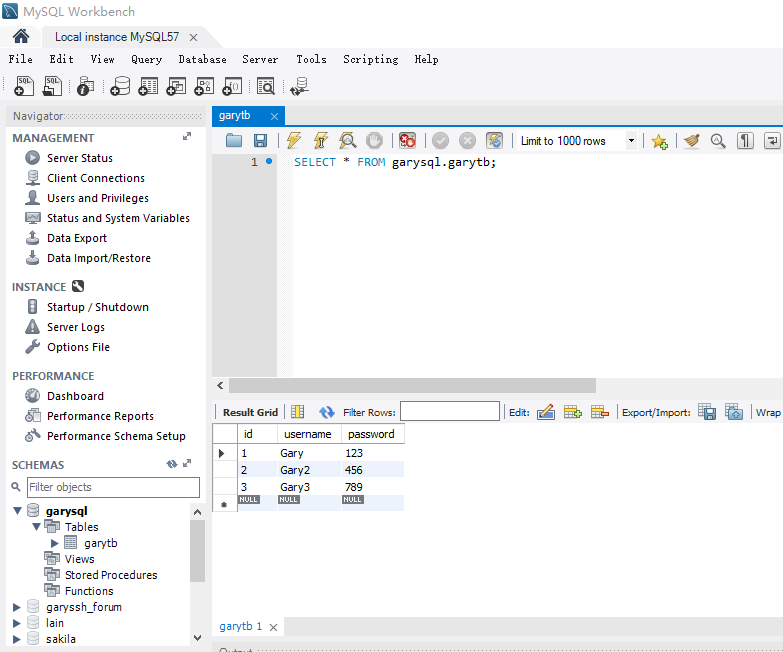
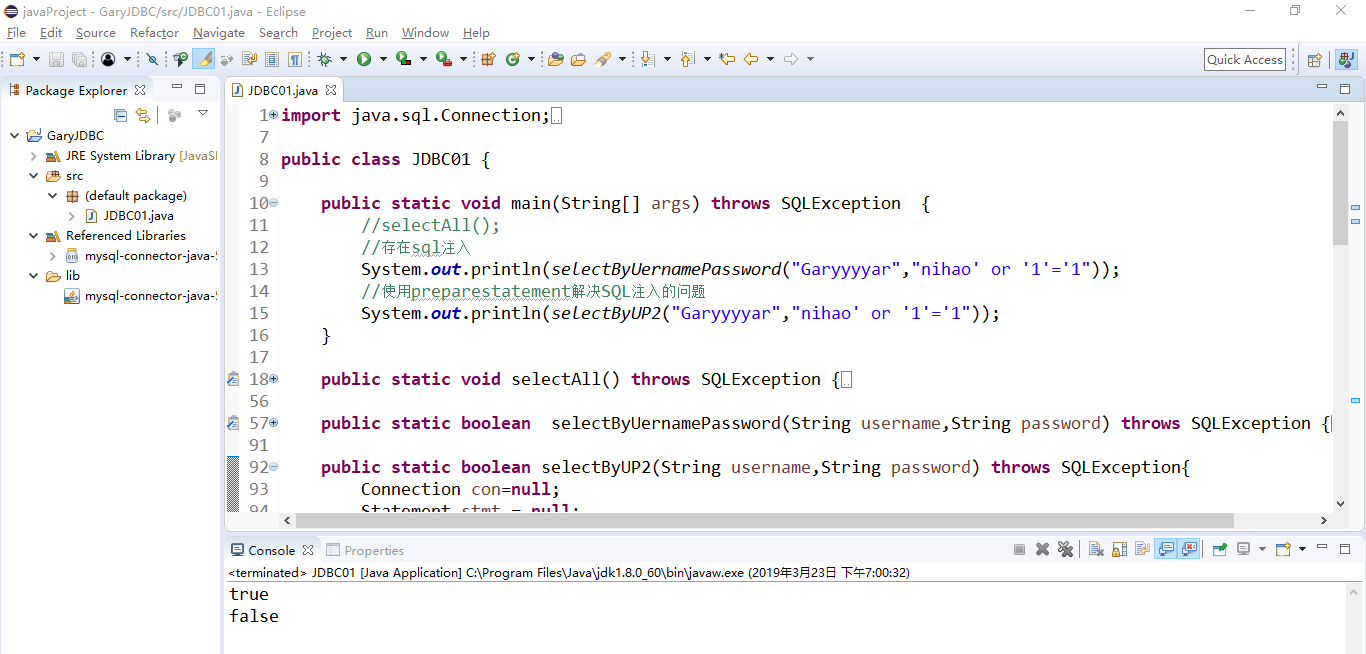
存在SQL注入问题
使用preparestatement做查询语句时可解决SQL注入的问题
pstmt.setString(1, username)将username作为一个结果传入到"where username = ?"的问号中
String sql = "select * from garytb where username = ? and password = ?";

            PreparedStatement pstmt = con.prepareStatement(sql);

            //添加参数

            pstmt.setString(1, username);

            pstmt.setString(2, password);

            //进行查询

            rs = pstmt.executeQuery();

            if(rs.next()) {

                return true;

            }else {

                return false;

            }
import java.sql.Connection;

import java.sql.DriverManager;

import java.sql.PreparedStatement;

import java.sql.ResultSet;

import java.sql.SQLException;

import java.sql.Statement;

public class JDBC01 {

    public static void main(String[] args) throws SQLException  {

        //selectAll();

        //存在sql注入

        System.out.println(selectByUernamePassword("Garyyyyar","nihao' or '1'='1"));

        //使用preparestatement解决SQL注入的问题

        System.out.println(selectByUP2("Garyyyyar","nihao' or '1'='1"));

    }

    public static void selectAll() throws SQLException {

        //注册驱动    使用驱动连接数据库

        Connection con = null;

        Statement stmt = null;

        ResultSet rs = null;

        try {

            Class.forName("com.mysql.jdbc.Driver");

            //String url ="jdbc:mysql://localhost:3306/garysql";

            //指定编码查询数据库

            String url ="jdbc:mysql://localhost:3306/garysql?useUnicode=true&characterEncoding=UTF8&useSSL=false";

            String user = "root";

            String password = "123456";

            //建立和数据库的连接

            con = DriverManager.getConnection(url,user,password);

            //数据库的增删改查

            stmt = con.createStatement();

            //返回一个结果集

            rs =stmt.executeQuery("select * from garytb");

            while(rs.next()) {

                //System.out.println(rs.getString(1)+","+rs.getString(2)+","+rs.getString(3));

                System.out.println(rs.getString("id")+","+rs.getString("username")+","+rs.getString("password"));

            }

        } catch (Exception e) {

            // TODO Auto-generated catch block

            e.printStackTrace();

        }finally {

            if(rs!=null)

                rs.close();

            if(stmt!=null)

                stmt.close();

            if(con!=null)

                con.close();

        }

    }

    public static boolean  selectByUernamePassword(String username,String password) throws SQLException {

        Connection con=null;

        Statement stmt = null;

        ResultSet rs = null;

        try {

            Class.forName("com.mysql.jdbc.Driver");

            String url ="jdbc:mysql://localhost:3306/garysql?useUnicode=true&characterEncoding=UTF8&useSSL=false";

            con = DriverManager.getConnection(url,"root","123456");

            stmt =con.createStatement();

            String sql = "select * from garytb where username = '"+username+"' and password = '"+password+"'";

            //System.out.println(sql);

            rs = stmt.executeQuery(sql);

            if(rs.next()) {

                return true;

            }else {

                return false;

            }

        } catch (Exception e) {

            // TODO Auto-generated catch block

            e.printStackTrace();

        }finally {

            if(rs!=null)

                rs.close();

            if(stmt!=null)

                stmt.close();

            if(con!=null)

                con.close();

        }

        return false;

    }

    public static boolean selectByUP2(String username,String password) throws SQLException{

        Connection con=null;

        Statement stmt = null;

        ResultSet rs = null;

        try {

            Class.forName("com.mysql.jdbc.Driver");

            String url ="jdbc:mysql://localhost:3306/garysql?useUnicode=true&characterEncoding=UTF8&useSSL=false";

            con = DriverManager.getConnection(url,"root","123456");

            String sql = "select * from garytb where username = ? and password = ?";

            PreparedStatement pstmt = con.prepareStatement(sql);

            //添加参数

            pstmt.setString(1, username);

            pstmt.setString(2, password);

            //进行查询

            rs = pstmt.executeQuery();

            if(rs.next()) {

                return true;

            }else {

                return false;

            }

        } catch (Exception e) {

            // TODO Auto-generated catch block

            e.printStackTrace();

        }finally {

            if(rs!=null)

                rs.close();

            if(stmt!=null)

                stmt.close();

            if(con!=null)

                con.close();

        }

        return false;

    }

}
JDBC01.java
public static boolean selectByUP2(String username,String password) throws SQLException{

        Connection con=null;

        Statement stmt = null;

        ResultSet rs = null;

        try {

            Class.forName("com.mysql.jdbc.Driver");

            String url ="jdbc:mysql://localhost:3306/garysql?useUnicode=true&characterEncoding=UTF8&useSSL=false";

            con = DriverManager.getConnection(url,"root","123456");

            String sql = "select * from garytb where username = ? and password = ?";

            PreparedStatement pstmt = con.prepareStatement(sql);

            //添加参数

            pstmt.setString(1, username);

            pstmt.setString(2, password);

            //进行查询

            rs = pstmt.executeQuery();

            if(rs.next()) {

                return true;

            }else {

                return false;

            }

        } catch (Exception e) {

            // TODO Auto-generated catch block

            e.printStackTrace();

        }finally {

            if(rs!=null)

                rs.close();

            if(stmt!=null)

                stmt.close();

            if(con!=null)

                con.close();

        }

        return false;

    }
MySQL_(Java)使用preparestatement解决SQL注入的问题的更多相关文章
- MyBatis是如何解决Sql注入的
转:[转]mybatis如何防止sql注入 java中预处理PrepareStatement为什么能起到防止SQL注入的作用??!! 一.SQL注入 sql注入大家都不陌生,是一种常见的攻击方式,攻击 ...
- JDBC_08_解决SQL注入问题 (登录和注册)
解决SQL注入问题 只要用户提供的信息不参与sql语句的编译过程,那么尽管用户输入的信息中含有sql关键字那么也不会起作用了 要想使用户提供信息不参与sql语句的编译过程,那么必须使用 java.sq ...
- jdbc 07: 解决sql注入
jdbc连接mysql,解决sql注入问题 package com.examples.jdbc.o7_解决sql注入; import java.sql.*; import java.util.Hash ...
- PreparedStatement解决sql注入问题
总结 PreparedStatement解决sql注入问题 :sql中使用?做占位符 2.得到PreparedStatement对象 PreparedStatement pst=conn.prepar ...
- 使用过滤器解决SQL注入和跨站点脚本编制
1 SQL注入.盲注 1.1 SQL注入.盲注概述 Web 应用程序通常在后端使用数据库,以与企业数据仓库交互.查询数据库事实上的标准语言是 SQL(各大数据库供应商都有自己的不同版本).Web 应用 ...
- IBatis.Net使用总结(一)-- IBatis解决SQL注入(#与$的区别)
IBatis解决SQL注入(#与$的区别) 在IBatis中,我们使用SqlMap进行Sql查询时,需要引用参数,在参数引用中可以使用两种占位符#和$.这两种占位符有什么区别呢? (1):#***#, ...
- 解决 SQL 注入的另类方法
本文是翻译,版权归原作者所有 原文地址(original source):https://bitcoinrevolt.wordpress.com/2016/03/08/solving-the-prob ...
- Java学习之路- SQL注入
用户名: __________ 密码:——————— 假如没有使用预处理的Statement 对象 拼接字符串查数据库的话,易收到sql注入攻击: 例如说 : mysql 中 #代表的是单行注释 ...
- [转]开发中如何解决SQL注入的问题
Java防止SQL注入 SQL 注入简介: SQL注入是最常见的攻击方式之一,它不是利用操作系统或其它系统的漏洞来实现攻击的,而是程序员因为没有做好判断,被不法用户钻了SQL的空子,下面 ...
随机推荐
- 面试常考的js题目(二)
1. 已知 fn 为一个预定义函数,实现函数 curryIt,调用之后满足如下条件: 返回一个函数 a,a 的 length 属性值为 1(即显式声明 a 接收一个参数) 调用 a 之后,返回一个函数 ...
- Ubuntu12.04+Caffe (+OpenCV+CPU-only)
经过一天的努力发现12.04 的pcre的库太低了, 要解决这个bug只能升级系统到16.04 麻蛋!!! 1. 下载大神MTCNN 源码,内含caffe https://github.co ...
- Shiro学习笔记总结,附加" 身份认证 "源码案例(一)
Shiro学习笔记总结 内容介绍: 一.Shiro介绍 二.subject认证主体 三.身份认证流程 四.Realm & JDBC reaml介绍 五.Shiro.ini配置介绍 六.源码案例 ...
- phpstudycomposer thinkPHP5.1 使用
1.首先把php变成全局变量 2.打开phpstudy composer 的安装目录 E:\phpstudy\PHPTutorial\tools\composer 把里面的文件全部删除(或者备份一下) ...
- Mysql(四)-1:单表查询
一 单表查询的语法 SELECT 字段1,字段2... FROM 表名 WHERE 条件 GROUP BY field HAVING 筛选 ORDER BY field LIMIT 限制条数 二 关键 ...
- string类的总结
一.string类头文件:#include <string>;using namespace std; 二.string类方法: 1.获取string的字符串长度:size(),size返 ...
- 一键登录怎么在iOS端实现?这篇文章教会你!
在一键登录出现之前,市场上最常见的APP 注册登录方式主要有账号密码.短信验证及第三方登录.这几种方式看似常见且便捷,实则存在许多安全隐患,用户体验也相对较差.首先,短信验证码到达率低.用户操作繁琐且 ...
- js实现购物车数量的增加与减少,js实现购物车数量的自增与自减
js实现购物车数量的增加与减少,js实现购物车数量的自增与自减 <!DOCTYPE html PUBLIC "-//W3C//DTD XHTML 1.0 Transitional//E ...
- zencart设置特价商品价格
登录后台-工具-安装SQL脚本(Install SQL Patches) 运行以下语句: , '0001-01-01'); 红色部分请替换成实际要设置的数据:1234表示产品ID,888表示特价.
- java8学习之Optional深入详解
自上次[http://www.cnblogs.com/webor2006/p/8243874.html]函数式接口的学习告一段落之后,这次来学习一下Optional,它并非是函数式接口的概念,点击查看 ...