
JavaWeb-SpringSecurity记住我功能
系列博文
项目已上传至guthub 传送门
JavaWeb-SpringSecurity初认识 传送门
JavaWeb-SpringSecurity在数据库中查询登陆用户 传送门
JavaWeb-SpringSecurity自定义登陆页面 传送门
JavaWeb-SpringSecurity实现需求-判断请求是否以html结尾 传送门
JavaWeb-SpringSecurity自定义登陆配置 传送门
JavaWeb-SpringSecurity图片验证ImageCode 传送门
JavaWeb-SpringSecurity记住我功能 传送门
JavaWeb-SpringSecurity使用短信验证码登陆 传送门
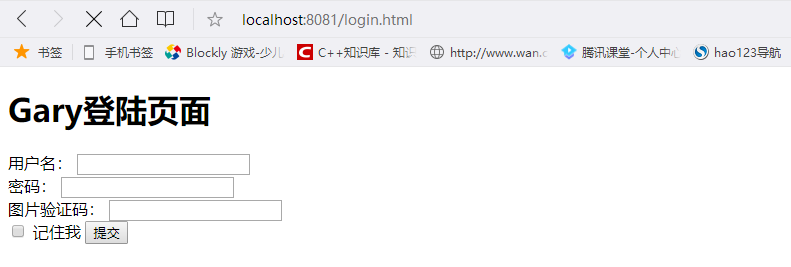
在login.html中添加一个复选框,表示"记住我"功能【注意:<input>标签的name一定是remember-me】
    <form action="/loginPage" method="post">

        用户名:

        <input type="text" name="username">

        <br>

        密码:

        <input type="password" name="password">

        <br>

        图片验证码:

        <input type="text" name="imageCode">

        <img src="/code/image">

        <br>

        <input name="remember-me" type="checkbox" value="true">

        记住我

        <input type="submit">

    </form>
在config层SecurityConfig.java中添加persistentTokenRepository()方法,用来在server层操作数据库
    @Autowired

    private DataSource dataSource;

    //负责操作数据库

    public PersistentTokenRepository  persistentTokenRepository()

    {

        JdbcTokenRepositoryImpl tokenRepository = new JdbcTokenRepositoryImpl();

        tokenRepository.setDataSource(dataSource);

        return tokenRepository;

    }
JdbcTokenRepositoryImpl要操作数据库,得在数据库中存在操作存储用户信息token数据库表,使用JdbcTokenRepositoryImpl接口中提供创建数据库语句
/** Default SQL for creating the database table to store the tokens */

    public static final String CREATE_TABLE_SQL = "create table persistent_logins (username varchar(64) not null, series varchar(64) primary key, "

            + "token varchar(64) not null, last_used timestamp not null)";

    /** The default SQL used by the <tt>getTokenBySeries</tt> query */

    public static final String DEF_TOKEN_BY_SERIES_SQL = "select username,series,token,last_used from persistent_logins where series = ?";

    /** The default SQL used by <tt>createNewToken</tt> */

    public static final String DEF_INSERT_TOKEN_SQL = "insert into persistent_logins (username, series, token, last_used) values(?,?,?,?)";

    /** The default SQL used by <tt>updateToken</tt> */

    public static final String DEF_UPDATE_TOKEN_SQL = "update persistent_logins set token = ?, last_used = ? where series = ?";

    /** The default SQL used by <tt>removeUserTokens</tt> */

    public static final String DEF_REMOVE_USER_TOKENS_SQL = "delete from persistent_logins where username = ?";
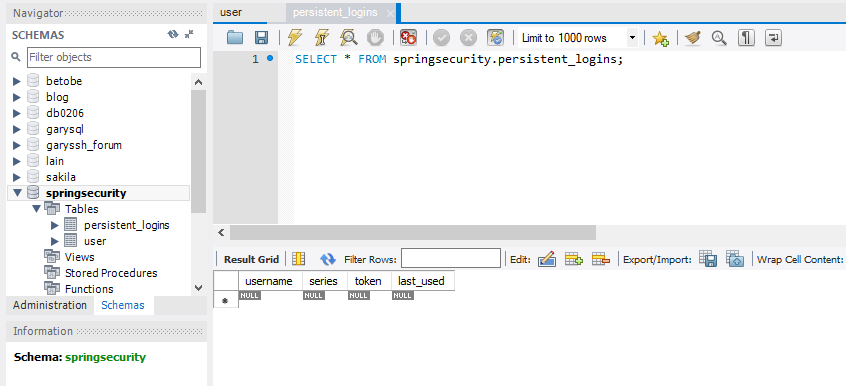
create table persistent_logins (username varchar(64) not null, series varchar(64) primary key, token varchar(64) not null, last_used timestamp not null)
gary.sql
在SecurityConfig.java实现"记住我"功能
@Autowired

    private DataSource dataSource;

    //负责操作数据库

    public PersistentTokenRepository  persistentTokenRepository()

    {

        JdbcTokenRepositoryImpl tokenRepository = new JdbcTokenRepositoryImpl();

        tokenRepository.setDataSource(dataSource);

        return tokenRepository;

    }

    @Autowired

    public UserDetailsService userDetailService;

    protected void configure(HttpSecurity http) throws Exception{

        //声明我们自己写的过滤器

        ValidateCodeFilter validateCodeFilter = new ValidateCodeFilter();

        //给过滤器赋值

        validateCodeFilter.setAuthenticationFailureHandler(loginFailureHandler);

        validateCodeFilter.setGarySecurityProperties(garySecurityProperties);

        validateCodeFilter.afterPropertiesSet();

        //表单验证(身份认证)

        http.addFilterBefore(validateCodeFilter, UsernamePasswordAuthenticationFilter.class)

            .formLogin()

            //自定义登陆页面

            .loginPage("/require")

            //如果URL为loginPage,则用SpringSecurity中自带的过滤器去处理该请求

            .loginProcessingUrl("/loginPage")

            //配置登陆成功调用loginSuccessHandler

            .successHandler(loginSuccessHandler)

            //配置登陆失败调用loginFailureHandler

            .failureHandler(loginFailureHandler)

            //记住我功能

            .and()

            .rememberMe()

            //配置persistentTokenRepository

            .tokenRepository(persistentTokenRepository())

            //配置userDetailsService

            .userDetailsService(userDetailService)

            .and()

            //请求授权

            .authorizeRequests()

            //在访问我们的URL时,我们是不需要省份认证,可以立即访问

            .antMatchers("/login.html","/require","/code/image").permitAll()

            //所有请求都被拦截,跳转到(/login请求中)

            .anyRequest()

            //都需要我们身份认证

            .authenticated()

            //SpringSecurity保护机制

            .and().csrf().disable();

    }
package com.Gary.GaryRESTful.config;

import javax.sql.DataSource;

import org.springframework.beans.factory.annotation.Autowired;

import org.springframework.context.annotation.Bean;

import org.springframework.context.annotation.Configuration;

import org.springframework.security.config.annotation.web.builders.HttpSecurity;

import org.springframework.security.config.annotation.web.configuration.WebSecurityConfigurerAdapter;

import org.springframework.security.core.userdetails.UserDetailsService;

import org.springframework.security.crypto.bcrypt.BCryptPasswordEncoder;

import org.springframework.security.crypto.password.PasswordEncoder;

import org.springframework.security.web.authentication.UsernamePasswordAuthenticationFilter;

import org.springframework.security.web.authentication.rememberme.JdbcTokenRepositoryImpl;

import org.springframework.security.web.authentication.rememberme.PersistentTokenRepository;

import com.Gary.GaryRESTful.filter.ValidateCodeFilter;

import com.Gary.GaryRESTful.handler.LoginFailureHandler;

import com.Gary.GaryRESTful.handler.LoginSuccessHandler;

import com.Gary.GaryRESTful.properties.GarySecurityProperties;

//Web应用安全适配器

@Configuration

public class SecurityConfig extends WebSecurityConfigurerAdapter{

    //告诉SpringSecurity密码用什么加密的

    @Bean

    public PasswordEncoder passwordEncoder()

    {

        return new BCryptPasswordEncoder();

    }

    @Autowired

    private LoginSuccessHandler loginSuccessHandler;

    @Autowired

    private LoginFailureHandler loginFailureHandler;

    @Autowired

    private GarySecurityProperties garySecurityProperties;

    @Autowired

    private DataSource dataSource;

    //负责操作数据库

    public PersistentTokenRepository  persistentTokenRepository()

    {

        JdbcTokenRepositoryImpl tokenRepository = new JdbcTokenRepositoryImpl();

        tokenRepository.setDataSource(dataSource);

        return tokenRepository;

    }

    @Autowired

    public UserDetailsService userDetailService;

    protected void configure(HttpSecurity http) throws Exception{

        //声明我们自己写的过滤器

        ValidateCodeFilter validateCodeFilter = new ValidateCodeFilter();

        //给过滤器赋值

        validateCodeFilter.setAuthenticationFailureHandler(loginFailureHandler);

        validateCodeFilter.setGarySecurityProperties(garySecurityProperties);

        validateCodeFilter.afterPropertiesSet();

        //表单验证(身份认证)

        http.addFilterBefore(validateCodeFilter, UsernamePasswordAuthenticationFilter.class)

            .formLogin()

            //自定义登陆页面

            .loginPage("/require")

            //如果URL为loginPage,则用SpringSecurity中自带的过滤器去处理该请求

            .loginProcessingUrl("/loginPage")

            //配置登陆成功调用loginSuccessHandler

            .successHandler(loginSuccessHandler)

            //配置登陆失败调用loginFailureHandler

            .failureHandler(loginFailureHandler)

            //记住我功能

            .and()

            .rememberMe()

            //配置persistentTokenRepository

            .tokenRepository(persistentTokenRepository())

            //配置userDetailsService

            .userDetailsService(userDetailService)

            .and()

            //请求授权

            .authorizeRequests()

            //在访问我们的URL时,我们是不需要省份认证,可以立即访问

            .antMatchers("/login.html","/require","/code/image").permitAll()

            //所有请求都被拦截,跳转到(/login请求中)

            .anyRequest()

            //都需要我们身份认证

            .authenticated()

            //SpringSecurity保护机制

            .and().csrf().disable();

    }

}
SecurityConfig.java
为防止一直记住用户,在GaryRESTful.properties中的GarySecurityProperties()方法下,配置token过期时间
    //LoginType登陆的方式,默认为JSON(restful设计风格)

    private LoginType loginType = LoginType.JSON;

    private ValidateCodeProperties code = new ValidateCodeProperties();

    private int rememberMeSeconds = 60*60;

    //getter()、setter()
在application.properties中配置Token过期时间
#Token过期时间

gary.security.rememberMeSeconds = 3600
在SecurityConfig.java下的configure()方法中配置过期秒数
    protected void configure(HttpSecurity http) throws Exception{

        //声明我们自己写的过滤器

        ValidateCodeFilter validateCodeFilter = new ValidateCodeFilter();

        //给过滤器赋值

        validateCodeFilter.setAuthenticationFailureHandler(loginFailureHandler);

        validateCodeFilter.setGarySecurityProperties(garySecurityProperties);

        validateCodeFilter.afterPropertiesSet();

        //表单验证(身份认证)

        http.addFilterBefore(validateCodeFilter, UsernamePasswordAuthenticationFilter.class)

            .formLogin()

            //自定义登陆页面

            .loginPage("/require")

            //如果URL为loginPage,则用SpringSecurity中自带的过滤器去处理该请求

            .loginProcessingUrl("/loginPage")

            //配置登陆成功调用loginSuccessHandler

            .successHandler(loginSuccessHandler)

            //配置登陆失败调用loginFailureHandler

            .failureHandler(loginFailureHandler)

            //记住我功能

            .and()

            .rememberMe()

            //配置persistentTokenRepository

            .tokenRepository(persistentTokenRepository())

            //配置过期秒数

            .tokenValiditySeconds(garySecurityProperties.getRememberMeSeconds())

            //配置userDetailsService

            .userDetailsService(userDetailService)

            .and()

            //请求授权

            .authorizeRequests()

            //在访问我们的URL时,我们是不需要省份认证,可以立即访问

            .antMatchers("/login.html","/require","/code/image").permitAll()

            //所有请求都被拦截,跳转到(/login请求中)

            .anyRequest()

            //都需要我们身份认证

            .authenticated()

            //SpringSecurity保护机制

            .and().csrf().disable();

    }
package com.Gary.GaryRESTful.config;

import javax.sql.DataSource;

import org.springframework.beans.factory.annotation.Autowired;

import org.springframework.context.annotation.Bean;

import org.springframework.context.annotation.Configuration;

import org.springframework.security.config.annotation.web.builders.HttpSecurity;

import org.springframework.security.config.annotation.web.configuration.WebSecurityConfigurerAdapter;

import org.springframework.security.core.userdetails.UserDetailsService;

import org.springframework.security.crypto.bcrypt.BCryptPasswordEncoder;

import org.springframework.security.crypto.password.PasswordEncoder;

import org.springframework.security.web.authentication.UsernamePasswordAuthenticationFilter;

import org.springframework.security.web.authentication.rememberme.JdbcTokenRepositoryImpl;

import org.springframework.security.web.authentication.rememberme.PersistentTokenRepository;

import com.Gary.GaryRESTful.filter.ValidateCodeFilter;

import com.Gary.GaryRESTful.handler.LoginFailureHandler;

import com.Gary.GaryRESTful.handler.LoginSuccessHandler;

import com.Gary.GaryRESTful.properties.GarySecurityProperties;

//Web应用安全适配器

@Configuration

public class SecurityConfig extends WebSecurityConfigurerAdapter{

    //告诉SpringSecurity密码用什么加密的

    @Bean

    public PasswordEncoder passwordEncoder()

    {

        return new BCryptPasswordEncoder();

    }

    @Autowired

    private LoginSuccessHandler loginSuccessHandler;

    @Autowired

    private LoginFailureHandler loginFailureHandler;

    @Autowired

    private GarySecurityProperties garySecurityProperties;

    @Autowired

    private DataSource dataSource;

    //负责操作数据库

    public PersistentTokenRepository  persistentTokenRepository()

    {

        JdbcTokenRepositoryImpl tokenRepository = new JdbcTokenRepositoryImpl();

        tokenRepository.setDataSource(dataSource);

        return tokenRepository;

    }

    @Autowired

    public UserDetailsService userDetailService;

    protected void configure(HttpSecurity http) throws Exception{

        //声明我们自己写的过滤器

        ValidateCodeFilter validateCodeFilter = new ValidateCodeFilter();

        //给过滤器赋值

        validateCodeFilter.setAuthenticationFailureHandler(loginFailureHandler);

        validateCodeFilter.setGarySecurityProperties(garySecurityProperties);

        validateCodeFilter.afterPropertiesSet();

        //表单验证(身份认证)

        http.addFilterBefore(validateCodeFilter, UsernamePasswordAuthenticationFilter.class)

            .formLogin()

            //自定义登陆页面

            .loginPage("/require")

            //如果URL为loginPage,则用SpringSecurity中自带的过滤器去处理该请求

            .loginProcessingUrl("/loginPage")

            //配置登陆成功调用loginSuccessHandler

            .successHandler(loginSuccessHandler)

            //配置登陆失败调用loginFailureHandler

            .failureHandler(loginFailureHandler)

            //记住我功能

            .and()

            .rememberMe()

            //配置persistentTokenRepository

            .tokenRepository(persistentTokenRepository())

            //配置过期秒数

            .tokenValiditySeconds(garySecurityProperties.getRememberMeSeconds())

            //配置userDetailsService

            .userDetailsService(userDetailService)

            .and()

            //请求授权

            .authorizeRequests()

            //在访问我们的URL时,我们是不需要省份认证,可以立即访问

            .antMatchers("/login.html","/require","/code/image").permitAll()

            //所有请求都被拦截,跳转到(/login请求中)

            .anyRequest()

            //都需要我们身份认证

            .authenticated()

            //SpringSecurity保护机制

            .and().csrf().disable();

    }

}
SecurityConfig.java
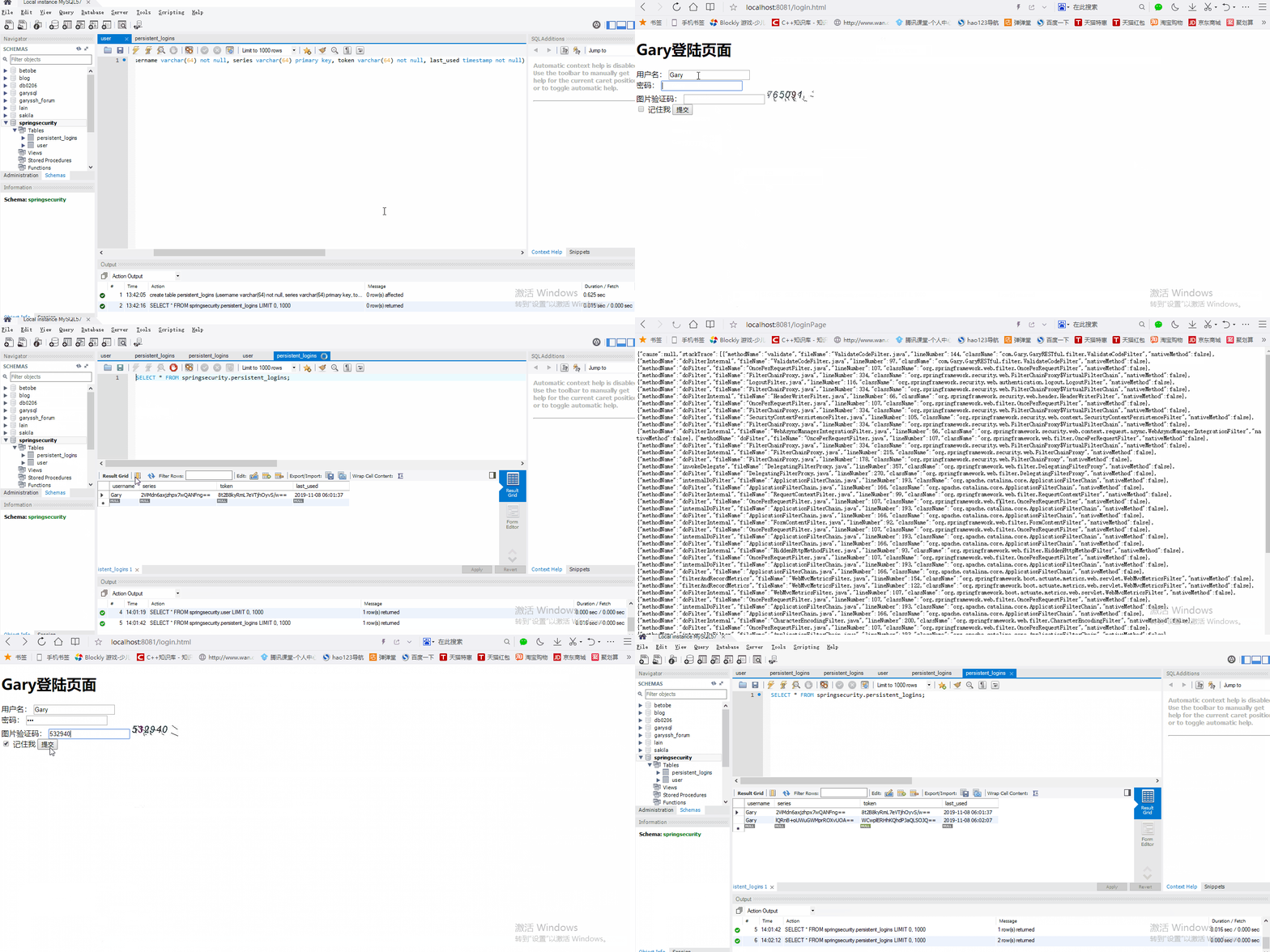
测试:每次用户勾选了了记住我,在persistent_logins表中就会多处一条token记录【如果用户不勾选记住我,persistent_logins表中不会多处token记录】
<!DOCTYPE html>

<html>

<head>

<meta charset="UTF-8">

<title>Insert title here</title>

</head>

<body>

<h1>Gary登陆页面</h1>

    <form action="/loginPage" method="post">

        用户名:

        <input type="text" name="username">

        <br>

        密码:

        <input type="password" name="password">

        <br>

        图片验证码:

        <input type="text" name="imageCode">

        <img src="/code/image">

        <br>

        <input name="remember-me" type="checkbox" value="true">

        记住我

        <input type="submit">

    </form>

</body>

</html>
login.html
#datasource

spring.datasource.url=jdbc:mysql:///springsecurity?serverTimezone=UTC&characterEncoding=utf-8

spring.datasource.username=root

spring.datasource.password=123456

spring.datasource.dricer-class-name=com.mysql.jdbc.Driver

#jpa

#打印出数据库语句

spring.jpa.show-sql=true

#更新数据库表

spring.jpa.hibernate.ddl-auto=update

#配置登陆方式

gary.security.loginType = JSON

server.port=8081

#验证码长度

gary.security.code.image.length = 6

#验证码图片的长

gary.security.code.image.width = 100

#配置哪些需要我们验证码的Filter

gary.security.code.image.url = /user,/user/*

#Token过期时间

gary.security.rememberMeSeconds = 3600
application.properties
package com.Gary.GaryRESTful.properties;

import org.springframework.boot.context.properties.ConfigurationProperties;

@ConfigurationProperties(prefix = "gary.security")

public class GarySecurityProperties {

    //LoginType登陆的方式,默认为JSON(restful设计风格)

    private LoginType loginType = LoginType.JSON;

    private ValidateCodeProperties code = new ValidateCodeProperties();

    private int rememberMeSeconds = 60*60;

    public int getRememberMeSeconds() {

        return rememberMeSeconds;

    }

    public void setRememberMeSeconds(int rememberMeSeconds) {

        this.rememberMeSeconds = rememberMeSeconds;

    }

    public ValidateCodeProperties getCode() {

        return code;

    }

    public void setCode(ValidateCodeProperties code) {

        this.code = code;

    }

    public LoginType getLoginType() {

        return loginType;

    }

    public void setLoginType(LoginType loginType) {

        this.loginType = loginType;

    }

}
GarySecurityProperties.java
package com.Gary.GaryRESTful.config;

import javax.sql.DataSource;

import org.springframework.beans.factory.annotation.Autowired;

import org.springframework.context.annotation.Bean;

import org.springframework.context.annotation.Configuration;

import org.springframework.security.config.annotation.web.builders.HttpSecurity;

import org.springframework.security.config.annotation.web.configuration.WebSecurityConfigurerAdapter;

import org.springframework.security.core.userdetails.UserDetailsService;

import org.springframework.security.crypto.bcrypt.BCryptPasswordEncoder;

import org.springframework.security.crypto.password.PasswordEncoder;

import org.springframework.security.web.authentication.UsernamePasswordAuthenticationFilter;

import org.springframework.security.web.authentication.rememberme.JdbcTokenRepositoryImpl;

import org.springframework.security.web.authentication.rememberme.PersistentTokenRepository;

import com.Gary.GaryRESTful.filter.ValidateCodeFilter;

import com.Gary.GaryRESTful.handler.LoginFailureHandler;

import com.Gary.GaryRESTful.handler.LoginSuccessHandler;

import com.Gary.GaryRESTful.properties.GarySecurityProperties;

//Web应用安全适配器

@Configuration

public class SecurityConfig extends WebSecurityConfigurerAdapter{

    //告诉SpringSecurity密码用什么加密的

    @Bean

    public PasswordEncoder passwordEncoder()

    {

        return new BCryptPasswordEncoder();

    }

    @Autowired

    private LoginSuccessHandler loginSuccessHandler;

    @Autowired

    private LoginFailureHandler loginFailureHandler;

    @Autowired

    private GarySecurityProperties garySecurityProperties;

    @Autowired

    private DataSource dataSource;

    //负责操作数据库

    public PersistentTokenRepository  persistentTokenRepository()

    {

        JdbcTokenRepositoryImpl tokenRepository = new JdbcTokenRepositoryImpl();

        tokenRepository.setDataSource(dataSource);

        return tokenRepository;

    }

    @Autowired

    public UserDetailsService userDetailService;

    protected void configure(HttpSecurity http) throws Exception{

        //声明我们自己写的过滤器

        ValidateCodeFilter validateCodeFilter = new ValidateCodeFilter();

        //给过滤器赋值

        validateCodeFilter.setAuthenticationFailureHandler(loginFailureHandler);

        validateCodeFilter.setGarySecurityProperties(garySecurityProperties);

        validateCodeFilter.afterPropertiesSet();

        //表单验证(身份认证)

        http.addFilterBefore(validateCodeFilter, UsernamePasswordAuthenticationFilter.class)

            .formLogin()

            //自定义登陆页面

            .loginPage("/require")

            //如果URL为loginPage,则用SpringSecurity中自带的过滤器去处理该请求

            .loginProcessingUrl("/loginPage")

            //配置登陆成功调用loginSuccessHandler

            .successHandler(loginSuccessHandler)

            //配置登陆失败调用loginFailureHandler

            .failureHandler(loginFailureHandler)

            //记住我功能

            .and()

            .rememberMe()

            //配置persistentTokenRepository

            .tokenRepository(persistentTokenRepository())

            //配置过期秒数

            .tokenValiditySeconds(garySecurityProperties.getRememberMeSeconds())

            //配置userDetailsService

            .userDetailsService(userDetailService)

            .and()

            //请求授权

            .authorizeRequests()

            //在访问我们的URL时,我们是不需要省份认证,可以立即访问

            .antMatchers("/login.html","/require","/code/image").permitAll()

            //所有请求都被拦截,跳转到(/login请求中)

            .anyRequest()

            //都需要我们身份认证

            .authenticated()

            //SpringSecurity保护机制

            .and().csrf().disable();

    }

}
SecurityConfig.java
JavaWeb-SpringSecurity记住我功能的更多相关文章
- SpringSecurity(2)---记住我功能实现
SpringSecurity(2)---记住我功能实现 上一篇博客实现了认证+授权的基本功能,这里在这个基础上,添加一个 记住我的功能. 上一篇博客地址:SpringSecurity(1)---认证+ ...
- SpringBoot + Spring Security 学习笔记(四)记住我功能实现
记住我功能的基本原理 当用户登录发起认证请求时,会通过UsernamePasswordAuthenticationFilter进行用户认证,认证成功之后,SpringSecurity 调用前期配置好的 ...
- java实现记住密码功能(利用cookie)
<br> <input type="text" id="userName" name="userName" value=& ...
- 通过sharedpreferences实现记住密码功能
通过sharedpreferences实现记住密码功能
- jquery.cookie.js 操作cookie实现记住密码功能的实现代码
jquery.cookie.js操作cookie实现记住密码功能,很简单很强大,喜欢的朋友可以参考下. 复制代码代码如下: //初始化页面时验证是否记住了密码 $(document).ready( ...
- cookie记住密码功能
很多门户网站都提供了记住密码功能,虽然现在的浏览器都已经提供了相应的记住密码功能 效果就是你每次进入登录页面后就不需要再进行用户名和密码的输入: 记住密码功能基本都是使用cookie来进行实现的,因此 ...
- 【原创】js中利用cookie实现记住密码功能
在登录界面添加记住密码功能,我首先想到的是在java后台中调用cookie存放账号密码,大致如下: HttpServletRequest request HttpServletResponse res ...
- android: SharedPreferences实现记住密码功能
既然是实现记住密码的功能,那么我们就不需要从头去写了,因为在上一章中的最佳实 践部分已经编写过一个登录界面了,有可以重用的代码为什么不用呢?那就首先打开 BroadcastBestPractice 项 ...
- asp.net记住我功能
登录页面的记住我功能 不能用session的原因:sessionID是以cookie的形式存在浏览器端的内存中 如果用户把浏览器关闭 则sessionID就消失 但是服务器端的sessi ...
随机推荐
- EXSI宿主机更换硬盘后虚机启动有问题
环境说明: 最近EXSI主机磁盘坏掉了,重新换掉磁盘以后启动虚机有问题. 虚机的报错信息如下: 找了下修复方法,操作过程为: 尝试修复 (以下是百度的方法) ls -l /dev/mapper mkd ...
- 区间问题 codeforces 422c+hiho区间求差问
先给出一个经典的区间处理方法 对每个区间 我们对其起点用绿色标识 终点用蓝色标识 然后把所有的点离散在一个坐标轴上 如下图 这样做有什么意义呢.由于我们的区间可以离散的放在一条轴上面那么我们在枚举区 ...
- dev chart使用
public class LineChartHelp { #region 折线图 /// <summary> /// 创建折线图 /// </summary> public v ...
- C#键盘事件
一: protected override void OnKeyDown(KeyEventArgs e) { if (e.Key==Key.Enter) { sendAppToServer(); } ...
- .NET CORE API 使用Postman中Post请求获取不到传参问题
开发中遇到个坑 记录下. 使用Postman请求core api 接口时,按之前的使用方法(form-data , x-www-form-urlencoded)怎么设置都无法访问. 最后采用raw写入 ...
- sass之mixin的全局引入(vue3.0)
sass之mixin的全局引入(vue3.0) 1.scss文件(mixin.scss) /* 渐变 */ @mixin gradual($color, $color1){ background: $ ...
- 鼠标右键点击弹出菜单(jQuery)
禁用浏览器默认事件,此处是兼容写法 $(document).contextmenu(function (e) { var event = e || window.event; if (event.pr ...
- js把一串字符串去重(能统计出字符重复次数更佳)
原文来自:https://juejin.im/post/5ba6e77e6fb9a05d0b14359b <script> let str = "12qwe345671dsfa2 ...
- 销售订单(SO)-API-登记销售订单
登记销售订单可以在新增订单的时候就登记:并不是去修改 flow_status 为booked,而是赋值action request:就下面两句 l_action_request_tbl(l_actio ...
- python中进制转换
使用Python内置函数:bin().oct().int().hex()可实现进制转换. 先看Python官方文档中对这几个内置函数的描述: bin(x)Convert an integer numb ...