
SpringBoot2.X&Prometheus使用
1、启动Prometheus
[root@ip101 prometheus-2.12.0.linux-amd64]# pwd

/opt/app/prometheus-2.12.0.linux-amd64

./prometheus --config.file=prometheus.yml  &

ps -ef|grep prometheus |grep -v grep
2、Prometheus 查看
2.1、Prometheus自身metrics
http://192.168.8.101:9090/metrics
2.2、 Prometheus自身graph
http://192.168.8.101:9090/graph
2.3、Prometheus自身targets
http://192.168.8.101:9090/targets
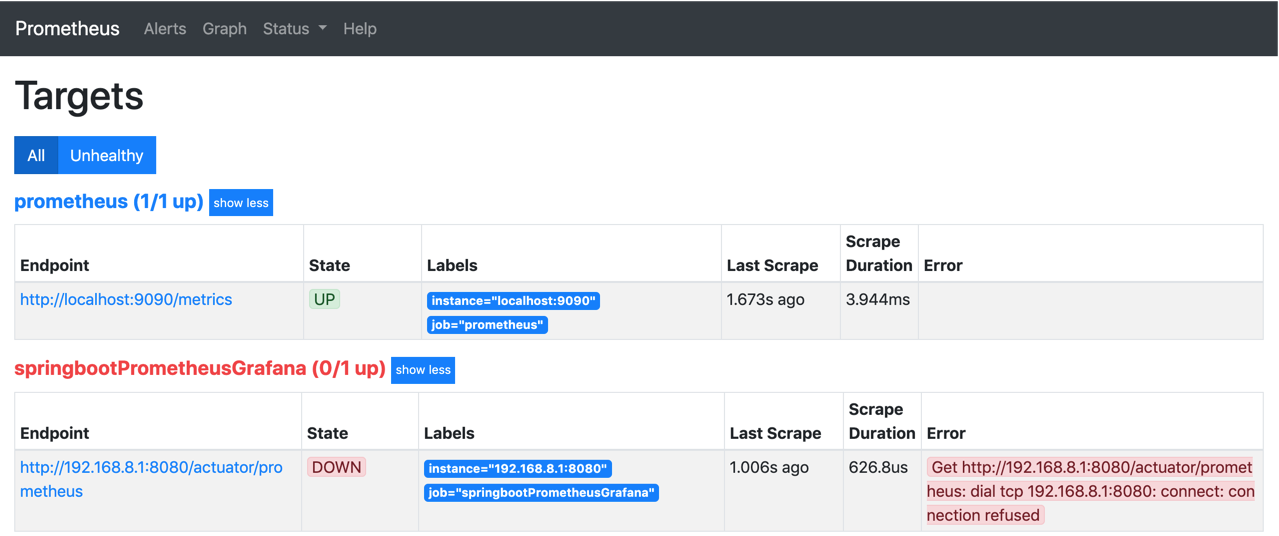
3、SpringBoot Actuator
server.port=8080

spring.application.name=springboot_prometheus

management.endpoints.web.exposure.include=*

management.metrics.tags.application=${spring.application.name}

#注意此处 如何配置为根目录的话,直接访问http://192.168.8.1:8080/prometheus

#http://192.168.8.1:8080/actuator/prometheus

management.endpoints.web.base-path=/actuator
Prometheus配置
global:

  scrape_interval: 15s

  scrape_timeout: 10s

  evaluation_interval: 15s

alerting:

  alertmanagers:

  - static_configs:

    - targets: []

    scheme: http

    timeout: 10s

    api_version: v1

scrape_configs:

- job_name: prometheus

  honor_timestamps: true

  scrape_interval: 15s

  scrape_timeout: 10s

  metrics_path: /metrics

  scheme: http

  static_configs:

  - targets:

    - localhost:9090

- job_name: springbootPrometheusGrafana

  honor_timestamps: true

  scrape_interval: 5s

  scrape_timeout: 5s

  metrics_path: /actuator/prometheus

  scheme: http

  static_configs:

  - targets:

    - 192.168.8.1:8080
访问SpringBoot的metrics_path: /actuator/prometheus
http://192.168.8.1:8080/actuator/prometheus
SpringBoot2.X&Prometheus使用的更多相关文章
- SpringBoot2配置prometheus浏览器访问404
背景:SpringBoot2的项目要配置 actuator + prometheus的健康检查,按照教程配置好之后再浏览器测试 http://localhost:port/prometheus 后40 ...
- SpringBoot2.x整合Prometheus+Grafana【附源码+视频】
图文并茂,新手入门教程,建议收藏 SpringBoot2.x整合Prometheus+Grafana[附源码+视频] 附源码+视频 目录 工程简介 简介 Prometheus grafana Spri ...
- Springboot2新特性概述
官方说明: https://github.com/spring-projects/spring-boot/wiki/Spring-Boot-2.0-Release-Notes 起码 JDK 8 和支持 ...
- Grafana+Prometheus打造springboot监控平台
1. 环境 springboot 1.5.10.RELEASE Grafana 5.4.2 Prometheus 2.6.0 jdk 1.8 2.通过micrometer与springboot应用和p ...
- 基于Docker+Prometheus+Grafana监控SpringBoot健康信息
在微服务体系当中,监控是必不可少的.当系统环境超过指定的阀值以后,需要提醒指定的运维人员或开发人员进行有效的防范,从而降低系统宕机的风险.在CNCF云计算平台中,Prometheus+Grafana是 ...
- 基于Prometheus搭建SpringCloud全方位立体监控体系
前提 最近公司在联合运维做一套全方位监控的系统,应用集群的技术栈是SpringCloud体系.虽然本人没有参与具体基础架构的研发,但是从应用引入的包和一些资料的查阅大致推算出具体的实现方案,这里做一次 ...
- 基于Prometheus和Grafana的监控平台 - 环境搭建
相关概念 微服务中的监控分根据作用领域分为三大类,Logging,Tracing,Metrics. Logging - 用于记录离散的事件.例如,应用程序的调试信息或错误信息.它是我们诊断问题的依据. ...
- 第七模块 :微服务监控告警Prometheus架构和实践
119.监控模式分类~1.mp4 logging:日志监控,Logging 的特点是,它描述一些离散的(不连续的)事件. 例如:应用通过一个滚动的文件输出 Debug 或 Error 信息,并通过日志 ...
- 3W字干货深入分析基于Micrometer和Prometheus实现度量和监控的方案
前提 最近线上的项目使用了spring-actuator做度量统计收集,使用Prometheus进行数据收集,Grafana进行数据展示,用于监控生成环境机器的性能指标和业务数据指标.一般,我们叫这样 ...
随机推荐
- dva中的一些备忘
dva/router就是react-router-dom dva/router里的routerRedux就是react-router-redux 一个react的单页面应用: 编写一个基础框架,包含单 ...
- VS调试 启动vs报错--未启动IIS
VS调试 启动程序报错——未启动IIS Express Web服务 解决办法: 1.关闭VS. 2.删出项目文件下的".vs"文件. 3.重新启动解决方案. 4.编译,运行OK. ...
- es6函数扩展(+ ...扩展运算符)
1.参数默认值 function foo(param = 'nihao'){ console.log(param); } foo('hello kitty'); 2.参数解构赋值 function f ...
- 首次给app添加页面
app添加页面的步骤(含泪史,都是自己摸索出来的) 1.通过页面上的文字,利用搜索功能找到这个页面 2.根据这个页面找到这个页面的action(注意了,这个R.layout.后面这个是页面文件名字) ...
- Nginx作为静态资源web服务之文件读取
Nginx作为静态资源web服务之文件读取 文件读取会使用到以下几个配置 1. sendfile 使用nginx作为静态资源服务时,通过配置sendfile可以有效提高文件读取效率,设置为on表示启动 ...
- 05.Zabbix自动化监控
1.Zabbix自动发现(被动) 网络发现官方手册 网络发现由两个阶段组成:发现discovery和动作actions 1.单击配置->自动发现->启动默认的Local network 2 ...
- ARM cortex-version
cortex-M\A\R M microcontroller 微控制器 就是单片机 A application 应用及处理器 就是手机平板电脑等 R realtime 实时处理器 响应 ...
- 7.Nginx_Keepalived高可用配置
2. 利用keepalived实现高可靠配置(HA) 2.1. 高可靠概念 HA(High Available):高可用性集群,是保证业务连续性的有效解决方案,一般有两个或两个以上的节点,且分为活动节 ...
- manjaro 常用软件安装
1.搜狗输入法 sudo pacman -S fcitx-sogoupinyin fcitx-configtool fcitx-im yay -Sa fcitx-qt4 sudo vim /etc/e ...
- 查看TensorFlow的版本以及安装路径
查看TensorFlow的版本以及安装路径 进入到Python环境 import tensorflow as tf tf.__version__ # 查看版本 tf.__path__ # 查看安装路径 ...