
Bootstrap之登陆页面范例
代码:
 <!DOCTYPE html>

 <html>

 <head>

     <meta charset="UTF-8">

     <meta http-equiv="X-UA-Compatible" content="IE=edge">

     <meta name="viewport" content="width=device-width, initial-scale=1">

     <!--<link rel="stylesheet" href="bootstrap/css/bootstrap.min.css">-->

     <link rel="stylesheet" href="../../bootstrap/css/bootstrap.min.css">

     <title>登录注册示例</title>

     <style>

         body {

             background-color: #eee;

         }

     </style>

 </head>

 <body>

 <div>

     <div>

         <div class="col-md-4 col-md-offset-5" style="margin-top: 150px">

             <h1 class="page-header col-md-offset-2">请登录</h1>

             <form role="form">

                 <div class="form-group">

                     <label for="inputEmail3" class="col-sm-2 control-label">邮箱</label>

                     <div>

                         <input type="email" id="inputEmail3" placeholder="Email">

                     </div>

                 </div>

                 <div class="form-group">

                     <label for="inputPassword3" class="col-sm-2 control-label">密码</label>

                     <div>

                         <input type="password" id="inputPassword3" placeholder="Password">

                     </div>

                 </div>

                 <div class="form-group">

                     <div class="col-sm-offset-2 col-sm-10">

                         <div>

                             <label>

                                 <input type="checkbox">记住我

                             </label>

                             <button class="btn btn-default btn-link">注册</button>

                         </div>

                     </div>

                 </div>

                 <div class="form-group">

                     <div class="col-sm-offset-2 col-sm-4">

                         <button type="submit" class="btn btn-primary btn-block">登录</button>

                     </div>

                 </div>

             </form>

         </div>

     </div>

 </div>

 <script src="https://cdn.bootcss.com/jquery/3.3.1/jquery.min.js"></script>

 </body>

 </html>
截图:
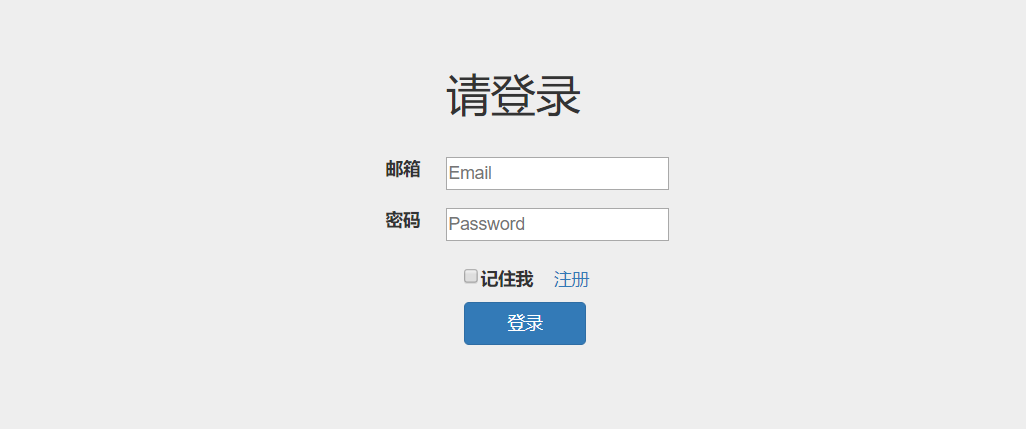
Bootstrap之登陆页面范例的更多相关文章
- 【Bootstrap】一个PC、平板、手机同一时候使用并且美观的登陆页面
Bootstrap如同前台框架,它已经布置好不少的CSS.前端开发的使用须要则直接调用就可以.其站点的网址就是http://www.bootcss.com.使用Bootstrap能降低前端开发时候在C ...
- Springsecurity3.1.3配置多个登陆页面
需求:网站的前台和后台不同的url需要不同的登陆页面,不同的异常捕获方式. spring-security3.1以后的版本支持多个<http>标签,因此本文所采用的方式就是使用两个,实际上 ...
- MUI APP防止登陆页面出现白屏
最近在用MUI开发APP,总体效果,在IOS上,是完美的,但是在低端的Android手机上,就会出现性能问题,我个人觉得最严重的是,就是首页,就是APP打开的第一个页面,在iOS上,由于性能高,所以, ...
- web系统登陆页面增加验证码
传统登陆页面中包含两个输入项: • 用户名 • 密码有时为了防止机器人进行自动登陆操作,或者防止恶意用户进行用户信息扫描,需增加动态验证码功能.此时,登陆页面中包含了三个输入项: • 用户名 • 密码 ...
- Ajax 提交session实效跳转到完整的登陆页面
在spring security 中 Ajax提交时,session超时,局部加载登陆页面,为解决这个问题,重写ajax提交,返回的是modeview或者没有制定datatype时; 如果检测到加载到 ...
- js实现登陆页面的拖拽功能
<!DOCTYPE html><html> <head> <meta charset="UTF-8"> <title>登 ...
- bootstrap中table页面做省市区级联效果(级联库见前面级联编辑)(非select下拉框)
<!DOCTYPE html><html lang="en"><head> <meta charset="UTF-8" ...
- iOS 本地加载html登陆页面
Html的代码 <!DOCTYPE html> <html lang="en"> <head> <meta charset="U ...
- 修改cas登陆页面-服务器端
原文地址:http://www.cnblogs.com/liveandevil/archive/2013/03/06/2946341.html 1.cas统一认证的登陆页面位于:cas目录/WEB-I ...
随机推荐
- (二 -3-1) 天猫精灵接入Home Assistant-自动发现Mqtt设备--灯系列 实战
#本片教程介绍了具体如何实现天猫精灵控制一个灯. 前提: HASS平台 你已经搭建一个可以在公网IP访问到的HASS平台--- 我用的是租了阿里云服务器,买了个域名,ubuntu1604系统 你已经搭 ...
- Oracle 迁移 序列
---删除序列select 'drop sequence ' || sequence_owner || '.' || SEQUENCE_NAME || ';'from dba_sequenceswhe ...
- XtraDB引擎
https://mariadb.com/kb/en/library/xtradb-and-innodb/ https://mariadb.com/kb/en/library/about-xtradb/ ...
- 普通用户使用Docker
1.查询是否有docker组 cat /etc/group 如果没有可以通过该命令添加(一般默认是有的) sudo groupadd docker 2.将当前用户添加到docker组 sudo use ...
- 面试笔记--Fast-Fail(快速失败)机制
1.解决: fail-fast机制,是一种错误检测机制.它只能被用来检测错误,因为JDK并不保证fail-fast机制一定会发生.若在多线程环境下使用fail-fast机制的集合,建议使用“java. ...
- React-记connect的几种写法
第一种 最普通,最常见,delllee和官网第写法. import React, { Component } from 'react'; import {connect} from 'react-re ...
- JVM深度解析
JVM是Java Virtual Machine(Java虚拟机)的缩写,JVM是一种用于计算设备的规范,它是一个虚构出来的计算机,是通过在实际的计算机上仿真模拟各种计算机功能来实现的.Java语言的 ...
- [Spark][Python][DataFrame][RDD]DataFrame中抽取RDD例子
[Spark][Python][DataFrame][RDD]DataFrame中抽取RDD例子 sqlContext = HiveContext(sc) peopleDF = sqlContext. ...
- Node.js这么下去...
Node.js是基于javascript的.event驱动的单进程服务器(也能实现cluster模式,只要一个fork()语句,类似于C语言的进程创建). 所以大胆估计:Node.js会把很多大网站吞 ...
- 常用的移动前端webapp交互细节
#常用的移动前端webapp交互细节 ##select的表现方式 ###PC端 select控件在传统PC桌面已经存在多年,由于在IE6等低版本浏览器容易造成层级错乱,一直被一些UI框架所抛弃,而用d ...