
关于破解visualsvn 我这里是版本是5.2.1
1.首先备份当前安装visualSVN文件的bin目录,万一出错还能反个水。一般默认安装路径是C:\Program Files (x86)\VisualSVN\bin
2.然后运行ildasm,Window中有自带的反编译ildasm工具,位于“C:\Program Files\Microsoft SDKs\Windows\v7.0A\bin\”。
3.用ildasm打开刚才备份的bin目录下的VisualSVN.Core.L.dll文件,单击文件菜单点击转储,如图
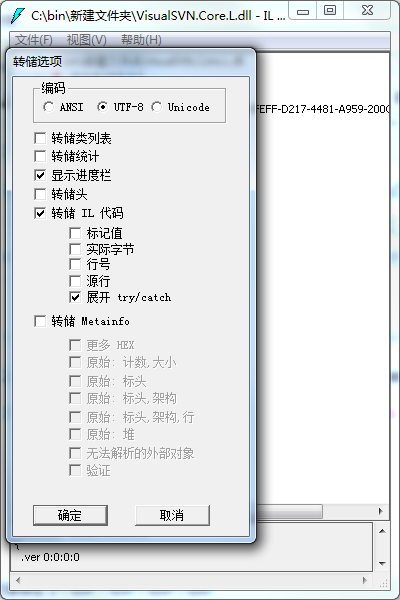
4.得到同名的il文件:VisualSVN.Core.L.il,用记事本打开得到的 VisualSVN.Core.L.il 文件,在其中搜索 “KeyToLicenseUnsafe”,找到KeyToLicenseUnsafe方法,大概在3188行附近。查找并替换成下面的代码,然后保存
.method public hidebysig static class VisualSVN.Core.Licensing.License

          KeyToLicenseUnsafe(class VisualSVN.Core.IDecoder decoder,

                             string key) cil managed

  {

    // 代码大小       69 (0x45)

    .locals init (class VisualSVN.Core.Licensing.License V_0, class VisualSVN.Core.Licensing.License V_1, class VisualSVN.Core.Licensing.License V_2)

    IL_0000: nop

    IL_0001: newobj instance void VisualSVN.Core.Licensing.License::.ctor()

    IL_0006: stloc.1

    IL_0007: ldloc.1

    IL_0008: ldsfld valuetype [mscorlib]System.DateTime [mscorlib]System.DateTime::MinValue

    IL_000d: stfld valuetype [mscorlib]System.DateTime VisualSVN.Core.Licensing.License::StartTime

    IL_0012: ldloc.1

    IL_0013: ldc.i4.1

    IL_0014: stfld valuetype VisualSVN.Core.Licensing.LicenseBinding VisualSVN.Core.Licensing.License::Binding

    IL_0019: ldloc.1

    IL_001a: ldc.i4 0x7ffffffe

    IL_001f: stfld int32 VisualSVN.Core.Licensing.License::Capacity

    IL_0024: ldloc.1

    IL_0025: ldsfld valuetype [mscorlib]System.DateTime [mscorlib]System.DateTime::MaxValue

    IL_002a: stfld valuetype [mscorlib]System.DateTime VisualSVN.Core.Licensing.License::EndTime

    IL_002f: ldloc.1

    IL_0030: ldc.i4.2

    IL_0031: stfld valuetype VisualSVN.Core.Licensing.LicenseType VisualSVN.Core.Licensing.License::Type

    IL_0036: ldloc.1

    IL_0037: ldstr "100"

    IL_003c: stfld string VisualSVN.Core.Licensing.License::PurchaseId

    IL_0041: ldloc.1

    IL_0042: call string [mscorlib]System.Environment::get_UserName()

    IL_0047: stfld string VisualSVN.Core.Licensing.License::LicensedTo

    IL_004c: ldloc.1

    IL_004d: stloc.0

    IL_004e: ldloc.0

    IL_004f: ldloc.0

    IL_0050: ldfld valuetype [mscorlib]System.DateTime VisualSVN.Core.Licensing.License::StartTime

    IL_0055: stfld valuetype [mscorlib]System.DateTime VisualSVN.Core.Licensing.License::PurchaseDate

    IL_005a: ldloc.0

    IL_005b: stloc.2

    IL_005c: br.s

    IL_005e

    IL_005e:ldloc.2

    IL_005f: ret

  } // end of method LicenseConverter::KeyToLicenseUnsafe

.method public hidebysig static class VisualSVN.Core.Licensing.License
KeyToLicenseUnsafe(class VisualSVN.Core.IDecoder decoder,
string key) cil managed
{
// 代码大小 69 (0x45)
.locals init (class VisualSVN.Core.Licensing.License V_0, class VisualSVN.Core.Licensing.License V_1, class VisualSVN.Core.Licensing.License V_2)
IL_0000: nop
IL_0001: newobj instance void VisualSVN.Core.Licensing.License::.ctor()
IL_0006: stloc.1
IL_0007: ldloc.1
IL_0008: ldsfld valuetype [mscorlib]System.DateTime [mscorlib]System.DateTime::MinValue
IL_000d: stfld valuetype [mscorlib]System.DateTime VisualSVN.Core.Licensing.License::StartTime
IL_0012: ldloc.1
IL_0013: ldc.i4.1
IL_0014: stfld valuetype VisualSVN.Core.Licensing.LicenseBinding VisualSVN.Core.Licensing.License::Binding
IL_0019: ldloc.1
IL_001a: ldc.i4 0x7ffffffe
IL_001f: stfld int32 VisualSVN.Core.Licensing.License::Capacity
IL_0024: ldloc.1
IL_0025: ldsfld valuetype [mscorlib]System.DateTime [mscorlib]System.DateTime::MaxValue
IL_002a: stfld valuetype [mscorlib]System.DateTime VisualSVN.Core.Licensing.License::EndTime
IL_002f: ldloc.1
IL_0030: ldc.i4.2
IL_0031: stfld valuetype VisualSVN.Core.Licensing.LicenseType VisualSVN.Core.Licensing.License::Type
IL_0036: ldloc.1
IL_0037: ldstr "100"
IL_003c: stfld string VisualSVN.Core.Licensing.License::PurchaseId
IL_0041: ldloc.1
IL_0042: call string [mscorlib]System.Environment::get_UserName()
IL_0047: stfld string VisualSVN.Core.Licensing.License::LicensedTo
IL_004c: ldloc.1
IL_004d: stloc.0
IL_004e: ldloc.0
IL_004f: ldloc.0
IL_0050: ldfld valuetype [mscorlib]System.DateTime VisualSVN.Core.Licensing.License::StartTime
IL_0055: stfld valuetype [mscorlib]System.DateTime VisualSVN.Core.Licensing.License::PurchaseDate
IL_005a: ldloc.0
IL_005b: stloc.2
IL_005c: br.s
IL_005e
IL_005e:ldloc.2
IL_005f: ret
} // end of method LicenseConverter::KeyToLicenseUnsafe
5.用管理员权限打开VS命令提示工具,如下图↓,我装的是VS2015

6. 运行下面的代码


,看到successfully表示成功了。将重新编译的dll文件覆盖到安装目录中就OK了。
7.然后运行你的VS就可以看到VisualSVN---About已经没有Lisence时间限制啦!
关于破解visualsvn 我这里是版本是5.2.1的更多相关文章
- (转)TortoiseSVN与VisualSVN Server搭建SVN版本控制系统
本片主要介绍如何搭建SVN版本控制系统,主要使用工具: 1 客户端:TortoiseSVN (小乌龟) 2 服务端:VisualSVN Server 搭建出图形化管理,以及右键菜单版本控制管理的SVN ...
- TortoiseSVN与VisualSVN Server搭建SVN版本控制系统
本片主要介绍如何搭建SVN版本控制系统,主要使用工具: 1 客户端:TortoiseSVN (小乌龟) 2 服务端:VisualSVN Server 搭建出图形化管理,以及右键菜单版本控制管理的SVN ...
- VisualSVN Server更改SVN版本库存放路径的方法
来源:http://blog.csdn.net/tcjy1000/article/details/42023849 最近也玩起了SVN软件版本管理,在本机上安装了VisualSVN Server+To ...
- 【版本控制】VisualSVN Server更改SVN版本库存放路径的方法
最近也玩起了SVN软件版本管理,在本机上安装了VisualSVN Server+TortoiseSVN,感觉还不错吧.但是,版本库存在哪里呢?在安装VisualSVN Server时,已经默认设置了, ...
- TortoiseSVN与VisualSVN Server搭建SVN版本控制系统【转】
转自:http://www.cnblogs.com/xing901022/p/4399382.html 本片主要介绍如何搭建SVN版本控制系统,主要使用工具: 1 客户端:TortoiseSVN (小 ...
- PyCharm永久破解方法,2021最新版本!!!
1,下载破解补丁(已更新到2021.1版本): 关注微信公众号<程序员的时光>,回复破解补丁即可: 下载补丁文件 jetbrains-agent.jar 和importat.txt文件并将 ...
- myeclipse破解教程,对所有版本有效,完美支持32位和64位
破解软件下载地址 执行Run.bat文件,按照以下步骤进行激活: 第一步:输入任意用户名 第二步:点击Systemid... 按钮,自动生成本机器的systemid. 第三步:点菜单Tools-> ...
- IDEA 最新版永久破解最简单方法(版本 IntelliJ IDEA 2018.3.5)
版权声明:本文为博主原创文章,仅作为学习交流使用,请在阅读后自行删除, 未经博主允许不得转载.https://www.cnblogs.com/linck/p/10522045.html 1.官网下载专 ...
- 使用补丁破解IntelliJ IDEA 2017收费版本(转)
1. 首先去官网http://www.jetbrains.com/idea/download/#section=windows下载Ultimate版(注意不是community版)下载并安装.一定要记 ...
随机推荐
- UVA - 558 Wormholes (SPEA算法模板题)
先给出题面:https://vjudge.net/problem/UVA-558 题意描述:给你含n个点以及m条边的图,让你判断在这个图中是否存在负权回路. 首先,我们来介绍什么是SPEA算法 SPF ...
- Mac os系统gdb调试器的安装与使用
Mac os系统gdb调试器的安装与使用 1.简介 Mac os下的Terminal 终端中默认情况下并没有安装gdb调试器,但是可以通过gcc编译器进行代码编译,如果出错了就需要通过gdb调试器进行 ...
- Spring配置之标签的三两事
今天看到项目的配置,看后就当是复习了.懵懵懂懂工作两年,感觉虽然自己一直在使用spring作为工具,但是也没有涉及到spring的方方面面,今天的研究从一次无意的自动补全开始,还是那句话,不爱研究的程 ...
- hadoop MapReduce
简单介绍 官方给出的介绍是hadoop MR是一个用于轻松编写以一种可靠的.容错的方式在商业化硬件上的大型集群上并行处理大量数据的应用程序的软件框架. MR任务通常会先把输入的数据集切分成独立的块(可 ...
- ssm项目整合shiro
pom.xml <properties> <shiro.version>1.2.2</shiro.version> </properties> < ...
- Eclipse上传新项目到GitLab
E&T: Eclipse; GitLab; GitLab和GitHub一样属于第三方基于Git开发的作品,免费且开源(https://github.com/gitlabhq/gitlabhq ...
- Junit单元测试随笔
Junit单元测试随笔 Mooctest 使用心得: Mooctest IDE非常适合新手使用,相比于Eclipse,他免去了配置环境的麻烦.eclipse中 Junit 编写代码经验总结 刚开始写测 ...
- Mysql逆向工程效率神器之使用IDE自动生成Java实体类
Mysql逆向工程效率神器之使用IDE自动生成Java实体类 简介:实战使用IDE根据Mysql自动生成java pojo实体类 1.IDEA连接数据库 菜单View→Tool Windows→Dat ...
- edgedb 内部pg 数据存储的探索 (二) 创建数据库命令说明
前面已经创建好了一个简单可以访问pg 的edgedb 环境,现在测试几个数据库操作命令在pg 的存储 创建数据库 连接环境 注意账户是按照上次创建的环境配置 edgedb -u edgedb 创建数据 ...
- Galaxian 小蜜蜂
发售年份 1979 平台 街机 开发商 南梦宫(Namco) 类型 射击 https://www.youtube.com/watch?v=XhYVcwhSWjI