
关于破解visualsvn 我这里是版本是5.2.1
1.首先备份当前安装visualSVN文件的bin目录,万一出错还能反个水。一般默认安装路径是C:\Program Files (x86)\VisualSVN\bin
2.然后运行ildasm,Window中有自带的反编译ildasm工具,位于“C:\Program Files\Microsoft SDKs\Windows\v7.0A\bin\”。
3.用ildasm打开刚才备份的bin目录下的VisualSVN.Core.L.dll文件,单击文件菜单点击转储,如图
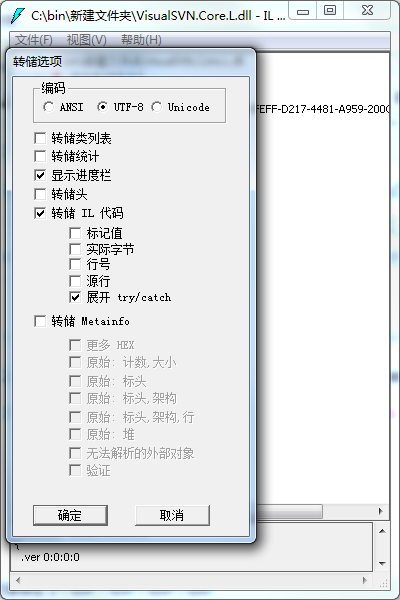
4.得到同名的il文件:VisualSVN.Core.L.il,用记事本打开得到的 VisualSVN.Core.L.il 文件,在其中搜索 “KeyToLicenseUnsafe”,找到KeyToLicenseUnsafe方法,大概在3188行附近。查找并替换成下面的代码,然后保存
.method public hidebysig static class VisualSVN.Core.Licensing.License

          KeyToLicenseUnsafe(class VisualSVN.Core.IDecoder decoder,

                             string key) cil managed

  {

    // 代码大小       69 (0x45)

    .locals init (class VisualSVN.Core.Licensing.License V_0, class VisualSVN.Core.Licensing.License V_1, class VisualSVN.Core.Licensing.License V_2)

    IL_0000: nop

    IL_0001: newobj instance void VisualSVN.Core.Licensing.License::.ctor()

    IL_0006: stloc.1

    IL_0007: ldloc.1

    IL_0008: ldsfld valuetype [mscorlib]System.DateTime [mscorlib]System.DateTime::MinValue

    IL_000d: stfld valuetype [mscorlib]System.DateTime VisualSVN.Core.Licensing.License::StartTime

    IL_0012: ldloc.1

    IL_0013: ldc.i4.1

    IL_0014: stfld valuetype VisualSVN.Core.Licensing.LicenseBinding VisualSVN.Core.Licensing.License::Binding

    IL_0019: ldloc.1

    IL_001a: ldc.i4 0x7ffffffe

    IL_001f: stfld int32 VisualSVN.Core.Licensing.License::Capacity

    IL_0024: ldloc.1

    IL_0025: ldsfld valuetype [mscorlib]System.DateTime [mscorlib]System.DateTime::MaxValue

    IL_002a: stfld valuetype [mscorlib]System.DateTime VisualSVN.Core.Licensing.License::EndTime

    IL_002f: ldloc.1

    IL_0030: ldc.i4.2

    IL_0031: stfld valuetype VisualSVN.Core.Licensing.LicenseType VisualSVN.Core.Licensing.License::Type

    IL_0036: ldloc.1

    IL_0037: ldstr "100"

    IL_003c: stfld string VisualSVN.Core.Licensing.License::PurchaseId

    IL_0041: ldloc.1

    IL_0042: call string [mscorlib]System.Environment::get_UserName()

    IL_0047: stfld string VisualSVN.Core.Licensing.License::LicensedTo

    IL_004c: ldloc.1

    IL_004d: stloc.0

    IL_004e: ldloc.0

    IL_004f: ldloc.0

    IL_0050: ldfld valuetype [mscorlib]System.DateTime VisualSVN.Core.Licensing.License::StartTime

    IL_0055: stfld valuetype [mscorlib]System.DateTime VisualSVN.Core.Licensing.License::PurchaseDate

    IL_005a: ldloc.0

    IL_005b: stloc.2

    IL_005c: br.s

    IL_005e

    IL_005e:ldloc.2

    IL_005f: ret

  } // end of method LicenseConverter::KeyToLicenseUnsafe

.method public hidebysig static class VisualSVN.Core.Licensing.License
KeyToLicenseUnsafe(class VisualSVN.Core.IDecoder decoder,
string key) cil managed
{
// 代码大小 69 (0x45)
.locals init (class VisualSVN.Core.Licensing.License V_0, class VisualSVN.Core.Licensing.License V_1, class VisualSVN.Core.Licensing.License V_2)
IL_0000: nop
IL_0001: newobj instance void VisualSVN.Core.Licensing.License::.ctor()
IL_0006: stloc.1
IL_0007: ldloc.1
IL_0008: ldsfld valuetype [mscorlib]System.DateTime [mscorlib]System.DateTime::MinValue
IL_000d: stfld valuetype [mscorlib]System.DateTime VisualSVN.Core.Licensing.License::StartTime
IL_0012: ldloc.1
IL_0013: ldc.i4.1
IL_0014: stfld valuetype VisualSVN.Core.Licensing.LicenseBinding VisualSVN.Core.Licensing.License::Binding
IL_0019: ldloc.1
IL_001a: ldc.i4 0x7ffffffe
IL_001f: stfld int32 VisualSVN.Core.Licensing.License::Capacity
IL_0024: ldloc.1
IL_0025: ldsfld valuetype [mscorlib]System.DateTime [mscorlib]System.DateTime::MaxValue
IL_002a: stfld valuetype [mscorlib]System.DateTime VisualSVN.Core.Licensing.License::EndTime
IL_002f: ldloc.1
IL_0030: ldc.i4.2
IL_0031: stfld valuetype VisualSVN.Core.Licensing.LicenseType VisualSVN.Core.Licensing.License::Type
IL_0036: ldloc.1
IL_0037: ldstr "100"
IL_003c: stfld string VisualSVN.Core.Licensing.License::PurchaseId
IL_0041: ldloc.1
IL_0042: call string [mscorlib]System.Environment::get_UserName()
IL_0047: stfld string VisualSVN.Core.Licensing.License::LicensedTo
IL_004c: ldloc.1
IL_004d: stloc.0
IL_004e: ldloc.0
IL_004f: ldloc.0
IL_0050: ldfld valuetype [mscorlib]System.DateTime VisualSVN.Core.Licensing.License::StartTime
IL_0055: stfld valuetype [mscorlib]System.DateTime VisualSVN.Core.Licensing.License::PurchaseDate
IL_005a: ldloc.0
IL_005b: stloc.2
IL_005c: br.s
IL_005e
IL_005e:ldloc.2
IL_005f: ret
} // end of method LicenseConverter::KeyToLicenseUnsafe
5.用管理员权限打开VS命令提示工具,如下图↓,我装的是VS2015

6. 运行下面的代码


,看到successfully表示成功了。将重新编译的dll文件覆盖到安装目录中就OK了。
7.然后运行你的VS就可以看到VisualSVN---About已经没有Lisence时间限制啦!
关于破解visualsvn 我这里是版本是5.2.1的更多相关文章
- (转)TortoiseSVN与VisualSVN Server搭建SVN版本控制系统
本片主要介绍如何搭建SVN版本控制系统,主要使用工具: 1 客户端:TortoiseSVN (小乌龟) 2 服务端:VisualSVN Server 搭建出图形化管理,以及右键菜单版本控制管理的SVN ...
- TortoiseSVN与VisualSVN Server搭建SVN版本控制系统
本片主要介绍如何搭建SVN版本控制系统,主要使用工具: 1 客户端:TortoiseSVN (小乌龟) 2 服务端:VisualSVN Server 搭建出图形化管理,以及右键菜单版本控制管理的SVN ...
- VisualSVN Server更改SVN版本库存放路径的方法
来源:http://blog.csdn.net/tcjy1000/article/details/42023849 最近也玩起了SVN软件版本管理,在本机上安装了VisualSVN Server+To ...
- 【版本控制】VisualSVN Server更改SVN版本库存放路径的方法
最近也玩起了SVN软件版本管理,在本机上安装了VisualSVN Server+TortoiseSVN,感觉还不错吧.但是,版本库存在哪里呢?在安装VisualSVN Server时,已经默认设置了, ...
- TortoiseSVN与VisualSVN Server搭建SVN版本控制系统【转】
转自:http://www.cnblogs.com/xing901022/p/4399382.html 本片主要介绍如何搭建SVN版本控制系统,主要使用工具: 1 客户端:TortoiseSVN (小 ...
- PyCharm永久破解方法,2021最新版本!!!
1,下载破解补丁(已更新到2021.1版本): 关注微信公众号<程序员的时光>,回复破解补丁即可: 下载补丁文件 jetbrains-agent.jar 和importat.txt文件并将 ...
- myeclipse破解教程,对所有版本有效,完美支持32位和64位
破解软件下载地址 执行Run.bat文件,按照以下步骤进行激活: 第一步:输入任意用户名 第二步:点击Systemid... 按钮,自动生成本机器的systemid. 第三步:点菜单Tools-> ...
- IDEA 最新版永久破解最简单方法(版本 IntelliJ IDEA 2018.3.5)
版权声明:本文为博主原创文章,仅作为学习交流使用,请在阅读后自行删除, 未经博主允许不得转载.https://www.cnblogs.com/linck/p/10522045.html 1.官网下载专 ...
- 使用补丁破解IntelliJ IDEA 2017收费版本(转)
1. 首先去官网http://www.jetbrains.com/idea/download/#section=windows下载Ultimate版(注意不是community版)下载并安装.一定要记 ...
随机推荐
- mysql 唯一索引与null.md
mysql 的唯一索引要求所有参与的列都不能够为 null 值,如果唯一索引中的任何一个元素含有 null 值,则唯一约束将不起作用. 示例代码 create table tb ( a int, b ...
- centos7 - mongodb3.6.5-配置文件
创建Linux管理员账号admin, 并加入wheel组,对mongodb, php等进行统一管理~ systemLog:destination: filelogAppend: truepath: / ...
- centos 7 中安装 mysql 5.7
centos 7 中安装 mysql 5.7 环境说明: 查看centos的版本:cat /etc/redhat-release 安装和配置步骤: 下载 mysql 源安装包: sudo curl - ...
- C++实验五
#include <iostream> #include <vector> #include <string> using namespace std; // 函数 ...
- 一个mysqldump的报错
1.MySQL版本 5.7.14-log 2.问题分析 mysqldump -uxxx -pxxx db_nale 一般来讲上述命令主要是用于MySQL的逻辑备份,用来备份某个数据的全部表,但是我在执 ...
- .NET第一章
1.介绍了.NET的作用和软件前景趋势 2.Visual studio .net 编程 3.介绍.net可以多种编程语言,通过公共语言类库存放 2.介绍C# 数据类型和变量设置,以及函数的使用 3.继 ...
- LeetCode 852. Peak Index in a Mountain Array C++ 解题报告
852. Peak Index in a Mountain Array -- Easy 方法一:二分查找 int peakIndexInMountainArray(vector<int>& ...
- Centos7.4下安装Jumpserver 1.0.0(支持windows组件)
0)系统环境CentOS 7.4 IP: 192.168.100.10 [root@jumpserver-server ~]# cat /etc/redhat-release CentOS Linux ...
- Python 二分法
# coding = utf-8 import random def Creat_Arr(): arr = [] for i in range(0,50) : arr.append(random.ra ...
- creator rotationY的问题
最近在做一个2D的小游戏,碰撞方面由于懒,就直接使用cocos自带的物理组件RigidBody了. 但是在父节点挂载RigidBody之后,会导致设置rotationY时失效,具体原因没有深查,估计是 ...