
SpringBoot aop 注解 数据权限校验
注解类:
@Retention(RetentionPolicy.RUNTIME)

public @interface DataAuthValid

{

    //位置

    public int index() default 0;

    //字段   id

    //public String id() default "id";

    //字段   id

    public String orgId() default "org_id";

    //mapper

    @SuppressWarnings("rawtypes")

    public Class<? extends Mapper> mapper();

}
AOP切面:
@Aspect

@Component

@Order(1)

public class DataAuthAop {

    private static String types = "java.lang.String,java.lang.Long,long";

    @Before("@annotation(dataAuth)")

    public void beforeMethod(JoinPoint point,DataAuthValid dataAuth) throws Exception {

        HttpServletRequest request = ((ServletRequestAttributes) RequestContextHolder.getRequestAttributes()).getRequest();

        Map<String, Object> payloadMap = (Map<String, Object>) request.getAttribute("payloadMap");

        Long companyid = Long.parseLong(payloadMap.get("companyid")+"");

        if(companyid != 1) {

            Object[] args = point.getArgs();

            Object obj = args[dataAuth.index()];

            String ids = null;

            String typeName = obj.getClass().getTypeName();

            if(types.contains(typeName)) {

                ids = obj + "";

            }else {

                Field[] fields = obj.getClass().getDeclaredFields();

                for (Field f : fields) {

                    f.setAccessible(true);

                    if("id".equals(f.getName())) {

                        Long id = (Long) f.get(obj);

                        ids = id + "";

                    }

                }

            }

            String[] idArr = ids.split(",");

            for (String id : idArr) {

                Class cla = dataAuth.mapper();

                Mapper mapper = (Mapper) SpringBeanFactoryUtils.getApplicationContext().getBean(cla);

                Object object = mapper.selectByPrimaryKey(Long.valueOf(id));

                Field field = obj.getClass().getDeclaredField(dataAuth.orgId());

                field.setAccessible(true);

                Long orgId = (Long)field.get(obj);

                if(!companyid.equals(orgId)) {

                    throw new RuntimeException();

                }

            }

        }

    }

}
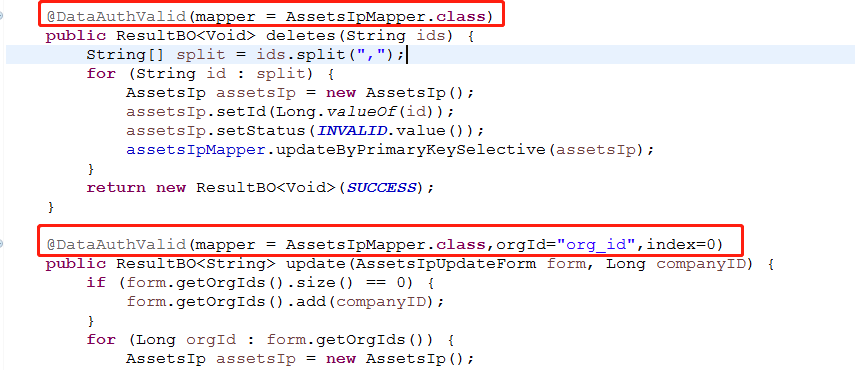
使用:
SpringBoot aop 注解 数据权限校验的更多相关文章
- Spring AOP 实现功能权限校验功能
版权声明:本文为博主原创文章,未经博主允许不得转载. 目录(?)[-] 使用拦截器实现未登录时跳转到登录界面的功能 1 拦截器SecurityInterceptor 2spring-mvcxml拦 ...
- springboot通过AOP和自定义注解实现权限校验
自定义注解 PermissionCheck: package com.mgdd.sys.annotation; import java.lang.annotation.*; /** * @author ...
- SpringBoot —— AOP注解式拦截与方法规则拦截
AspectJ是一个面向切面的框架,它扩展了Java语言.AspectJ定义了AOP语法,所以它有一个专门的编译器用来生成遵守Java字节编码规范的Class文件. SpringBoot中AOP的使用 ...
- SpringBoot AOP注解式拦截与方法规则拦截
AOP的本质还是动态代理对方法调用进行增强. SpringBoot 提供了方便的注解实现自定义切面Aspect. 1.使用需要了解的几个概念: 切面.@Aspect 切点.@Pointcut. 通知. ...
- 基于Spring Aop实现类似shiro的简单权限校验功能
在我们的web开发过程中,经常需要用到功能权限校验,验证用户是否有某个角色或者权限,目前有很多框架,如Shiro Shiro有基于自定义登录界面的版本,也有基于CAS登录的版本,目前我们的系统是基于C ...
- SpringSecurity权限管理系统实战—九、数据权限的配置
目录 SpringSecurity权限管理系统实战-一.项目简介和开发环境准备 SpringSecurity权限管理系统实战-二.日志.接口文档等实现 SpringSecurity权限管理系统实战-三 ...
- Salesforce的数据权限机制
本文主要介绍了 Salesforce 对于系统中数据的访问控制是如何设计的,然后也了解了下 Alfresco 和 Oracle VPD 的数据权限机制.希望对一些业务系统的数据权限的访问控制设计能有所 ...
- 使用AOP+自定义注解完成spring boot的接口权限校验
记使用AOP+自定义注解完成接口的权限校验,代码如下: pom文件添加所需依赖: 1 <dependency> 2 <groupId>org.aspectj</group ...
- Springboot学习06-Spring AOP封装接口自定义校验
Springboot学习06-Spring AOP封装接口自定义校验 关键字 BindingResult.Spring AOP.自定义注解.自定义异常处理.ConstraintValidator 前言 ...
随机推荐
- SQLite 读取数据时,随机顺序
SELECT * FROM [数据表] ORDER BY random() 通过 random() 这个函数来排序
- []TLD code run
opencv3.3.1 https://github.com/alantrrs/OpenTLD https://github.com/arthurv/OpenTLD problem opencv3.0 ...
- Sql Server 2005/2008数据库被标记为“可疑”/“质疑”的问题
日常对Sql Server 2005关系数据库进行操作时,有时对数据库(如:Sharepoint网站配置数据库名Sharepoint_Config)进行些不正常操作如数据库在读写时而无故停止数据库,从 ...
- Linux本地yum源配置以及使用yum源安装gcc编译环境
本文档是图文安装本地yum源的教程,以安装gcc编译环境为例. 适用范围:所有的cetos,红帽,fedroa版本 适用人群:有一点linux基础的小白 范例系统版本:CentOS Linux rel ...
- MySQL出现too many connections(1040)错误解决方法
https://www.cnblogs.com/2881064178dinfeng/p/6938112.html 其实MySQL默认的最大连接数为100,可能在大访问量的时候造成了连接不上数据库.解决 ...
- Taskctl安装及配置Kettle插件
服务端安装 从官网下载服务端安装包(含字符客户端/代理组件) 1.环境变量设置 在fedora的终端下,输入sudo vi /etc/profile,将以下语句添加至文末 export TASKCTL ...
- 修改Docker默认的网段
背景 一同事在研究他的安全大业,需要在AWS服务器上部署他的秘密武器,秘密武器通过Docker来部署:在部署前可以通过跳板机的内外网ssh登录上这台服务器:部署后只能通过外网ssh登录这台服务器... ...
- Flink
1. Flink表接受是基于dataset.datastream的:首先需要注册一个dataset,然后通过sql去查询这个dataset,返回的即使基于dataset查询结果,这个查询结构就是Fli ...
- [转]在ASP.NET Core中使用百度在线编辑器UEditor
原文地址:https://www.cnblogs.com/durow/p/6116393.html 0x00 起因 最近需要一个在线编辑器,之前听人说过百度的UEditor不错,去官网下了一个.不过服 ...
- 剑指offer 8.递归和循环 跳台阶
题目描述 一只青蛙一次可以跳上1级台阶,也可以跳上2级.求该青蛙跳上一个n级的台阶总共有多少种跳法(先后次序不同算不同的结果). 解题思路一: a.如果两种跳法,1阶或者2阶,那么假定第一次跳的是 ...