
SpringMVC框架一:搭建测试
这里做一个Demo:展示商品列表
新建Dynamic Web Project:

导入jar包,放在lib下:
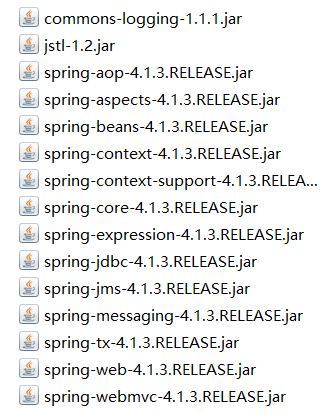
放入Lib文件夹之后,会自动build path
接下来配置web.xml:
<?xml version="1.0" encoding="UTF-8"?>

<web-app xmlns:xsi="http://www.w3.org/2001/XMLSchema-instance"

    xmlns="http://java.sun.com/xml/ns/javaee"

    xsi:schemaLocation="http://java.sun.com/xml/ns/javaee http://java.sun.com/xml/ns/javaee/web-app_2_5.xsd"

    id="WebApp_ID" version="2.5">

    <display-name>springMVC</display-name>

    <welcome-file-list>

        <welcome-file>index.html</welcome-file>

        <welcome-file>index.htm</welcome-file>

        <welcome-file>index.jsp</welcome-file>

        <welcome-file>default.html</welcome-file>

        <welcome-file>default.htm</welcome-file>

        <welcome-file>default.jsp</welcome-file>

    </welcome-file-list>

    <!-- 前端控制器 -->

    <servlet>

        <servlet-name>springmvc</servlet-name>

        <servlet-class>org.springframework.web.servlet.DispatcherServlet</servlet-class>

        <init-param>

            <param-name>contextConfigLocation</param-name>

            <param-value>classpath:springmvc.xml</param-value>

        </init-param>

    </servlet>

    <servlet-mapping>

        <servlet-name>springmvc</servlet-name>

        <url-pattern>*.action</url-pattern>

    </servlet-mapping>

</web-app>
简单写一个商品列表的jsp页面:itemList.jsp
<%@ page language="java" contentType="text/html; charset=UTF-8"

    pageEncoding="UTF-8"%>

<%@ taglib uri="http://java.sun.com/jsp/jstl/core" prefix="c" %>

<%@ taglib uri="http://java.sun.com/jsp/jstl/fmt"  prefix="fmt"%>

<!DOCTYPE html PUBLIC "-//W3C//DTD HTML 4.01 Transitional//EN" "http://www.w3.org/TR/html4/loose.dtd">

<html>

<head>

<meta http-equiv="Content-Type" content="text/html; charset=UTF-8">

<title>查询商品列表</title>

</head>

<body>

<form action="${pageContext.request.contextPath }/item/queryitem.action" method="post">

查询条件:

<table width="100%" border=1>

<tr>

<td><input type="submit" value="查询"/></td>

</tr>

</table>

商品列表:

<table width="100%" border=1>

<tr>

    <td>商品名称</td>

    <td>商品价格</td>

    <td>生产日期</td>

    <td>商品描述</td>

    <td>操作</td>

</tr>

<c:forEach items="${itemList }" var="item">

<tr>

    <td>${item.name }</td>

    <td>${item.price }</td>

    <td><fmt:formatDate value="${item.createtime}" pattern="yyyy-MM-dd HH:mm:ss"/></td>

    <td>${item.detail }</td>

    <td><a href="${pageContext.request.contextPath }/itemEdit.action?id=${item.id}">修改</a></td>

</tr>

</c:forEach>

</table>

</form>

</body>

</html>
商品Items的POJO类:
package org.dreamtech.springmvc.pojo;

import java.util.Date;

public class Items {

    public Items(Integer id, String name, Float price, Date createtime, String detail) {

        super();

        this.id = id;

        this.name = name;

        this.price = price;

        this.createtime = createtime;

        this.detail = detail;

    }

    private Integer id;

    private String name;

    private Float price;

    private String pic;

    private Date createtime;

    private String detail;

    public Integer getId() {

        return id;

    }

    public void setId(Integer id) {

        this.id = id;

    }

    public String getName() {

        return name;

    }

    public void setName(String name) {

        this.name = name == null ? null : name.trim();

    }

    public Float getPrice() {

        return price;

    }

    public void setPrice(Float price) {

        this.price = price;

    }

    public String getPic() {

        return pic;

    }

    public void setPic(String pic) {

        this.pic = pic == null ? null : pic.trim();

    }

    public Date getCreatetime() {

        return createtime;

    }

    public void setCreatetime(Date createtime) {

        this.createtime = createtime;

    }

    public String getDetail() {

        return detail;

    }

    public void setDetail(String detail) {

        this.detail = detail == null ? null : detail.trim();

    }

}
springmvc配置文件:SpringMVC.xml:
<?xml version="1.0" encoding="UTF-8"?>

<beans xmlns="http://www.springframework.org/schema/beans"

    xmlns:xsi="http://www.w3.org/2001/XMLSchema-instance" xmlns:p="http://www.springframework.org/schema/p"

    xmlns:context="http://www.springframework.org/schema/context"

    xmlns:mvc="http://www.springframework.org/schema/mvc"

    xsi:schemaLocation="http://www.springframework.org/schema/beans http://www.springframework.org/schema/beans/spring-beans-4.0.xsd

        http://www.springframework.org/schema/mvc http://www.springframework.org/schema/mvc/spring-mvc-4.0.xsd

        http://www.springframework.org/schema/context http://www.springframework.org/schema/context/spring-context-4.0.xsd">

    <!-- 扫描@Controler @Service -->

    <context:component-scan base-package="org.dreamtech" />

</beans>
ItemController:
package org.dreamtech.springmvc.controller;

import java.util.ArrayList;

import java.util.Date;

import java.util.List;

import org.dreamtech.springmvc.pojo.Items;

import org.springframework.stereotype.Controller;

import org.springframework.web.bind.annotation.RequestMapping;

import org.springframework.web.servlet.ModelAndView;

@Controller

public class ItemController {

    @RequestMapping(value = "/item/itemlist.action")

    public ModelAndView itemList() {

        // 创建页面需要显示的商品数据(模拟从数据库中取出)

        List<Items> list = new ArrayList<Items>();

        list.add(new Items(1, "1华为 荣耀", 2399f, new Date(), "质量好!1"));

        list.add(new Items(2, "2华为 荣耀", 2399f, new Date(), "质量好!2"));

        list.add(new Items(3, "3华为 荣耀", 2399f, new Date(), "质量好!3"));

        list.add(new Items(4, "4华为 荣耀", 2399f, new Date(), "质量好!4"));

        list.add(new Items(5, "5华为 荣耀", 2399f, new Date(), "质量好!5"));

        list.add(new Items(6, "6华为 荣耀", 2399f, new Date(), "质量好!6"));

        ModelAndView mav = new ModelAndView();

        mav.addObject("itemList", list);

        mav.setViewName("/WEB-INF/jsp/itemList.jsp");

        return mav;

    }

}
这里返回的是ModelAndView:这种是最全的返回类型
另外可以返回:String,直接返回视图名即可,如果要传参,带个Model,model.addAttribute()即可
这种方式推荐使用:
重定向:返回"redirect:/xx/xxx":用于修改完信息后
转发:返回"forward:/xx/xxx"
最后一种返回voic:适用于无返回视图的情况:JSON,如果强行返回或者传参,需要servlet原生方法
启动Tomcat:
访问:http://localhost:8080/springMVC/item/itemlist.action
看到页面和数据:
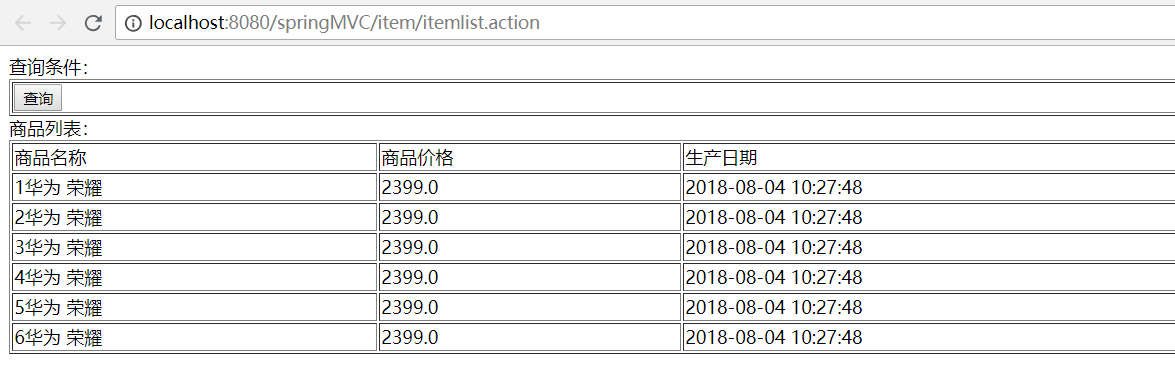
到这里,第一个小案例就完成了
后边会仔细介绍SpringMVC
SpringMVC框架一:搭建测试的更多相关文章
- SpringMVC 框架的搭建及基本功能的实现
首先新建一个WEB项目 导入jar包 我们基于Spring mvc框架进行开发,需要依赖一下的spring jar包: spring-aop-4.0.4.RELEASE.jar spring-bean ...
- Spring学习之SpringMVC框架快速搭建实现用户登录功能
引用自:http://blog.csdn.net/qqhjqs/article/details/41683099?utm_source=tuicool&utm_medium=referral ...
- springmvc框架的搭建
1引入jar包 jar包下载地址http://maven.springframework.org/release/org/ 以下是我引入的jar包 aopalliance-1.0.jaraspectj ...
- springmvc框架简单搭建
一.利用xml 配置 1.web.xml <web-app version="2.4" xmlns="http://java.sun.com/xml/n ...
- Idea搭建SpringMVC框架(初次接触)
公司转Java开发,做的第一个项目是SpringMVC框架,因为底层是同事封装,等完成整个项目,对SpringMVC框架的搭建还不是很了解,所以抽时间不忙的时候自己搭建了一个SpringMVC框架. ...
- 基于maven从头搭建springMVC框架
0.准备工作 首先将eclipse和需要的插件准备好,例如maven插件,spring IDE插件. 1.建立maven下的webapp项目 1.新建一个maven项目,类型为webapp,如下图 2 ...
- springMVC学习篇 - 搭建环境及关键点
springMVC是spring家族中一个重要的组件,和struts一样作为一套前台框架被广泛的应用于各种项目. 之前在很多项目组都用到springMVC,只感觉很强大,但是对这套框架的知识了解比较少 ...
- 用IntelliJ IDEA 开发Spring+SpringMVC+Mybatis框架 分步搭建三:配置spring并测试
这一部分的主要目的是 配置spring-service.xml 也就是配置spring 并测试service层 是否配置成功 用IntelliJ IDEA 开发Spring+SpringMVC+M ...
- 用IntelliJ IDEA 开发Spring+SpringMVC+Mybatis框架 分步搭建二:配置MyBatis 并测试(2 配置spring-dao和测试)
用IntelliJ IDEA 开发Spring+SpringMVC+Mybatis框架 分步搭建二:配置MyBatis 并测试(1 搭建目录环境和依赖) 四:在\resources\spring 下面 ...
- 用IntelliJ IDEA 开发Spring+SpringMVC+Mybatis框架 分步搭建二:配置MyBatis 并测试(1 构建目录环境和依赖)
引言:在用IntelliJ IDEA 开发Spring+SpringMVC+Mybatis框架 分步搭建一 的基础上 继续进行项目搭建 该部分的主要目的是测通MyBatis 及Spring-dao ...
随机推荐
- 使用 python 操作 mongodb 常用的操作
pymongo 的安装命令 pip install pymongo. import pymongo 数据库及集合查询(创建) 连接数据库 查询数据库中的数据库 查询数据库中的集合 创建数据库和集合只需 ...
- NumPy学习_01 ndarray相关概念
1.NumPy库 NumPy = Numerical Python 是高性能科学计算和数据分析的基础库. pandas库充分借鉴了NumPy的相关概念,先行掌握NumPy库的用法,才能把pandas的 ...
- Python 中 Iterator和Iterable的区别
Python中 list,truple,str,dict这些都可以被迭代,但他们并不是迭代器.为什么? 因为和迭代器相比有一个很大的不同,list/truple/map/dict这些数据的大小是确定的 ...
- U-Mail企业邮箱如何导入授权文件
首先,由于U-Mail有Linux版本与Windows版本的区别,并且都非常简单,所以就有了下面的步骤: Windows版本 <点击快速跳转> Linux版本 <点击快速跳转> ...
- css firefox火狐浏览器下的兼容性问题
1.DOCTYPE 影响 CSS 处理 2.FF: div 设置 margin-left, margin-right 为 auto 时已经居中, IE 不行 3.FF: body 设置 text-al ...
- SHELL脚本学习-自动生成AWR报告
自动生成AWR报告,每个小时生成一次. #编辑脚本:vim awr_auto.sh #oracle用户下执行 #!/bin/bash # 每个小时执行一次,自动生成AWR报告 source ~/.ba ...
- Maven引入自定义jar包
1.将项目打成jar包 或者下载某个jar包 放在某个目录下(随便吧,桌面也行),这里是放在F:/ jar包为 alipay.jar 2.给jar包取个名字 用原名也行(maven打包默认会 ...
- 使用kbmmw 生成客户端delphi函数原型
前面我们讲了使用swagger 生成java,php 的客户端调用函数原型. 对于delphi,其实很遗憾,不能直接生成客户端函数原型代码. 不要紧,解铃还须系铃人,既然是kbmmw 自己生成的,我们 ...
- thinkphp5省市区三级联动例子
数据库 数据库下载地址:https://files.cnblogs.com/files/fan-bk/packet_region.zip php <?php namespace app\inde ...
- C#语法快速热身
if选择结构: 简单:if结构 单分子:If-else结构 多重:f-else-if结构 嵌套:if结构 语法: If(条件1){ If(条件2) }else{ } }else{ } Switch结构 ...