
使用Druid作为SpringBoot项目数据源(添加监控)
Druid在监控、可扩展性、稳定性和性能方面具有明显的优势。通过Druid提供的监控功能,可以实时观察数据库连接池和SQL查询的工作情况。使用Druid连接池在一定程度上可以提高数据访问效率。
链接:https://www.jianshu.com/p/e84e2709f383
application.yml
spring:

  datasource:

    url: jdbc:mysql://localhost:3306/mstest?useUnicode=true&characterEncoding=utf-8

    driverClassName: com.mysql.jdbc.Driver

    username: root

    password: 123qwe

    #最大活跃数

    maxActive: 20

    #初始化数量

    initialSize: 1

    #最大连接等待超时时间

    maxWait: 60000

    #打开PSCache,并且指定每个连接PSCache的大小

    poolPreparedStatements: true

    maxPoolPreparedStatementPerConnectionSize: 20

    #通过connectionProperties属性来打开mergeSql功能;慢SQL记录

    #connectionProperties: druid.stat.mergeSql=true;druid.stat.slowSqlMillis=5000

    minIdle: 1

    timeBetweenEvictionRunsMillis: 60000

    minEvictableIdleTimeMillis: 300000

    validationQuery: select 1 from dual

    testWhileIdle: true

    testOnBorrow: false

    testOnReturn: false

    #配置监控统计拦截的filters,去掉后监控界面sql将无法统计,'wall'用于防火墙

    filters: stat, wall, log4j

  jpa:

      database: MySQL

      show-sql: true

      hibernate:

        naming_strategy: org.hibernate.cfg.ImprovedNamingStrategy
2.DruidConfiguration.java
实现Druid的访问Servlet以及Filter
package com.example.demo;

import com.alibaba.druid.pool.DruidDataSource;

import com.alibaba.druid.support.http.StatViewServlet;

import com.alibaba.druid.support.http.WebStatFilter;

import org.springframework.boot.context.properties.ConfigurationProperties;

import org.springframework.boot.web.servlet.FilterRegistrationBean;

import org.springframework.boot.web.servlet.ServletRegistrationBean;

import org.springframework.context.annotation.Bean;

import org.springframework.context.annotation.Configuration;

import javax.sql.DataSource;

/**

 * Created by 20160216 on 2018/2/8.

 */

@Configuration

public class DruidConfiguration {

    @Bean

    public ServletRegistrationBean statViewServlet(){

        //创建servlet注册实体

        ServletRegistrationBean servletRegistrationBean = new ServletRegistrationBean(new StatViewServlet(),"/druid/*");

        //设置ip白名单

        servletRegistrationBean.addInitParameter("allow","127.0.0.1");

        //设置ip黑名单,如果allow与deny共同存在时,deny优先于allow

        servletRegistrationBean.addInitParameter("deny","192.168.0.19");

        //设置控制台管理用户

        servletRegistrationBean.addInitParameter("loginUsername","druid");

        servletRegistrationBean.addInitParameter("loginPassword","123456");

        //是否可以重置数据

        servletRegistrationBean.addInitParameter("resetEnable","false");

        return servletRegistrationBean;

    }

    @Bean

    public FilterRegistrationBean statFilter(){

        //创建过滤器

        FilterRegistrationBean filterRegistrationBean = new FilterRegistrationBean(new WebStatFilter());

        //设置过滤器过滤路径

        filterRegistrationBean.addUrlPatterns("/*");

        //忽略过滤的形式

        filterRegistrationBean.addInitParameter("exclusions","*.js,*.gif,*.jpg,*.png,*.css,*.ico,/druid/*");

        return filterRegistrationBean;

    }

    @Bean

    @ConfigurationProperties(prefix = "spring.datasource")

    public DataSource druidDataSource(){

        return new DruidDataSource();

    }

}
3.pom.xml
<?xml version="1.0" encoding="UTF-8"?>

<project xmlns="http://maven.apache.org/POM/4.0.0" xmlns:xsi="http://www.w3.org/2001/XMLSchema-instance"

    xsi:schemaLocation="http://maven.apache.org/POM/4.0.0 http://maven.apache.org/xsd/maven-4.0.0.xsd">

    <modelVersion>4.0.0</modelVersion>

    <groupId>com.example</groupId>

    <artifactId>less03</artifactId>

    <version>0.0.1-SNAPSHOT</version>

    <packaging>war</packaging>

    <name>less03</name>

    <description>Demo project for Spring Boot</description>

    <parent>

        <groupId>org.springframework.boot</groupId>

        <artifactId>spring-boot-starter-parent</artifactId>

        <version>1.5.10.RELEASE</version>

        <relativePath/> <!-- lookup parent from repository -->

    </parent>

    <properties>

        <project.build.sourceEncoding>UTF-8</project.build.sourceEncoding>

        <project.reporting.outputEncoding>UTF-8</project.reporting.outputEncoding>

        <java.version>1.8</java.version>

    </properties>

    <dependencies>

        <dependency>

            <groupId>org.springframework.boot</groupId>

            <artifactId>spring-boot-starter-data-jpa</artifactId>

        </dependency>

        <dependency>

            <groupId>org.springframework.boot</groupId>

            <artifactId>spring-boot-starter-web</artifactId>

        </dependency>

        <dependency>

            <groupId>mysql</groupId>

            <artifactId>mysql-connector-java</artifactId>

            <scope>runtime</scope>

        </dependency>

            <dependency>

                <groupId>org.springframework.boot</groupId>

                <artifactId>spring-boot-starter-tomcat</artifactId>

                 <!--<scope>provided</scope>-->

        </dependency>

        <dependency>

            <groupId>com.alibaba</groupId>

            <artifactId>druid</artifactId>

            <version>1.0.29</version>

        </dependency>

        <dependency>

            <groupId>org.springframework.boot</groupId>

            <artifactId>spring-boot-starter-test</artifactId>

            <scope>test</scope>

        </dependency>

    </dependencies>

    <build>

        <plugins>

            <plugin>

                <groupId>org.springframework.boot</groupId>

                <artifactId>spring-boot-maven-plugin</artifactId>

            </plugin>

        </plugins>

    </build>

</project>
4.登录
127.0.0.1:8080/druid/login.html
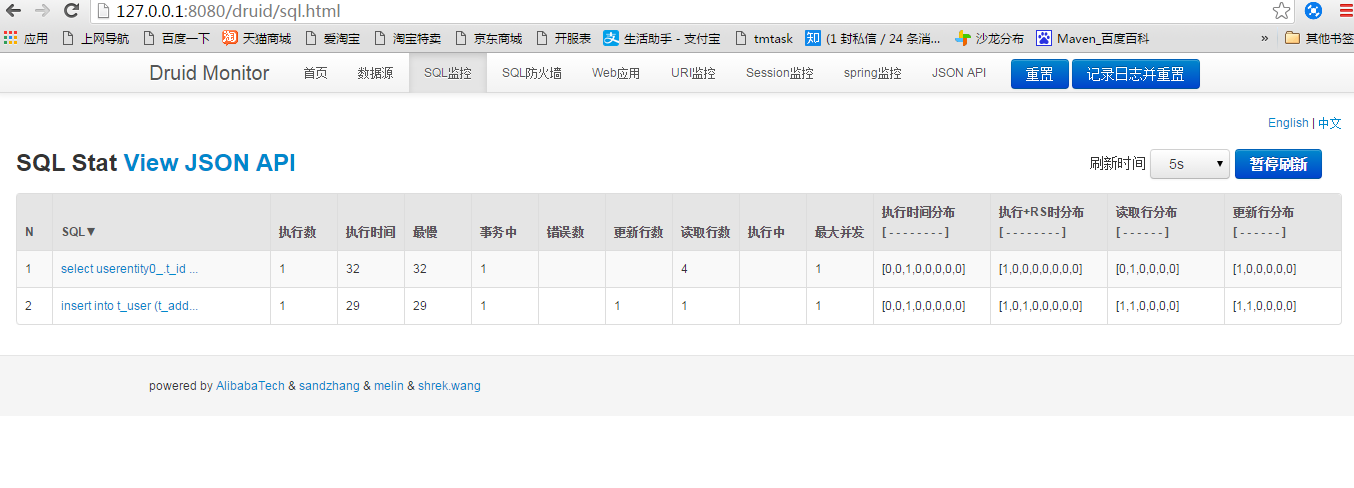
5.监控
使用Druid作为SpringBoot项目数据源(添加监控)的更多相关文章
- 在SpringBoot项目中添加logback的MDC
在SpringBoot项目中添加logback的MDC 先看下MDC是什么 Mapped Diagnostic Context,用于打LOG时跟踪一个“会话“.一个”事务“.举例,有一个web ...
- springboot项目如何添加热部署
环境jdk1.8.maven3.6.使用工具为idea 1.在pom.xml文件中添加依赖 <dependency> <groupId>org.springframework. ...
- 在SpringBoot项目中添加SpringMVC拦截器
1.认识拦截器 SpringMVC的拦截器(Interceptor)不是Filer,同样可以实现请求的预处理.后处理.使用拦截器仅需要两个步骤 实现拦截器 注册拦截器 1.1实现拦截器 实现拦截器可以 ...
- (入门SpringBoot)SpringBoot项目数据源以及整合mybatis(二)
1.配置tomcat数据源: # 数据源基本配置spring.datasource.url=jdbc:mysql://localhost:3306/shoptest?useUnicode=true ...
- springboot项目pom添加依赖
在dependency 后面 ALt+/ 可以打开编辑窗口.
- spring-boot 项目整合logback
使用spring-boot项目中添加日志输出,java的日志输出一共有两个大的方案log4j/log4j2 ,logback.log4j2算是对log4j的一个升级版本. 常规做法是引入slf4j作为 ...
- mac和linux下使用Docker,部署SpringBoot项目到docker
主要是看一下如何在linux及mac上安装docker,创建docker镜像,部署SpringBoot项目到docker,并借助于DaoCloud进行docker镜像下载加速等. 我用的电脑是mac, ...
- 创建简易的SpringBoot项目
创建简易的SpringBoot项目 这两天在学习springboot,菜鸟刚刚知道这个东西,看着springboot项目下那一大堆目录都不知道从何下手,还是静下心来从最简单的创建一个项目入手,这路和大 ...
- springboot(4)Druid作为项目数据源(添加监控)
参考博客:恒宇少年:https://www.jianshu.com/p/e84e2709f383 Druid简介 Druid是一个关系型数据库连接池,它是阿里巴巴的一个开源项目.Druid支持所有JD ...
随机推荐
- HTML5+CSS3(3)
一.CSS3新增属性用法整理 1.box-shadow(阴影效果) 2.border-color(为边框设置多种颜色) 3.border-image(图片边框) 4.text-shadow(文本阴影) ...
- Android 开发 存储目录的详解
简介 Android设备,有3个地方的文件存储位置,他们分别是: 内部存储空间(用户无法浏览到此目录) 外部存储空间(就是手机自身的文件管理目录,用户可以浏览) SD卡的存储空间(需要插入T卡) Sh ...
- SpringCloud系列六:Feign接口转换调用服务(Feign 基本使用、Feign 相关配置)
1.概念:Feign 接口服务 2.具体内容 现在为止所进行的所有的 Rest 服务调用实际上都会出现一个非常尴尬的局面,例如:以如下代码为例: Dept dept = this.restTempla ...
- 性能学习随笔(1)--负载均衡之f5负载均衡
负载均衡设计涉及软件负载和硬件负载,下文转自CSDN中一篇文章涉及f5硬负载知识 ----转载:https://blog.csdn.net/tvk872/article/details/8063489 ...
- scala 读取保存文件 去除字符特殊
/** * 读取文件 * @param filename * @return */ def readFormFile(filename: String) = { var ooop = "&q ...
- java使用Filter过滤器对Response返回值进行修改
转:java使用Filter过滤器对Response返回值进行修改 练习时只做了对request 的处理,这里记录一下,filter 对 response的处理. 原文地址:java使用Filter过 ...
- paramiko
http://www.cnblogs.com/wupeiqi/articles/5095821.html
- win10x64启动vs2010报错:未能加载C:\Windows\Microsoft.NET\Framework\v2.0.50727\microsoft.vsa.tlb
换了新电脑,因为是win10x64系统,可能是兼容性的问题吧. 启动vs2010,在启动画面直接报错:未能加载C:\Windows\Microsoft.NET\Framework\v2.0.50727 ...
- 吴裕雄 python 数据可视化
import pandas as pd df = pd.read_csv("F:\\python3_pachongAndDatareduce\\data\\pandas data\\taob ...
- 如何自定义Django数据库中的字段
新建完项目之后,想要自定义字段 # 创建一个自定义的字段 class MycharField(models.Field): def __inif__(self, max_lenth, *args, * ...