
Java学习笔记 -- Java定时调度工具Timer类
1 关于 (时间宝贵的请跳过)
本教程是基于Java定时任务调度工具详解之Timer篇的学习笔记。
什么是定时任务调度
基于给定的时间点,给定的时间间隔或者给定的执行次数自动执行的任务。在Java中的定时调度工具
- Timer
- Quartz
两者主要区别
- 出身上,Timer是Java提供的原生Scheduler(任务调度)工具类,不需要导入其他jar包;而Quartz是OpenSymphony开源组织在任务调度领域的一个开源项目,完全基于Java实现。
- 功能上,如需要实现在某个具体时间执行什么任务的话,Timer足以胜任;如需要实现每个星期六8点闹钟提醒之类的复杂任务,就需要用Quartz。因此,Quartz在时间控制上的功能远比Timer强大和完善。
- 底层上,Timer使用一个后台线程去执行定时任务,Quartz拥有后台线程执行池(类比JDBC连接池),能够使用多个执行线程去执行定时任务。
简而言之,Quartz > Timer,Timer是被动地根据既定时间去调度任务的,Quartz则是自己主动定制时间规则去支持更加丰富地调度方法。
本文主要是讲解Timer工具类的,故而下文中不会过多讨论Quartz。
- 前导知识
| Timer, Quartz的使用 | Quartz, Spring的整合 |
|---|---|
| Java编程知识 | Spring基础知识 |
2 Timer简介和配套视频课程
Timer类位于java.util包下,有关Timer类的详细描述信息请点击这里访问Oracle Java的官方api文档查阅。
Timer工具类图是Timer工具类及有关类的类图。
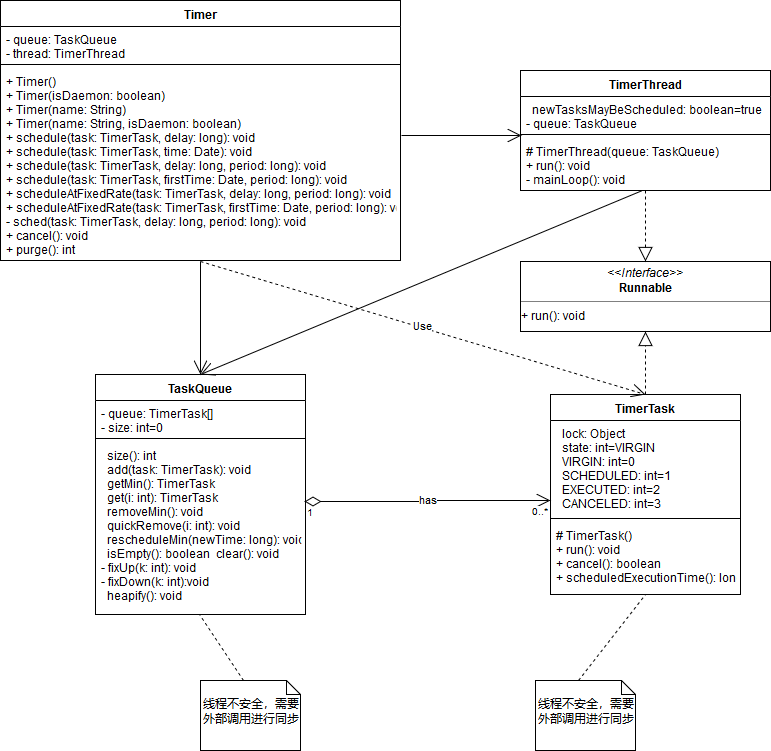
快速开始:
/*

 * Foo.java -- JDK 1.8

 */

package timer;

import java.util.Timer;

import java.util.TimerTask;

/**

 * Description:

 * <p>

 * <p>

 * @author ascribed

 * @date 2019-04-03 Wed PM 19:15:08

 */

public class Foo {

    public static void main(String[] args) {

        Timer timer = new Timer(); // 1. 创建Timer实例,关联线程不能是daemon(守护/后台)线程

        FooTimerTask fooTimerTask = new FooTimerTask(); // 2. 创建任务对象

        timer.schedule(fooTimerTask, 3000L, 2000L); // 3. 通过Timer定时定频率调用fooTimerTask的业务代码

    }

}

class FooTimerTask extends TimerTask {

    @Override

    public void run() {

        // TODO 业务代码......

        System.out.println("Hello Timer!");

    }

}
3 Timer函数和综合运用
3.1 Timer定时函数的用法
注意:Timer类在时间granularity(粒度)是毫秒级的,实际上Timer的schedule系列方法获取时间的方式是System.currentTimeMillis()(当前时间与Unix元年之差,类型为long),最多只能到毫秒级,而一些操作系统的计时精度会达到1/10毫秒。
3.1.1 schedule()方法的4种用法
- schedule(TimerTask task, Date time)
作用
在时间等于或超过time的时候执行且仅执行一次task (单次)。
源码
    public void schedule(TimerTask task, Date time) {

        sched(task, time.getTime(), 0);

    }
- schedule(TimerTask task, Date firstTime, long period)
作用
时间等于或超过firstTime时首次执行task,之后每隔peroid毫秒重复执行一次task (多次)。
源码
    public void schedule(TimerTask task, long delay, long period) {

        if (delay < 0)

            throw new IllegalArgumentException("Negative delay.");

        if (period <= 0)

            throw new IllegalArgumentException("Non-positive period.");

        sched(task, System.currentTimeMillis()+delay, -period);

    }
- schedule(TimerTask task, long delay)
作用
等待delay毫秒后执行且仅执行一次task (单次)。
源码
    public void schedule(TimerTask task, long delay) {

        if (delay < 0)

            throw new IllegalArgumentException("Negative delay.");

        sched(task, System.currentTimeMillis()+delay, 0);

    }
- schedule(TimerTask task, long delay, long period)
作用
等待delay毫秒后首次执行task, 之后每个period毫秒重复执行一次task (多次)。
源码
    public void scheduleAtFixedRate(TimerTask task, long delay, long period) {

        if (delay < 0)

            throw new IllegalArgumentException("Negative delay.");

        if (period <= 0)

            throw new IllegalArgumentException("Non-positive period.");

        sched(task, System.currentTimeMillis()+delay, period);

    }
3.1.2 scheduleAfixRate()的2种用法
- scheduleAtFixedRate(TimerTask task, Date firstTime, long period)
作用
时间等于或超过time时首次执行task,之后每隔peroid毫秒重复执行一次task (多次, 同schedule第2种用法)。
源码
    public void scheduleAtFixedRate(TimerTask task, long delay, long period) {

        if (delay < 0)

            throw new IllegalArgumentException("Negative delay.");

        if (period <= 0)

            throw new IllegalArgumentException("Non-positive period.");

        sched(task, System.currentTimeMillis()+delay, period);

    }
- scheduleAtFixedRate(TimerTask task, long delay, long period)
作用
等待delay毫秒后首次执行task, 之后每个period毫秒重复执行一次task (多次, 同schedule第4种用法)。
源码
    public void scheduleAtFixedRate(TimerTask task, Date firstTime, long period) {

        if (period <= 0)

            throw new IllegalArgumentException("Non-positive period.");

        sched(task, firstTime.getTime(), period);

    }
笔记:
- schedule()和scheduleAtFixedRate()方法都能实现对任务的一次或多次调度。
- schedule()按是否可重复执行分为单次和多次,按任务初次执行计算方式分为delay(long型延迟毫秒数)和time(Date型时间)。
- schedule()和scheduleAtFixedRate()最终都是调用Timer类下的sched()方法实现的。
演示代码包含DemoTimer.java和TimerUtils.java,代码清单:
/*

 * DemoTimer.java -- JDK 1.8

 */

package timer;

import java.util.Calendar;

import java.util.Timer;

import java.util.TimerTask;

/**

 * Description:

 * <p>

 * <p>

 * @author ascribed

 * @date 2019-04-03 Wed PM 18:37:03

 */

public class DemoTimer {

    public static void main(String[] args) {

        Calendar calendar = TimerUtils.current();

        TimerUtils.miscellaneous("Current time is : ", calendar.getTime());

        calendar.add(Calendar.SECOND, 3); // 当前时间加3秒

        Timer timer = new Timer();

        DemoTimerTask demoTimerTask = new DemoTimerTask("No. 1");

        demoTimerTask.setName("schedule1");

        timer.schedule(demoTimerTask, calendar.getTime()); // 3.1.1.1

//        demoTimerTask.setName("schedule2");

//        timer.schedule(demoTimerTask, calendar.getTime(), 2000); // 3.1.1.2

//

//        demoTimerTask.setName("schedule3");

//        timer.schedule(demoTimerTask, 3000); // 3.1.1.3

//

//        demoTimerTask.setName("schedule4");

//        timer.schedule(demoTimerTask, 3000, 2000); // 3.1.1.4

//

//        demoTimerTask.setName("scheduleAtFixedRate1");

//        timer.scheduleAtFixedRate(demoTimerTask, calendar.getTime(), 2000); // 3.1.2.1

//

//        demoTimerTask.setName("scheduleAtFixedRate2");

//        timer.scheduleAtFixedRate(demoTimerTask, 3000, 2000); // 3.1.2.2

    }

}

class DemoTimerTask extends TimerTask {

    String name; // 任务名

    public DemoTimerTask(String name) {

        this.name = name;

    }

    @Override

    public void run() {

        TimerUtils.miscellaneous("Current time is : ", TimerUtils.current().getTime());

        System.out.println("Current exec name is : " + name); // 打印当前name的内容

    }

    public String getName() {

        return name;

    }

    public void setName(String name) {

        this.name = name;

    }

}

/*

 * TimerUtils.java -- JDK 1.8

 */

package timer;

import java.text.SimpleDateFormat;

import java.util.Calendar;

import java.util.Date;

import java.util.TimerTask;

/**

 * Description:

 * <p>

 * <p>

 * @author ascribed

 * @date 2019-04-03 Wed PM 18:40:26

 */

public class TimerUtils {

    final static SimpleDateFormat sdf = new SimpleDateFormat("yyyy-MM-dd HH:mm:ss"); // 定义日期格式

    static Calendar current() {

        Calendar calendar = Calendar.getInstance(); // 通过静态工厂方法创建Calendar实例

        return calendar;

    }

    static void schedtime(TimerTask task) {

        System.out.println("scheduled time is " + sdf.format(task.scheduledExecutionTime()));

    }

    static void miscellaneous(String str, Date date) {

        System.out.println(str + sdf.format(date));

    }

}
3.2 其他重要函数
3.2.1 TimerTask的cancel(), scheduledExecutionTime()
- cancel()
作用
终止此计时器,丢弃所有当前已安排(scheduled)的任务。
说明
通过查看源码,TimerTask的实现机制是通过设置标志位来记录timer task的状态,调用cancel()方法的timer task实例并没有从相应TaskQueue队列移除,这是和Timer类的cancel()方法不同之处。
源码
    public boolean cancel() {

        synchronized(lock) {

            boolean result = (state == SCHEDULED);

            state = CANCELLED;

            return result;

        }

    }
- scheduledExecutionTime()
作用
从此计时器的任务队列中移除所有已取消(canceled)的任务。
返回值
从队列中移除的任务数。
源码
    public long scheduledExecutionTime() {

        synchronized(lock) {

            return (period < 0 ? nextExecutionTime + period

                               : nextExecutionTime - period);

        }

    }
不能与fixed-delay执行式的重复任务搭配使用,也就是不用于schedule方法,应为schedule方法的(scheduled execution time)计划执行时间会偏移理想的计划时间,对她使用这个方法没有无意义。
演示代码清单:
/*

 * CancelTest.java -- JDK 1.8

 */

package timer;

import java.util.Timer;

import java.util.TimerTask;

/**

 * Description:

 * <p>

 * <p>

 * @author ascribed

 * @date 2019-04-03 Wed PM 19:43:04

 */

public class CancelTest {

    public static void main(String[] args) {

        Timer timer = new Timer();

        MyTimerTask myTimerTask = new MyTimerTask("schedule");

        TimerUtils.miscellaneous("Current time is : ", TimerUtils.current().getTime());

        timer.schedule(myTimerTask, 3000, 2000); // 3.2.1

//        timer.schedule(myTimerTask, 3000); // 3.3.2

//        TimerUtils.schedtime(myTimerTask);

    }

}

class MyTimerTask extends TimerTask {

    private String name;

    private Integer count = 0;

    public MyTimerTask(String name) {

        this.name = name;

    }

    @Override

    public void run() {

        if (count < 3) {

            TimerUtils.miscellaneous("Current time is : ", TimerUtils.current().getTime());

            System.out.println("Current exec name is : " + name);

            count++;

        } else {

            cancel();

            System.out.println("Task canceled");

            System.exit(0);

        }

    }

    public String getName() {

        return name;

    }

    public void setName(String name) {

        this.name = name;

    }

}
3.2.2 Timer的cancel(), purge()
- cancel()
作用
终止此计时器,丢弃所有当前已安排的任务。
源码
    public void cancel() {

        synchronized(queue) {

            thread.newTasksMayBeScheduled = false;

            queue.clear();

            queue.notify();  // 防止队列已为空的处理

        }

    }
- purge()
作用
purge,意为净化;(将不需要的东西)从......清除,相比消灭显得优雅一些。从此计时器的任务队列中移除所有已取消的任务。
返回值
从队列中移除的任务数。
源码
     public int purge() {

         int result = 0;

         synchronized(queue) {

             for (int i = queue.size(); i > 0; i--) {

                 if (queue.get(i).state == TimerTask.CANCELLED) {

                     queue.quickRemove(i);

                     result++;

                 }

             }

             if (result != 0)

                 queue.heapify();

         }

         return result;

     }

}
演示代碼:
/*

 * CancelTest.java -- JDK 1.8

 */

package timer;

import java.util.Date;

import java.util.Timer;

import java.util.TimerTask;

/**

 * Description:

 * <p>

 * <p>

 * @author ascribed

 * @date 2019-04-03 Wed PM 19:43:04

 */

public class CancelTest {

    public static void main(String[] args) throws InterruptedException {

        Timer timer = new Timer();

        MyTimerTask task1 = new MyTimerTask("task1");

        MyTimerTask task2 = new MyTimerTask("task2");

        TimerUtils.miscellaneous("start time is : ", new Date());

        // task1首次执行是距离现在时间2秒后,之后每隔2秒执行一次

        // task2首次执行是距离现在时间1秒后,之后每隔2秒执行一次

        timer.schedule(task1, 1000, 2000); // 奇数次执行

        timer.schedule(task2, 2000, 2000); // 偶数次执行

//        System.out.println("current canceled task number is : " + timer.purge());

        Thread.sleep(5000); // 当前线程休眠5秒后cancel生效,没有此句立即触发cancel

        TimerUtils.miscellaneous("cancel time is : ", new Date());

        /*3.2.2.1

        下面两句执行完后程序只剩下后台线程,JRE判定当前程序结束

        因为当前程序只有后台线程,所有前台线程结束,后台的工作无前台线程使用就是没有意义的

         */

        timer.cancel(); // 当前线程若检测到timer对队列中的任务进行调度则终止timer并从任务队列移除所有任务

        System.out.println("Tasks all canceled!"); // 若此句输出后看到还有任务运行则停止所有运行的程序,这可能是之前运行的程序未终止

        // 3.2.2.2

//        task1.cancel(); // 当前线程每次检测到timer对task1进行schedule取消task1

//        System.out.println("current canceled task number is : " + timer.purge());

    }

}

class MyTimerTask extends TimerTask {

    private String name;

    private Integer count = 0;

    public MyTimerTask(String name) {

        this.name = name;

    }

    @Override

    public void run() {

        if (count < 3) {

            TimerUtils.miscellaneous("Current time is : ", TimerUtils.current()

                    .getTime());

            System.out.println("Current exec name is : " + name);

            count++;

        } else {

            cancel();

            System.out.println("Task canceled");

            System.exit(0);

        }

    }

    public String getName() {

        return name;

    }

    public void setName(String name) {

        this.name = name;

    }

}
3.3 schedule()和scheduledAtFixedRate()的区别
两种情况看区别一览表
| 方法 | schedule | scheduleAtFixedRate |
|---|---|---|
| 首次计划执行时间早于当前时间 | "fixed-delay",用代码的形式理解就是scheduleAtfixedDelay();如果第一次执行时间被delay了,随后的执行时间按照上一次实际执行完成的时间点进行计算。 |
"fixed-rate",义如其名;如果第一次执行时间按照上一次开始的时间点进行计算,并且为了赶上进度会多次执行任务,因此TimerTask中的执行体需要考虑同步。 |
| 任务执行所需的时间超出任务的执行周期间隔 | 下一次执行时间相对于上一次实际执行完成的时间点,因此执行时间会不断延后。 |
下一次执行时间相对于上一次开始的时间点,因此执行时间一般不会延后,因此存在并发性。 |
fixed-delay和fixed-rate执行的区别
- 对于fixed-delay执行讲解:
如当前时间2020-01-01 00:01:00,period为2000毫秒,将开始执行时间提前6秒即2020-01-01 00:01:57秒,首次执行时间为2020-01-01 00:01:00而不是2020-01-01 00:01:57,代码snippet:
        Calendar calendar = Calendar.getInstance();

        calendar.add(Calendar.SECOND, -6); // L1

        Timer timer = new Timer();

        // 第一次执行为6秒前,之后么个两秒钟执行一次

        timer.schedule(new TimerTask() {

            @Override

            public void run() { // L2

                System.out.println("Scheduled exec time is : " + TimerUtils.sdf.format(scheduledExecutionTime()));

                System.out.println("Task is being executed!");

            }

        }, calendar.getTime(), 2000);
如果任务时间为3000毫秒,第一次执行开始时间2020-01-01 00:01:00,第二次为2020-01-01 00:01:03而不是2020-01-01 00:01:02。
这里使用在任务线程休眠三秒来实现,注释掉L1行代码,在L1处添加代码休眠三秒,代码snippet:
        Calendar calendar = Calendar.getInstance();

        Timer timer = new Timer();

        timer.schedule(new TimerTask() {

            @Override

            public void run() {

                try {

                    Thread.sleep(3000);

                } catch (InterruptedException e) {

                    e.printStackTrace();

                }

                System.out.println("Scheduled exec time is : " + TimerUtils.sdf.format(scheduledExecutionTime()));

                System.out.println("Task is being executed!");

            }

        }, calendar.getTime(), 2000);
- 对于fixed-reate执行讲解:
如当前时间2019-04-03 23:02:58,period为2000毫秒,将开始执行时间提前6秒即2019-04-03 23:02:52秒,首次执行时间为2019-04-03 23:02:52,控制台会看到开始会一下子执行如下4次任务:
Current time is : 2019-04-03 23:02:58

Scheduled exec time is : 2019-04-03 23:02:52

Task is being executed!

Scheduled exec time is : 2019-04-03 23:02:54

Task is being executed!

Scheduled exec time is : 2019-04-03 23:02:56

Task is being executed!

Scheduled exec time is : 2019-04-03 23:02:58

Task is being executed!
代码snippet:
        Calendar calendar = Calendar.getInstance();

        calendar.add(Calendar.SECOND, -6); // L1

        Timer timer = new Timer();

        timer.scheduleAtFixedRate(new TimerTask() {

            @Override

            public void run() {// L3

                System.out.println("Scheduled exec time is : " + TimerUtils.sdf.format(scheduledExecutionTime()));

                System.out.println("Task is being executed!");

            }

        }, calendar.getTime(), 2000);

    }
如果任务时间为3000毫秒,period为2000毫秒,当前时间2019-04-03 23:23:22,第一次执行开始时间2019-04-03 23:23:22,第二次执行时间2019-04-03 23:23:24,两个任务执行时间段有交集。
注释掉L1所在行,在L3处让任务线程休眠三秒模仿执行时间为3秒的任务,代码snippet:
        Calendar calendar = Calendar.getInstance();

        calendar.add(Calendar.SECOND, -6); // L1

        Timer timer = new Timer();

        timer.scheduleAtFixedRate(new TimerTask() {

            @Override

            public void run() {

                try {

                    Thread.sleep(3000); // L3

                } catch (InterruptedException e) {

                    e.printStackTrace();

                }

                System.out.println("Scheduled exec time is : " + TimerUtils.sdf.format(scheduledExecutionTime()));

                System.out.println("Task is being executed!");

            }

        }, calendar.getTime(), 2000);
注释掉不需要的代码观察效果,演示代码:
/*

 * DifferenceTest.java -- JDK 1.8

 */

package timer;

import java.util.Calendar;

import java.util.Timer;

import java.util.TimerTask;

/**

 * Description:

 * <p>

 * <p>

 * @author ascribed

 * @date 2019-04-03 Wed PM 21:47:38

 */

public class DifferenceTest {

    public static void main(String[] args) {

        Calendar calendar = TimerUtils.current();

        TimerUtils.miscellaneous("Current time is : ", calendar.getTime());

        // 设置成6秒前的时间,若当前时间为2016-12-28 00:00:06

        // 那么设置之后时间变成2016-12-28 00:00:00

        calendar.add(Calendar.SECOND, -6); // L1

        Timer timer = new Timer();

        // 第一次执行为6秒前,之后么个两秒钟执行一次

        timer.schedule(new TimerTask() {

            @Override

            public void run() {

                try {

                    Thread.sleep(3000); // L2

                } catch (InterruptedException e) {

                    e.printStackTrace();

                }

                System.out.println("Scheduled exec time is : " + TimerUtils.sdf.format(scheduledExecutionTime()));

                System.out.println("Task is being executed!");

            }

        }, calendar.getTime(), 2000); // 此处有个语法糖,编译器生成一个匿名类继承抽象类TimerTask通过new实例化,这并不违反抽象类不能实例化这一原则

        timer.scheduleAtFixedRate(new TimerTask() {

            @Override

            public void run() {

                try {

                    Thread.sleep(3000);  // L3

                } catch (InterruptedException e) {

                    e.printStackTrace();

                }

                System.out.println("Scheduled exec time is : " + TimerUtils.sdf.format(scheduledExecutionTime()));

                System.out.println("Task is being executed!");

            }

        }, calendar.getTime(), 2000);

    }

}
4 实战
实现两个机器人
跳舞机器人:每隔两秒打印最近一次计划的时间和执行内容
灌水机器人:模拟往桶里倒水,直到桶里的水满为止
灌水机器人工作流程
灌水,如果水不满,则一直工作;如果水满,则停止工作。
跳舞机器人
跳舞,如果水不满,则一直工作;如果水满,则跳舞两秒后停止工作。
代码清单
DancingRobot.java、WaterRobot.java和Executor.java。
/*

 * WaterRobot.java -- JDK 1.8

 */

package timer;

import java.util.Timer;

import java.util.TimerTask;

/**

 * Description:

 * <p>

 * <p>

 * @author ascribed

 * @date 2019-04-02 Tue PM 16:44:17

 */

public class WaterRobot extends TimerTask {

    private Timer timer;

    // 最大容量5L

    private Integer bucketCapacity = 0;

    private final String unit = "L";

    public WaterRobot(Timer timer) {

        this.timer = timer;

    }

    @Override

    public void run() {

        // 灌水到桶满为止

        if (bucketCapacity < 5) {

            System.out.println("Add 1L water into the bucket!");

            bucketCapacity++;

        } else {

            // 水满之后停止执行

            System.out.println("The number of canceled task in timer is : " + timer.purge());

            cancel();

            System.out.println("The waterRot has been aborted");

            System.out.println("The number of canceled task in timer is : " + timer.purge());

            System.out.println("Current water is " + bucketCapacity + unit);

            // 等待两秒钟,终止timer里面的所有内容

            try {

                Thread.sleep(2000);

            } catch (InterruptedException e) {

                e.printStackTrace();

            }

            timer.cancel();

        }

    }

}

/*

 * DancingRobot.java -- JDK 1.8

 */

package timer;

import java.text.SimpleDateFormat;

import java.util.TimerTask;

/**

 * Description:

 * <p>

 * <p>

 * @author ascribed

 * @date 2019-04-02 Tue PM 16:35:12

 */

public class DancingRobot extends TimerTask {

    @Override

    public void run() {

        SimpleDateFormat sdf = new SimpleDateFormat(TimeConstants.DATE_FORMAT);

        System.out.println("Scheduled exec time is : " + sdf.format(scheduledExecutionTime())); // 获得最近一次任务执行的计划时间

        System.out.println("Dancing happily!");

    }

}

/*

 * Executor.java -- JDK 1.8

 */

package timer;

import java.text.SimpleDateFormat;

import java.util.Calendar;

import java.util.Timer;

/**

 * Description:

 * <p>

 * <p>

 * @author ascribed

 * @date 2019-04-02 Tue PM 16:54:04

 */

public class Executor {

    public static void main(String[] args) {

        Timer timer = new Timer();

        Calendar calendar = Calendar.getInstance();

        SimpleDateFormat sdf = new SimpleDateFormat(TimeConstants.DATE_FORMAT);

        System.out.println("Current time is : " + sdf.format(calendar.getTime()));

        DancingRobot dr = new DancingRobot();

        WaterRobot wr = new WaterRobot(timer);

        timer.schedule(dr, calendar.getTime(), 2000);

        timer.scheduleAtFixedRate(wr, calendar.getTime(), 1000);

    }

}
执行结果
Current time is : 2019-04-04 01:19:20

Scheduled exec time is : 2019-04-04 01:19:21

Dancing happily!

Add 1L water into the bucket!

Add 1L water into the bucket!

Add 1L water into the bucket!

Scheduled exec time is : 2019-04-04 01:19:23

Dancing happily!

Add 1L water into the bucket!

Add 1L water into the bucket!

Scheduled exec time is : 2019-04-04 01:19:25

Dancing happily!

The number of canceled task in timer is : 0

The waterRot has been aborted

The number of canceled task in timer is : 1

Current water is 5L
5 Timer的缺陷
天生的两种缺陷
- 管理并发任务的缺陷
Timer有且仅有一个线程去执行定时任务,如果存在多个任务,且任务时间过长,会导致执行结果与预期不符。
演示代码:
/*

 * ExTimer.java -- JDK 1.8

 */

package timer;

import java.util.Calendar;

import java.util.Timer;

import java.util.TimerTask;

/**

 * Description:

 * <p>

 * <p>

 * @author ascribed

 * @date 2019-04-03 Wed PM 23:37:41

 */

public class ConTimer {

    public static void main(String[] args) {

        Timer timer = new Timer();

        ConTimerTask exTimerTask1 = new ConTimerTask("No.1", 2000);

        ConTimerTask exTimerTask2 = new ConTimerTask("No.2", 2000);

        Calendar calendar = TimerUtils.current();

        TimerUtils.miscellaneous("Current time is : ", calendar

                .getTime());

        timer.schedule(exTimerTask1, calendar.getTime());

        timer.schedule(exTimerTask2, calendar.getTime());

//        timer.scheduleAtFixedRate(exTimerTask1, calendar.getTime(), 2000);

//        timer.scheduleAtFixedRate(exTimerTask2, calendar.getTime(), 2000);

    }

}

class ConTimerTask extends TimerTask {

    private String name;

    private long costTime;

    public ConTimerTask(String name, long costTime) {

        this.setName(name);

        this.costTime = costTime;

    }

    @Override

    public void run() {

        System.out.println(name + "'s current exec time is : " + TimerUtils.sdf.format(Calendar.getInstance()

                .getTime())); // 输出当前时间

        try {

            Thread.sleep(costTime);

        } catch (InterruptedException e) {

            e.printStackTrace();

        }

        System.out.println(name + "'s finish time is : " + TimerUtils.sdf.format(Calendar.getInstance()

                .getTime())); // 输出costTime之后的时间

    }

    public String getName() {

        return name;

    }

    public void setName(String name) {

        this.name = name;

    }

}
执行结果:
Current time is : 2019-04-04 01:04:24

No.1's current exec time is : 2019-04-04 01:04:24

No.1's finish time is : 2019-04-04 01:04:26

No.2's current exec time is : 2019-04-04 01:04:26

No.2's finish time is : 2019-04-04 01:04:28
- 当任务抛出异常时的缺陷
如果TimerTask抛出RuntimeException,Timer会停止所有任务的运行。
演示代码:
/*

 * ExTimer.java -- JDK 1.8

  */

package timer;

import java.util.Timer;

import java.util.TimerTask;

/**

 * Description:

 * <p>

 * <p>

 * @author ascribed

 * @date 2019-04-04 Thu AM 00:33:14

 */

public class ExTimer {

    public static void main(String[] args) {

        Timer timer = new Timer();

        ExTimerTask task1 = new ExTimerTask("task1");

        ExTimerTask task2 = new ExTimerTask("task2");

        timer.scheduleAtFixedRate(task1, 1000, 1000);

        timer.scheduleAtFixedRate(task2, 1000, 2000 );

    }

}

class ExTimerTask extends TimerTask {

    private String name;

    public ExTimerTask(String name) {

        this.name = name;

    }

    @Override

    public void run() {

        System.out.println(name);

        throw new IllegalStateException();

    }

    public String getName() {

        return name;

    }

    public void setName(String name) {

        this.name = name;

    }

}
执行结果:
task1

Exception in thread "Timer-0" java.lang.IllegalStateException

	at timer.ExTimerTask.run(ExTimer.java:37)

	at java.util.TimerThread.mainLoop(Timer.java:555)

	at java.util.TimerThread.run(Timer.java:505)
- TimerTask是一次性
定时器(Timer)的TimerTask实例只能schedule一次,再次调用会抛出运行时异常IllegalStateException,这是一个运行时异常。
解决方法有二:一是反射修改state字段,二是每次用new一个TimerTask。
Timer的使用禁区
- 对时效性要求较高的多任务并发作业
- 对复杂的任务的调度
JDK里的Timer
由于本人水平有限,故有关Timer内部细节可参考这篇文章。
Java学习笔记 -- Java定时调度工具Timer类的更多相关文章
- [java学习笔记]java语言核心----面向对象之this关键字
一.this关键字 体现:当成员变量和函数的局部变量重名时,可以使用this关键字来区别:在构造函数中调用其它构造函数 原理: 代表的是当前对象. this就是所在函数 ...
- [java学习笔记]java语言核心----面向对象之构造函数
1.构造函数概念 特点: 函数名与类名相同 不用定义返回值类型 没有具体的返回值 作用: 给对象进行初始化 注意: 默认构造函数 多个构造函数是以重载出现的 一个类中如果 ...
- Java学习笔记31(IO:Properties类)
Properties类,表示一个持久的j集,可以存在流中,或者从流中加载 是Hashtable的子类 map集合的方法都能用 用途之一:在开发项目中,我们最后交给客户的是一个编译过的class文件,客 ...
- java学习笔记6--类的继承、Object类
接着前面的学习: java学习笔记5--类的方法 java学习笔记4--类与对象的基本概念(2) java学习笔记3--类与对象的基本概念(1) java学习笔记2--数据类型.数组 java学习笔记 ...
- 吴裕雄--天生自然java开发常用类库学习笔记:定时调度
// 完成具体的任务操作 import java.util.TimerTask ; import java.util.Date ; import java.text.SimpleDateFormat ...
- java学习笔记37(sql工具类:JDBCUtils)
在之前的内容中,我们发现,当我们执行一条语句时,每新建一个方法,就要重新连接一次数据库,代码重复率很高,那么能不能把这些重复代码封装成一个类呢,我们学习方法时,就学习到方法就是为了提高代码的利用率,所 ...
- [Java学习笔记] Java异常机制(也许是全网最独特视角)
Java 异常机制(也许是全网最独特视角) 一.Java中的"异常"指什么 什么是异常 一句话简单理解:异常是程序运行中的一些异常或者错误. (纯字面意思) Error类 和 Ex ...
- java学习笔记----java入门
java基础 一.java语言跨平台原理 1.什么是跨平台? 跨平台就是一个软件可以在不同的操作系统中运行,但是不需要对其修改.换句话说,java语言编写的软件在不做修改的情况下就能在不同的系统平台上 ...
- 我的Java学习笔记-Java面向对象
今天来学习Java的面向对象特性,由于与C#的面向对象类似,不需详细学习 一.Java继承 继承可以使用 extends 和 implements 这两个关键字来实现继承. extends:类的继承是 ...
随机推荐
- 30天学会绘画 (Mark Kistler 著)
第一课 球形 (已看) 第二课 重叠的球 (已看) 第三课 更多排列的球 (已看) 第四课 立方体 (已看) 第五课 空心立方体 (已看) 第六课 堆放的桌子 (已看) 第七课 堆放更多的立方体 (已 ...
- zabbix和iptables的nat表结合使用
A 机器要去访问C机器,但是无法直接访问到A可以访问到B机器,B机器可以访问到C机器这时候就可以再B机器设置nat,让A机器访问C机器 正好工作中zabbix server要监控2个http地址,缺无 ...
- openstack--10--知识点补充
关于uuid和Fernet方式比较 提供令牌有四种方式[fernet|pkiz|pki|uuid]默认是uuid.
- 左耳听风-ARTS-第3周(2019/4/7-2019/4/13)
Algorithm 本周的算法题是按顺序合并两个已排序的链表(https://leetcode.com/problems/merge-two-sorted-lists/).和归并排序的合并已排序数组的 ...
- go 的数据类型
bool string int int8 int16 int32(rune) int64 uint uint8(byte) uint16 uint32 uint64 uintptr:无符号整型,用于存 ...
- 剑指offer 9.递归和循环 变态跳台阶
题目描述 一只青蛙一次可以跳上1级台阶,也可以跳上2级……它也可以跳上n级.求该青蛙跳上一个n级的台阶总共有多少种跳法. 这道题还是编程题? 数学渣渣看到心拔凉拔凉的, 要用到数学归纳法来 ...
- nginx配置备份
server { listen 80; server_name localhost; set $expires_duration "30d"; if ($uri ~* \.html ...
- vue中的组件化
组件化 1.定义全局组件 1.要在父实例中使用某个组件,组件必须在实例值之前定义2.组件其实也是一个Vue实例,因此它在定义时也会接收:data.methond.生命周期函数等3.不同的组件不会与页面 ...
- 工控随笔_14_西门子_Step7项目:打开项目不可用解决方法
由于计算机系统区域和语言的设置,以及Step建立项目时的不同设置,有时候利用Step7打开项目时 会遇到如下情况: 项目不可用. 具体如下图所示: 图 step 7 打开时项目不可用 一.Step ...
- Java小问题
Java中的小问题,放在这里备查. 1.匿名类模仿block排序 Collections.sort(names, new Comparator<String>() { @Override ...