
大型运输行业实战_day15_1_全文检索之Lucene
1.引入
全文检索简介: 非结构化数据又一种叫法叫全文数据。从全文数据(文本)中进行检索就叫全文检索。


2.数据库搜索的弊端
案例 :
select * from product where product like ‘苹果’g
1、 使用like,会导致索引失效
(没有索引时)速度相对慢
2、 搜索效果不好
3、 没有相关度排序
3.全文解锁实现原理

4.简单使用
4.1.创建索引与搜索索引
首先导入jar包
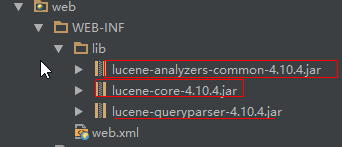
代码:
 package com.day02.lucene;

 import org.apache.lucene.analysis.Analyzer;

 import org.apache.lucene.analysis.standard.StandardAnalyzer;

 import org.apache.lucene.document.Document;

 import org.apache.lucene.document.Field;

 import org.apache.lucene.document.FieldType;

 import org.apache.lucene.index.DirectoryReader;

 import org.apache.lucene.index.IndexReader;

 import org.apache.lucene.index.IndexWriter;

 import org.apache.lucene.index.IndexWriterConfig;

 import org.apache.lucene.queryparser.classic.ParseException;

 import org.apache.lucene.queryparser.classic.QueryParser;

 import org.apache.lucene.search.IndexSearcher;

 import org.apache.lucene.search.Query;

 import org.apache.lucene.search.ScoreDoc;

 import org.apache.lucene.search.TopDocs;

 import org.apache.lucene.store.Directory;

 import org.apache.lucene.store.FSDirectory;

 import org.apache.lucene.util.Version;

 import org.junit.Test;

 import java.io.File;

 import java.io.IOException;

 /**

  * Created by Administrator on 2/10.

  */

 public class HelloLucene {

     //索引地址目录

     private String file = "E:\\lucene\\indexOne";

     //索引版本配置

     private Version matchVersion = Version.LUCENE_4_10_4;

     //案例文档

     private String doc1 = "Hello world Hello";

     private String doc2 = "Hello java world Hello Hello";

     private String doc3 = "Hello lucene world";

     /**

      * 创建索引代码

      *

      * @throws IOException

      */

     @Test

     public void testCreateIndex() throws IOException {

         System.out.println("-----测试开始------");

         //创建索引目录地址对象

         Directory directory = FSDirectory.open(new File(file));

         //指定分词规则

         Analyzer analyzer = new StandardAnalyzer();

         //创建索引配置对象

         IndexWriterConfig conf = new IndexWriterConfig(matchVersion, analyzer);

         //创建索引对象

         IndexWriter indexWriter = new IndexWriter(directory, conf);

         //创建文本属性

         FieldType fieldType = new FieldType();

         fieldType.setStored(true);//存储数据

         fieldType.setIndexed(true);//添加索引

         //创建要添加的文本对象

         Document document1 = new Document();

         document1.add(new Field("doc", doc1, fieldType));

         //添加索引

         indexWriter.addDocument(document1);

         //创建要添加的文本对象

         Document document2 = new Document();

         document2.add(new Field("doc", doc2, fieldType));

         //添加索引

         indexWriter.addDocument(document2);

         //创建要添加的文本对象

         Document document3 = new Document();

         document3.add(new Field("doc", doc3, fieldType));

         //添加索引

         indexWriter.addDocument(document3);

         //关闭资源

         indexWriter.close();

     }

     /**

      *获取索引

      * 1.创建查询分析器(QueryParser),使用查询分析器得到查询对象

      * 2.使用索引搜索器(IndexSearcher).search(查询对象, 获取的多少条数据),使用索引搜索器获得文档结果集(TopDocs)

      * 3.遍历文档结果集获取文档id

      * 4.使用IndexSearcher通过文档id获取文档对象,并获取文档具体字段值

      */

     String key = "lucene";

     @Test

     public void testSearchIndex() throws IOException, ParseException {

         System.out.println("-----测试开始------");

         //1.创建索引目录地址对象

         Directory directory = FSDirectory.open(new File(file));

         //2.创建目录阅读器

         IndexReader indexReader = DirectoryReader.open(directory);

         //3.创建索引搜索器

         IndexSearcher indexSearcher = new IndexSearcher(indexReader);

         //需要查询的字段

         String query = "doc";

         //4.创建分词器

         StandardAnalyzer standardAnalyzer = new StandardAnalyzer();

         //5.创建查询分析器

         QueryParser queryParser = new QueryParser(query, standardAnalyzer);

         //6.使用查询分析器(查询关键字)获取对应的对象

         Query parse = queryParser.parse(key);

         //7.获取查询结果

         int n = 1000;//最大返回对象数

         TopDocs topDocs = indexSearcher.search(parse, n);

         //8.获取总天数

         int totalHits = topDocs.totalHits;

         System.out.println("totalHits=>" + totalHits);

         //9.获取查询返回结果集

         ScoreDoc[] scoreDocs = topDocs.scoreDocs;

         //10.遍历结果集

         for (ScoreDoc scoreDoc : scoreDocs) {

             //获取文档主键

             int docId = scoreDoc.doc;

             System.out.println("docId=" + docId);

             //通过文档Id获取文档对象

             Document doc = indexSearcher.doc(docId);

             //获取文档值

             String docValue = doc.get("doc");//根据存放的key

             System.out.println("docValue=" + docValue);

         }

     }

 }
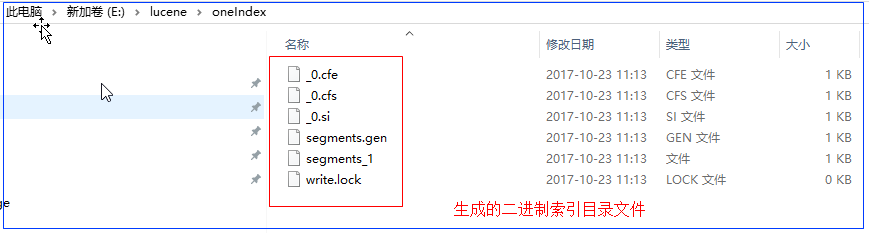
创建索引测试结果如下:
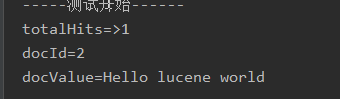
执行索引搜索结果如下图:
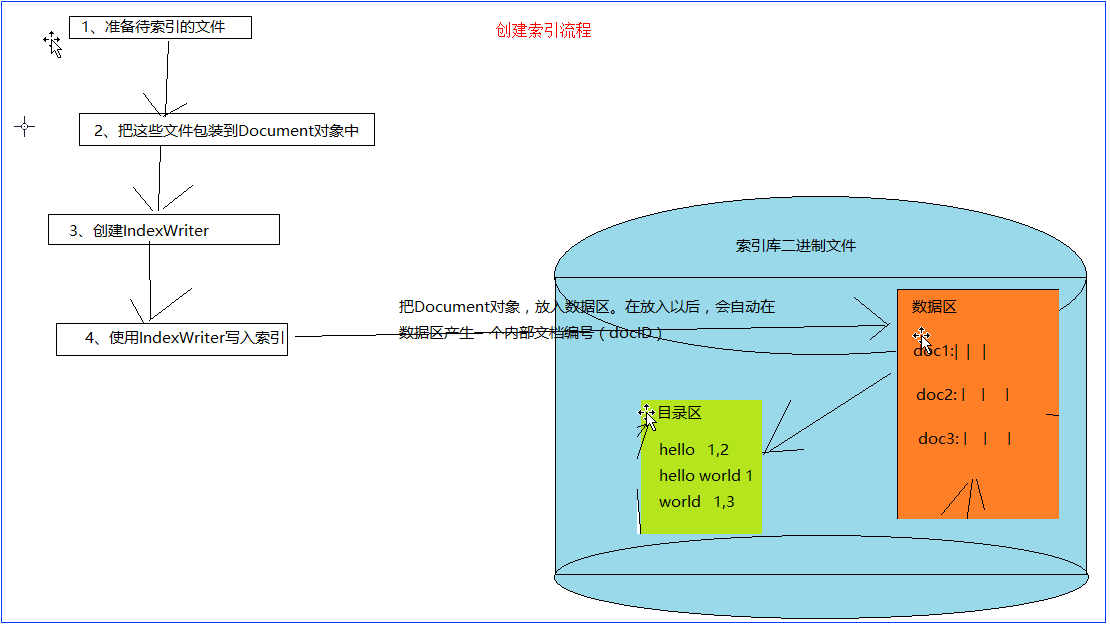
5.执行流程

大型运输行业实战_day15_1_全文检索之Lucene的更多相关文章
- 大型运输行业实战_day11_2_事务理论与实际生产配置事务管理
1.什么是事务(Transaction:tx) 数据库的某些需要分步完成,看做是一个整体(独立的工作单元),不能分割,要么整体成功,要么整体生效.“一荣俱荣,一损俱损”,最能体现事务的思想.案例:银行 ...
- 大型运输行业实战_day01_1_业务分析
1.业务分析 发展历史: 上车收费-->车站买票(相当于先收钱后上车)-->站务系统--->联网售票 2.项目结构 3.开发流程分析 1.业务分析 图文并茂 ...
- 大型运输行业实战_day14_1_webserivce简单入门
1.简单使用 1.1.服务端 1.编写接口 package com.day02.sation.ws; /** * Created by Administrator on 1/12. */ public ...
- 大型运输行业实战_day13_1_定时任务spring-quartz
1.jar包 拷贝quartz-2.2.3.jar包到项目 2.编写定时任务类TicketQuart.java package com.day02.sation.task; import com.da ...
- 大型运输行业实战_day12_1_权限管理实现
1.业务分析 权限说的是不同的用户对同一个系统有不同访问权限,其设计的本质是:给先给用户分配好URL,然后在访问的时候判断该用户是否有当前访问的URL. 2.实现 2.1数据库设计标准5表权限结构 2 ...
- 大型运输行业实战_day11_1_aop理论与aop实际业务操作
1.aop概述 Spring的AOP:什么叫做AOP:Aspect oritention programming(面向切面编程)什么是切面:看图,业务方法 执行前后.AOP的目的:AOP能够将那些与业 ...
- 大型运输行业实战_day01_2_需求文档
1.文档格式 (见模板文件) 2.Axure简单使用 2.1安装Axure傻瓜式安装 2.2简单使用axure 3.总结 需求文件完成后应该包括三种文件: 1.axure文件 2.axure生成的ht ...
- 大型运输行业实战_day10_1_自定义事务管理类
1.创建事务管理类 TransactionManager.java package com.day02.sation.transaction; import com.day02.sation.uti ...
- 大型运输行业实战_day09_2_站间互售实现
1.添加站间互售入口 对应的html代码 <button onclick="otherStation()">站间互售</button> 对应的js发送函数 ...
随机推荐
- oracle 问题
OCIEnvCreate 失败,返回代码为 -1,但错误消息文本不可用. 客户端文件没复制全 ORA-01017: invalid username/password; logon denied == ...
- 浮动ip原理及简单实现
原理:https://blog.csdn.net/readiay/article/details/53538085 简单实现:https://www.cnblogs.com/victorwu/p/70 ...
- socket-tcp
server import socketip_port=('127.0.0.1',8080);back_log=5buffer_size=1024 serv=socket.socket(socket. ...
- python中的ljust、rjust
ljust()将字符串左对齐右侧填充 rjust()将字符串右对齐左侧填充 举个例子: 1 a = "hello world" 2 a1 = a.ljust(15, "* ...
- WebForm(内置函数)
Response - 响应对象1.定义:Response对象用于动态响应客户端请示,控制发送给用户的信息,并将动态生成响应.若指定的cookie不存在,则创建它.若存在,则将自动进行更新.结果返回给客 ...
- HTML5 实现获取 gzip 压缩数据,并进行解压,同时解决汉字乱码,相关 pako.js
1, 下载 pako.js => http://nodeca.github.io/pako/#Deflate.prototype.onData 2, 首先需要了解一下 XMLHttpReques ...
- Linux 指令(一)文件/目录操作
1. 创建目录 mkdir 格式 mkdir [OPTION]... DIRECTORY... 选项 -p 递归创建 -v 创建时提示 例: root@ubuntu:/home/eko/x# mkdi ...
- java 常用第3方工具
https://www.cnblogs.com/chenpi/p/5608628.html#_label4
- Set原理
一.HashSet判断重读值的原理 1. 哈希表的存储结构: ==>数组+链表,数组的每个元素以链表的形式存储 2.如何把对象存储到哈希表中 ==>先计算对象的hashcod值,再对数组的 ...
- 火狐Firefox浏览器所有历史版本下载地址
Mozilla Firefox 频繁的更新,导致许多好用的插件在更新后不能兼容,而且想换回低版本还不容易啊,官网上只看到最新版本和前一个版本的下载. 这里为大家提供了一个下载链接,是来自Mozilla ...