
CS190.1x-ML_lab3_linear_reg_student
这次作业主要是有关监督学习,数据集是来自UCI Machine Learning Repository的Million Song Dataset。我们的目的是训练一个线性回归的模型来预测一首歌的发行年份。相关ipynb文件见我github。
作业主要分成5个部分:读取和解析数据,创建模型和评价一个基础模型,训练和评估一个线性回归模型,用MLlib选择参数,增加交互项的特征。
Part 1 Read and parse the initial dataset
Load and check the data
读取数据,转换为RDD,看看数据前5个长啥样。
labVersion = 'cs190_week3_v_1_3'

# load testing library

from test_helper import Test

import os.path

baseDir = os.path.join('data')

inputPath = os.path.join('cs190', 'millionsong.txt')

fileName = os.path.join(baseDir, inputPath)

numPartitions = 2

rawData = sc.textFile(fileName, numPartitions)

# TODO: Replace <FILL IN> with appropriate code

numPoints = rawData.count()

print numPoints

samplePoints = rawData.take(5)

print samplePoints
samplePoints输出结果为
[u'2001.0,0.884123733793,0.610454259079,0.600498416968,0.474669212493,0.247232680947,0.357306088914,0.344136412234,0.339641227335,0.600858840135,0.425704689024,0.60491501652,0.419193351817', u'2001.0,0.854411946129,0.604124786151,0.593634078776,0.495885413963,0.266307830936,0.261472105188,0.506387076327,0.464453565511,0.665798573683,0.542968988766,0.58044428577,0.445219373624', u'2001.0,0.908982970575,0.632063159227,0.557428975183,0.498263761394,0.276396052336,0.312809861625,0.448530069406,0.448674249968,0.649791323916,0.489868662682,0.591908113534,0.4500023818', u'2001.0,0.842525219898,0.561826888508,0.508715259692,0.443531142139,0.296733836002,0.250213568176,0.488540873206,0.360508747659,0.575435243185,0.361005878554,0.678378718617,0.409036786173', u'2001.0,0.909303285534,0.653607720915,0.585580794716,0.473250503005,0.251417011835,0.326976795524,0.40432273022,0.371154511756,0.629401917965,0.482243251755,0.566901413923,0.463373691946']
Using LabeledPoint
在MLlib中,监督学习的记录存为LabeledPoint object。我们现在要写个函数,把RDD中的元素转换为LabeledPoint object。
from pyspark.mllib.regression import LabeledPoint

import numpy as np

# Here is a sample raw data point:

# '2001.0,0.884,0.610,0.600,0.474,0.247,0.357,0.344,0.33,0.600,0.425,0.60,0.419'

# In this raw data point, 2001.0 is the label, and the remaining values are features

# TODO: Replace <FILL IN> with appropriate code

def parsePoint(line):

    """Converts a comma separated unicode string into a `LabeledPoint`.

    Args:

        line (unicode): Comma separated unicode string where the first element is the label and the

            remaining elements are features.

    Returns:

        LabeledPoint: The line is converted into a `LabeledPoint`, which consists of a label and

            features.

    """

    return LabeledPoint(line.split(',')[0],line.split(',')[1:])

parsedSamplePoints = map(lambda x: parsePoint(x),samplePoints)

firstPointFeatures = parsedSamplePoints[0].features

firstPointLabel = parsedSamplePoints[0].label

print firstPointFeatures, firstPointLabel

d = len(firstPointFeatures)

print d
Visualization 1 Features
画了50个点的所有特征的灰度图
import matplotlib.pyplot as plt

import matplotlib.cm as cm

sampleMorePoints = rawData.take(50)

# You can uncomment the line below to see randomly selected features.  These will be randomly

# selected each time you run the cell.  Note that you should run this cell with the line commented

# out when answering the lab quiz questions.

# sampleMorePoints = rawData.takeSample(False, 50)

parsedSampleMorePoints = map(parsePoint, sampleMorePoints)

dataValues = map(lambda lp: lp.features.toArray(), parsedSampleMorePoints)

def preparePlot(xticks, yticks, figsize=(10.5, 6), hideLabels=False, gridColor='#999999',

                gridWidth=1.0):

    """Template for generating the plot layout."""

    plt.close()

    fig, ax = plt.subplots(figsize=figsize, facecolor='white', edgecolor='white')

    ax.axes.tick_params(labelcolor='#999999', labelsize='10')

    for axis, ticks in [(ax.get_xaxis(), xticks), (ax.get_yaxis(), yticks)]:

        axis.set_ticks_position('none')

        axis.set_ticks(ticks)

        axis.label.set_color('#999999')

        if hideLabels: axis.set_ticklabels([])

    plt.grid(color=gridColor, linewidth=gridWidth, linestyle='-')

    map(lambda position: ax.spines[position].set_visible(False), ['bottom', 'top', 'left', 'right'])

    return fig, ax

# generate layout and plot

fig, ax = preparePlot(np.arange(.5, 11, 1), np.arange(.5, 49, 1), figsize=(8,7), hideLabels=True,

                      gridColor='#eeeeee', gridWidth=1.1)

image = plt.imshow(dataValues,interpolation='nearest', aspect='auto', cmap=cm.Greys)

for x, y, s in zip(np.arange(-.125, 12, 1), np.repeat(-.75, 12), [str(x) for x in range(12)]):

    plt.text(x, y, s, color='#999999', size='10')

plt.text(4.7, -3, 'Feature', color='#999999', size='11'), ax.set_ylabel('Observation')

pass

Find the range
从标签里找到最大值和最小值。
# TODO: Replace <FILL IN> with appropriate code

parsedDataInit = rawData.map(lambda x: parsePoint(x))

onlyLabels = parsedDataInit.map(lambda x: x.label)

minYear = onlyLabels.takeOrdered(1)[0]

maxYear = onlyLabels.takeOrdered(1, key=lambda x: -x)[0]

print maxYear, minYear
Shift labels
转换特征,把最小的特征置为0.
# TODO: Replace <FILL IN> with appropriate code

parsedData = parsedDataInit.map(lambda x: LabeledPoint((x.label - minYear),x.features))

# Should be a LabeledPoint

print type(parsedData.take(1)[0])

# View the first point

print '\n{0}'.format(parsedData.take(1))
Training, validation, and test sets
这次用randomSplit()把数据随机分成三部分,记得缓存起来。
# TODO: Replace <FILL IN> with appropriate code

weights = [.8, .1, .1]

seed = 42

parsedTrainData, parsedValData, parsedTestData = parsedData.randomSplit(weights, seed)

parsedTrainData.cache()

parsedValData.cache()

parsedTestData.cache()

nTrain = parsedTrainData.count()

nVal = parsedValData.count()

nTest = parsedTestData.count()

print nTrain, nVal, nTest, nTrain + nVal + nTest

print parsedData.count()
Part 2 Create and evaluate a baseline model
Average label
我们首先想一个最简单的模型:Average label。主要思路是无论给什么入参,我们都给一样的判断:标签的平均值。
# TODO: Replace <FILL IN> with appropriate code

averageTrainYear = (parsedTrainData

                    .map(lambda x: x.label).sum() / float(nTrain))

print averageTrainYear
Root mean squared error
我们用RMSE来衡量一个模型的好坏。
# TODO: Replace <FILL IN> with appropriate code

def squaredError(label, prediction):

    """Calculates the the squared error for a single prediction.

    Args:

        label (float): The correct value for this observation.

        prediction (float): The predicted value for this observation.

    Returns:

        float: The difference between the `label` and `prediction` squared.

    """

    return (label - prediction)**2

def calcRMSE(labelsAndPreds):

    """Calculates the root mean squared error for an `RDD` of (label, prediction) tuples.

    Args:

        labelsAndPred (RDD of (float, float)): An `RDD` consisting of (label, prediction) tuples.

    Returns:

        float: The square root of the mean of the squared errors.

    """

    return np.sqrt((labelsAndPreds.map(lambda x:(x[0]-x[1])**2).sum())/labelsAndPreds.count())

labelsAndPreds = sc.parallelize([(3., 1.), (1., 2.), (2., 2.)])

# RMSE = sqrt[((3-1)^2 + (1-2)^2 + (2-2)^2) / 3] = 1.291

exampleRMSE = calcRMSE(labelsAndPreds)

print exampleRMSE
Training, validation and test RMSE
# TODO: Replace <FILL IN> with appropriate code

labelsAndPredsTrain = parsedTrainData.map(lambda lp:(lp.label,averageTrainYear))

rmseTrainBase = calcRMSE(labelsAndPredsTrain)

labelsAndPredsVal = parsedValData.map(lambda lp:(lp.label,averageTrainYear))

rmseValBase = calcRMSE(labelsAndPredsVal)

labelsAndPredsTest = parsedTestData.map(lambda lp:(lp.label,averageTrainYear))

rmseTestBase = calcRMSE(labelsAndPredsTest)

print 'Baseline Train RMSE = {0:.3f}'.format(rmseTrainBase)

print 'Baseline Validation RMSE = {0:.3f}'.format(rmseValBase)

print 'Baseline Test RMSE = {0:.3f}'.format(rmseTestBase)
Part 3 Train (via gradient descent) and evaluate a linear regression model
Gradient summand
from pyspark.mllib.linalg import DenseVector

# TODO: Replace <FILL IN> with appropriate code

def gradientSummand(weights, lp):

    """Calculates the gradient summand for a given weight and `LabeledPoint`.

    Note:

        `DenseVector` behaves similarly to a `numpy.ndarray` and they can be used interchangably

        within this function.  For example, they both implement the `dot` method.

    Args:

        weights (DenseVector): An array of model weights (betas).

        lp (LabeledPoint): The `LabeledPoint` for a single observation.

    Returns:

        DenseVector: An array of values the same length as `weights`.  The gradient summand.

    """

    x = lp.features

    y = lp.label

    summand = (np.dot(weights,x) -y ) * x

    return summand

exampleW = DenseVector([1, 1, 1])

exampleLP = LabeledPoint(2.0, [3, 1, 4])

# gradientSummand = (dot([1 1 1], [3 1 4]) - 2) * [3 1 4] = (8 - 2) * [3 1 4] = [18 6 24]

summandOne = gradientSummand(exampleW, exampleLP)

print summandOne

exampleW = DenseVector([.24, 1.2, -1.4])

exampleLP = LabeledPoint(3.0, [-1.4, 4.2, 2.1])

summandTwo = gradientSummand(exampleW, exampleLP)

print summandTwo
Use weights to make predictions
# TODO: Replace <FILL IN> with appropriate code

def getLabeledPrediction(weights, observation):

    """Calculates predictions and returns a (label, prediction) tuple.

    Note:

        The labels should remain unchanged as we'll use this information to calculate prediction

        error later.

    Args:

        weights (np.ndarray): An array with one weight for each features in `trainData`.

        observation (LabeledPoint): A `LabeledPoint` that contain the correct label and the

            features for the data point.

    Returns:

        tuple: A (label, prediction) tuple.

    """

    return (observation.label,np.dot(weights,observation.features))

weights = np.array([1.0, 1.5])

predictionExample = sc.parallelize([LabeledPoint(2, np.array([1.0, .5])),

                                    LabeledPoint(1.5, np.array([.5, .5]))])

labelsAndPredsExample = predictionExample.map(lambda lp: getLabeledPrediction(weights, lp))

print labelsAndPredsExample.collect()
Gradient descent
这次作业最难地方就是实现梯度下降。
# TODO: Replace <FILL IN> with appropriate code

def linregGradientDescent(trainData, numIters):

    """Calculates the weights and error for a linear regression model trained with gradient descent.

    Note:

        `DenseVector` behaves similarly to a `numpy.ndarray` and they can be used interchangably

        within this function.  For example, they both implement the `dot` method.

    Args:

        trainData (RDD of LabeledPoint): The labeled data for use in training the model.

        numIters (int): The number of iterations of gradient descent to perform.

    Returns:

        (np.ndarray, np.ndarray): A tuple of (weights, training errors).  Weights will be the

            final weights (one weight per feature) for the model, and training errors will contain

            an error (RMSE) for each iteration of the algorithm.

    """

    # The length of the training data

    n = trainData.count()

    # The number of features in the training data

    d = len(trainData.take(1)[0].features)

    w = np.zeros(d)

    alpha = 1.0

    # We will compute and store the training error after each iteration

    errorTrain = np.zeros(numIters)

    for i in range(numIters):

        # Use getLabeledPrediction from (3b) with trainData to obtain an RDD of (label, prediction)

        # tuples.  Note that the weights all equal 0 for the first iteration, so the predictions will

        # have large errors to start.

        labelsAndPredsTrain = trainData.map(lambda lp: getLabeledPrediction(w, lp))

        errorTrain[i] = calcRMSE(labelsAndPredsTrain)

        # Calculate the `gradient`.  Make use of the `gradientSummand` function you wrote in (3a).

        # Note that `gradient` sould be a `DenseVector` of length `d`.

        gradient = trainData.map(lambda lp:gradientSummand(DenseVector(w),lp)).sum()

        # Update the weights

        alpha_i = alpha / (n * np.sqrt(i+1))

        w -= alpha_i * gradient

    return w, errorTrain

# create a toy dataset with n = 10, d = 3, and then run 5 iterations of gradient descent

# note: the resulting model will not be useful; the goal here is to verify that

# linregGradientDescent is working properly

exampleN = 10

exampleD = 3

exampleData = (sc

               .parallelize(parsedTrainData.take(exampleN))

               .map(lambda lp: LabeledPoint(lp.label, lp.features[0:exampleD])))

print exampleData.take(2)

exampleNumIters = 5

exampleWeights, exampleErrorTrain = linregGradientDescent(exampleData, exampleNumIters)

print exampleWeights
Train the model
# TODO: Replace <FILL IN> with appropriate code

numIters = 50

weightsLR0, errorTrainLR0 = linregGradientDescent(parsedTrainData,numIters)

labelsAndPreds = parsedValData.map(lambda lp:getLabeledPrediction(weightsLR0,lp))

rmseValLR0 = calcRMSE(labelsAndPreds)

print 'Validation RMSE:\n\tBaseline = {0:.3f}\n\tLR0 = {1:.3f}'.format(rmseValBase,

                                                                       rmseValLR0)
Part 4 Train using MLlib and perform grid search
事实上,MLlib里面提供了LinearRegressionWithSGD来实现上面的算法,而且功能更强大,比如选择随机梯度算法,以及加L1和L2正则化。
from pyspark.mllib.regression import LinearRegressionWithSGD

# Values to use when training the linear regression model

numIters = 500  # iterations

alpha = 1.0  # step

miniBatchFrac = 1.0  # miniBatchFraction

reg = 1e-1  # regParam

regType = 'l2'  # regType

useIntercept = True  # intercept

# TODO: Replace <FILL IN> with appropriate code

firstModel = LinearRegressionWithSGD.train(parsedTrainData, iterations=numIters, step=alpha,

                                           miniBatchFraction=miniBatchFrac, initialWeights=None, regParam=reg, regType=regType,

                                          intercept=useIntercept)

# weightsLR1 stores the model weights; interceptLR1 stores the model intercept

weightsLR1 = firstModel.weights

interceptLR1 = firstModel.intercept

print weightsLR1, interceptLR1
Predict
这里我们用MLlib提供的LinearRegressionModel.predict()方法来预测。
# TODO: Replace <FILL IN> with appropriate code

samplePoint = parsedTrainData.take(1)[0]

samplePrediction = firstModel.predict(samplePoint.features)

print samplePrediction
Evaluate RMSE
# TODO: Replace <FILL IN> with appropriate code

labelsAndPreds = parsedValData.map(lambda lp:(lp.label,firstModel.predict(lp.features)))

rmseValLR1 = calcRMSE(labelsAndPreds)

print ('Validation RMSE:\n\tBaseline = {0:.3f}\n\tLR0 = {1:.3f}' +

       '\n\tLR1 = {2:.3f}').format(rmseValBase, rmseValLR0, rmseValLR1)
Grid search
我们要改进上面的结果,比如正则化的参数试试1e-10, 1e-5, and 1。
# TODO: Replace <FILL IN> with appropriate code

bestRMSE = rmseValLR1

bestRegParam = reg

bestModel = firstModel

numIters = 500

alpha = 1.0

miniBatchFrac = 1.0

for reg in (1e-10,1e-5,1):

    model = LinearRegressionWithSGD.train(parsedTrainData, numIters, alpha,

                                          miniBatchFrac, regParam=reg,

                                          regType='l2', intercept=True)

    labelsAndPreds = parsedValData.map(lambda lp: (lp.label, model.predict(lp.features)))

    rmseValGrid = calcRMSE(labelsAndPreds)

    print rmseValGrid

    if rmseValGrid < bestRMSE:

        bestRMSE = rmseValGrid

        bestRegParam = reg

        bestModel = model

rmseValLRGrid = bestRMSE

print ('Validation RMSE:\n\tBaseline = {0:.3f}\n\tLR0 = {1:.3f}\n\tLR1 = {2:.3f}\n' +

       '\tLRGrid = {3:.3f}').format(rmseValBase, rmseValLR0, rmseValLR1, rmseValLRGrid)
Vary alpha and the number of iterations
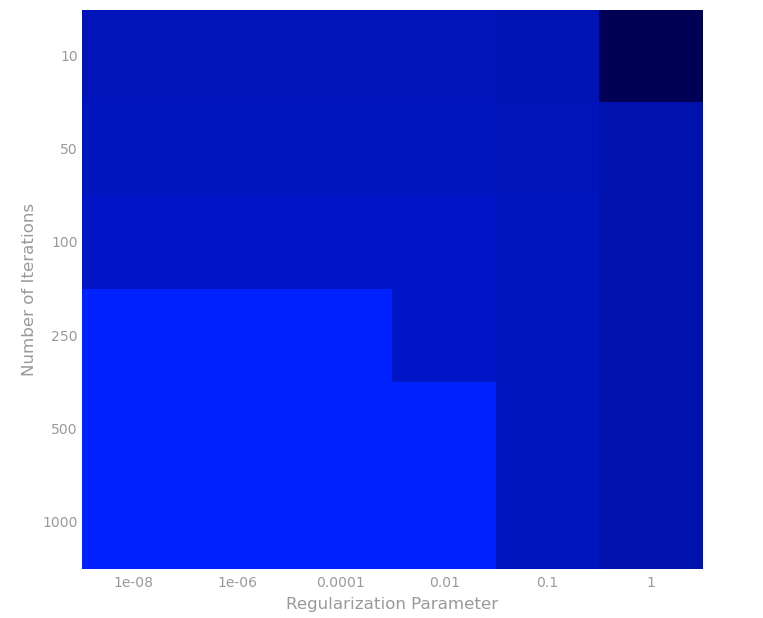
这次我们试试找alpha和迭代次数的其他值的情况下的RMSE。
# TODO: Replace <FILL IN> with appropriate code

reg = bestRegParam

modelRMSEs = []

for alpha in (1e-5,10):

    for numIters in (500,5):

        model = LinearRegressionWithSGD.train(parsedTrainData, numIters, alpha,

                                              miniBatchFrac, regParam=reg,

                                              regType='l2', intercept=True)

        labelsAndPreds = parsedValData.map(lambda lp: (lp.label, model.predict(lp.features)))

        rmseVal = calcRMSE(labelsAndPreds)

        print 'alpha = {0:.0e}, numIters = {1}, RMSE = {2:.3f}'.format(alpha, numIters, rmseVal)

        modelRMSEs.append(rmseVal)
通过上面结果,可以画出如下图。
Part 5 Add interactions between features
Add 2-way interactions
这里我们加一些交互项进去,这是线性回归很常见的做法,可以增加模型的复杂度。我们可以用itertools.product来产生2-way interaction。
# TODO: Replace <FILL IN> with appropriate code

import itertools

def twoWayInteractions(lp):

    """Creates a new `LabeledPoint` that includes two-way interactions.

    Note:

        For features [x, y] the two-way interactions would be [x^2, x*y, y*x, y^2] and these

        would be appended to the original [x, y] feature list.

    Args:

        lp (LabeledPoint): The label and features for this observation.

    Returns:

        LabeledPoint: The new `LabeledPoint` should have the same label as `lp`.  Its features

            should include the features from `lp` followed by the two-way interaction features.

    """

    origLabel = lp.label

    origFeatures = lp.features

    twoWayFeatures = map(lambda (x,y):x*y ,itertools.product(origFeatures,repeat=2))

    return LabeledPoint(origLabel,np.hstack((origFeatures,twoWayFeatures)))

print twoWayInteractions(LabeledPoint(0.0, [2, 3]))

# Transform the existing train, validation, and test sets to include two-way interactions.

trainDataInteract = parsedTrainData.map(lambda lp: twoWayInteractions(lp)).cache()

valDataInteract = parsedValData.map(lambda lp: twoWayInteractions(lp)).cache()

testDataInteract = parsedTestData.map(lambda lp: twoWayInteractions(lp)).cache()
Build interaction model
我们增加了新的特征后,重新训练模型。
# TODO: Replace <FILL IN> with appropriate code

numIters = 500

alpha = 1.0

miniBatchFrac = 1.0

reg = 1e-10

modelInteract = LinearRegressionWithSGD.train(trainDataInteract, numIters, alpha,

                                              miniBatchFrac, regParam=reg,

                                              regType='l2', intercept=True)

labelsAndPredsInteract = valDataInteract.map(lambda lp: (lp.label, modelInteract.predict(lp.features)))

rmseValInteract = calcRMSE(labelsAndPredsInteract)

print ('Validation RMSE:\n\tBaseline = {0:.3f}\n\tLR0 = {1:.3f}\n\tLR1 = {2:.3f}\n\tLRGrid = ' +

       '{3:.3f}\n\tLRInteract = {4:.3f}').format(rmseValBase, rmseValLR0, rmseValLR1,

                                                 rmseValLRGrid, rmseValInteract)
Evaluate interaction model on test data
# TODO: Replace <FILL IN> with appropriate code

labelsAndPredsTest = testDataInteract.map(lambda lp: (lp.label, modelInteract.predict(lp.features)))

rmseTestInteract = calcRMSE(labelsAndPredsTest)

print ('Test RMSE:\n\tBaseline = {0:.3f}\n\tLRInteract = {1:.3f}'

       .format(rmseTestBase, rmseTestInteract))
我们发现无论是训练的RMSE还是测试集上的RMSE,均比之前的模型要好。
CS190.1x-ML_lab3_linear_reg_student的更多相关文章
- CS190.1x Scalable Machine Learning
这门课是CS100.1x的后续课,看课程名字就知道这门课主要讲机器学习.难度也会比上一门课大一点.如果你对这门课感兴趣,可以看看我这篇博客,如果对PySpark感兴趣,可以看我分析作业的博客. Cou ...
- CS190.1x-ML_lab1_review_student
这是CS190.1x第一次作业,主要教你如何使用numpy.numpy可以说是python科学计算的基础包了,用途非常广泛.相关ipynb文件见我github. 这次作业主要分成5个部分,分别是:数学 ...
- Introduction to Big Data with PySpark
起因 大数据时代 大数据最近太热了,其主要有数据量大(Volume),数据类别复杂(Variety),数据处理速度快(Velocity)和数据真实性高(Veracity)4个特点,合起来被称为4V. ...
- Ubuntu16.04 802.1x 有线连接 输入账号密码,为什么连接不上?
ubuntu16.04,在网络配置下找到802.1x安全性,输入账号密码,为什么连接不上? 这是系统的一个bug解决办法:假设你有一定的ubuntu基础,首先你先建立好一个不能用的协议,就是按照之 ...
- 解压版MySQL5.7.1x的安装与配置
解压版MySQL5.7.1x的安装与配置 MySQL安装文件分为两种,一种是msi格式的,一种是zip格式的.如果是msi格式的可以直接点击安装,按照它给出的安装提示进行安装(相信大家的英文可以看懂英 ...
- RTImageAssets 自动生成 AppIcon 和 @2x @1x 比例图片
下载地址:https://github.com/rickytan/RTImageAssets 此插件用来生成 @3x 的图片资源对应的 @2x 和 @1x 版本,只要拖拽高清图到 @3x 的位置上,然 ...
- 802.1x协议&eap类型
EAP: 0,扩展认证协议 1,一个灵活的传输协议,用来承载任意的认证信息(不包括认证方式) 2,直接运行在数据链路层,如ppp或以太网 3,支持多种类型认证 注:EAP 客户端---服务器之间一个协 ...
- 脱壳脚本_手脱壳ASProtect 2.1x SKE -> Alexey Solodovnikov
脱壳ASProtect 2.1x SKE -> Alexey Solodovnikov 用脚本.截图 1:查壳 2:od载入 3:用脚本然后打开脚本文件Aspr2.XX_unpacker_v1. ...
- iOS图片攻略之:有3x自动生成2x 1x图片
关键字:Xcode插件,生成图片资源 代码类库:其他(Others) GitHub链接:https://github.com/rickytan/RTImageAssets 本项目是一个 Xc ...
- Keil V4.72升级到V5.1X之后
问题描述 Keil V4.72升级到V5.1x之后,原来编译通过的工程,出现了如下错误: .\Libraries\CMSIS\CM3\DeviceSupport\ST\STM32F10x\STM32f ...
随机推荐
- CSS样式----CSS样式表的继承性和层叠性(图文详解)
本文最初于2017-07-29发表于博客园,并在GitHub上持续更新前端的系列文章.欢迎在GitHub上关注我,一起入门和进阶前端. 以下是正文. 本文重点 CSS的继承性 CSS的层叠性 计算权重 ...
- python 流程控制(for循环语句)
1,for循环基本语法 2, for循环常用序列 3,for循环 else使用方法 1,for循环基本语法 for iterating_var in sequence: statements(s) 2 ...
- “由于这台计算机没有终端服务器客户端访问许可证”解决方案
由于windows2003默认仅支持2个终端用户的登陆.当"终端连接超出了最大连接"的情况出现导致不能登录. 1.在另外一台Windows2003的机器上运行"tsmmc ...
- 简单实现MySQL数据库的日志审计
时间 2018-12-23 08:01:11 FreeBuf 原文 https://www.freebuf.com/articles/es/192062.html 主题 MySQL 0×0 背景 ...
- 解决myeclipse项目中,多出的WebContent文件夹
由于通过svn导入项目,导致项目中多出WebContent文件夹,而在此之前正常的是WebRoot文件夹.这个WebContent删了之后还会自己冒出来. 直到我发现篇博客:http://blog.s ...
- PgSQL基础之 安装postgresql数据系统
参考这位仁兄的文章,真的非常好:https://blog.csdn.net/jerry_sc/article/details/76408116#创建数据目录 后来我又自己写了一个shell脚本,来自动 ...
- 一次gcc编译失败分析
1. 场景: 在使用gcc编译时,编译器报错:xxx:'xxx'未定义的引用 2. 排查过程: 首先,我很自然的想到是不是自己使用了未定义的函数或者将函数名称写错了,在检查了一边过后,我发现自己使 ...
- python第四十五课——继承性之多重继承
演示多重继承的结构和使用 子类:Dog 直接父类:Animal 间接父类:Creature #生物类 class Creature: def __init__(self,age): print('我是 ...
- Volley源码分析(一)RequestQueue分析
Volley源码分析 虽然在2017年,volley已经是一个逐渐被淘汰的框架,但其代码短小精悍,网络架构设计巧妙,还是有很多值得学习的地方. 第一篇文章,分析了请求队列的代码,请求队列也是我们使用V ...
- Python在自动化运维时经常会用到的方法
得到当前工作目录,即当前Python脚本工作的目录路径:os.getcwd() 返回指定目录下的所有文件和目录名:os.listdir() 函数用来删除一个文件:os.remove() 删除多个目录: ...