
JNI开发篇——报错:Flag android.useDeprecatedNdk is no longer supported and will be removed in the next……
大概意思就是说:
- android.useDeprecatedNdk不再支持了
- 让使用CMake or ndk-build
- 然后还有链接
解决方法:
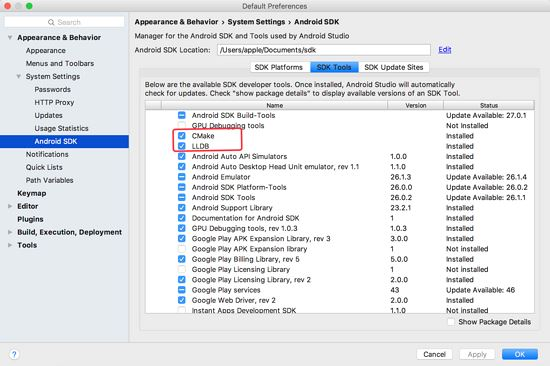
1、先通过SDKManager下载:CMake和LLDB
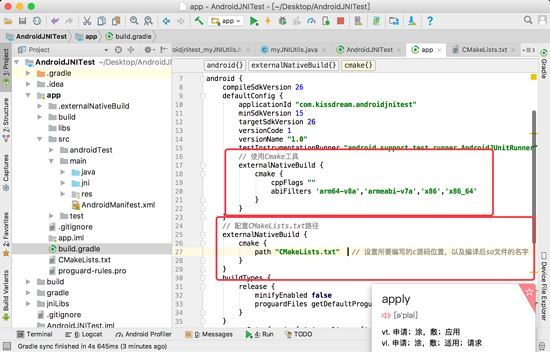
2、在build.gradle的defaultConfig节点下加入:
// 使用Cmake工具

    externalNativeBuild {

      cmake {

        cppFlags ""

        //生成多个版本的so文件

        abiFilters 'arm64-v8a','armeabi-v7a','x86','x86_64'

      }

    }
在build.gradle的android节点下加入:
// 配置CMakeLists.txt路径

  externalNativeBuild {

    cmake {

      path "CMakeLists.txt"  // 设置所要编写的c源码位置,以及编译后so文件的名字

    }

  }
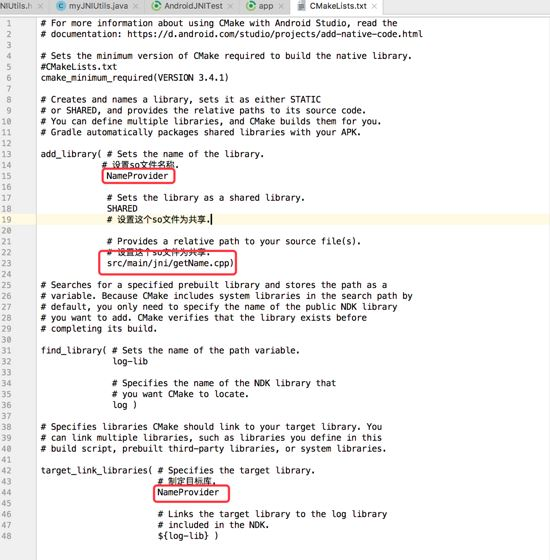
3、添加CMakeLists.txt文件到build.gradle文件同级目录下,具体内容如下:
# For more information about using CMake with Android Studio, read the

# documentation: https://d.android.com/studio/projects/add-native-code.html

# Sets the minimum version of CMake required to build the native library.

#CMakeLists.txt

cmake_minimum_required(VERSION 3.4.1)

# Creates and names a library, sets it as either STATIC

# or SHARED, and provides the relative paths to its source code.

# You can define multiple libraries, and CMake builds them for you.

# Gradle automatically packages shared libraries with your APK.

add_library( # Sets the name of the library.

      # 设置so文件名称.

       NameProvider

       # Sets the library as a shared library.

       SHARED

       # 设置这个so文件为共享.

       # Provides a relative path to your source file(s).

       # 设置这个so文件为共享.

       src/main/jni/getName.cpp)

# Searches for a specified prebuilt library and stores the path as a

# variable. Because CMake includes system libraries in the search path by

# default, you only need to specify the name of the public NDK library

# you want to add. CMake verifies that the library exists before

# completing its build.

find_library( # Sets the name of the path variable.

       log-lib

       # Specifies the name of the NDK library that

       # you want CMake to locate.

       log )

# Specifies libraries CMake should link to your target library. You

# can link multiple libraries, such as libraries you define in this

# build script, prebuilt third-party libraries, or system libraries.

target_link_libraries( # Specifies the target library.

            # 制定目标库.

            NameProvider

            # Links the target library to the log library

            # included in the NDK.

            ${log-lib} )
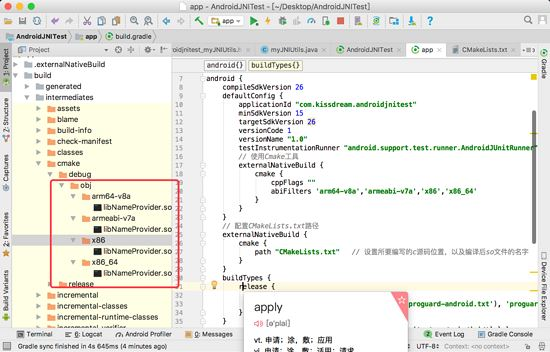
至此,我们所有的流程都做完了,下面来检查一下我们的成果,见证奇迹的时候到了:
JNI开发篇——报错:Flag android.useDeprecatedNdk is no longer supported and will be removed in the next……的更多相关文章
- 【转】 IOS开发xcode报错之has been modified since the precompiled header was built
本文转载自 IOS开发xcode报错之has been modified since the precompiled header was built 其实我是升级xcode到4.6.3的时候遇到的 ...
- IOS开发 xcode报错之has been modified since the precompiled header was built
转载的文章 很实用 IOS开发xcode报错之has been modified since the precompiled header was built 今天做百度地图的时候第一次发现下面错误 ...
- 报错:Method definition shorthands are not supported by current JavaScript version
当你在html中使用调用js中的方法时,会出现这行报错: method definition shorthands are not supported by current JavaScript ve ...
- Android Jni开发,报com.android.ide.common.process.ProcessException: Error configuring 错误解决方案
今天在练习JNI项目时,Android studio版本为:3.1.3,Gradle版本为4.4.由于Android studio 3.X弃用了 android.useDeprecatedNdk=tr ...
- 高德地图Demo运行报错 com.android.ide.common.process.ProcessException: Failed to execute aapt
最近由于有需求去做导航方面的Android开发,很是无奈,以前也的确是没有搞过,领导开大会当着所有人的面说这是给我分配的第一个工作,无论如何要做好,突然间感觉压力好大,自己已经多年没有敲过代码,而且A ...
- iOS开发编译报错、常见问题(实时更新)
一.报错与警报 1.错误代码:No architectures to compile for (ONLY_ACTIVE_ARCH=YES, active arch=x86_64, VALID_ARCH ...
- hadoop项目开发运行报错(log4j:WARN No appenders could be found for logger (org.apache.hadoop.metrics2.lib.MutableMetricsFactory).)
使用hadoop+myeclipse开发项目是测试运行报错: log4j:WARN No appenders could be found for logger (org.apache.hadoop. ...
- Vue tools开发工具报错Cannot read property '__VUE_DEVTOOLS_UID__' of undefined
使用 vue tools 开发工具,不显示调试面板中的组件,点击控制台报错: Cannot read property 'VUE_DEVTOOLS_UID' of undefined 在 main.j ...
- android-解决 Android N 上 报错:android.os.FileUriExposedException
解决 Android N 上 安装Apk时报错:android.os.FileUriExposedException: file:///storage/emulated/0/Download/appN ...
随机推荐
- 【Noip模拟 20161005】公约数
问题描述 小ww最近仔细研究了公约数,他想到了以下问题:现有nn个正整数,从中选k(2≤k≤n)k(2≤k≤n) 个,设这kk个数的最大公约数为gg,则这kk个数的价值为k×gk×g.求这个价值的最大 ...
- WebStorm新创建项目介绍
WebStorm创建一个项目 这里支持有很多的类型项目: Empty Project ----一个空的项目 Html5 Boilerplate ----HTML5开发框架 We ...
- iptables学习
droidwall.sh #!/system/bin/sh IPTABLES=iptables BUSYBOX=busybox GREP=grep ECHO=echo # Try to find bu ...
- ArcGIS(ESRI)的发展历史和版本历史(简介)
作者:fenghuayoushi 来源:CSDN 原文:https://blog.csdn.net/fenghuayoushi/article/details/6677360 ESRI公司介绍 ...
- 学Android开发的人可以去的几个网站
学Android开发的人可以去的几个网站 1.<IT蓝豹>Android开源项目分享平台国内非常好的一个Android开发者分享站,分享android所有特效,每天都有最新的Android ...
- Java happen-before
下面是happens-before原则规则: 程序次序规则:一个线程内,按照代码顺序,书写在前面的操作先行发生于书写在后面的操作: 锁定规则:一个unLock操作先行发生于后面对同一个锁额lock操作 ...
- ubuntu下zaibbix3.2报警搭建
1.安装sudo apt install sendmail 2.测试发送邮件: echo "正文!" | mail -s 标题 XXX@qq.com 3.成功后继续安装邮件服务器. ...
- 'basetsd.h': No such file or directory
By Select the Windows 8.1 SDK During install. Download visualcppbuildtools_full.exe from below websi ...
- ChromDevTools
[ChromDevTools] 1.如何打开DevTools. 在Chrome菜单中选择 更多工具 > 开发者工具 在页面元素上右键点击,选择 “检查” 使用 快捷键 F12 2.切换 Devi ...
- Ajax图片异步上传并回显
1.jsp页面 <td width="20%" class="pn-flabel pn-flabel-h"></td> <td w ...