
JNI开发篇——报错:Flag android.useDeprecatedNdk is no longer supported and will be removed in the next……
大概意思就是说:
- android.useDeprecatedNdk不再支持了
- 让使用CMake or ndk-build
- 然后还有链接
解决方法:
1、先通过SDKManager下载:CMake和LLDB
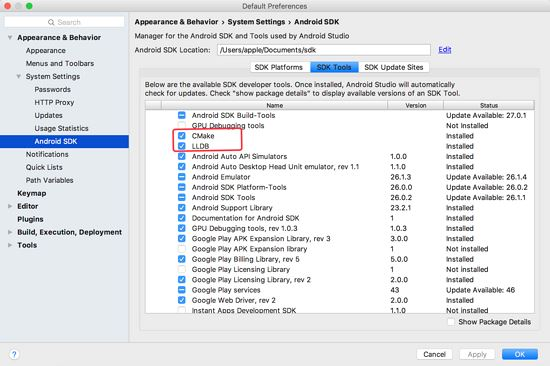
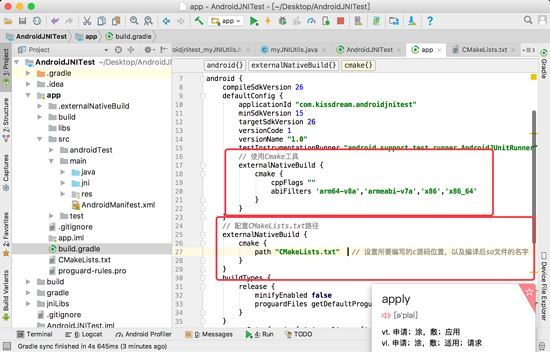
2、在build.gradle的defaultConfig节点下加入:
// 使用Cmake工具

    externalNativeBuild {

      cmake {

        cppFlags ""

        //生成多个版本的so文件

        abiFilters 'arm64-v8a','armeabi-v7a','x86','x86_64'

      }

    }
在build.gradle的android节点下加入:
// 配置CMakeLists.txt路径

  externalNativeBuild {

    cmake {

      path "CMakeLists.txt"  // 设置所要编写的c源码位置,以及编译后so文件的名字

    }

  }
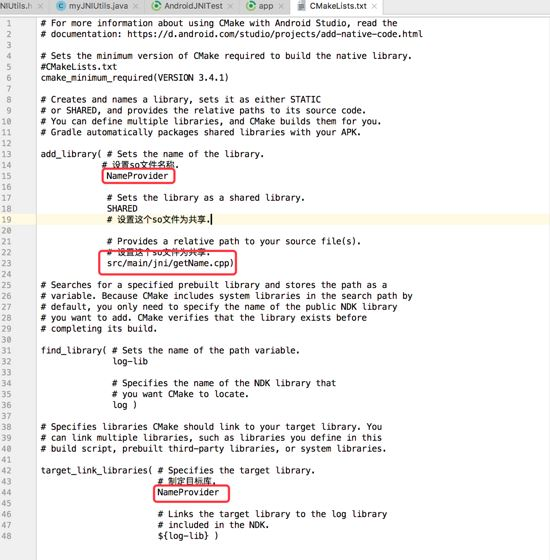
3、添加CMakeLists.txt文件到build.gradle文件同级目录下,具体内容如下:
# For more information about using CMake with Android Studio, read the

# documentation: https://d.android.com/studio/projects/add-native-code.html

# Sets the minimum version of CMake required to build the native library.

#CMakeLists.txt

cmake_minimum_required(VERSION 3.4.1)

# Creates and names a library, sets it as either STATIC

# or SHARED, and provides the relative paths to its source code.

# You can define multiple libraries, and CMake builds them for you.

# Gradle automatically packages shared libraries with your APK.

add_library( # Sets the name of the library.

      # 设置so文件名称.

       NameProvider

       # Sets the library as a shared library.

       SHARED

       # 设置这个so文件为共享.

       # Provides a relative path to your source file(s).

       # 设置这个so文件为共享.

       src/main/jni/getName.cpp)

# Searches for a specified prebuilt library and stores the path as a

# variable. Because CMake includes system libraries in the search path by

# default, you only need to specify the name of the public NDK library

# you want to add. CMake verifies that the library exists before

# completing its build.

find_library( # Sets the name of the path variable.

       log-lib

       # Specifies the name of the NDK library that

       # you want CMake to locate.

       log )

# Specifies libraries CMake should link to your target library. You

# can link multiple libraries, such as libraries you define in this

# build script, prebuilt third-party libraries, or system libraries.

target_link_libraries( # Specifies the target library.

            # 制定目标库.

            NameProvider

            # Links the target library to the log library

            # included in the NDK.

            ${log-lib} )
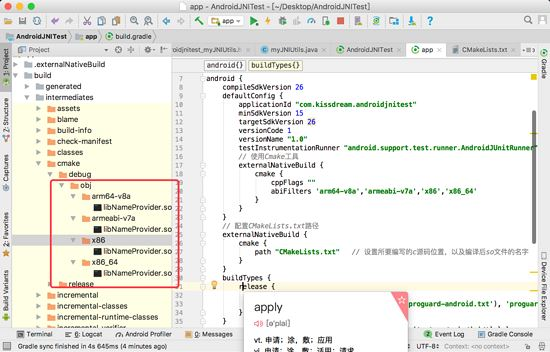
至此,我们所有的流程都做完了,下面来检查一下我们的成果,见证奇迹的时候到了:
JNI开发篇——报错:Flag android.useDeprecatedNdk is no longer supported and will be removed in the next……的更多相关文章
- 【转】 IOS开发xcode报错之has been modified since the precompiled header was built
本文转载自 IOS开发xcode报错之has been modified since the precompiled header was built 其实我是升级xcode到4.6.3的时候遇到的 ...
- IOS开发 xcode报错之has been modified since the precompiled header was built
转载的文章 很实用 IOS开发xcode报错之has been modified since the precompiled header was built 今天做百度地图的时候第一次发现下面错误 ...
- 报错:Method definition shorthands are not supported by current JavaScript version
当你在html中使用调用js中的方法时,会出现这行报错: method definition shorthands are not supported by current JavaScript ve ...
- Android Jni开发,报com.android.ide.common.process.ProcessException: Error configuring 错误解决方案
今天在练习JNI项目时,Android studio版本为:3.1.3,Gradle版本为4.4.由于Android studio 3.X弃用了 android.useDeprecatedNdk=tr ...
- 高德地图Demo运行报错 com.android.ide.common.process.ProcessException: Failed to execute aapt
最近由于有需求去做导航方面的Android开发,很是无奈,以前也的确是没有搞过,领导开大会当着所有人的面说这是给我分配的第一个工作,无论如何要做好,突然间感觉压力好大,自己已经多年没有敲过代码,而且A ...
- iOS开发编译报错、常见问题(实时更新)
一.报错与警报 1.错误代码:No architectures to compile for (ONLY_ACTIVE_ARCH=YES, active arch=x86_64, VALID_ARCH ...
- hadoop项目开发运行报错(log4j:WARN No appenders could be found for logger (org.apache.hadoop.metrics2.lib.MutableMetricsFactory).)
使用hadoop+myeclipse开发项目是测试运行报错: log4j:WARN No appenders could be found for logger (org.apache.hadoop. ...
- Vue tools开发工具报错Cannot read property '__VUE_DEVTOOLS_UID__' of undefined
使用 vue tools 开发工具,不显示调试面板中的组件,点击控制台报错: Cannot read property 'VUE_DEVTOOLS_UID' of undefined 在 main.j ...
- android-解决 Android N 上 报错:android.os.FileUriExposedException
解决 Android N 上 安装Apk时报错:android.os.FileUriExposedException: file:///storage/emulated/0/Download/appN ...
随机推荐
- 1.加快Xshell客户端连接到CentOS的速度
1.编辑打开ssh的配置文件 /etc/ssh/sshd_config 找到里面的UseDNS yes修改为:#UseDNS no service sshd restart
- log4j日志输出级别变更
1. 现阶段log4j日志输出配置 示例:基础服务日志配置 #DEBUG < INFO < WARN < ERROR < FATAL\u65E5\u5FD7\u7684\u ...
- python 函数返回值笔记
今天学习python时候学习到闭包和柯里化 感觉看概念时候不好理解,自己写下大概就明白点了 柯里化如下 定义一个加法函数 def add(x, y): return x + y 这是没有柯里化之前的函 ...
- MYSQL数据库中,常见的数据类型有哪些?它们与java中的数据类型如何对应
A.常规 映射 integer 或者 int int 或者 java.lang.Integer INTEGER 4 字节 long long Long BIGINT 8 字节 short short ...
- JAVAWEB 一一 Sturts2+ibatis(框架,Sturts2,用action代替servlet)
web.xml <?xml version="1.0" encoding="UTF-8"?> <web-app version="2 ...
- JS代码注释
1.css和js都可以使用/**/进行注释 2.html使用<!---->注释 3.单行js代码可以使用//进行注释 <!DOCTYPE html> <html lang ...
- 吴裕雄 python深度学习与实践(6)
from pylab import * import pandas as pd import matplotlib.pyplot as plot import numpy as np filePath ...
- 吴裕雄 oracle PL/SQL编程
- Incompatible shapes during the half way training---Invalid argument: Incompatible shapes: [1,63,4] vs. [1,64,4]
这是tensorflow model 中我使用它的faster--cnn,但是就是训练过程中,代码执行到一半 一般是step=40~120的时候就报错了: INFO:tensorflow:global ...
- 最小生成树一·Prim算法
描述 最近,小Hi很喜欢玩的一款游戏模拟城市开放出了新Mod,在这个Mod中,玩家可以拥有不止一个城市了! 但是,问题也接踵而来——小Hi现在手上拥有N座城市,且已知这N座城市中任意两座城市之间建造道 ...