
python3入门教程
|
python : 3.5 jdk : 1.7 eclipse : 4.5.2(有点低了,需要对应Neon 4.6,不然总是会弹出提示框) |
应该学习最新版本的 Python 3 还是旧版本的 Python 2.7?
MySqlDB官网只支持Python3.4,这里Python3.5使用第三方库PyMysql连接Mysql数据库。
http://dev.mysql.com/downloads/connector/python/2.0.html

PyMysql下载地址:
https://pypi.python.org/pypi/PyMySQL#downloads
Windows下安装方法:
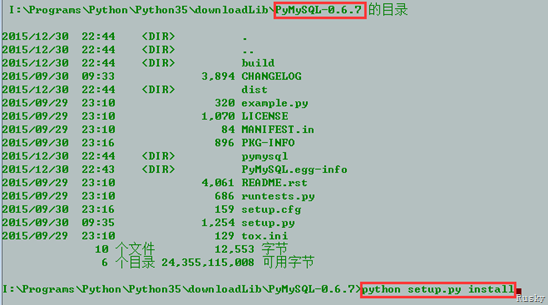
下载解压后,进入PyMySql-0.6.7目录,执行python setup.py install安装
test1.py
 import urllib.request as request

 def baidu_tieba(url, begin_page, end_page):

     for i in range(begin_page, end_page + 1):

         sName = 'D:/360Downloads/test/'+str(i).zfill(5)+'.html'

         print('正在下载第'+str(i)+'个页面, 并保存为'+sName)

         m = request.urlopen(url+str(i)).read()

         with open(sName,'wb') as file:

             file.write(m)

         file.close()

 if __name__ == "__main__":

     url = "http://tieba.baidu.com/p/"

     begin_page = 1

     end_page = 3

     baidu_tieba(url, begin_page, end_page)
test2.py
 import urllib.request as request

 import re

 import os

 import urllib.error as error

 def baidu_tieba(url, begin_page, end_page):

     count = 1

     for i in range(begin_page, end_page + 1):

         sName = 'D:/360Downloads/test/' + str(i).zfill(5) + '.html'

         print('正在下载第' + str(i) + '个页面, 并保存为' + sName)

         m = request.urlopen(url + str(i)).read()

         # 创建目录保存每个网页上的图片

         dirpath = 'D:/360Downloads/test/'

         dirname = str(i)

         new_path = os.path.join(dirpath, dirname)

         if not os.path.isdir(new_path):

             os.makedirs(new_path)

         page_data = m.decode('gbk', 'ignore')

         page_image = re.compile('<img src=\"(.+?)\"')

         for image in page_image.findall(page_data):

             pattern = re.compile(r'^http://.*.png$')

             if  pattern.match(image):

                 try:

                     image_data = request.urlopen(image).read()

                     image_path = dirpath + dirname + '/' + str(count) + '.png'

                     count += 1

                     print(image_path)

                     with open(image_path, 'wb') as image_file:

                         image_file.write(image_data)

                     image_file.close()

                 except error.URLError as e:

                     print('Download failed')

         with open(sName, 'wb') as file:

             file.write(m)

         file.close()

 if __name__ == "__main__":

     url = "http://tieba.baidu.com/p/"

     begin_page = 1

     end_page = 3

     baidu_tieba(url, begin_page, end_page)
test3.py
 #python3.4 爬虫教程

 #爬取网站上的图片

 #林炳文Evankaka(博客:http://blog.csdn.net/evankaka/)

 import urllib.request

 import socket

 import re

 import sys

 import os

 targetDir = r"D:\PythonWorkPlace\load"  #文件保存路径

 def destFile(path):

     if not os.path.isdir(targetDir):

         os.makedirs(targetDir)

     pos = path.rindex('/')

     t = os.path.join(targetDir, path[pos+1:])

     print(t)

     return t

 if __name__ == "__main__":  #程序运行入口

     weburl = "http://www.douban.com/"

     webheaders = {'User-Agent':'Mozilla/5.0 (Windows NT 6.1; WOW64; rv:23.0) Gecko/20100101 Firefox/23.0'}

     req = urllib.request.Request(url=weburl, headers=webheaders)  #构造请求报头

     webpage = urllib.request.urlopen(req)  #发送请求报头

     contentBytes = webpage.read()

     for link, t in set(re.findall(r'(https:[^\s]*?(jpg|png|gif))', str(contentBytes))):  #正则表达式查找所有的图片

         print(link)

         try:

             urllib.request.urlretrieve(link, destFile(link)) #下载图片

         except:

             print('失败') #异常抛出
test4.py
 '''

 第一个示例:简单的网页爬虫

 爬取豆瓣首页

 '''

 import urllib.request

 #网址

 url = "http://bj.58.com/caishui/28707491160259x.shtml?adtype=1&entinfo=28707491160259_0&adact=3&psid=156713756196890928513274724"

 #请求

 request = urllib.request.Request(url)

 #爬取结果

 response = urllib.request.urlopen(request)

 data = response.read()

 #设置解码方式

 data = data.decode('utf-8')

 #打印结果

 print(data)

 #打印爬取网页的各类信息

 # print(type(response))

 # print(response.geturl())

 # print(response.info())

 # print(response.getcode())
test5.py
 #!/usr/bin/env python

 #-*-coding: utf-8 -*-

 import re

 import urllib.request as request

 from bs4 import BeautifulSoup as bs

 import csv

 import os

 import sys

 from imp import reload

 reload(sys)

 def GetAllLink():

     num = int(input("爬取多少页:>"))

     if not os.path.exists('./data/'):

         os.mkdir('./data/')

     for i in range(num):

         if i+1 == 1:

             url = 'http://nj.58.com/piao/'

             GetPage(url, i)

         else:

             url = 'http://nj.58.com/piao/pn%s/' %(i+1)

             GetPage(url, i)

 def GetPage(url, num):

     Url = url

     user_agent = 'Mozilla/5.0 (X11; Ubuntu; Linux x86_64; rv:32.0) Gecko/20100101 Firefox/32.0'

     headers = { 'User-Agent' : user_agent }

     req = request.Request(Url, headers = headers)

     page = request.urlopen(req).read().decode('utf-8')

     soup = bs(page, "html.parser")

     table = soup.table

     tag = table.find_all('tr')

     # 提取出所需的那段

     soup2 = bs(str(tag), "html.parser")

     title = soup2.find_all('a','t')         #标题与url

     price = soup2.find_all('b', 'pri')      #价格

     fixedprice = soup2.find_all('del')      #原价

     date = soup2.find_all('span','pr25')    #时间

     atitle = []

     ahref = []

     aprice = []

     afixedprice = []

     adate = []

     for i in title:

         #print i.get_text(), i.get('href')

         atitle.append(i.get_text())

         ahref.append(i.get('href'))

     for i in price:

         #print i.get_text()

         aprice.append(i.get_text())

     for i in fixedprice:

         #print j.get_text()

         afixedprice.append(i.get_text())

     for i in date:

         #print i.get_text()

         adate.append(i.get_text())

     csvfile = open('./data/ticket_%s.csv'%num, 'w')

     writer = csv.writer(csvfile)

     writer.writerow(['标题','url','售价','原价','演出时间'])

     '''

     每个字段必有title,但是不一定有时间date

     如果没有date日期,我们就设为'---'

     '''

     if len(atitle) > len(adate):

         for i in range(len(atitle) - len(adate)):

             adate.append('---')

         for i in range(len(atitle) - len(afixedprice)):

             afixedprice.append('---')

         for i in range(len(atitle) - len(aprice)):

             aprice.append('---')

     for i in range(len(atitle)):

             message = atitle[i]+'|'+ahref[i]+'|'+aprice[i]+ '|'+afixedprice[i]+'|'+ adate[i]

             writer.writerow([i for i in str(message).split('|')])

     print ("[Result]:> 页面 %s 信息保存完毕!"%(num+1))

     csvfile.close()

 if __name__ == '__main__':

     GetAllLink()
test6.py
 #!/usr/bin/env python

 #-*-coding: utf-8 -*-

 import urllib.request as request

 from bs4 import BeautifulSoup as bs

 import sys

 from imp import reload

 reload(sys)

 def GetAllLink():

     num = int(input("爬取多少页:>"))

     for i in range(num):

         if i+1 == 1:

             url = 'http://bj.58.com/caishui/?key=%E4%BB%A3%E7%90%86%E8%AE%B0%E8%B4%A6%E5%85%AC%E5%8F%B8&cmcskey=%E4%BB%A3%E7%90%86%E8%AE%B0%E8%B4%A6%E5%85%AC%E5%8F%B8&final=1&jump=1&specialtype=gls'

             GetPage(url, i)

         else:

             url = 'http://bj.58.com/caishui/pn%s/'%(i+1)+'?key=%E4%BB%A3%E7%90%86%E8%AE%B0%E8%B4%A6%E5%85%AC%E5%8F%B8&cmcskey=%E4%BB%A3%E7%90%86%E8%AE%B0%E8%B4%A6%E5%85%AC%E5%8F%B8&final=1&specialtype=gls&PGTID=0d30215f-0000-1941-5161-367b7a641048&ClickID=4'

             GetPage(url, i)

 def GetPage(url, num):

     Url = url

     user_agent = 'Mozilla/5.0 (X11; Ubuntu; Linux x86_64; rv:32.0) Gecko/20100101 Firefox/32.0'

     headers = { 'User-Agent' : user_agent }

     req = request.Request(Url, headers = headers)

     page = request.urlopen(req).read().decode('utf-8')

     soup = bs(page, "html.parser")

     table = soup.table

     tag = table.find_all('tr')

     # 提取出所需的那段

     soup2 = bs(str(tag), "html.parser")

     title = soup2.find_all('a','t')         #标题与url

     companyName = soup2.find_all('a','sellername') #公司名称

     atitle = []

     ahref = []

     acompanyName = []

     for i in title:

         atitle.append(i.get_text())

         ahref.append(i.get('href'))

     for i in companyName:

         acompanyName.append(i.get_text())

     for i in range(len(ahref)):

         getSonPage(str(ahref[i]))

 def getSonPage(url):

     Url = url

     user_agent = 'Mozilla/5.0 (X11; Ubuntu; Linux x86_64; rv:32.0) Gecko/20100101 Firefox/32.0'

     headers = { 'User-Agent' : user_agent }

     req = request.Request(Url, headers = headers)

     page = request.urlopen(req).read().decode('utf-8')

     soup = bs(page, "html.parser")

     print("=========================")

     #类别

     print(soup.find('div','su_con').get_text())

     #服务区域

     print(soup.find('div','su_con quyuline').get_text())

     #联 系 人

     print(soup.find_all('ul','suUl')[0].find_all('li')[2].find_all('a')[0].get_text())

     #商家地址

     print(soup.find_all('ul','suUl')[0].find_all('li')[3].find('div','su_con').get_text().replace("\n",'').replace("\r",'').replace('\t','').replace(' ',''))

     #服务项目

     print(soup.find('article','description_con').get_text().replace("_____________________________________","\n\r").replace("___________________________________","\n\r").replace("(以下为公司北京区域分布图)",""))

     print("=========================")

 if __name__ == '__main__':

     GetAllLink()
test7.py
 import pymysql

 conn = pymysql.connect(host='192.168.1.102', port=3306,user='root',passwd='',db='test',charset='UTF8')

 cur = conn.cursor()

 cur.execute("select version()")

 for i in cur:

     print(i)

 cur.close()

 conn.close()
python3入门教程的更多相关文章
- python3入门教程(一)之 hello world
概述 python 这门语言这几年非常的火,很多技术都用的到,像爬虫,大数据,人工智能等,包括很多的小孩都首选python作为入门学习语言,那python 究竟是怎样一门语言呢? Python 是一个 ...
- python3入门教程(二)操作数据库(一)
概述 最近在准备写一个爬虫的练手项目,基本想法是把某新闻网站的内容分类爬取下来,保存至数据库,再通过接口对外输出(提供后台查询接口).那么问题就来了,python到底是怎么去操作数据库的呢?我们今天就 ...
- 【django入门教程】Django的安装和入门
很多初学django的朋友,都不知道如何安装django开发以及django的入门,今天小编就给大家讲讲django入门教程. 注明:python版本为3.3.1.Django版本为1.5.1,操作系 ...
- Python入门教程(1)
人生苦短,我用Python! Python(英语发音:/ˈpaɪθən/), 是一种面向对象.解释型计算机程序设计语言,由Guido van Rossum于1989年底发明,第一个公开发行版发行于19 ...
- Python 3.6.3 官网 下载 安装 测试 入门教程 (windows)
1. 官网下载 Python 3.6.3 访问 Python 官网 https://www.python.org/ 点击 Downloads => Python 3.6.3 下载 Python ...
- Python爬虫入门教程 37-100 云沃客项目外包网数据爬虫 scrapy
爬前叨叨 2019年开始了,今年计划写一整年的博客呢~,第一篇博客写一下 一个外包网站的爬虫,万一你从这个外包网站弄点外快呢,呵呵哒 数据分析 官方网址为 https://www.clouderwor ...
- Python爬虫入门教程 36-100 酷安网全站应用爬虫 scrapy
爬前叨叨 2018年就要结束了,还有4天,就要开始写2019年的教程了,没啥感动的,一年就这么过去了,今天要爬取一个网站叫做酷安,是一个应用商店,大家可以尝试从手机APP爬取,不过爬取APP的博客,我 ...
- 2018-06-20 中文代码示例视频演示Python入门教程第三章 简介Python
知乎原链 Python 3.6.5官方入门教程中示例代码汉化后演示 对应在线文档: 3. An Informal Introduction to Python 不知如何合集, 请指教. 中文代码示例P ...
- Python 数据处理库 pandas 入门教程
Python 数据处理库 pandas 入门教程2018/04/17 · 工具与框架 · Pandas, Python 原文出处: 强波的技术博客 pandas是一个Python语言的软件包,在我们使 ...
随机推荐
- C语言基础入门
搭建Windows平台C/C++开发环境 第1步: 第2步: 第3步: 第4步: 第5步: 第6步: 第7步: 第8步: 第9步: 第10步: 第11步: 第12步: 第13步: 第14步: 第15步 ...
- python玩丢手绢问题,出局的顺序
# 丢手绢问题# 游戏规则: 有N个小朋友玩丢手绢游戏,做成一圈,从第一个小朋友开始数数,从一开始数,数到指定数字的小朋友要出列,然后下一个小朋友继续从1开始数,依次类推,算出最后一个留下来的小朋友是 ...
- DAX2012 R3安装
安装程序跟DAX2009大同小异,不过这验证需要的组件也太多了,简直是.NET Framework大阅兵啊,各种版本都需要安装,特别是VC++从2008一直装到2012,有点崩溃... DEMO数据的 ...
- (转)如何禁用Windows 10系统的触摸屏
https://baijiahao.baidu.com/s?id=1593890738706748667 现在许多优质的Windows 10个人电脑都配备了触摸屏,因为触摸屏的日益普及,Windows ...
- ubuntu上装MySQL遇到的问题及解决办法
验证原有主机上是否已安装mysql 运行sudo netstat -tap | grep mysql命令查看是否有Mysql的端口 查看到mysql已安装上了: 启动my ...
- zabbix 分布式zabbix_proxy
Zabbix是一个分布式监控系统,它可以以一个中心点.多个分节点的模式运行,使用Proxy能大大的降低Zabbix Server的压力,Zabbix Proxy可以运行在独立的服务器上 1)下载zab ...
- 学JS的心路历程-物件与原型(三)
昨天有说明到函式与建构式的原型,及指定建构式函式原型为另一个建构式函式,但其实这会造成复写constructor的问题. 复写constructor的问题(vmwork) 我们昨天有提到「建构式函式可 ...
- vue分页 点击(非下拉)
1.主页面 <template> <div class="list"> <template v-if="count"> 55 ...
- 获取cookie
1.cookie是存储在用户本地终端的数据,实际上是一小段的文本信息 2.cookie的作用 帮助web站点保存有关的访问者的信息,方便用户的访问,如记住用户名和密码,实现自动登录功能案例:查看访问我 ...
- 修改.net反编译的dll
用.Net reflector 打开,配合reflexil工具. 有两种修改方法. 1.重写,试过,但不好用. 2.修改IL指令 一般只需修改简单的if判断. 方法:找到需要修改的行,把brfalse ...