
Windows Live Writer代码插件整理
以下code插件命名按照 Windows Live Writer 中显示的插件名

1、Source code plug-in(cnblogs官方推荐)
界面:
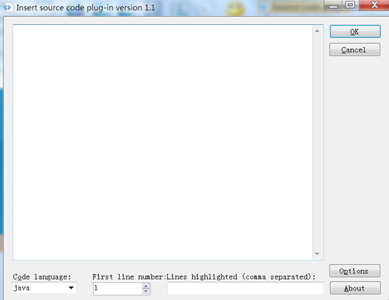

效果:
/**

 * Returns the value in the current thread's copy of this

 * thread-local variable.  If the variable has no value for the

 * current thread, it is first initialized to the value returned

 * by an invocation of the {@link #initialValue} method.

 * 返回当前线程的线程本地变量副本的值

 * 如果当前线程的这个变量还没有赋值,可以通过调用 setInitialValue()方法赋初始值

 *

 * @return the current thread's value of this thread-local

 */

public T get() {

    Thread t = Thread.currentThread();//当前线程

    ThreadLocalMap map = getMap(t);//获取当前线程的 ThreadLocalMap

    //如果ThreadLocalMap不为空

    if (map != null) {

        //以当前 ThreadLocal(线程本地变量)为key,从ThreadLocalMap中获取对应的Entry(key:ThreadLocal,value:Object)

        ThreadLocalMap.Entry e = map.getEntry(this);

        if (e != null)

            return (T)e.value;

    }

    //如果还当前ThreadLocal(线程本地变量)无法获取value,调用初始化value方法

    return setInitialValue();

}
特点:
1、Windows Live Writer编辑和预览效果不一样
2、插入代码后不便于再编辑
3、发布到cnblogs后,效果不错
下载:http://files.cnblogs.com/files/trust-freedom/SourceCodePlugin_version_1.1.zip
2、SyntaxHighlighter
界面:

效果:
/**

 * Returns the value in the current thread's copy of this

 * thread-local variable.  If the variable has no value for the

 * current thread, it is first initialized to the value returned

 * by an invocation of the {@link #initialValue} method.

 * 返回当前线程的线程本地变量副本的值

 * 如果当前线程的这个变量还没有赋值,可以通过调用 setInitialValue()方法赋初始值

 *

 * @return the current thread's value of this thread-local

 */

public T get() {

    Thread t = Thread.currentThread();//当前线程

    ThreadLocalMap map = getMap(t);//获取当前线程的 ThreadLocalMap

    //如果ThreadLocalMap不为空

    if (map != null) {

        //以当前 ThreadLocal(线程本地变量)为key,从ThreadLocalMap中获取对应的Entry(key:ThreadLocal,value:Object)

        ThreadLocalMap.Entry e = map.getEntry(this);

        if (e != null)

            return (T)e.value;

    }

    //如果还当前ThreadLocal(线程本地变量)无法获取value,调用初始化value方法

    return setInitialValue();

}
参考:http://www.cnblogs.com/rollenholt/archive/2012/03/08/2384594.html
特点:
1、Windows Live Writer编辑和预览效果一致
2、插入代码后便于编辑,点击代码块后,右侧显示
3、发布到cnblogs后,和Windows Live Writer效果不完全相同,宽度变小了

下载:http://files.cnblogs.com/files/trust-freedom/SyntaxHighlighter.rar
3、插入代码(cnblogs官方推荐)
界面:

效果:
/**

 * Returns the value in the current thread's copy of this

 * thread-local variable.  If the variable has no value for the

 * current thread, it is first initialized to the value returned

 * by an invocation of the {@link #initialValue} method.

 * 返回当前线程的线程本地变量副本的值

 * 如果当前线程的这个变量还没有赋值,可以通过调用 setInitialValue()方法赋初始值

 *

 * @return the current thread's value of this thread-local

 */

public T get() {

    Thread t = Thread.currentThread();//当前线程

    ThreadLocalMap map = getMap(t);//获取当前线程的 ThreadLocalMap

    //如果ThreadLocalMap不为空

    if (map != null) {

        //以当前 ThreadLocal(线程本地变量)为key,从ThreadLocalMap中获取对应的Entry(key:ThreadLocal,value:Object)

        ThreadLocalMap.Entry e = map.getEntry(this);

        if (e != null)

            return (T)e.value;

    }

    //如果还当前ThreadLocal(线程本地变量)无法获取value,调用初始化value方法

    return setInitialValue();

}
参考:http://www.cnblogs.com/cmt/archive/2012/06/26/live_writer_cnblogs_code_highlight.html
特点:
1、和cnblogs官方的浏览器编辑器的code插件效果差不多,高亮效果还不错
2、Windows Live Writer编辑和预览效果一致
3、无法显示行号
4、隔行不能设置不同颜色
5、插入代码后不便于再编辑,有点类似图片的效果
下载:http://files.cnblogs.com/files/trust-freedom/WindowsLiveWriter.CNBlogs.CodeHighlighter.zip
4、插入代码
界面:

效果:
1: /**
2: * Returns the value in the current thread's copy of this
3: * thread-local variable. If the variable has no value for the
4: * current thread, it is first initialized to the value returned
5: * by an invocation of the {@link #initialValue} method.
6: * 返回当前线程的线程本地变量副本的值
7: * 如果当前线程的这个变量还没有赋值,可以通过调用 setInitialValue()方法赋初始值
8: *
9: * @return the current thread's value of this thread-local
10: */
11: public T get() {
12: Thread t = Thread.currentThread();//当前线程
13: ThreadLocalMap map = getMap(t);//获取当前线程的 ThreadLocalMap
14: //如果ThreadLocalMap不为空
15: if (map != null) {
16: //以当前 ThreadLocal(线程本地变量)为key,从ThreadLocalMap中获取对应的Entry(key:ThreadLocal,value:Object)
17: ThreadLocalMap.Entry e = map.getEntry(this);
18: if (e != null)
19: return (T)e.value;
20: }
21:
22: //如果还当前ThreadLocal(线程本地变量)无法获取value,调用初始化value方法
23: return setInitialValue();
24: }
参考:http://www.cnblogs.com/psunny/archive/2010/03/03/1677693.html
特点:
1、编辑界面可选项较多
2、发不到cnblogs后和Windows Live Writer状态不完全一样,Windows Live Writer中有横向、纵向滚动条,cnblogs中都没有
3、插入代码后不便于再编辑,有点类似图片的效果
下载:http://files.cnblogs.com/files/trust-freedom/WLWSourceCodePluginLib.zip
我也是刚用cnblogs写博客不久,整理了几个觉得还可以的代码插件,欢迎批评指教,如果大家有更好的也欢迎互相交流。
Windows Live Writer代码插件整理的更多相关文章
- Windows Live Writer 代码插件改造
源码和插件都在后面,如果不想看我神神叨叨的可以直接到文章后面下载 一 .找插件 在使用Windows Live Writer 经常要用到插入代码的功能,根据博客园中教程,分别使用了: WindowsL ...
- 【转】Windows Live Writer 代码插件改造
源码和插件都在后面,如果不想看我神神叨叨的可以直接到文章后面下载 一 .找插件 在使用Windows Live Writer 经常要用到插入代码的功能,根据博客园中教程,分别使用了: WindowsL ...
- win7 下的open live writer代码插件
open live writer 是博客园官方推荐的编辑器.恰好被它的各种便利吸引住了,于是花点时间研究一下,结果又用了好长时间,因为代码插件一时安装不了.在这里推荐小伙伴们可以先去看看这篇博文:ht ...
- Windows Live Writer代码高亮插件对比
一.Paste ASVisual Studio Code 参考:http://www.cnblogs.com/mikelij/archive/2010/11/13/1876199.html 插件下载: ...
- open Live Writer 代码插件安装
1,第一步:下载open live writer插件,下载地址:http://www.cnblogs.com/memento/p/5995173.html 2,拷贝文件到Plugins目录(自己建立) ...
- Windows Live Writer测试插件
这是用WLW写的,测试 这是图片: 这是地图: 这是代码: 一会重发
- Windows Live Writer加载代码着色插件步骤
博客园内置支持SyntaxHighlighter代码着色,代码着色语法:<pre class='brush:编程语言'>代码</pre>. 需要注意的是:如何你使用Syntax ...
- 用 Windows Live Writer 和 SyntaxHighlighter 插件写高亮代码
博客园内置支持SyntaxHighlighter代码着色,代码着色语法:<pre class='brush:编程语言'>代码</pre>. 需要注意的是:如何你使用Syntax ...
- 新语言代码高亮及Windows Live Writer插件开发
最近在博客园做一些学习笔记.一个是看apple的swift官方书,另外一个是随学校课堂(SICP)学习scheme. 这两种语言都谈不上普及(或者说swift太新).博客园原来的windows liv ...
随机推荐
- Asp.Net Core 项目实战之权限管理系统(7) 组织机构、角色、用户权限
0 Asp.Net Core 项目实战之权限管理系统(0) 无中生有 1 Asp.Net Core 项目实战之权限管理系统(1) 使用AdminLTE搭建前端 2 Asp.Net Core 项目实战之 ...
- 【手记】WebBrowser响应页面中的blank开新窗口及window.close关闭本窗体
注:本文适用.net 2.0+的winform项目 目的: 点击页面中的target="_blank"链接时,弹出新窗体 页面中有window.close()操作时,关闭窗体 上述 ...
- EnumHelper.cs枚举助手(枚举描述信息多语言支持)C#
C#里面经常会用到枚举类型,枚举是值类型对象,如果你想用枚举类型的多属性特性,或者你想在MVC页面上通过简单的值类型转换,将某字段值所代表的含义转换为文字显示,这时候必须要将枚举扩展,是它支持文本描述 ...
- Yii 2.x Behavior - 类图
yii\base\Component 继承这个类的类都具备扩展行为的能力
- 开源物联网框架ServerSuperIO 3.0正式发布(C#),跨平台:Win&Win10 Iot&Ubuntu&Ubuntu Mate,一套设备驱动跨平台挂载,附:开发套件和教程。
3.0版本主要更新内容: 1.增加跨平台能力:Win&Win10 Iot&Ubuntu&Ubuntu Mate 2.统一设备驱动接口:可以一套设备驱动,跨平台挂载运行,降低人力 ...
- JSON字符串和对象 的转换
一 通过eval() 函数可以将JSON字符串转化为对象 var obj = eval('(' + str + ')'); 或者 var obj = str.parseJSON(); //由JSON ...
- 微信小程序注册
小程序是一种新的开放能力,可以在微信内被便捷地获取和传播,同时具有出色的使用体验.开发者可以根据平台提供的能力,快速地开发一个小程序. 开放内容包括: 1.开放注册范围:企业.政府.媒体.其他组织: ...
- Android中点击隐藏软键盘最佳方法——Android开发之路4
Android中点击隐藏软键盘最佳方法 实现功能:点击EditText,软键盘出现并且不会隐藏,点击或者触摸EditText以外的其他任何区域,软键盘被隐藏: 1.重写dispatchTouchEve ...
- GCD的相关函数使用
GCD 是iOS多线程实现方案之一,非常常用 英文翻译过来就是伟大的中枢调度器,也有人戏称为是牛逼的中枢调度器 是苹果公司为多核的并行运算提出的解决方案 1.一次性函数 dispatch_once 顾 ...
- DXGI 1.4的新特性
其实到写这篇文章的时候,DXGI已经出1.5版了,但很多朋友实际上还在用1.2甚至1.1,所以现在谈1.4一点也不过时,而且1.4又是一次非常重大的更新,很值得仔细谈谈. 为了支持Direct3D 1 ...